PS4 [Research]PS2 emulator configuration on PS4

Fix for The Legend of Spyro™ Dawn of the Dragon®

CLI
Code:
--gs-uprender=2x2
--gs-upscale=edgesmooth

--cdvd-sector-read-cycles=5000
--ee-cycle-scalar=2.0
--vu1-mpg-cycles=600

#emu used=aofa
LUA
Code:
-- The Legend of Spyro™ Dawn of the Dragon®
-- disable bloom by Raigho @pcsx2 forums
-- emu used=aofa

local gpr = require("ee-gpr-alias")

apiRequest(0.1)

local eeObj = getEEObject()
local emuObj = getEmuObject()

emuObj.SetDisplayAspectWide()

local patcher = function()
--Disable Bloom
eeObj.WriteMem32(0x006628BC,0x00000000)
 
 
--emuObj.ThrottleMax()
end

emuObj.AddVsyncHook(patcher)

Tested a little. Works fine so far.


We can fix the bloom effect rather than disable it. Doesn't seem to affect shadows or any other graphical effects.

LUA:
apiRequest(0.1)

local eeObj = getEEObject()
local emuObj = getEmuObject()

-- Bloom fix
emuObj.SetGsTitleFix( "forceSimpleFetch", "reserved", { texMode=2 } )
 
Crazy Taxi (SLES50215)

TXT.
Code:
--host-display-mode=16:9
--force-pal-60hz=1

LUA.
Code:
-- Crazy Taxi [SLES-50215] (E)
-- emu used=KOF 2000

apiRequest(1.0)  

local gpr = require("ee-gpr-alias")

local eeObj  = getEEObject()
local emuObj = getEmuObject()

local patcher = function()

-- 16:9
eeObj.WriteMem32(0x0018812c,0x3c013f40) --3c013f80 hor fov
eeObj.WriteMem32(0x0015e870,0x3c013f40) --00000000 renderfix
eeObj.WriteMem32(0x0015e880,0x4481f000) --3c013f80
eeObj.WriteMem32(0x0015e884,0x46010d03) --4481a000
eeObj.WriteMem32(0x0015e898,0x3210ffff) --00000000
eeObj.WriteMem32(0x0015e89c,0x2610ffff) --3210ffff
eeObj.WriteMem32(0x0015e8a0,0x0c066634) --2610ffff
eeObj.WriteMem32(0x0015e8a4,0x0200202d) --0c066634
eeObj.WriteMem32(0x0015e8a8,0x4600a003) --0200202d
eeObj.WriteMem32(0x0015e8ac,0x0200202d) --4600a003
eeObj.WriteMem32(0x0015e8b0,0x0c06660e) --0200202d
eeObj.WriteMem32(0x0015e8b4,0xe7809da8) --0c06660e
eeObj.WriteMem32(0x0015e8b8,0x461ea502) --e7809da8

emuObj.ThrottleMax()
end

emuObj.AddVsyncHook(patcher)

KOF 2000 FiX Stuck on game LOGO! Also Widescreen displayed more correct then in NTSC version! Will be good port it to NTSC!

Crazy Taxi. Short GamePlay! (PAL)
VIDEO
 
@nifengyuexia
Sorry to dig up old skeletons:)
Any success with that old crash bug in Dynasty Warriors 3 XL when we trying to load Battle of Wan Castle? Always bugged me that it prevents progress of Musou campaign.
Maybe FPU/COP accuracy range needed?

EDIT: MK Armageddon still has SPS graphic glitches with small particles both in Konquest and when in a fight (falling leaves, sparks from metal or lava, etc.)

EDIT2: Does anyone know why --gs-force-bilinear=1 always crashes emus? Trying to fix pixelated ui text in Snowblind games. Seems forcing bilinear filtering fixed it in PCSX2.
Try this:

Dynasty Warriors 3 - SLUS-20277

Emu: Jakv2


Code:
apiRequest(0.1)

local eeObj = getEEObject()
local emuObj = getEmuObject()

local patcher = function()

eeObj.WriteMem32(0x0013AC30, 0x03E00008)
end
emuObj.AddVsyncHook(patcher)
 
Found the fix to Spyro A New Beginning NTSC thanks to an old PCSX2 thread. Appearantly, it's the same as the PAL version.. or it's the PAL version that is wrong. Anyhow, this worked for NTSC, I have tested:

LUA:
apiRequest(0.4)

-- The Legend of Spyro: A New Beginning

local eeObj = getEEObject()
local emuObj = getEmuObject()

eeInsnReplace(0x001849B8, 0x44840800, 0x00000000) -- Fixes HUD and menu display.

-- Graphic improvement: removes corrupted lines on screen with uprender enabled

emuObj.SetGsTitleFix( "forceSimpleFetch", "reserved", { texMode=1 } ) --texMode=1 ?
emuObj.SetGsTitleFix( "forceSimpleFetch", "reserved", { texMode=2 } ) --texMode=2 is BILINEAR


Emu used: KOF98. This emu seems to work great for Eternal Night too. No other bugs or performance issues detected.
 
@Drobovik2 Try this

Dynasty Warriors 3 - SLUS-20277

Emu: Jakv2


Code:
apiRequest(0.1)

local eeObj = getEEObject()
local emuObj = getEmuObject()

local patcher = function()

eeObj.WriteMem32(0x0013B5E0, 0x0)
eeObj.WriteMem32(0x0013B5E4, 0x0)
end
emuObj.AddVsyncHook(patcher)
 
@Scalerize
Just ran a quick test with new code. Good news, now seems the Wan Castle stage is playable and not crashing upon pressing Select+Start to go back to menu. Still need to play throu the stage to finish it normally or test quit saving. But unfortunately falling-through-the-map is still present. If you jump at certain places character is just falling through the floor then stops underground so to speak and teleports back to the surface.:)
Any clue why this falling thru map is connected to the patch?

Update: No more crashing during Wan Castle stage either upon loading the stage, exiting and saving, then loading back into the stage. Stage can be finished normally, the only thing is still present is falling thru floors.
 
Last edited:
@Scalerize
Just ran a quick test with new code. Good news, now seems the Wan Castle stage is playable and not crashing upon pressing Select+Start to go back to menu. Still need to play throu the stage to finish it normally or test quit saving. But unfortunately falling-through-the-map is still present. If you jump at certain places character is just falling through the floor then stops underground so to speak and teleports back to the surface.:)
Any clue why this falling thru map is connected to the patch?
The patch simply skips jumping to the function causing the crash. It has to be related in some way to the FPU to be causing geometrical inaccuracies such as the one you mentioned. Idk what else may be causing this, but I might, however, be able to pull something off once I get my hands on it again.
 
UEFA Champions League Season 2001-2002 - (SLES-50398)
emu used=Jakxv2

Lua:
Code:
apiRequest(2.0)

local emuObj    = getEmuObject()
local eeObj     = getEEObject()

local patcher = function()
--fix crash
eeObj.WriteMem32(0x002338e8,0x0)  --pcsx2 trap exception code
end
emuObj.AddVsyncHook(patcher)
 
Last edited:
Hey @Vika23 , I'm really a fan of your work and tried some of the games u fix like max payne it is a great mem tho, anyways I have been trying to get to play Ben 10 Ultimate Alien Cosmic Destruction and tried alot of programs to port it to my PS4 Pro but the prob is the game is 4GBs and when I try porting with any emulator it gets 1GB idk how and why, If u can see what is going on with this game that will be great and hope u good luck :courage:
 
Hey @Vika23 , I'm really a fan of your work and tried some of the games u fix like max payne it is a great mem tho, anyways I have been trying to get to play Ben 10 Ultimate Alien Cosmic Destruction and tried alot of programs to port it to my PS4 Pro but the prob is the game is 4GBs and when I try porting with any emulator it gets 1GB idk how and why, If u can see what is going on with this game that will be great and hope u good luck :courage:
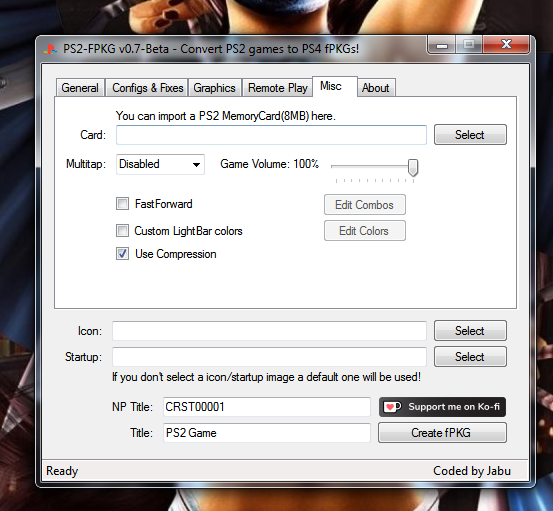
Well, if u use Jabu tool for example, in setting we have checkbox with "Use Compression", you can remove it!
Thats why after convert you have smaller size of game then before!
Compress.png
 
Dark Summit. Short GamePlay!
VIDEO


Full lua.

Code:
-- Dark Summit
-- emu used=Fahrenheit
apiRequest(1.2)    -- request version 0.1 API. Calling apiRequest() is mandatory.

local emuObj = getEmuObject()
local eeObj  = getEEObject()

local WS = function()

--Widescreen hack 16:9

--X-Fov
--02000446 280100ae 42080546
eeObj.WriteMem32(0x003d2240,0x08030000)

eeObj.WriteMem32(0x000c0000,0x46040002)
eeObj.WriteMem32(0x000c0004,0x3c013f40)
eeObj.WriteMem32(0x000c0008,0x00000000)
eeObj.WriteMem32(0x000c000c,0x4481f000)
eeObj.WriteMem32(0x000c0010,0x461e0002)
eeObj.WriteMem32(0x000c0014,0x080f4891)

--Render fix
--003f013c 00a88144 0000b07f
eeObj.WriteMem32(0x0036305c,0x3c013f2b) --3c013f00

emuObj.ThrottleMax()

end

emuObj.AddVsyncHook(WS)

FiX for PAL version (SLES50575)

TXT.
Code:
--host-display-mode=16:9
--force-pal-60hz=1

LUA.
Code:
-- Dark Summit (PAL)
-- emu used=Fahrenheit
apiRequest(1.2)    -- request version 0.1 API. Calling apiRequest() is mandatory.

local emuObj = getEmuObject()
local eeObj  = getEEObject()

local WS = function()

--Widescreen hack 16:9

--X-Fov
--02000446 280100ae 42080546
eeObj.WriteMem32(0x003d37d0,0x08030000)

eeObj.WriteMem32(0x000c0000,0x46040002)
eeObj.WriteMem32(0x000c0004,0x3c013f40)
eeObj.WriteMem32(0x000c0008,0x00000000)
eeObj.WriteMem32(0x000c000c,0x4481f000)
eeObj.WriteMem32(0x000c0010,0x461e0002)
eeObj.WriteMem32(0x000c0014,0x080f4df5)

--Render fix
--003f013c 00a88144 0000b07f
eeObj.WriteMem32(0x0036444c,0x3c013f2b) --3c013f00

emuObj.ThrottleMax()

end

emuObj.AddVsyncHook(WS)

Dark Summit. French Dub Test!
VIDEO
 
@Vika23 so I unchecked "Use Compression" option, So with my first try I used Jak V2 as the emu and opened the game then I see the playstation 2 logo intro then endless black screen but with fps counter is on I see that the game is still running not frozen but as I said Black Screen but I noticed something when I was going to delete it and its save file to try the other emu I saw in the save game menu a corrupted data, But for Rogue V1 when I try to open the game just crashes, I think Jak V2 can still run the game but I think I'm missing something.
 
@Vika23 so I unchecked "Use Compression" option, So with my first try I used Jak V2 as the emu and opened the game then I see the playstation 2 logo intro then endless black screen but with fps counter is on I see that the game is still running not frozen but as I said Black Screen but I noticed something when I was going to delete it and its save file to try the other emu I saw in the save game menu a corrupted data, But for Rogue V1 when I try to open the game just crashes, I think Jak V2 can still run the game but I think I'm missing something.
Well, thats mean game need other emu! Just need pick right one, or find commands on pcsx2 forums! Sometime we have luck and fix black screen just with picking right emu, sometime need do more work!
 
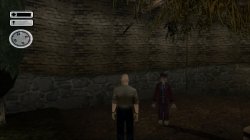
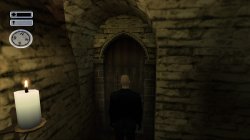
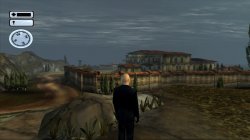
Hitman 2 Silent Assassin (SLUS20374)

FIX

TXT.

Code:
--host-display-mode=16:9
--cdvd-sector-read-cycles=2000

LUA.
Code:
--Hitman 2 Silent Assassin (SLUS20374)
--emu used=Star Ocean v1

apiRequest(0.1)

local emuObj         = getEmuObject()
local eeObj            = getEEObject()

local fix = function()
--16:9 Widescreen
eeObj.WriteMem32(0x00313f7c,0x3c013f10) --3c013f40 vert FOV
eeObj.WriteMem32(0x002bbe18,0x3c1b3f40) --00000000 zoom
eeObj.WriteMem32(0x002bc00c,0x3c013f00) --3c013f80
eeObj.WriteMem32(0x002bc010,0x4481a800) --4481a000
eeObj.WriteMem32(0x002bc014,0x4615ad00) --3c013f00
eeObj.WriteMem32(0x002bc018,0x449bf000) --4481a800
eeObj.WriteMem32(0x002bc054,0x461e0002) --46150002
eeObj.WriteMem32(0x002bc058,0x46150002) --4600a583
eeObj.WriteMem32(0x002bc05c,0x4600a583) --e6200054
eeObj.WriteMem32(0x002bc060,0xe6200054) --3c01bf00
eeObj.WriteMem32(0x002bc064,0x4600a807) --44810000

end
emuObj.AddVsyncHook(fix)

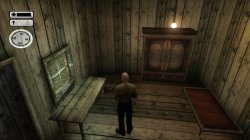
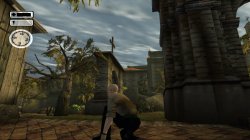
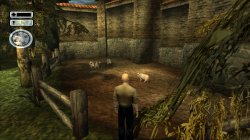
Was alot bugs before, Black screen with jakv2 and rogue v1 emus! Freeze at loading with jakxv2 emu! Booting with parappa the rapper 2 v1 and ADK emus but with speech issue! and finally Star Ocean v1 emu get game works correct!

Hitman 2 Silent Assassin. Before\\\After FiX Comparison & Short Gameplay!
VIDEO
 

Attachments

  • 01.jpg
    01.jpg
    777.4 KB · Views: 45
  • 02.jpg
    02.jpg
    764.5 KB · Views: 45
  • 03.jpg
    03.jpg
    1.3 MB · Views: 46
  • 04.jpg
    04.jpg
    823 KB · Views: 43
  • 05.jpg
    05.jpg
    421.9 KB · Views: 45
  • 06.jpg
    06.jpg
    644.1 KB · Views: 49
Wacky Races Starring Dastardly & Muttley (SLES-50183)

CLI:
--gs-kernel-cl-up="up2x2skipinterp"
--vu0-di-bits=0
--vu1-di-bits=0
--vu1-mpg-cycles=400

Siren v1 emu used.

Skipinterp fixes the vertical semi-visible black lines. Previously with JakX, this game still had stutters, the vu-di commands simply turned them into micro stutters so tracks like Fish N Ships or Terminal Termoil were still pretty bad when you were next to the other racers, however Siren v1 has almost eliminated them entirely, I normally only get 1 or 0 micro stutters per race even when I'm next to the other racers. I also recommend turning 60Hz mode on in the options menu.

And for Monsters Inc. - Scare Island (SCES-50595), the Parappa v1 is better than KOF98, there was severe lag in the boss challenges with the latter and Parappa emu fixed it. It is perfect now.

EDIT - one more:
Alpine Racer 3 (SCES-50887)
CLI:
--vu1-no-clamping=0
--vu0-no-clamping=0
--vu-custom-min-max=0

Emu used: Jak v2

Fixes some rendering/flickering issues behind your snowborder. I think vu-custom isn't really necessary but the game works fine with it either way. VU clamping should suffice.
 
Last edited:
Hi everybody!
I have been trying to do a lua file containing some cheats by Code Master for Midnight Club 3: Dub Edition Remix SLUS-21355 but I wasn't able to
can you guys tell what's the issue? here is the code;

Code:
-- emu used=jak

apiRequest(0.1)

local gpr = require("ee-gpr-alias")

local emuObj         = getEmuObject()
local eeObj            = getEEObject()

local fix = function()
--16:9

--Max Infinite Nitro (Cars Don't Need Nitro Package)
eeObj.WriteMem32(0x2028B0D4,0x24110005)
eeObj.WriteMem32(0x2028B0D8,0xA4510012)
eeObj.WriteMem32(0x2028B0E0,0x24060005)
eeObj.WriteMem32(0x2028B0CC,0x24070064)
eeObj.WriteMem32(0x2028B0D0,0xA447000E)
--Unlock More Cars/Customization
eeObj.WriteMem32(0x40800864,0x00030001)
eeObj.WriteMem32(0xFFFFFFFF,0x00000000)

emuObj.ThrottleMax()
end
emuObj.AddVsyncHook(fix)
 
@Vika23 so I unchecked "Use Compression" option, So with my first try I used Jak V2 as the emu and opened the game then I see the playstation 2 logo intro then endless black screen but with fps counter is on I see that the game is still running not frozen but as I said Black Screen but I noticed something when I was going to delete it and its save file to try the other emu I saw in the save game menu a corrupted data, But for Rogue V1 when I try to open the game just crashes, I think Jak V2 can still run the game but I think I'm missing something.
that game boot with okage v2 emu and this commands:
Code:
--vu1-mpg-cycles=850 
--safe-area-min=0.9 #full screen 
--ps2-lang=system 
--host-display-mode=full       
--gs-upscale=edgesmooth
--gs-uprender=2x2
 
Hi everybody!
I have been trying to do a lua file containing some cheats by Code Master for Midnight Club 3: Dub Edition Remix SLUS-21355 but I wasn't able to
can you guys tell what's the issue? here is the code;

Code:
-- emu used=jak

apiRequest(0.1)

local gpr = require("ee-gpr-alias")

local emuObj         = getEmuObject()
local eeObj            = getEEObject()

local fix = function()
--16:9

--Max Infinite Nitro (Cars Don't Need Nitro Package)
eeObj.WriteMem32(0x2028B0D4,0x24110005)
eeObj.WriteMem32(0x2028B0D8,0xA4510012)
eeObj.WriteMem32(0x2028B0E0,0x24060005)
eeObj.WriteMem32(0x2028B0CC,0x24070064)
eeObj.WriteMem32(0x2028B0D0,0xA447000E)
--Unlock More Cars/Customization
eeObj.WriteMem32(0x40800864,0x00030001)
eeObj.WriteMem32(0xFFFFFFFF,0x00000000)

emuObj.ThrottleMax()
end
emuObj.AddVsyncHook(fix)
that code is causing crash:
Code:
--Unlock More Cars/Customization
eeObj.WriteMem32(0x40800864,0x00030001)
eeObj.WriteMem32(0xFFFFFFFF,0x00000000)
 

Similar threads

Back
Top