
You are using an out of date browser. It may not display this or other websites correctly.
You should upgrade or use an alternative browser.
You should upgrade or use an alternative browser.
PS4 [Research]PS2 emulator configuration on PS4
- Thread starter kozarovv
- Start date
Strange, the game and the code works fine when codebreaker is merged to the game. but I don't use it because all of the game cutscenes don't show up, it feels like they are "removed"that code is causing crash:
Code:--Unlock More Cars/Customization eeObj.WriteMem32(0x40800864,0x00030001) eeObj.WriteMem32(0xFFFFFFFF,0x00000000)
Game + Codebreaker = Works fine but no cutscenes at all --> maybe need a fix?
Game + No CB = Works fine and normal

Vika23
Senior Member
EDIT - one more:
Alpine Racer 3 (SCES-50887)
CLI:
--vu1-no-clamping=0
--vu0-no-clamping=0
--vu-custom-min-max=0
Emu used: Jak v2
Fixes some rendering/flickering issues behind your snowborder. I think vu-custom isn't really necessary but the game works fine with it either way. VU clamping should suffice.
Full Config!
TXT.
Code:
--host-display-mode=16:9
--vu1-no-clamping=0
--vu0-no-clamping=0
LUA.
Code:
-- Alpine Racer 3 (SCES50887)
-- Widescreen Hack by El_Patas
-- Jak v2

apiRequest(0.1)

local gpr = require("ee-gpr-alias")
local eeObj = getEEObject()
local emuObj = getEmuObject()

local patcher = function()

--Gameplay 16:9
eeObj.WriteMem32(0x206A1E5C,0x3F199999) --3F800000 (Increases hor. axis)

--All Characters
eeObj.WriteMem32(0x20127620,0x20020001)

--All Tracks
eeObj.WriteMem32(0x20127598,0x20020001)

emuObj.ThrottleMax()
end
emuObj.AddVsyncHook(patcher)
Game works perfect!
Alpine Racer 3. Short GamePlay!
VIDEO
Vika23
Senior Member
Strange, the game and the code works fine when codebreaker is merged to the game. but I don't use it because all of the game cutscenes don't show up, it feels like they are "removed"
Game + Codebreaker = Works fine but no cutscenes at all --> maybe need a fix?
Game + No CB = Works fine and normal
Some games not support cheats with WriteMem32
you try convert cheats as eeInsnReplace way or just patch iso with ps2 patch engine app

Jvn9207
Member
use this(i hope this can help you), its a json file (contain cheats - goldhen cheat).Strange, the game and the code works fine when codebreaker is merged to the game. but I don't use it because all of the game cutscenes don't show up, it feels like they are "removed"
Game + Codebreaker = Works fine but no cutscenes at all --> maybe need a fix?
Game + No CB = Works fine and normal
just copy into notepad and save as json.
Code:
{
  "name": "Midnight Club 3 DUB Edition Remix™",
  "id": "SLUS21355",
  "version": "01.00",
  "process": "eboot.bin",
  "mods": [
    {
      "name": "Unlock All",
      "type": "checkbox",
      "memory": [
        {
          "offset": "807FE19B1C",
          "on": "01010101",
          "off": "00000000"
        },
        {
          "offset": "807FE19B1E",
          "on": "01010101",
          "off": "00000000"
        },
        {
          "offset": "807FE19B1F",
          "on": "00010101",
          "off": "00000000"
        },
        {
          "offset": "807FE19B1C",
          "on": "01010101",
          "off": "00000000"
        },
        {
          "offset": "807FE19B20",
          "on": "00000101",
          "off": "00000000"
        },
        {
          "offset": "807FE19B21",
          "on": "00000001",
          "off": "00000000"
        },
        {
          "offset": "807FE19B22",
          "on": "00000001",
          "off": "00000000"
        }
      ]
    },
    {
      "name": "Max Infinite Nitro (Cars Don't Need Nitro Package)",
      "type": "checkbox",
      "memory": [
        {
          "offset": "807FA8B0D4",
          "on": "24110005",
          "off": "00000000"
        },
        {
          "offset": "807FA8B0D8",
          "on": "A4510012",
          "off": "00000000"
        },
        {
          "offset": "807FA8B0E0",
          "on": "24060005",
          "off": "00000000"
        },
        {
          "offset": "807FA8B0CC",
          "on": "24070064",
          "off": "00000000"
        },
        {
          "offset": "807FA8B0D0",
          "on": "A447000E",
          "off": "00000000"
        }
      ]
    },
    {
      "name": "Disable Car damage",
      "type": "checkbox",
      "memory": [
        {
          "offset": "807FAD49D8",
          "on": "03E00008",
          "off": "00000000"
        },
        {
          "offset": "807FAD49DC",
          "on": "00000000",
          "off": "00000000"
        }
      ]
    },
    {
      "name": "Motion blur",
      "type": "checkbox",
      "memory": [
        {
          "offset": "807FD1170C",
          "on": "3C013FB0",
          "off": "3C013F80"
        }
      ]
    },
    {
      "name": "No wall hit impact",
      "type": "checkbox",
      "memory": [
        {
          "offset": "807FCDEB08",
          "on": "3C010000",
          "off": "3C013F80"
        }
      ]
    }
  ],
  "credits": [
    "Internet"
  ]
}
Code:
/data/GoldHEN/cheats/json.
Code:
SLUS21355_01.00.json
Last edited:
Vika23
Senior Member
Sled Storm (SLES50683)
FIX
TXT.
PAL version (Unlike NTSC) had some slowdowns, but was - FiXed with picked right emu!
Sled Storm. Short GamePlay!
VIDEO
FIX
TXT.
Code:
--cdvd-sector-read-cycles=2000
--vu0-no-clamping=0
--vu1-no-clamping=0
--host-gamepads=2
Code:
-- emu used=Rogue v1PAL version (Unlike NTSC) had some slowdowns, but was - FiXed with picked right emu!
Sled Storm. Short GamePlay!
VIDEO
Attachments
I appreciate your work. cheats show up but none of them worked for me and some of them can't even be checked (No notification + become uncheckd after you go to the game).use this(i hope this can help you), its a json file (contain cheats - goldhen cheat).
just copy into notepad and save as json.
-path to drop file(ftp or ps4xplorer manager):Code:{ "name": "Midnight Club 3 DUB Edition Remix™", "id": "SLUS21355", "version": "01.00", "process": "eboot.bin", "mods": [ { "name": "Unlock All", "type": "checkbox", "memory": [ { "offset": "807FE19B1C", "on": "01010101", "off": "00000000" }, { "offset": "807FE19B1E", "on": "01010101", "off": "00000000" }, { "offset": "807FE19B1F", "on": "00010101", "off": "00000000" }, { "offset": "807FE19B1C", "on": "01010101", "off": "00000000" }, { "offset": "807FE19B20", "on": "00000101", "off": "00000000" }, { "offset": "807FE19B21", "on": "00000001", "off": "00000000" }, { "offset": "807FE19B22", "on": "00000001", "off": "00000000" } ] }, { "name": "Max Infinite Nitro (Cars Don't Need Nitro Package)", "type": "checkbox", "memory": [ { "offset": "807FA8B0D4", "on": "24110005", "off": "00000000" }, { "offset": "807FA8B0D8", "on": "A4510012", "off": "00000000" }, { "offset": "807FA8B0E0", "on": "24060005", "off": "00000000" }, { "offset": "807FA8B0CC", "on": "24070064", "off": "00000000" }, { "offset": "807FA8B0D0", "on": "A447000E", "off": "00000000" } ] }, { "name": "Disable Car damage", "type": "checkbox", "memory": [ { "offset": "807FAD49D8", "on": "03E00008", "off": "00000000" }, { "offset": "807FAD49DC", "on": "00000000", "off": "00000000" } ] }, { "name": "Motion blur", "type": "checkbox", "memory": [ { "offset": "807FD1170C", "on": "3C013FB0", "off": "3C013F80" } ] }, { "name": "No wall hit impact", "type": "checkbox", "memory": [ { "offset": "807FCDEB08", "on": "3C010000", "off": "3C013F80" } ] } ], "credits": [ "Internet" ] }
-filename:Code:/data/GoldHEN/cheats/json.
Code:SLUS21355_01.00.json
Jvn9207
Member
That's strangeI appreciate your work. cheats show up but none of them worked for me and some of them can't even be checked (No notification + become uncheckd after you go to the game).
 ,well , I'll investigate what the error is, thanks for trying
Sled Storm (SLES50683)
FIX
TXT.
Code:--cdvd-sector-read-cycles=2000 --vu0-no-clamping=0 --vu1-no-clamping=0 --host-gamepads=2
Code:-- emu used=Rogue v1
PAL version (Unlike NTSC) had some slowdowns, but was - FiXed with picked right emu!
Sled Storm. Short GamePlay!
VIDEO
Just wondering if you have any idea if this would work for PS2 cheats on goldhen or is it just for PS4 game cheats.use this(i hope this can help you), its a json file (contain cheats - goldhen cheat).
just copy into notepad and save as json.
-path to drop file(ftp or ps4xplorer manager):Code:{ "name": "Midnight Club 3 DUB Edition Remix™", "id": "SLUS21355", "version": "01.00", "process": "eboot.bin", "mods": [ { "name": "Unlock All", "type": "checkbox", "memory": [ { "offset": "807FE19B1C", "on": "01010101", "off": "00000000" }, { "offset": "807FE19B1E", "on": "01010101", "off": "00000000" }, { "offset": "807FE19B1F", "on": "00010101", "off": "00000000" }, { "offset": "807FE19B1C", "on": "01010101", "off": "00000000" }, { "offset": "807FE19B20", "on": "00000101", "off": "00000000" }, { "offset": "807FE19B21", "on": "00000001", "off": "00000000" }, { "offset": "807FE19B22", "on": "00000001", "off": "00000000" } ] }, { "name": "Max Infinite Nitro (Cars Don't Need Nitro Package)", "type": "checkbox", "memory": [ { "offset": "807FA8B0D4", "on": "24110005", "off": "00000000" }, { "offset": "807FA8B0D8", "on": "A4510012", "off": "00000000" }, { "offset": "807FA8B0E0", "on": "24060005", "off": "00000000" }, { "offset": "807FA8B0CC", "on": "24070064", "off": "00000000" }, { "offset": "807FA8B0D0", "on": "A447000E", "off": "00000000" } ] }, { "name": "Disable Car damage", "type": "checkbox", "memory": [ { "offset": "807FAD49D8", "on": "03E00008", "off": "00000000" }, { "offset": "807FAD49DC", "on": "00000000", "off": "00000000" } ] }, { "name": "Motion blur", "type": "checkbox", "memory": [ { "offset": "807FD1170C", "on": "3C013FB0", "off": "3C013F80" } ] }, { "name": "No wall hit impact", "type": "checkbox", "memory": [ { "offset": "807FCDEB08", "on": "3C010000", "off": "3C013F80" } ] } ], "credits": [ "Internet" ] }
-filename:Code:/data/GoldHEN/cheats/json.
Code:SLUS21355_01.00.json
sargentfart
Member
In Xenosaga Episode I, there is a custom PS3 config that fixes the AGWS shop (getting stuck if you enter it) along with some FMV fixes.
Though it seems like the FPKG builder only works with official config files because I have tried a custom PS3 config before in another game and the game would just simply crash before reaching the PS2 logo. I guess it needs to be converted into a LUA script or did I do something wrong?
Though it seems like the FPKG builder only works with official config files because I have tried a custom PS3 config before in another game and the game would just simply crash before reaching the PS2 logo. I guess it needs to be converted into a LUA script or did I do something wrong?
Jvn9207
Member
it supports PS2 cheats, this is what I do:Just wondering if you have any idea if this would work for PS2 cheats on goldhen or is it just for PS4 game cheats.View attachment 41932
example blade II ps2:
Code:
{"name":"Blade II","id":"SLUS20360","version":"01.00","process":"eboot.bin","mods":[{"name":"Name cheat","type":"checkbox","memory":[{"offset":"address","on":"xxxxxxxx","off":"xxxxxxxx"}]}],"credits":["xxxxx"]}
Code:
Access all missions-main menu
2048C562 0100FF00  => 0100ff00:code on - 0000FF00: code off
Code:
[0]-3-8080000000we delete the 2 and add the 808 and subtract 400000.
it would look like this:
Code:
808008C562
Code:
{"name":"Blade II","id":"SLUS20360","version":"01.00","process":"eboot.bin","mods":[{"name":"Acces all missions-main menu","type":"checkbox","memory":[{"offset":"808008C562","on":"0100FF00","off":"0000FF00"}]}],"credits":["internet"]}I hope this is understood, I'm bad at making tutorials
 .
.why do I need to subtract 400000?it supports PS2 cheats, this is what I do:
example blade II ps2:
i have this code from internet (cb):Code:{"name":"Blade II","id":"SLUS20360","version":"01.00","process":"eboot.bin","mods":[{"name":"Name cheat","type":"checkbox","memory":[{"offset":"address","on":"xxxxxxxx","off":"xxxxxxxx"}]}],"credits":["xxxxx"]}
-look in ps4cheater in the section(almost all cheats are found here):Code:Access all missions-main menu 2048C562 0100FF00 => 0100ff00:code on - 0000FF00: code off
- so to search for this code you have to do this:Code:[0]-3-8080000000
we delete the 2 and add the 808 and subtract 400000.
it would look like this:
now add to json file:Code:808008C562
some codes may not work.Code:{"name":"Blade II","id":"SLUS20360","version":"01.00","process":"eboot.bin","mods":[{"name":"Acces all missions-main menu","type":"checkbox","memory":[{"offset":"808008C562","on":"0100FF00","off":"0000FF00"}]}],"credits":["internet"]}
I hope this is understood, I'm bad at making tutorials
Jvn9207
Member
I don't know, that's how it workswhy do I need to subtract 400000?
Well, MC3 Remix cheats work now fine after doing this. Thank you guys so much for your help and effort.idont know
I don't know, that's how it works
Jvn9207
Member
Warriors of might and magic
emu used=gta sa
Lua: SLUS-20006_config.lua
Lua: SLES-50187_config.lua
emu used=gta sa
Code:
--path-patches="/app0/patches"
--gs-uprender=2x2
--gs-upscale=edgesmooth
--vu1-mpg-cycles=700
--host-display-mode=16:9
#--force-pal-60hz=1 #sles ver.
Lua: SLUS-20006_config.lua
Code:
apiRequest(0.6)

local eeObj = getEEObject()
local emuObj = getEmuObject()

local patcher   = function()
--Widescreen hack by ElHecht and Arapapa
eeObj.WriteMem32(0x002fc470, 0x3C013F81)
eeObj.WriteMem32(0x002fc478, 0x3421DE4D)
eeObj.WriteMem32(0x002fc520, 0xAC810000)
--render fix
eeObj.WriteMem32(0x0015a30c, 0x3C013EC0)
--Menu Fix
eeObj.WriteMem32(0x00263c08, 0x3C01C04D)
eeObj.WriteMem32(0x00263c0c, 0x3421B6D8)
eeObj.WriteMem32(0x00263c14, 0x3C01404D)
eeObj.WriteMem32(0x00263c18, 0x3421B6D8)
eeObj.WriteMem32(0x002fc6e4, 0x3C023FAB)-- newgame menu zoom
eeObj.WriteMem32(0x002fc6e8, 0x3442AAAB)--newgame menu zoom
eeObj.WriteMem32(0x002fc6fc, 0xAC82003C)
emuObj.ThrottleMax()
end
emuObj.AddVsyncHook(patcher)
Lua: SLES-50187_config.lua
Code:
apiRequest(0.6)

local eeObj = getEEObject()
local emuObj = getEmuObject()

local patcher   = function()
--Widescreen hack by ElHecht
eeObj.WriteMem32(0x002fc8c0, 0x3c013f81) --hor fov
eeObj.WriteMem32(0x002fc8c8, 0x3421de4d) --hor fov
eeObj.WriteMem32(0x002fc970, 0xac810000)
eeObj.WriteMem32(0x0015a20c, 0x3c013ec0) --renderfix
eeObj.WriteMem32(0x00263e9c, 0x3c013f9e) --newgame menu ver fov
eeObj.WriteMem32(0x00263f5c, 0x3c013f49) --newgame menu ver position
eeObj.WriteMem32(0x002fcb34, 0x3c023faa) --newgame menu zoom
eeObj.WriteMem32(0x002fcb38, 0x3442aaab) --newgame menu zoom
eeObj.WriteMem32(0x002fcb4c, 0xac82003c)
emuObj.ThrottleMax()
end
emuObj.AddVsyncHook(patcher)
Last edited:
Just found a code for widescreen Hack in ps2-home, sorry for asking but can you give a try and make Lua file, please?
Thanks in advance
Thanks in advance
Code:
//gametitle=Midnight Club 3 - DUB Edition Remix SLUS_213.55
//comment=Widescreen Hack

20527e14 3c013fe3
20527e18 34218e34

20527e14 3c013fe3
20527e18 34218e34
Vika23
Senior Member
Its Raw type cheats! Try search PCSX2CE java app for pc for convert for pnach (way for ps3 actually)Just found a code for widescreen Hack in ps2-home, sorry for asking but can you give a try and make Lua file, please?
Thanks in advance
Code://gametitle=Midnight Club 3 - DUB Edition Remix SLUS_213.55 //comment=Widescreen Hack 20527e14 3c013fe3 20527e18 34218e34 20527e14 3c013fe3 20527e18 34218e34
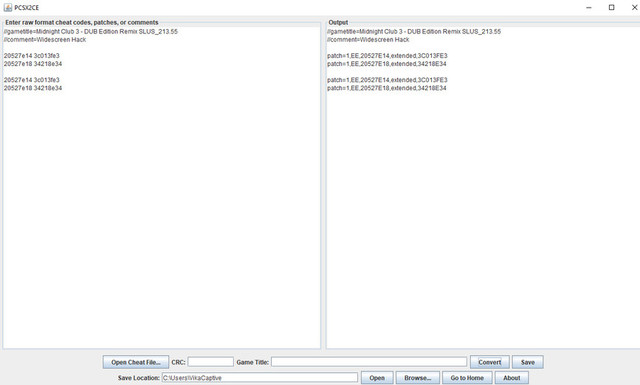
thats mean it will be as
Code:
--Widescreen Hack
eeObj.WriteMem32(0x20527E14,0x3C013FE3)
eeObj.WriteMem32(0x20527E18,0x34218E34)

eeObj.WriteMem32(0x20527E14,0x3C013FE3)
eeObj.WriteMem32(0x20527E18,0x34218E34)
Jvn9207
Member
Pac-man world rally pal
emu:jakxv2
txt:
LUA: SLES-54584_config.lua
emu:jakxv2
txt:
Code:
--vu1-mpg-cycles=850
--vu1-no-clamping=0 #fix graphics
--vu1-jr-cache-policy=newprog #fix crash
--force-pal-60hz=1
--ee-cycle-scalar=1.0
--iop-cycle-scalar=1.0
--safe-area-min=0.9
--ps2-lang=system
--host-display-mode=16:9
--gs-uprender=2x2
--gs-upscale=EdgeSmooth
--gs-force-bilinear=1
LUA: SLES-54584_config.lua
Code:
apiRequest(1.0)

local emuObj = getEmuObject()
emuObj.ThrottleMax()
emuObj.SetGsTitleFix( "forceSimpleFetch", "reserved", { texMode=1} ) --fix glitch loading screen
Last edited:
Similar threads
-
-
-
PS4 How to play multiplayer (3-4 players) using PSX-FPKG?
- Started by PSXP_Kira
- Replies: 2
-
 PS3 [PS2] Gundam Warriors 2 FPU rounding fix
- Started by Low_Plankton_3329
- Replies: 0