PS3 [Research] Quick Preview - Loading Whats New locally from /PS3/WSCREEN/

DeViL303

Developer
PSX-Place Supporter
I need some help with something if there is anyone out there interested and capable. :)

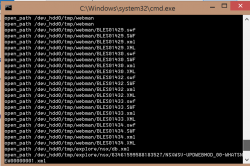
I happened to make a possibly interesting discovery the other day by pure chance. I was playing with whats new, and I turned on the Quick Preview option found in the context menu (press triangle on the icon). Well at the same time I had debug output from socat open on my PC and I happened to see it start scanning all usb ports for a PS3/WSCREEN/ folder.

upload_2019-10-1_5-6-24.png


unknown.png

unknown.png


So it checks 127 usb ports and card readers and plus a few others, kind of interesting right. Now I had already come across that path a few times in the explore_plugin.sprx and it is interesting as it just has 1 variable that checks all usbs =dev_usb%03u but that's not really important now.

upload_2019-10-1_5-16-22.png


So after a bit of messing I figured out it is looking for jpgs and pngs inside the PS3/WSCREEN/ folder, they can be named anything, and they will show up just like normal. If I click on them I get a no entry symbol.:

unknown.png


Anyway I also know its looking for an xml to go with each image. I know this because if I create an xml with the same name as an image, then that image will not load. So its trying to read the xml, and not getting the syntax its expecting so its leaving that image out.

I suspect that it wants an xml with variables matching these entries in the sprx = channel....owner...picks...new.....modified........links...link....psns. I am just stuck now as i dont know what syntax to put them in.

Does anyone know how to figure this out in IDA or have any tips as to xml format?

It could be like this:
Code:
<channel>test</channel>
<owner>test</owner>
<link>http://test.com</link>

or like
Code:
<channel="test" owner="test" link="http://test.com">

etc etc.
 
Last edited:
Other than XML it checks SWF too.
Real format
Code:
<?xml version="1.0" encoding="utf-8" standalone="yes"?>
<channel>
  <message>VALUE HERE</message>
  <owner>VALUE HERE</owner>
  <!--Till here all fine, picks, pickups etc need to be tested-->
  <!--link is ok, but link_num may not be its attribute-->
   <links link_num="value">
       <link>VALUE HERE, must contain and start with "psns"</link>
       <link>VALUE HERE, must contain and start with "psns"</link>
       <link>VALUE HERE, must contain and start with "psns"</link>
       <link>VALUE HERE, must contain and start with "psns"</link>
   </links>
 
</channel>
List of string used:
channel mandatory root node , 100% sure of this.
message not mandatory
owner not mandatory
picks can be node or attribute
pickup ca be node of attribute of channel or of picks
urgent attribute ( possible node: channel, picks, pickup)
new attribute (possible node: channel,picks, pickup) - checked if equals "1"
modified attribute ( possible node: channel,picks, pickup)
links node with list of of "link" children. Maybe its child node of picks/pickups but I doubt it.
link node with link value.
link_num attribute I believe. It is not a attribute of link though, I am sure about that.

psns - Links are checked if they start with it otherwise they are ignored.
link%u - For each link the link in links the loop generates link0,link1,link2....
link_num - its checked only if there link node, and its checked only when link looping ends.
 
Other than XML it checks SWF too.
Real format
Code:
<?xml version="1.0" encoding="utf-8" standalone="yes"?>
<channel>
  <message>VALUE HERE</message>
  <owner>VALUE HERE</owner>
  <!--Till here all fine, picks, pickups etc need to be tested-->
  <!--link is ok, but link_num may not be its attribute-->
   <links link_num="value">
       <link>VALUE HERE, must contain and start with "psns"</link>
       <link>VALUE HERE, must contain and start with "psns"</link>
       <link>VALUE HERE, must contain and start with "psns"</link>
       <link>VALUE HERE, must contain and start with "psns"</link>
   </links>
 
</channel>
List of string used:
channel mandatory root node , 100% sure of this.
message not mandatory
owner not mandatory
picks can be node or attribute
pickup ca be node of attribute of channel or of picks
urgent attribute ( possible node: channel, picks, pickup)
new attribute (possible node: channel,picks, pickup) - checked if equals "1"
modified attribute ( possible node: channel,picks, pickup)
links node with list of of "link" children. Maybe its child node of picks/pickups but I doubt it.
link node with link value.
link_num attribute I believe. It is not a attribute of link though, I am sure about that.

psns - Links are checked if they start with it otherwise they are ignored.
link%u - For each link the link in links the loop generates link0,link1,link2....
link_num - its checked only if there link node, and its checked only when link looping ends.

Wow, Nice one, I had just figured out it is looking for swf, SWF, XML and xml when i changed the path to hdd I started getting some extra debug output.

upload_2019-10-2_6-21-10.png

That is working, message brings a title on XMB. Also now with the xml working that also allows the swf to work if it exists, this is very cool.

I have just tried picks, urgent and new like this and they work too.

Code:
<picks>1</picks>
<urgent>0</urgent>
<new>1</new>

An item can only be either new or urgent as the symbol shows in the same place.

upload_2019-10-2_7-26-52.png


Only issue I have now is that those psns type links do not work on Rebug for some reason. They just show a no entry symbol, always have. Hopefully I can unlock http/psvp/psgm type links too somehow.
 
Wow, Nice one, I had just figured out it is looking for swf, SWF, XML and xml when i changed the path to hdd I started getting some extra debug output.

View attachment 20352

That is working, message brings a title on XMB. Also now with the xml working that also allows the swf to work if it exists, this is very cool.

I have just tried picks, urgent and new like this and they work too.

Code:
<picks>1</picks>
<urgent>0</urgent>
<new>1</new>

An item can only be either new or urgent as the symbol shows in the same place.

View attachment 20354


Only issue I have now is that those psns type links do not work on Rebug for some reason. They just show a no entry symbol, always have. Hopefully I can unlock http/psvp/psgm type links too somehow.

I'm thinking about the possibility to download things straight from it, like game demos and homebrews
 
Its possible I guess, but if using it for downloads then its better and easier to use the normal method of loading What's New from the internet as all links work and it can update automatically.

Its a shame this is limited to psns type links, this method would have been perfect for webman launchpad and stuff like that. All webman would have had to do is copy the images and xmls for games found into the WSCREEN folder, and then all games would show up icons in correct proportions with no xml generation and also no XMB reload needed to see changes. You could add new games and just exity and enter whats new to see them.

Anyway this psns limitation fucks it for me for everything.


On a related note i found a way to load Whats New segments in a normal XMB menu, it loads up full size icons which is strange to see. Also swfs work. :)

using wboard://localhost/list?


Have I got enough clocks.?! :)


unknown.png


It has issues though, icons overlapping and no titles.
 
Last edited:
An item can only be either new or urgent as the symbol shows in the same place.
So what <picks> for?
Only issue I have now is that those psns type links do not work on Rebug for some reason. They just show a no entry symbol, always have
XML still has not been found. modified attribute we don't know where it is, neither pickup.
What does owner do?
It's possible the format the link/links node is wrong, and that's why links are ignored.

Do you have a xml file form here https://www.psx-place.com/threads/t...xmls-for-some-homebrew-content-ids-wtf.24581/ which actually has data. That can help me find the format faster.
 
So what <picks> for?
Picks makes it appear at the top with that yellow background ignoring the normal xml order, I guess in this case ignoring the alphabetical sorting of the images. That is something I know from the normal nsx xmls. Normally though its in a different format, Also normally urgent is called emergency and is in a different format too.
upload_2019-10-2_17-28-35.png


I suspect the "modified" is the lastm date from the normal nsx xmls. Will probably be in different format too <><> instead of =" ".
upload_2019-10-2_17-29-58.png


XML still has not been found. modified attribute we don't know where it is, neither pickup.
What does owner do?
Owner seems to do nothing, at least nothing visible. In the nsx xmls there is an example of that I found last night.
upload_2019-10-2_17-44-25.png


Also a SCEA one there too.

For the pickup I have no idea, never seen anything like that.


It's possible the format the link/links node is wrong, and that's why links are ignored.

Yeah, i just mean normally in Rebug, all those psns type links are blocked, So we would not know if it was working even if we had it right. psgm and psvp work ok and http of course, but if this method is limited to psns and those dont work we are kind of fecked. TBH even if they did work, they just link back to npsignin plugin and newstore plugin for direct store links afaik. Not much use to us. If we can patch an sprx to remove that limitation, even just getting http working would be nice.

Do you have a xml file form here https://www.psx-place.com/threads/t...xmls-for-some-homebrew-content-ids-wtf.24581/ which actually has data. That can help me find the format faster.

Well those ones are only made when apps are booted and are all blank I THINK, not sure. Do you mean those or the official nsx xmls. I worked out there are about 14 thousand NSX xmls hosted and another 14k xil xmls. :)

Here is the link format to find them all: Replace first %s with any of the approx 50 NP environments found here: https://www.psdevwiki.com/ps3/Environments
And replace the second %s with any of the approx 70 country codes.


NSX:
https://nsx.sec.%s.dl.playstation.net/nsx/sec/Xz78TMQ1Uf31VCYr/c/NSXWSV/NSXWSV-PN.P3.%s-XMB_TV_INSTALL01.xml
https://nsx.sec.%s.dl.playstation.net/nsx/sec/Xz78TMQ1Uf31VCYr/c/NSXWSV/NSXWSV-PN.P3.VIDEO.%s-BILLBOARD0000001.xml
https://nsx.sec.%s.dl.playstation.net/nsx/sec/Xz78TMQ1Uf31VCYr/c/NSXWSV/NSXWSV-PN.P3.GAME.%s-BILLBOARD0000001.xml
https://nsx.sec.%s.dl.playstation.net/nsx/sec/Xz78TMQ1Uf31VCYr/c/NSXWSV/NSXWSV-PN.P3.%s-WHATSNEW00000001.xml

XIL:
https://nsx.sec.%s.dl.playstation.net/nsx/sec/Xz78TMQ1Uf31VCYr/c/NSXWSV/NSXWSV-PN.P3.%s-XMB_COLUMN_GAME.xml
https://nsx.sec.%s.dl.playstation.net/nsx/sec/Xz78TMQ1Uf31VCYr/c/NSXWSV/NSXWSV-PN.P3.%s-XMB_COLUMN_MUSIC.xml
https://nsx.sec.%s.dl.playstation.net/nsx/sec/Xz78TMQ1Uf31VCYr/c/NSXWSV/NSXWSV-PN.P3.%s-XMB_COLUMN_TV.xml
https://nsx.sec.%s.dl.playstation.net/nsx/sec/Xz78TMQ1Uf31VCYr/c/NSXWSV/NSXWSV-PN.P3.%s-XMB_COLUMN_VIDEO.xml


Some Examples:

NSX:
https://nsx.sec.prod-qa.dl.playstat...c/NSXWSV/NSXWSV-PN.P3.US-WHATSNEW00000001.xml
https://nsx.sec.sp-int.dl.playstati...c/NSXWSV/NSXWSV-PN.P3.GB-XMB_TV_INSTALL01.xml
https://nsx.sec.np.dl.playstation.n...WSV/NSXWSV-PN.P3.GAME.IE-BILLBOARD0000001.xml
https://nsx.sec.np.dl.playstation.n...SV/NSXWSV-PN.P3.VIDEO.FR-BILLBOARD0000001.xml

XIL:
https://nsx.sec.q1-pmgt.dl.playstat.../c/NSXWSV/NSXWSV-PN.P3.US-XMB_COLUMN_GAME.xml
https://nsx.sec.d3-pmgt.dl.playstation.net/nsx/sec/Xz78TMQ1Uf31VCYr/c/NSXWSV/NSXWSV-PN.P3.US-XMB_COLUMN_MUSIC.xml
https://nsx.sec.sp-int.dl.playstation.net/nsx/sec/Xz78TMQ1Uf31VCYr/c/NSXWSV/NSXWSV-PN.P3.US-XMB_COLUMN_TV.xml
https://nsx.sec.np.dl.playstation.net/nsx/sec/Xz78TMQ1Uf31VCYr/c/NSXWSV/NSXWSV-PN.P3.US-XMB_COLUMN_VIDEO.xml


That last nsx one has an example of psns link in nsx format, but they can all be different. I was hoping someone would download all 28k nsx and xil xmls so we can look for rare entries before Sony servers shutdown,
 
Last edited:
Here's some notes I had taken before with examples of syntax.

Normally the New icon is shown based on the date of the item.

Targets:
Code:
<target type="u">psvp:play?url=http%3A%2F%2Ffp.scea.com%2Fcontent%2FModules%2F988%2Fhtml%2Fflv%2FPulse_116_HDEX_Master_2.flv</target>
<target type="u">psvp:play?url=http%3A%2F%2Fposeidon%2Edl%2Eplaystation%2Enet%2Fcdn%2FJP0082%2FNPJB90194%5F00%2FFREE%5FCONTENT2aMYNCGqAEUdUQcNf6Uq%2FFINAL%2520FANTASY%2520XIV%2520TRAILER%2520E3%2520ver%2Emp4
<target type="u">http://www.us.playstation.com/PS3/Games/Gran_Turismo_5_Prologue</target>
<target type="p">UV0012-NPVA07010_CN-0000000000009862</target>
<target type="u">psgm:install?contentid=EP0001-CONTENTID_00-0000000000000000&amp;url=http://link_to_package.pkg</target>
<target type="c">STORE-MSF76008-MEMBERSAREA</target>
<target type="c">STORE-MSF76009-PS3GAMES</target>
<target type="u">psns:mygame?type=playhistory</target>
<target type="u">psns:browse?top=game</target>
<target type="u">psgm:play?id=BLES80608</target>
<target type="p">UV0001-NPVA38121_E1-0000000000074590</target>
<target type="p">DOM006-NPVA41101_E1-0000000000078342</target>
<target type="p">IV0003-NPXS09016_00-SWQA000000004000?emcid=AAABBBCCC&amp;smcid=XXXYYYZZZ</target>
<target type="c">PN.P3.US-PN.P3.VIDEO.US-TESTDYNAMIC1</target>


Icons:
Code:
<url type="1">http://nsx.e1-np.dl.playstation.net/fs/nsx/material/8/838b9bdf26220a2c65119fa2ec9f78f8f2b41c8e-1085.png</url>
<url type="2">http://nsx.e1-np.dl.playstation.net/fs/nsx/material/b/bfb84adea632698a67e8a7c26e409a184b8a30fc-2026.jpg</url>
<url type="73">http://nsx.e1-np.dl.playstation.net/fs/nsx/material/6/692494c2b5878b9bc57d961b692f6d33f93129b3-1126.swf</url>
<url type="117">http://nsx.np.dl.playstation.net/nsx/material/6/62c86f1cc8f6e341d0763977f802f55aa1dfb204-973553.png</url>
<url type="118">http://nsx.np.dl.playstation.net/nsx/material/9/9c5b14cdd0f4f7e2f3e6c03369cfd6f8c8da97b9-397457.jpg</url>
<url type="121">http://nsx.np.dl.playstation.net/nsx/material/7/708177d2c790b3088231a39f01391f7bd1ea089b-1182834.png</url>
<url type="123">http://nsx.np.dl.playstation.net/nsx/material/4/4a4436e4b3534fd12496d0173cc506312f6f9b6e-1182835.png</url>
<url type="124">http://nsx.np.dl.playstation.net/nsx/material/2/2b10e05db5ec51dba6d11a253e3e1063e63f8dca-1182836.png</url>
<url type="122">http://nsx.np.dl.playstation.net/nsx/material/4/442ed5d88b9a3f2f689ff9d432da40d2f25fe245-1182837.png</url>

Data:
Code:
<data name="416d46fc0d7cf66c64d6c940c227e13a073e8a1a-397458.txt" type="120">
WW91VHViZSBhbGxvd3MgdXNlcnMgdG8gdmlldyB1c2VyLWNyZWF0ZWQgdmlkZW9zIGFuZCBjb21tZW50cy4gSWYgeW91IHNoYXJlIHlvdXIgZGV2aWNlIHdpdGggY2hpbGRyZW4gd2hvIHVzZSBTb255IEVudGVydGFpbm1lbnQgTmV0d29yayBzdWItYWNjb3VudHMsIHBsZWFzZSBub3RlIHRoZSBuZXR3b3JrIGNvbnRyb2xzIHlvdSBoYXZlIHNldCBmb3IgdGhvc2Ugc3ViLWFjY291bnRzIHdpbGwgbm90IHByZXZlbnQgdGhlbSB1c2luZyBZb3UgVHViZSBvbmNlIHlvdSBkb3dubG9hZCB0aGlzIHNvZnR3YXJlIHRvIHRoaXMgZGV2aWNlLg==</data>

<data name="a6edea9a2348da0692842827d3fd22b5fa37b878-4805.xml" type="33">
77u/PD94bWwgdmVyc2lvbj0iMS4wIiBlbmNvZGluZz0idXRmLTgiPz4NCjwhLS0gQ3JlYXRlZCB3aXRoIExpcXVpZCBYTUwgU3R1ZGlvIDEuMC43LjAgKGh0dHA6Ly93d3cubGlxdWlkLXRlY2hub2xvZ2llcy5jb20pIC0tPg0KPGNudHJ5aW5mbyB4bWxuczp4c2k9Imh0dHA6Ly93d3cudzMub3JnLzIwMDEvWE1MU2NoZW1hLWluc3RhbmNlIg0KCXhzaTpub05hbWVzcGFjZVNjaGVtYUxvY2F0aW9uPSJjbnRyeWluZm8ueHNkIg0KCWdhbWVfYXZhaWxhYmxlX3VudGlsPSI5OTk5LTEyLTMxVDIzOjU5OjU5Ljk5WiIgZ2FtZV9hdmFpbGFibGVfZnJvbT0iMjAwOC0wMy0wMVQwMDowMDowMC4wMFoiDQoJdmlkZW9fYXZhaWxhYmxlX3VudGlsPSI5OTk5LTEyLTMxVDIzOjU5OjU5Ljk5WiIgdmlkZW9fYXZhaWxhYmxlX2Zyb209IjIwMDgtMDctMTZUMDM6MDA6MDAuMDBaIj4NCiAgPGxhYmVsIGxhbmc9IjEiPlVuaXRlZCBTdGF0ZXM8L2xhYmVsPg0KICA8Y3VyZm10IGxhbmc9IjEiIGRlY3BudD0iLiIgc3ltcG9zPSJiIiBzcGFjZT0ibiIgZmlnbnVtPSIzIiBmaWdwbnQ9IiwiIHRheHBydD0ieSIgLz4NCiAgPGRhdGVmbXQgdHlwZT0ibWR5IiAvPg0KICA8YWRkcj4NCiAgICA8ZWxtIHR5cGU9InNhMSIgZWRpdD0ieSIgbGlzdD0ibiIgLz4NCiAgICA8ZWxtIHR5cGU9InNhMiIgZWRpdD0ieSIgbGlzdD0ibiIgLz4NCiAgICA8ZWxtIHR5cGU9InNhMiIgZWRpdD0ieSIgbGlzdD0ibiIgLz4NCiAgICA8ZWxtIHR5cGU9ImN0IiBlZGl0PSJ5IiBsaXN0PSJuIiAvPg0KICAgIDxlbG0gdHlwZT0ic3AiIGVkaXQ9InkiIGxpc3Q9InkiIC8+DQogICAgPGVsbSB0eXBlPSJwYyIgZWRpdD0ieSIgbGlzdD0ibiIgb3NrPSJudW0iIC8+DQogICAgPGVsbSB0eXBlPSJjciIgZWRpdD0ibiIgbGlzdD0ibiIgLz4NCiAgPC9hZGRyPg0KICA8Y2hhcmdlPg0KICAgIDxlbG0gdHlwZT0iY2MiIC8+DQogICAgPGVsbSB0eXBlPSJwc25jIiAvPg0KICA8L2NoYXJnZT4NCjwvY250cnlpbmZvPg==</data>


Tags:
Code:
anno="picks=1"
anno="emergency=1"


Good xml example:
This xml has lots of examples of different things inc emergency and picks, swf, flv, mp4.
https://nsx.sec.q2-spint.dl.playsta...c/NSXWSV/NSXWSV-PN.P3.US-WHATSNEW00000001.xml
 
Last edited:
Its possible I guess, but if using it for downloads then its better and easier to use the normal method of loading What's New from the internet as all links work and it can update automatically.

Its a shame this is limited to psns type links, this method would have been perfect for webman launchpad and stuff like that. All webman would have had to do is copy the images and xmls for games found into the WSCREEN folder, and then all games would show up icons in correct proportions with no xml generation and also no XMB reload needed to see changes. You could add new games and just exity and enter whats new to see them.

Anyway this psns limitation fucks it for me for everything.


On a related note i found a way to load Whats New segments in a normal XMB menu, it loads up full size icons which is strange to see. Also swfs work. :)

using wboard://localhost/list?


Have I got enough clocks.?! :)


unknown.png


It has issues though, icons overlapping and no titles.

Are Those clocks swf?

can they be reading in other places of the xmb?
 
Are Those clocks swf?

can they be reading in other places of the xmb?
Yes, swf, I dont think they could be called anywhere. But maybe. What I showed can be done with just xml mods. :) But hard to explain. I might make a separate thread sometime.
 
Last edited:
@NewFile

I think format might be something like this?

Code:
<?xml version="1.0" encoding="utf-8" standalone="yes"?>
<channel>
<picks>0</picks>
<urgent>1</urgent>
<new>0</new>
<message>title</message>
<owner>SCEA</owner>
<modified>2019-03-01T00:50:22.000Z</modified>
<links link_num="1">
<link>psns:browse?top=game</link>
 </links>
</channel>

or this :
Code:
<?xml version="1.0" encoding="utf-8" standalone="yes"?>
<channel>
<picks>0</picks>
<urgent>1</urgent>
<new>0</new>
<message>title</message>
<owner>SCEA</owner>
<modified>2019-03-01T00:50:22.000Z</modified>
<links>
<link0>psns:browse?top=game</link0>
</links>
</channel>

Also, do you know what the bdc reference is to? Maybe not related.

upload_2019-10-2_21-43-28.png
 
Last edited:
@DeViL303
That very "bdc" is the value for something. Setting Quick Preview option to On will save the setting somewhere (Xregistry, local config file, local xml, I don't know check socat) with the param as "FaustPreview" and value "on".
If FaustPreview value is "on" it will start checking all usb drives. If it is not on then it will check something related to "bcd" in the same file.
So find what socat logs when Quck Preview is set from On/Off
 
@NewFile
Nothing there, It just calls wboard plugin and thats it.

Code:
LV1 poke 0x800000000800a3b4 386000017be40620
open_path /dev_flash/vsh/resource/qgl/rhm.qrc
open_path /dev_flash/vsh/resource/wboard_plugin.rco
open_path /dev_flash/vsh/module/wboard_plugin.sprx
open_path /dev_flash/vsh/resource/explore/icon/cinfo-bg-whatsnew.jpg
open_path /dev_usb000/PS3/WSCREEN
open_path /dev_flash/vsh/resource/explore/icon/cinfo-bg-whatsnew.jpg
open_path /dev_hdd0/tmp/explore/nsx/db.xml
open_path /dev_hdd0/tmp/explore/nsx/63461821825932983/NSXWSV-PN.P3.US-WHATSNEW00000001.xml
open_path /dev_hdd0/tmp/explore/nsx
open_path /dev_hdd0/tmp/explore/nsx/63461821825932983/NSXWSV-PN.P3.US-WHATSNEW00000001.xml
open_path /dev_hdd0/home/00000001/etc/boot_history.dat
open_path /dev_usb000/PS3/WSCREEN/BLES01431.JPG
open_path /dev_usb000/PS3/WSCREEN/BLES01432.JPG
open_path /dev_usb000/PS3/WSCREEN/BLES01429.JPG
open_path /dev_bdvd
LV1 poke 0x800000000800a3b4 386000017be40620
open_path /dev_bdvd

The problem is that socat does not log a lot of stuff, it does not seem to log much of what explore plugin sprx does at all. category xmls are not logged for example, Also the xmls on usb with the same name as image are not logged, no URLs are logged. I think debug output just hooks a couple of main files.

It would be great if debug output could be extended to include more detailed info, I'm sure it would help with things like getting PS Home running and reviving online services for other games.

Also it would be great if we could tell if a file was being read or written or just queried too. Also lots of URLs have so many variables that its hard to know what the final URL that gets called is.
 
This comic reference looks interesting too. Another type of ps3 extra / NSX content or..?

upload_2019-10-7_0-15-12.png
 
@NewFile
Not sure if this would help with the xml syntax but the LINK.XML used in WT apps (completely unrelated) has a "link" entry and it has a number, its possible they used something similar here?

Code:
<?xml version="1.0" encoding="UTF-8" standalone="yes"?>
<link ver="1.0">
<url>http://www.ps3devwiki.com</url>
</link>
 
Kind of interesting, an old entry in an q-spint NSX xml for Playstation Home.

https://nsx.sec.q-spint.dl.playstat...c/NSXWSV/NSXWSV-PN.P3.TR-WHATSNEW00000001.xml

Code:
 <mtrl id="1310309841" mname="HOME TEST" from="2010-12-15T00:00:00.000Z" until="2011-12-15T00:00:00.000Z" lastm="2010-12-15T06:45:40.000Z" anno="">
            <name></name>
            <owner>DS</owner>
            <desc></desc>
            <url type="2">http://nsx.e1-np.dl.playstation.net/fs/nsx/material/6/65d53a1c3e00e176ce85bf529328bf751eeb0bca-2441.jpg</url>
            <target type="u">psgm:play?id=NPIA00005&amp;arg=version%3D1%2E0%26scene%5Fname%3DJ%5FFS%5F3DDGH%5F1%5F181D%5F4365%26spawn%5Fid%3Dblah%26opt1%3D1%26opt2%3D%E6%97%A5%E6%9C%AC%E8%AA%9E</target>
            <cntry agelmt="0">all</cntry>
            <lang>all</lang>
        </mtrl>

I knew we could boot apps using the URI with the short content ID like this "psgm:play?id=NPIA00005", but see this example here. It's sending extra arguments to the application along with the URI, by the looks of it they will make you boot into a certain space or something like that.
 

Attachments

Back
Top