
Good news comes from the libretro team, as the flagship project RetroArch matures to version 1.6.0 and the beloved PS3 version has been apart of the mix along with a new version for PS Vita / PlayStation TV (& other non playstation ports) as well. The PS3 version does not contain any new cores since some of the previous builds in v1.3 era (maybe one or two less like "81"), but the build overall does seem more polished and most features are working well from initial test, but you may encounter a few bugs which if you do its also good to report them. The Vita port continues to see developer Frangarcj lead the charge with speed in mind for this update, see the details about these ports and others as the libretro team continues evolving this multi-system emulator that seems to run on just about every popular platform out there.
-STLcardsWS
PlayStation Releases
v1.6.0 - Changelog (All Platforms)
Included Cores (Emulators)
Other versions release note
-
PlayStation 3 port
- Sony might have just ended production of the PlayStation3 in Japan as of two days ago, but we are still supporting it for RetroArch regardless! The last stable release for RA PS3 was back in 1.3.6 days, so the remaining diehard PS3 jailbroken users will be glad to hear that 1.6.0 is available for PS3 right now!
- We are only supplying the DEX version. We will assume PS3 repackers will be able to make a CEX version out of this.
PS Vita / PlayStation TV Port
- Frangarcj has provided patches which fixes the slow file I/O speeds for the Vita port, an issue which afflicts a lot of homebrew on the Vita actually. Menu performance regressions should also be fixed. For instance, the menu was previously erroneously running at 30fps.
-
Here is a changelog of most of the things that changed (Across Platforms):
- AUTOSAVE/SRAM – Fix bug #3829 / #4820 (https://github.com/libretro/RetroArch/issues/3829)
- ENDIANNESS: Fixed database scanning. Should fix scanning on PS3/WiiU/Wii, etc.
- NET: Fix bug #4703 (https://github.com/libretro/RetroArch/issues/4703)
- ANDROID: Runtime permission checking
- ANDROID: Improve autoconf fallback
- ANDROID: Improve shield portable/gamepad device grouping workaround
- ANDROID: Allow remotes to retain OK/Cancel position when menu_swap_ok_cancel is enabled
- LOCALIZATION: Update/finish French translation LOCALIZATION: Update German translation
- LOCALIZATION: Update Japanese translation
- LOCALIZATION/GUI: Korean font should display properly now with XMB/MaterialUI's default font
- MENU: Improved rendering for XMB ribbon; using additive blending (Vulkan/GL)
- OSX/MACOS: Fixes serious memory leak
- WINDOWS: Added WASAPI audio driver for low-latency audio. Both shared and exclusive mode.
- WINDOWS: Added RawInput input driver for low-latency, low-level input.
- WINDOWS: Core mouse input should be relative again in cores
- MISC: Various frontend optimizations.
- VIDEO: Fix threaded video regression; tickering of menu entries would no longer work.
- WII: Fix crashing issues which could occur with the dummy core
- WIIU: HID Controller support
- WIIU: XMB/MaterialUI menu driver support
- WIIU: Initial network/netplay support
- LOBBIES: Fallback to filename based matching if no CRC matches are found (for people making playlists by hand)
- LOBBIES: GUI refinement, show stop hosting when a host has been started, show disconnect when playing as client
- LOBBIES: if the game is already loaded it will try to connect directly instead of re-loading content (non-fullpath cores only)
- LOBBIES: unify both netplay menus
- THUMBNAILS: Thumbnails show up now in Load Content -> Collection, Information -> Database
- VITA: Fix slow I/O
- VITA: Fix 30fps menu (poke into input now instead of reading the entire input buffer which apparently is slow)
- VITA: Fix frame throttle
- VULKAN: Unicode font rendering support. Should fix bad character encoding for French characters, etc.
- VULKAN: Fix some crashes on loading some thumbnails
- AUDIO: Audio mixer support. Mix up to 8 streams with the game's audio.
-
PlayStation 3 - Included Cores
- 2048_libretro_ps3
- fbalpha2012_libretro_ps3
- fceumm_libretro_ps3
- genesis_plus_gx_libretro_ps3
- gw_libretro_ps3
- handy_libretro_ps3
- mame2000_libretro_ps3
- mame2003_libretro_ps3
- mednafen_gba_libretro_ps3
- mednafen_lynx_libretro_ps3
- mednafen_ngp_libretro_ps3
- mednafen_pce_fast_libretro_ps3
- mednafen_pcfx_libretro_ps3
- mednafen_supergrafx_libretro_ps3
- mednafen_vb_libretro_ps3
- mednafen_wswan_libretro_ps3
- nestopia_libretro_ps3
- nxengine_libretro_ps3
- prboom_libretro_ps3
- prosystem_libretro_ps3
- quicknes_libretro_ps3
- snes9x2010_libretro_ps3
- stella_libretro_ps3
- vba_next_libretro_ps3
- ..
- .
- .
- .
- .
- .
- .
- .
- .
- .
- .
- .
- .
- .
- .
PS Vita / PlayStation TV - Included Cores
- 81_libretro
- 2048_libretro
- desmume_libretro
- dosbox_libretro
- fbalpha_libretro
- fbalpha2012_cps1_libretro
- fbalpha2012_cps2_libretro
- fbalpha2012_libretro
- fbalpha2012_neogeo_libretro
- fceumm_libretro
- fuse_libretro
- gambatte_libretro
- genesis_plus_gx_libretro
- gpsp_libretro
- gw_libretro
- handy_libretro
- mame2000_libretro
- mame2003_libretro
- mednafen_ngp_libretro
- mednafen_pce_fast_libretro
- mednafen_vb_libretro
- mednafen_wswan_libretro
- nestopia_libretro
- nxengine_libretro
- pcsx_rearmed_libretro
- picodrive_libretro
- prboom_libretro
- prosystem_libretro
- quicknes_libretro
- snes9x2002_libretro
- snes9x2005_libretro
- snes9x2005_plus_libretro
- snes9x2010_libretro
- stella_libretro
- tgbdual_libretro
- tyrquake_libretro
- vba_next_libretro
- vecx_libretro
- yabause_libretro
-
PowerPC OSX port
- It's also been a long time since we released a new build of the PowerPC OSX port. We have bundled the cores that have been ported to PowerPC inside the main app bundle. To use this version, you need at least MacOS X version 10.5 (Leopard) and a PowerPC Mac.
Wii port
- The Wii port has received stability fixes amongst other things.
WiiU port
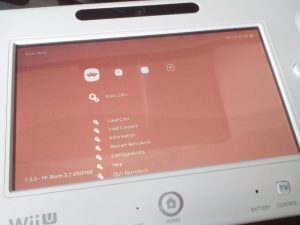
- Each and every RetroArch release is always a community effort. FIX94 and aliaspider have made numerous improvements to the WiiU version of RetroArch. For one, it has HID controller support now, which means you can use gamepads other than the default Wii U gamepads on it. There is also support for the XMB and MaterialUI menu drivers. There are some graphical touches missing from it such as shader effects though, so don't expect to see the fancy ribbon animating on the WiiU yet.
- Overall, it is a big improvement on what went before. Netplay should also start to work on WiiU.
Windows version improvements
- Windows users now can use the WASAPI audio driver for the first time, which should allow for lower-latency audio. And if that isn't enough, there is another successfully completed bounty, a RawInput input driver, which should allow for lower-latency low-level input.
Vulkan renderer
- The Vulkan renderer has received some improvements. It should now support Unicode font rendering and render certain accented French characters correctly.
Localization
- There have been several localization improvements. The German and Japanese translations have been updated, and Korean text should finally display properly.
Audio mixer
- Now here is a real standout feature we are excited to tell you about! RetroArch now has a built-in audio mixer which allows you to mix up to 8 separate audio streams and splice them together with the game's audio. To put it more simply, this means custom soundtrack support from inside RetroArch!
- Currently, there are a couple of limitations here –
- 1 – The only supported audio files so far are Ogg Vorbis files (.ogg) and regular Wave files (.wav). Over time, there will be more audio codecs supported.
- 2 – The audio mixer tracks will only play when the game is running. They will not play while inside the menu, unless you turn off 'Pause when menu activated' (Settings -> User Interface -> Menu).
- 3 – You can only mix up to 8 simultaneous audio streams so far. Looping is not yet available, neither is pausing an audio stream or changing a stream's volume. All of these might be added in later versions of RetroArch though.
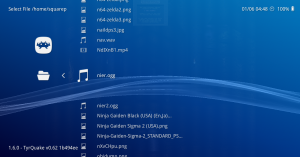
While the game is running, go to Load Content, and select a supported audio file (either an Ogg Vorbis .ogg file or a .wav file)
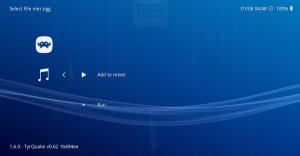
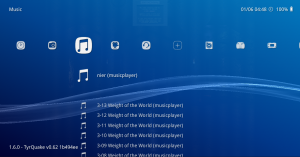
Select 'Add to MIxer'. If the game is already running, this should start playing the music immediately and also add it to your music collection.
Last edited by a moderator:


 Thanks







