PS3 RetroArch 1.7.1 Extended Version

IIRC, @STLcardsWS had an ancient build (like pre-1.0) of the Jaguar core that was full-speed, but had a blue tint to the graphics. Perhaps there is hope for this core ?

I had almost forgot about that (wondering if i have that core anymore, i lost alot of my files, not all but a portion)
Doobz i believe gave that to me when he was trying to get various cores to work back then.

You are more then likely referring to this post. https://forums.libretro.com/t/are-these-cores-possible-in-the-works/285/28
 
DOSBox start screen has weird green lines on it. No way to type commands - the RetroArch PS3 OSK has never worked AFAIK, and you can supposedly map keys to controller buttons (quick menu-> controls), but that's not working. Some games fail to load, others go back to the start screen with this...

Within the RetroArch UI there is an OSK and that does work (in this latest version) You can see it if entering info into Netplay.
But i do not think this is the same control function typically used in games.

Have you tried using a USB keyboard:
Which ever button is "Auto 9" will toggle keyboard (according to the help menu)
RetroArch PS3_12.png
 
The info file says it's required, maybe it's wrong. The Fuse core's info file does not indicate a BIOS, but it does need them.

I am finding so many docs for retroarch and libretro. There is some good notes with RetroPie and Lakka and some pages of the official seem to be a bit hidden. anyhow been reading up on alot of things documented in other projects as well and should get a good foundation for us as well.

Here is a Bios table they have for various cores for Lakka
http://www.lakka.tv/doc/BIOSes/
 
I made according to this instruction but also ps3 freez after pressing OK

I should have mentioned that you load the .uae file you edited, not the game referenced in the .uae file, sorry. Loading the .uae file should boot directly to the game, not the GUI.

Which SNES core is it that has been included in this RetroArch that can play Far East of Eden?

Tenchu Maykou Zero (Far East of Eden) translation working full-speed in SNES9x. Just beat the second boss who is apparently an ice wizard from Hell, LOL.

Within the RetroArch UI there is an OSK and that does work (in this latest version) You can see it if entering info into Netplay.
But i do not think this is the same control function typically used in games.

Have you tried using a USB keyboard:
Which ever button is "Auto 9" will toggle keyboard (according to the help menu)
View attachment 11521

Don't have a USB keyboard, can't test this. The RetroArch OSK works in the menu (I use it a lot while using Tyrquake), but it doesn't work while a game is running, but maybe it isn't supposed to. Given the messed-up graphics, the problem with DOSBox might be endian-related.
 
I should have mentioned that you load the .uae file you edited, not the game referenced in the .uae file, sorry. Loading the .uae file should boot directly to the game, not the GUI.
I load game a from file and i try load game from .uae edited txt, both methode dont work. PS3 still freez after pressing OK button in emu.(cannon folder)
 
I load game a from file and i try load game from .uae edited txt, both methode dont work. PS3 still freez after pressing OK button in emu.(cannon folder)

No, you load the .uae file from the RetroArch menu, not the the emulator's GUI. Make sure the path(s) to your floppy(s) are correct - one tiny mistyping and it will freeze.
 
No, you load the .uae file from the RetroArch menu, not the the emulator's GUI. Make sure the path(s) to your floppy(s) are correct - one tiny mistyping and it will freeze.
I load kickstart in emu gui, uae and adf also in the emulator itself not in RA. I tried in all ways, always the same effect Ps3 freez on OK button in emu GUI.
 
Wrong foarm
but can some get ki and ki2 workin on the ps3 please....
Or like other thread said...
".....cant because hardware limitation...." ps3 can't emulate mame 3d games,,,,,

I'M GUESSING N64 IS BEEN OUT OF THE QUESTION...TOO....
 
Wrong foarm
but can some get ki and ki2 workin on the ps3 please....
Or like other thread said...
".....cant because hardware limitation...." ps3 can't emulate mame 3d games,,,,,

I'M GUESSING N64 IS BEEN OUT OF THE QUESTION...TOO....

Simply put, Anything 3d is a no go on the PS3.
Its possible as we see it with PS1 / PS2 / PSP emulation on the PS3, but that has proper hardware support and emus were created by Sony Where as homebrew scene has not solved these issues and its a massive undertaking for such a project on the PS3 PPC & unique cell environment.

So anything 3d will not be full speed (if they work), but its possible just not likely
 
I load kickstart in emu gui, uae and adf also in the emulator itself not in RA. I tried in all ways, always the same effect Ps3 freez on OK button in emu GUI.

I'm confused...you need to load the .uae file from RetroArch, and it should boot directly to the game's startup screen...the emulator's GUI should not show up. I wish I could post a video about this, but I don't have the tools. Can anybody else verify my procedure works?

On a side note, forget about modifying nr_floppies to get multi-disk games to work. Instead, add the following to the .uae file...

floppy2type=0
floppy3type=0
 
It would be good to simplify and automate, and to add support for the keyboard not only for this core and the ability to use the pad as a mouse. Very deeply tests RA
 
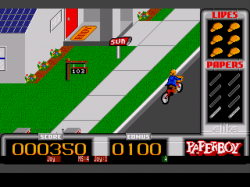
Got Hatari to load a game...this core has controls and a GUI very similar to P-UAE.

Paperboy-180405-184306.png


- BIOS info (from Libretro docs)

tos.img, but there are different versions needed for different systems...

For ST emulation - 1.00, 1.02, 1.04, 2.06 (US 1.02 recommended)
For STE emulation - 1.xx, 2.xx
For TT emulation - 3.xx
For Falcon emulation - 4.xx (4.04 recommended)

There is an open-source alternative (EmuTOS) that runs all 4 systems, but compatibility is hit-and-miss.

- Config info (from Libretro docs)

For multi-disk games, you'll need a config file.
Hatari does not create its config file automatically.
Create a plain text file, call it hatari.cfg and copy/paste this...

[Floppy]
bAutoInsertDiskB = TRUE
FastFloppy = TRUE
nWriteProtection = 0
szDiskAFileName = /dev_hdd0/ROMS/atari_st/Formula One Grand Prix.stx
szDiskBFileName = /dev_hdd0/ROMS/atari_st/Formula One Grand Prix (B).stx
szDiskImageDirectory = /dev_hdd0/ROMS/atari_st/
szDiskAZipPath =
szDiskBZipPath =

[ROM]
szCartridgeImageFileName =
szTosImageFileName = /dev_hdd0/game/SSNE10000/USRDIR/cores/system/tos.img

(Edit szDiskAFileName, szDiskBFileName, and szDiskImageDirectory to match your setup.)
Stick this config in the RetroArch system folder.
Load the game referenced in szDiskAFileName.

- Issues

- Can't swap disks via emulator's GUI - clicking Browse does nothing, and may freeze the PS3.
- Can't save/load sates from GUI (GUI -> Memory).
- Can't load or save configs.
- Runs at 50 FPS - not sure if this is PAL mode or not full-speed.

 
Got Hatari to load a game...this core has controls and a GUI very similar to P-UAE.

View attachment 11689


- BIOS info (from Libretro docs)

tos.img, but there are different versions needed for different systems...

For ST emulation - 1.00, 1.02, 1.04, 2.06 (US 1.02 recommended)
For STE emulation - 1.xx, 2.xx
For TT emulation - 3.xx
For Falcon emulation - 4.xx (4.04 recommended)

There is an open-source alternative (EmuTOS) that runs all 4 systems, but compatibility is hit-and-miss.

- Config info (from Libretro docs)

For multi-disk games, you'll need a config file.
Hatari does not create its config file automatically.
Create a plain text file, call it hatari.cfg and copy/paste this...

[Floppy]
bAutoInsertDiskB = TRUE
FastFloppy = TRUE
nWriteProtection = 0
szDiskAFileName = /dev_hdd0/ROMS/atari_st/Formula One Grand Prix.stx
szDiskBFileName = /dev_hdd0/ROMS/atari_st/Formula One Grand Prix (B).stx
szDiskImageDirectory = /dev_hdd0/ROMS/atari_st/
szDiskAZipPath =
szDiskBZipPath =

[ROM]
szCartridgeImageFileName =
szTosImageFileName = /dev_hdd0/game/SSNE10000/USRDIR/cores/system/tos.img

(Edit szDiskAFileName, szDiskBFileName, and szDiskImageDirectory to match your setup.)
Stick this config in the RetroArch system folder.
Load the game referenced in szDiskAFileName.

- Issues

- Can't swap disks via emulator's GUI - clicking Browse does nothing, and may freeze the PS3.
- Can't save/load sates from GUI (GUI -> Memory).
- Can't load or save configs.
- Runs at 50 FPS - not sure if this is PAL mode or not full-speed.

Very Nice :) .. I got away from testing some cores myself, started messing with some features.

I started working on this guide: http://www.psx-place.com/threads/retroarch-ps3-guide-2018-wip.17119/#post-112674

I figured that way i could identify more issues that way and just help document more of the features which testing some cores and each system of the core (that is important as well on some of the newer cores). I will update this on that guide (a text link to your post for now) and will add this as a working core as well in the other list that i need to update as well with some other info in this thread..
 
Something to take note of @Ezio @Zar

These overlays, the one the online updater downloads (common-overlays)
is not very useful for the most part since its all touchscreen related. :
gamepads
ipad
keyboards
rpi
wii


Effects has some nice scanlines so those are nice and a few of the borders are okay but most are for non ps3 ports.

Now some of these i think would be better for PS3 user's.

Online Updater appears to only take the "common-overlays"
 
SNES9x core supports MSU-1 games. The MSU-1 is an expansion chip that adds 4 gigabytes (!) of extra storage, namely for FMV and CD-quality music. The chip could be considered an user-created version of the SNES-CD accessory which was never released. It works on real hardware, the SD2SNES flash cart, and the bsnes, Higan, and SNES9x emulators.

Example : Super Mario World with MSU-1 -

Tested this with Conker's High Rule Tail (an awesome hack of Zelda 3). The only issue was the intro FMV (the James Bond one, not the Star Wars one) was not full-speed. Everything else was fine - there are no loading times with the music tracks.

Other SNES games with MSU-1 support...(full,updated list here...http://www.psx-place.com/threads/retroarch-1-7-1-extended-version.17068/page-8#post-118184)

Instructions here...http://www.psx-place.com/threads/retroarch-1-7-1-extended-version.17068/page-8#post-117055

Actraiser
Chrono Trigger
F-Zero
Killer Instinct
Mega Man X
Mega Man X3
Rock 'n Roll Racing
Secret of Mana
Super Mario Kart
Super Mario World
Super Metroid
Zelda 3
 
Last edited:
Back
Top