SEN Enabler

SEN Enabler - Tutorial & Latest Releases 6.2.7

charles is a paid app correct? and with all these plugins coming out these days, think its a higher risk of getting banned? these whole reason i havent converted to cobra yet. and the webman on the xmb sketches me out.
great work by the way. [MENTION=246]Nathan[/MENTION]_r32_69 (@Evilnat)
lots of customs and lots of work.
thank you so much.
(my post arent posting at the scene, so if they "pop up" and seem to be a double post, thats why)
 
charles is a paid app correct? and with all these plugins coming out these days, think its a higher risk of getting banned? these whole reason i havent converted to cobra yet. and the webman on the xmb sketches me out.
great work by the way. [MENTION=246]Nathan[/MENTION]_r32_69 (@Evilnat)
lots of customs and lots of work.
thank you so much.
(my post arent posting at the scene, so if they "pop up" and seem to be a double post, thats why)

Yes, Charles is a paid app, plugins are stored on PS3 to send them to Sony, deleting it and blocking URLs with Charles will reset all data and minimize ban risk

Thank so much mate :)

Regards
 
ICON0-2.png


I DON'T RECOMMEND USING PUBLIC IDS

Download: MEGA || MEDIAFIRE || SENDSPACE || RGHOST


Changelog said:
Improvements v5.8.1

  • Added more compatibility with CFWs Cobra
  • Disables any other spoof fix
  • Updated screenshots fix
  • Updated act.dat deletion/unsigned act/rif fix
  • Updated Cobra stage for DEX
  • Added fix Cobra hash option
  • Spoof checks/tasks updated for more security
  • Fixed kernel swapped FW detection/patch with new mode (Thanks to Joonie for warn me about this)
  • Shows recommended MAC Vendor IDs (Thanks to aldostools for the tip)
  • Deleted junk and improved code
  • SEN Plugin updated to v1.5

Thanks to Zrandi, Joonie, aldostools, lokuelo and Franzes80 for his help

It took one month to add new features, update all code to make it more efficient and test it in all CFW, sorry to all who have been waiting this release, it has so much work behind :)

New options are available, now you can choose if you want Screenshots on XMB/Game/Homebrew, patch to disable act.dat deletion and patch for unsigned act.dat/raf/rif like old version of SEN Enabler

  • Screenshots: This option is available on Enable/Disable SEN access menu and Custom spoof menu, enables/disables screenshots options on XMB/Game/Homebrew
  • Unsigned act/rif: This option is available on Enable/Disable SEN access menu and Custom spoof menu, enables/disables option to use unsigned act.dat and rif files
  • Disable act.dat deletion: This option is available on Enable/Disable SEN access menu and Custom spoof menu, enables/disables deletion of invalid act.dat
  • Disable any other spoof and spoof fix: Now can disable any other spoof and spoof fix without restore it before to start with SEN Enabler, use directly if you use another spoof
  • Updated Cobra stage for DEX: Some Cobra stages was wrong defined to patch, now this must be fixed
  • Added fix Cobra hash option: This option is available on Settings menu on page 3, will fix current Cobra hash and update stage2, use this if you can't run PS2 games for example (in some cases you need to update PS2EMU)
  • Spoof checks/tasks updated for more security: I added more checks on spoof options, if appears any problem will stop all process, every task have his own check now
  • Fixed kernel swapped FW detection/patch with new mode: This option is available on Settings menu on page 3 under Patch mode text, if is set on Default mode will use default method to patch CID, PSID and syscalls, otherwise if is set on Auto search will search all offsets to patch CID, PSID and syscalls, this makes SEN Enabler FW independant for future CFW and if this option works fine without any error i will replace default patch system with this one to make SEN Enabler to work on all future CFW without add compatibility before (Thanks to Joonie for warn me ;))
  • Shows recommended MAC Vendor IDs: This text will pop up when MAC is spoofed, will show recommended MAC Vendor ID used by Sony (Thanks to aldostools for the tip ;))
  • Deleted junk and improved code: All junk code is deleted and improved the code to make it more efficient
  • SEN Plugin updated to v1.5: Now SEN Plugin will use Patch mode configured in SEN Enabler, if is in Auto search SEN Plugin will use this mode and if is set on Default mode will use this instead, when plugin is loading will read SEN Enabler configuration file too to use these info (language, modes, etc...)


For those who doesn't know how to enable SEN access, go to SEN/PSN Options and select Enable SEN/PSN access (pressing :[]: button three times in main menu) and not Custom spoof, 9.99 Spoof is not created to go online, so if you are using it DON'T LOG IN ON SEN UNDER ANY CIRCUMSTANCES AND NEVER ENABLE PS3'S NETWORK!!

Remember to use Charles Proxy now along with SEN Enabler and block three URLs (you can add more if you want), this software will minimize ban risk, but a ban is not 100% avoided on CFW

URLs to block said:
Block all these URLs on Charles or similar:


IF YOU FIND ANY BUG, PLEASE LET ME KNOW
 
Hi Evilnat, thank your app. I am using 5.8.1, but I met one issue.
In the main menu, I pressed SQUARE button and then SQUARE button again. appear ' Disable SEN access', when I pressed SQUARE again, Heart 3 beeps, and prompt ' Enable/disable SEN access is not necessary'. what is wrong with me?
 
Hi Evilnat, thank your app. I am using 5.8.1, but I met one issue.
In the main menu, I pressed SQUARE button and then SQUARE button again. appear ' Disable SEN access', when I pressed SQUARE again, Heart 3 beeps, and prompt ' Enable/disable SEN access is not necessary'. what is wrong with me?

Hi mate.
That means you are in the last CFW at this moment, 4.70 CFW, and SEN Enabler doesn't disable it because is not necessary but i will make a modification for v5.8.2 about this

Regards
 
Hi mate.
That means you are in the last CFW at this moment, 4.70 CFW, and SEN Enabler doesn't disable it because is not necessary but i will make a modification for v5.8.2 about this

Regards

The evil genius strikes again :)
 
Hi mate.
That means you are in the last CFW at this moment, 4.70 CFW, and SEN Enabler doesn't disable it because is not necessary but i will make a modification for v5.8.2 about this

Regards

Hi Evilnat, thank your answers. but I still have question. "because is not necessary" that mean SEN Enabler is enabled now so we did not need enable again, right?
and more question, about Charles software, I knew this software is just working on windows. But my ps3 connect in wireless from my router, I did not know how to block URLs by Charles. if I need setup something in SEN Enabler?
 
Hi Evilnat, thank your answers. but I still have question. "because is not necessary" that mean SEN Enabler is enabled now so we did not need enable again, right?
and more question, about Charles software, I knew this software is just working on windows. But my ps3 connect in wireless from my router, I did not know how to block URLs by Charles. if I need setup something in SEN Enabler?
What I did was block the url from the router, I find it a waste having to turn on the PC to play using charles.
 
What I did was block the url from the router, I find it a waste having to turn on the PC to play using charles.

thanks, and Do you know how to disable all debug? My CFW is '4.70 [REBUG] [COBRA]'. actually I did not know how to disable all debug option.
 
ICON0_1.png


I DON'T RECOMMEND USING PUBLIC IDS

Download: MEGA || MEDIAFIRE || SENDSPACE || RGHOST


Changelog said:
Improvements v5.8.2

  • Updated OFW, FULL CFW, APP and PACKAGES modes
  • Updated all menus
  • Menus more fluid than before
  • Random crash in menus seems to be fixed
  • Added progress bar in some tasks
  • Updated Cobra stage data in some CFWs
  • PKG size reduced again (3.84mb > 1.42mb)
  • SEN Plugin updated to v1.6
  • Added patch at startup in SEN Plugin
  • Patch MAC/IDs/Syscalls at startup with flag files
  • Fixed PS button and screen flickering on Title/TitleID task

Thanks to MaMaRe [PSX-PLACE] for add Brazilian/Portuguese language, xllBIGGBOSSllx [YOUTUBE STReeT poRKs], GeopByteSs [TWITTER], RevilingDante [WIISOS], franzes80 [GAMESONIC] and lokuelo [PSX-PLACE] for his help


Screenshots
SEN%20Enabler%20New%20menu.png


SEN%20Enabler%20Progress%20bar.png


In this version all menus are re-coded, will be more fluid and all randomly crashes seems to be fixed now, this seems to be fixed now, zero crashes since i updated it. I wanted to add progress bar on some tasks like Spoof options and Fix hash, finally it's done and now is easy to check if all is fine and to know approximately how much time left to finish.

In older versions, if PS button was pressed will crash the PS3, now if is pressed will exit to XMB at any time, for example if you are enabling PSN/SEN access and PS is pressed will kill all SEN Enabler's process to exit XMB, use this with caution because you can get BSOD/RSOD if you exit when some tasks are working

XMB Modes are updated too, with this PKG's size is reduced from 3.84mb to 1.42mb (From ~70mb since older versions), is tested on all CEX CFWs with good results, on DEX is tested on some CFWs without issues, if you see something please let me know quickly, if you have blackscreen install your CFW from Recovery Mode menu

SEN Plugin now can patch data on startup, to do this you need to put some "flag" files on your USB device with FAT32 format like this:

  • x:\SEN_Enabler\flags\patch_ids_startup [Patches CID and PSID]
  • x:\SEN_Enabler\flags\patch_mac_startup [Patches MAC]
  • x:\SEN_Enabler\flags\patch_syscalls_startup [Deletes history files and hide Syscalls]

Remember SEN Plugin can be installed from SEN Enabler settings menu, you can chose what you want to patch simply putting the flag file on your USB device, will do it when PS3 is starting automatically (all flag files are in RAR)
If text is not displayed in some tasks maybe is because peek/poke/LV1 is disabled

This "flags" method maybe will be replaced in a future release with a newer mode


For those who doesn't know how to enable SEN access, go to SEN/PSN Options and select Enable SEN/PSN access (pressing :[]: button three times in main menu) and not Custom spoof, 9.99 Spoof is not created to go online, so if you are using it DON'T LOG IN ON SEN UNDER ANY CIRCUMSTANCES AND NEVER ENABLE PS3'S NETWORK!!

Remember to use Charles Proxy now along with SEN Enabler and block three URLs (you can add more if you want), this software will minimize ban risk, but a ban is not 100% avoided on CFW

URLs to block said:
Block all these URLs on Charles or similar:


IF YOU FIND ANY BUG, PLEASE LET ME KNOW
 
Last edited:
ICON0_1.png


I DON'T RECOMMEND USING PUBLIC IDS

Download: MEGA || MEDIAFIRE || SENDSPACE || RGHOST


Changelog said:
Improvements v5.8.3

  • Online works again with OFW 4.75
  • Added support for CFWs 4.75
  • Added option to install themes
  • SEN Plugin updated to v1.7
  • VSH Menu in SEN Plugin from 3141card's POC
  • Added image version from 4.75 in Custom spoof option
  • Added version from 4.75 in Custom spoof option
  • Updated patches on SEN Options
  • Improved code

Thanks to 3141card for PS3 VSH Menu, Alexander for CFW 4.75 to test it, xllBIGGBOSSllx [YOUTUBE STReeT poRKs], GeopByteSs [TWITTER], RevilingDante [WIISOS], franzes80 [GAMESONIC], zrandi [ZRANDISCENE] and Misterkio for his help
Finally i updated SEN Enabler to version 5.8.3, it took me some days of full work because Sony released OFW 4.75, need to update it quickly

This version has the requested option to install custom themes, SEN Enabler only have one default theme installed from memory, if you want to install your custom theme the default one will be omitted and will show your theme when SEN Enabler is starting. This option is in Settings menu in page 4, under the name of Themes options. Here are theme all options:

  • Themes: This option will show all available themes to install, it depends of Source option, if USB is selected will search in an USB device it and if HDD is selected will search in SEN Enabler's themes folder, when a theme is installed will be on SEN Enabler's theme folder
  • Restore original theme: Restores default SEN Enabler theme
  • Delete installed themes: Deletes all installed themes on SEN Enabler's themes folder
  • Source: Select where SEN Enabler need to look for themes, USB or SEN Enabler's theme folder (HDD)

I added two themes along with SEN Theme Tool in the RAR file, SEN Enabler Default Theme [v1].sen and SEN Enabler Default Theme [v2].sen, the first one is old theme and second one is the current theme


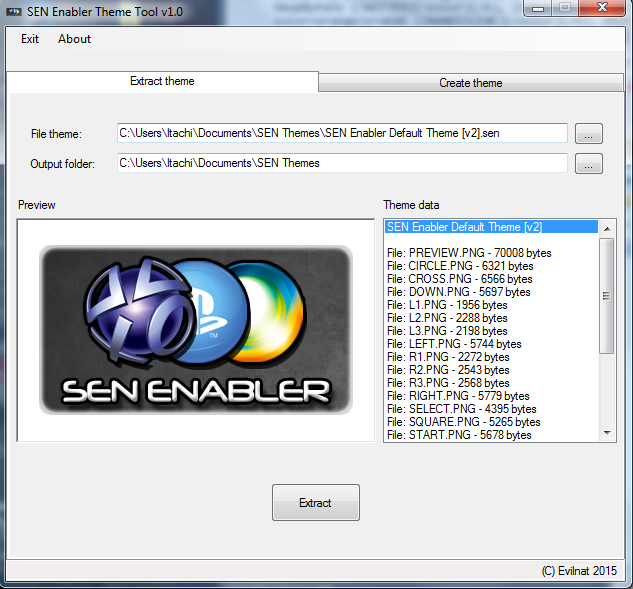
SEN Theme Tool

951e690e48f479e693f941cf2e0990c0.png
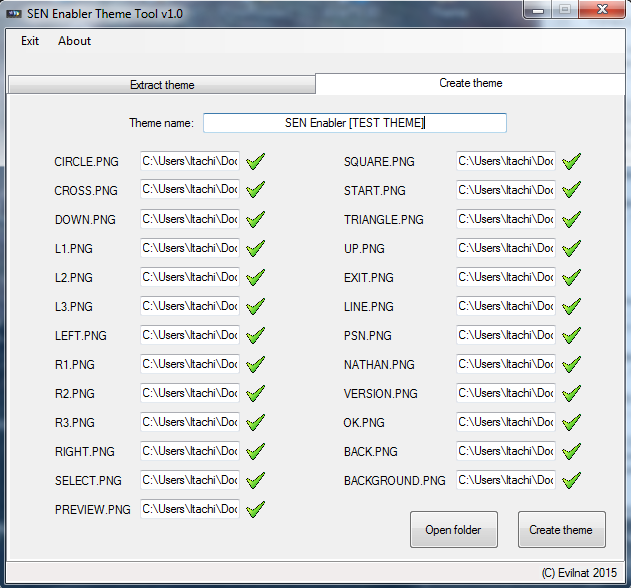
a2ac29baf4e2bf311cede8fe17f7048e.png

SEN Theme Tool is the only app to make themes for SEN Enabler, it can create and extract themes, for extract them you need to select theme file and output directory, and to create a theme you need all PNG files from a directory (will search necessary files automatically), put a name and create the theme, you can use one theme as base for your custom theme


SEN Enabler Plugin

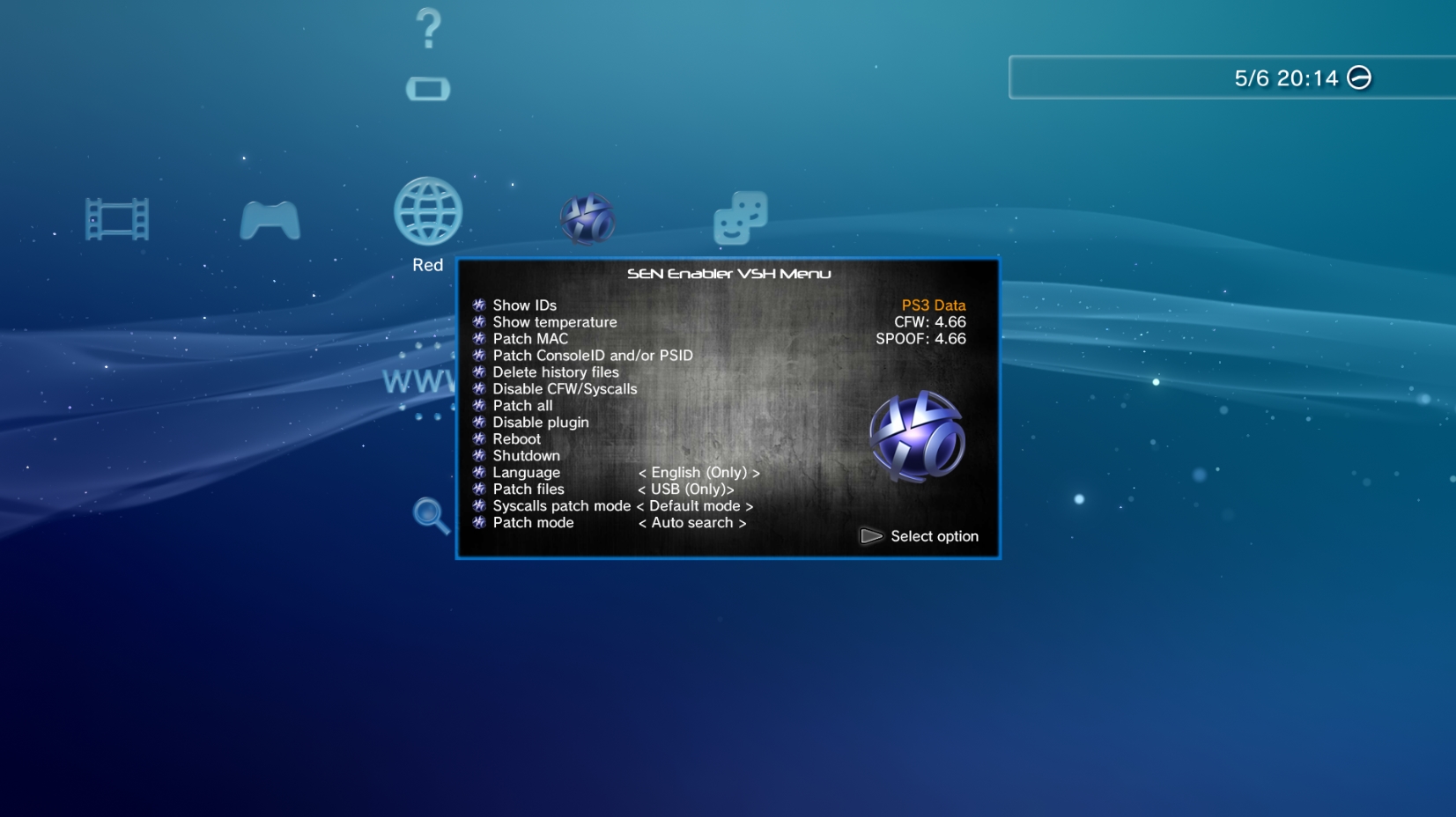
9d8b92e33ead8d59cd7233c1e292e487.jpg


Thank so much to [MENTION=21]3141card[/MENTION] for his POC of PS3 VSH Menu, i improved it to load PNG from memory instead from files on USB/HDD, if you didn't see it here is the Source Code and SPRX, i'm using it as base for my plugin, you can use it and add your tasks or improve it

These are all the options:

  • L1 + R1: Open/close SEN Plugin options menu
  • START: Do selected option
  • Show IDs: Show current MAC/CID/PSID
  • Show temperature: Show current CPU and RSX temperature
  • Patch MAC: Patch current MAC
  • Patch ConsoleID and/or PSID: Patch CID or PSID, depend what you want to patch with patch files
  • Delete history files: Delete files sent to Sony
  • Disable CFW/Syscalls: Disable CFW's syscalls
  • Patch all: Patch CID/PSID, hide syscalls, delete history files and disable plugin
  • Disable plugin: Disable SEN Plugin
  • Reboot: Reboot PS3 system
  • Shutdown: Shutdown PS3 system
  • Language: Select language (English only for now)
  • Patch files: Select source of patch files (USB only for now)
  • Syscalls patch mode: Patches syscalls with mode Default/1/2/3
  • Patch mode: Select option to patch IDs, auto search will find IDs on LV2/LV1 instead use offsets

It has his own configuration file, the old versions used SEN Enabler cfg, now you can use it without SEN Enabler installed on your PS3, and languages will be updated quickly along with other options

To all who spoof CID, be careful because you can be banned quickly now, SPOOF CID AT YOUR OWN RISK

For those who doesn't know how to enable SEN access, go to SEN/PSN Options and select Enable SEN/PSN access (pressing :[]: button three times in main menu) and not Custom spoof, 9.99 Spoof is not created to go online, so if you are using it DON'T LOG IN ON SEN UNDER ANY CIRCUMSTANCES AND NEVER ENABLE PS3'S NETWORK!!

Remember to use Charles Proxy now along with SEN Enabler and block three URLs (you can add more if you want), this software will minimize ban risk, but a ban is not 100% avoided on CFW

URLs to block said:
Block all these URLs on Charles or similar:


IF YOU FIND ANY BUG, PLEASE LET ME KNOW
 
Last edited:
Cool, vsh like psp!!! You really are great evilnat!!!

Maybe this sounds like a noob question, can I use this on 4.70 to going online? Or I have to update 4.75???
 
Back
Top