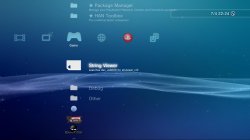
PS3 String Viewer and DECR 0.90FW XMB Items (Partially working)

Yeah, deleted both of those.

I have done some tests with
Code:
<Pair key="icon_fixed_width"><String>181</String></Pair>
 <Pair key="icon_fixed_height"><String>11</String></Pair>
and no luck, does not work any way I use it.
Damn, bad luck, this is exactly what was needed for webman covers, when i saw it for first time it inmediatly came to mind webman

But, this does work:
Code:
<View id="seg_string_viewer">
 <Attributes>
 <Table key="add_to_all">
 <Pair key="info"><String>info test</String></Pair>
 </Table>
 <Table key="StrViewer"  include="add_to_all">
 <Pair key="icon_rsc"><String>item_tex_ms_icon</String></Pair>
 <Pair key="title"><String>String Viewer</String></Pair>
 <Pair key="module_name"><String>strviewer_plugin</String></Pair>
 <Pair key="module_action"><String>1</String></Pair>
 </Table>
 </Attributes>
 <Items>
 <Item  class="type:x-xmb/module-action" key="StrViewer" attr="StrViewer" />
 </Items>
 </View>

So we can use the "include" to reduce xml size lots, but not to resize icons from I can see.
Nice, this is very important because is a general feature (there are lot of places where can be used)
If you test more experiments with this please remember the other 2 variants i mentioned
-Using several includes in the same line (so a single item includes several others)
-Prepare a "cascade" of includes (so item1 includes item2... and item2 includes item3... item3 includes item4... and so on)

Im guessing both should work... but is just a theory, if you confirm please tell

Im interested in the "child grid" view, but don't think it works in newer FW.
Code:
<Table key="GridTest">
 <Pair key="icon_rsc"><String>item_tex_ms_icon</String></Pair>
 <Pair key="title"><String>Grid Test</String></Pair>
 <Pair key="child"><String>grid</String></Pair>
 </Table>
Not sure why this called your attention... are you thinking the "grid" name is some kind of reserved "keyword" that triggers some special features ?

What i think is a special keyword is the name "segmentize" (used like one of that "view_id")... i think is "splitting" the horizontal XMB bar... but i have no idea how is made
And probably is very related with the category_settings.sprx so i guess is needed to reverse that sprx (and maybe some more stuff) to look at all info together to have a good overview... and then to compare with retail firmwares (because this changed in retail)
So is a hard challengue, is over my skills XD

btw, I found a copy of the xmb_debug_plugin.sprx in one of those old dev_flash dumps. :) Cant seem to get it to do much though except crash ps3 (only does that if I rename it to an existing plugin)
In scetool try to resign it by using the option "template". And for the template you have to select a .sprx from 4.82 firmware, this way your resigned sprx "should" work on 4.82

Also found lots of typos, who ever wrote old pre release FW is worse than me :)
Code:
<Query
 class="type:x-xmb/folder-pixmap"
 key="GridTest"
 attr="GridTest"
 src="host://lolcalhost/app_home/data/art/GridTest" />

"lol" , no wonder they never included it in the FW, they broke it with a typo :)
\o/ call host
Good typo :)
 
How would I inject something like that
There is a xml replacer tool published by team ps3xploit, with that you should be able to replace one (or more) of the xml that works as the lists that displays icons in the vertical columns of XMB (settings, photo, video, music, game, etc... every one of those has a xml that defines what appears in them)

But the modifyed xml files you should install is limited to whatever that was published in internet that was CONFIRMED WORKING AND STABLE
This is not a must... is mostly a suggetion, because in the practise you can write a corrupted xml to a "han compatible only" PS3 model and this is not going to cause a big harm... in the worst scenario what is going to happen is when you try to turn on the PS3 the firmware is not able to load the XMB completly (so you see some kind of errors in screen, or you dont see anything)... but this can be fixed easy by reinstalling the firmware PUP (the same exact firmware you had installed before you fucked up your XMB)

If someone on HAN wants to do some experiments with this XML files we are talking... the most safest way and easyer too... is by adding a couple of lines in the xml file to "redirect" the loading to usb

So what the PS3 firmware does is... when the PS3 boots and loads your modifyed xml, then it reads the line where you are "redirecting" the load to usb.... an then it attempts to load a "fully customized" xml from root of usb, and can happen 2 posible things:
-If custom xml is in usb.... it will be loaded
-If custom xml is not in usb.... nothing happens (firmware continues working normally, no errors)

Also... it doesnt matter if the xml file on usb is completly damaged or corrupted... at the time you boot the ps3 the xmb will load it (and xmb will crash)... but you just need to reboot ps3 (and disconnect the usb with the corrupted xml) and the ps3 will boot normally

This is the safest and faster way to do experiments with this xml files :)
 
Last edited:
btw, I found a copy of the xmb_debug_plugin.sprx in one of those old dev_flash dumps. :) Cant seem to get it to do much though except crash ps3 (only does that if I rename it to an existing plugin)
In scetool try to resign it by using the option "template". And for the template you have to select a .sprx from 4.82 firmware, this way your resigned sprx "should" work on 4.82

I would recommend using SSL's scetool (https://github.com/Sorvigolova/scetool), it's the only tool which handles early SELF's etc. 100% correctly.
 
In scetool try to resign it by using the option "template". And for the template you have to select a .sprx from 4.82 firmware, this way your resigned sprx "should" work on 4.82
Custom sprx work on 4.82 ofw if we sign them with scetool??
 
@aldostools I wonder would the string viewer plugin be useful for something else in cfw, as it can be called with a "module_action" and it is not used for anything as far as we know, maybe it can be used by webman or a xai type plugin?
 
@aldostools I wonder would the string viewer plugin be useful for something else in cfw, as it can be called with a "module_action" and it is not used for anything as far as we know, maybe it can be used by webman or a xai type plugin?

Currently I don't see any use for it webMAN... Maybe it could be used in some XMB mod..
Actually I don't know what is the purpose of the string viewer plugin... I thought it was used to show PARAM.HIS, but that is done by game_ext_plugin.sprx
 
So after much reversing (jk) I now know the format required for the strviewer_cnf, it needs to be a file with that name, no extension and containing text in this format:
Code:
Title = "Title on XMB 1" path = "/path/" file = "filename1"
Title = "Title on XMB 2" path = "/path/" file = "filename2"
So just 3 items in quotes per item, the rest is not needed, first is name on XMB, second is the folder/path on usb000, and the third is the start of the filename.

So the above example will create items called "Title on XMB *" which when clicked will look to dev_usb000/path/filename*.xml, where * is the name of the country you entered first of all. I have not figured out the format of the next xml yet. Language xmls from rcos are a no go, no error if the file exists, but just kind of sits on a blank screen with a moving wave, no crash.

See how it looks.

screenshot_2018_04_07_22_24_57.jpg screenshot_2018_04_07_22_25_09.jpg screenshot_2018_04_07_22_25_21.jpg screenshot_2018_04_07_22_25_32.jpg
 
Last edited:
since u found out where the file explorer came from, do u think that there might be a copy/paste function in the future? I dont wont to annoy u cause im sure u get asked the question alot by new modders but do u think it might be possible in the future now?
 
since u found out where the file explorer came from, do u think that there might be a copy/paste function in the future? I dont wont to annoy u cause im sure u get asked the question alot by new modders but do u think it might be possible in the future now?
No, unfortunately its the very same situation now really. I don't see any possibility of copy with that method tbh.
 
@DeViL303

I was browsing psdevwiki without any reason and I came across a xml that caught my attention with "str" tags, so I was anxious to see if it could be read with strviewer and voila, it works

See here

Code:
<?xml version="1.0" encoding="UTF-8"?>
<!DOCTYPE locale SYSTEM "locale.dtd">
<locale lang="en" encoding="utf16">
    <str id="msg_information_board_no_network">Notifications about PLAYSTATION® related topics are displayed when connected to a network.                To set not to display, go to [Network] &gt; [Information Board] and select [Do Not Display] from the options menu.</str><!--dtype="C"-->
    <str id="msg_information_board_no_network_list">Notifications about PLAYSTATION® related topics are displayed when connected to a network.&#xa;To set not to display, go to [Network] &gt; [Information Board] and select [Do Not Display] from the options menu.</str><!--dtype="C"-->
</locale>

Other thing that caught my attention is the <!--dtype="C"--> tag as the strview plugin added [C] in front of the id=name, so i decompiled the strviewer_plugin.sprx and i found a lot of more

W4TQGj0.png


So i tried with all of them, at first [C] [W] [T] types there were no difference, they all showed the text centered but i added loren ipsum to test their behaviour and the real difference between them become noticeable.

This is the result:


Attachments

Last edited:
@sandungas the video you added to the wiki is wrong :P
Ops, i dont remember where i got the link, is fine now ?
https://www.psdevwiki.com/ps3/String_Viewer#Pre-retail_firmwares

Edit:
Btw, someone figured what means each letter ?, there is a list of 8 posible values for the dtype, and it seems to be the first letter of the feature name
For the "G" you said is like a notification at bottom... but the codename they gave to that feature seems to start by G
And the "I" maybe it just means "Info"... or... "Information Board" (the official widget from old firmwares)

<!--dtype="C"-->
<!--dtype="E"-->
<!--dtype="W"-->
<!--dtype="R"-->
<!--dtype="T"-->
<!--dtype="N"--> Notification
<!--dtype="G"-->
<!--dtype="I"-->


-------------
Edit2:
Im also wondering what means the word dtype, is a name very generic :/
The first idea that came to mind is "document type" but thats wrong because is triggering a feature that is specific of each XML line, in other words, we can create a XML with multiple lines, and every line having a different dtype
The second thing that came to mind is "data type"... just because it fits but thats wrong too because all that lines are a data type = string
And the third thing that came to mind is "display type"... this is my winner horse by now
 
Last edited:
I was messing around, and I found , on CEX, you can delete all the shop xmls, the tool xmls, the category_sysconf.xml , not sure why we even leave them in normal CFW. Also , I stripped out loads of unused stuff from the used ones, reduced the xmls by over 50% in size overall without removing any features. :)

The category_sysconf.xml is used in-game XMB, i stripped mine down just to show the options that are really usable in-game, i removed all the ones that displays to exit the game to access it
 

Attachments

Last edited:

Similar threads

Back
Top