PS3 Syscon fan settings (Coordinate Graphs)

For the record
This post is a confirmation of another COK-001 motherboard using a thermal config with checksum 0x7115

This post is a confirmation of another SEM-001 motherboard using a thermal config with checksum 0x86D6

This post seems to be a confirmation of another SEM-001 motherboard using a thermal config with checksum 0x86D6
 
Last edited:
So are we at a point yet where we can use a homebrew to install a modded syscon with a more aggressive fan control?
Not yet, to unlock the GameOS access to syscon eeprom is needed to install a PUP containing an special PKG with an exploit that is going to be applyed as a syscon "patch"
The original data is not modifyed by applying syscon patches, the patch is "overlayed" on top of the original data without rewriting it, so is safe theoretically, if we remove the patch the data is back to original
This patch is something generic (only applyed by using an unique identifyer of the syscon), and it seems is posible to create this kind of patch for all PS3 models

After that patch is applyed we have freedom to overwrite the real data (this would change the thermal config permanently, not as a patch, but as the base software)... and i guess after that we can "uninstall" the patch to lock syscon again, but this removal of the patch is optional
 
Hello, nice work being done here.
Maybe this has already been mentioned, but @sandungas you are right in asking for more samples of thermal profiles.
There seem to be more out there in the wild.

Here is a B model with a different fan curve. It's not the one commonly seen for COK boards, as you can see the Cell shutdown temperature is 90c instead of 85 for example.

Here is a small test

Worth mentioning the system is still warranty sealed and working fine. So not opened to properly access the SYSCON, as the system is not even mine.
The fan was manually jammed for the video test, It can be seen that it's different profile.

Cheers
 
Here is a B model with a different fan curve. It's not the one commonly seen for COK boards, as you can see the Cell shutdown temperature is 90c instead of 85 for example.
Interesting, is something unusual, btw, the custom fancontrol softwares takes samples with a gap of around 3 seconds, so sometimes the temperature values we see in the screen could be a bit confusing, also sometimes is hard to know if is CELL or RSX who are "driving" the fan. But the fanspeeds are a lot more accurate and more handy to identify the thermal config, i made a list of what can be seen in your video:

??/?? - 20% <---------- this fanspeed 20% is a must have (but the temperatures associated with it doesnt matters)
74/66 - 25%
<------------------------ missing a fanspeed here ?
81/71 - 27%
82/72 - 28%
83/72 - 29%
84/73 - 30%
85/74 - 35%
86/75 - 45%
87/75 - 50%
<------------------------ missing a fanspeed here ?
88/76 - 100%

It seems in the video doesnt appears the first fan speed, doesnt matters much but i just added it to count the total number of fan speeds
The first PS3 motherboards (COK-001, COK-002, and SEM-001) have a total of 10 fan speeds (from P0 up to P9), and that PS3 of the video could have 10... but im wondering if it have another one with fanspeed 26% and other around 75%

Incase it have more than 10 maybe is because it was refurbished ?
Anyway... the fan speeds that can be seen in your video doesnt matches with any sample i have from retail PS3s... neither COK-001 prototypes, neither the frankenstein v2 (with a RSX @ 40nm) discussed here

It could be the frankenstein v1 though (with the RSX @ 65nm)... we dont have a sample of the "thermal config" of that first version of the frankenstein
Can you take a look at this screen to see if it have Syscon SoftID = 0x0F29 ?
https://www.psdevwiki.com/ps3/More_System_Information
https://www.psx-place.com/threads/f...cecha-with-40nm-rsx.28069/page-17#post-277503

 
Last edited:
Interesting, is something unusual, btw, the custom fancontrol softwares takes samples with a gap of around 3 seconds, so sometimes the temperature values we see in the screen could be a bit confusing, also sometimes is hard to know if is CELL or RSX who are "driving" the fan. But the fanspeeds are a lot more accurate and more handy to identify the thermal config, i made a list of what can be seen in your video:

??/?? - 20% <---------- this fanspeed 20% is a must have (but the temperatures associated with it doesnt matters)
74/66 - 25%
<------------------------ missing a fanspeed here ?
81/71 - 27%
82/72 - 28%
83/72 - 29%
84/73 - 30%
85/74 - 35%
86/75 - 45%
87/75 - 50%
<------------------------ missing a fanspeed here ?
88/76 - 100%

It seems in the video doesnt appears the first fan speed, doesnt matters much but i just added it to count the total number of fan speeds
The first PS3 motherboards (COK-001, COK-002, and SEM-001) have a total of 10 fan speeds (from P0 up to P9), and that PS3 of the video could have 10... but im wondering if it have another one with fanspeed 26% and other around 75%

Incase it have more than 10 maybe is because it was refurbished ?
Anyway... the fan speeds that can be seen in your video doesnt matches with any sample i have from retail PS3s... neither COK-001 prototypes, neither the frankenstein v2 (with a RSX @ 40nm) discussed here

It could be the frankenstein v1 though (with the RSX @ 65nm)... we dont have a sample of the "thermal config" of that first version of the frankenstein
Can you take a look at this screen to see if it have Syscon SoftID = 0x0F29 ?
https://www.psdevwiki.com/ps3/More_System_Information
https://www.psx-place.com/threads/f...cecha-with-40nm-rsx.28069/page-17#post-277503

Im the owner of the B01 with the wacky syscon fan profile, i have just checked the syscon softID and it is the usual 0B8E.
 

Attachments

  • PXL_20210203_165501415.jpg
    PXL_20210203_165501415.jpg
    4.4 MB · Views: 94
Im the owner of the B01 with the wacky syscon fan profile, i have just checked the syscon softID and it is the usual 0B8E.
Thx, do you know if it was refurbished ?, it has been always yours ? (because you bought it in a shop when it was released?) or you bought it used ?
There is something you consider could help us to identify that CECHB models with an unknown thermal config ?
Lets say... manufacturing date, region, or if is an special edition shipped in a bundle with a popular game, etc ?

By now i cant tell anything interesting about your PS3 thermal config, the good thing from it is we have the accurate "duty" values (the fan speeds) so incase someone shares a thermal config dump with that same speeds we are going to be able to compare them

The bad thing is it breaks the whoe concept that there is only 1 thermal config for every motherboard, this sucks for me because it would mean i need to make more images :D
By now it looks the total of images i will need to do to cover all PS3 retail motherboards is going to be around 10 or 16, and 2 more for DECR models, and 2 more for the (official) COK frankensteins v1 and v2
 
Thx, do you know if it was refurbished ?, it has been always yours ? (because you bought it in a shop when it was released?) or you bought it used ?
There is something you consider could help us to identify that CECHB models with an unknown thermal config ?
Lets say... manufacturing date, region, or if is an special edition shipped in a bundle with a popular game, etc ?

By now i cant tell anything interesting about your PS3 thermal config, the good thing from it is we have the accurate "duty" values (the fan speeds) so incase someone shares a thermal config dump with that same speeds we are going to be able to compare them

The bad thing is it breaks the whoe concept that there is only 1 thermal config for every motherboard, this sucks for me because it would mean i need to make more images :D
By now it looks the total of images i will need to do to cover all PS3 retail motherboards is going to be around 10 or 16, and 2 more for DECR models, and 2 more for the (official) COK frankensteins v1 and v2

I picked the system up used on eBay. (oddly enough for some reason it had been imported into the UK and it was missold as a CECHC03, when infact its a B01 for £45) it was made in novemeber of 2006 in China. The smart plate on top is a little loose, however the warranty seal has not been tampred with in any way. and when i got it, it already had CFW on it if that helps at all.

Apart from that i dont think there is anything special about the system.
 
I picked the system up used on eBay. (oddly enough for some reason it had been imported into the UK and it was missold as a CECHC03, when infact its a B01 for £45) it was made in novemeber of 2006 in China. The smart plate on top is a little loose, however the warranty seal has not been tampred with in any way. and when i got it, it already had CFW on it if that helps at all.

Apart from that i dont think there is anything special about the system.
Ok, if at some point you open it take a look at the motherboard model "printed" in it, there are some rare models documented from around year 2006, the best way to see how many there are is in this table for the platform_id
https://www.psdevwiki.com/ps3/Platform_ID

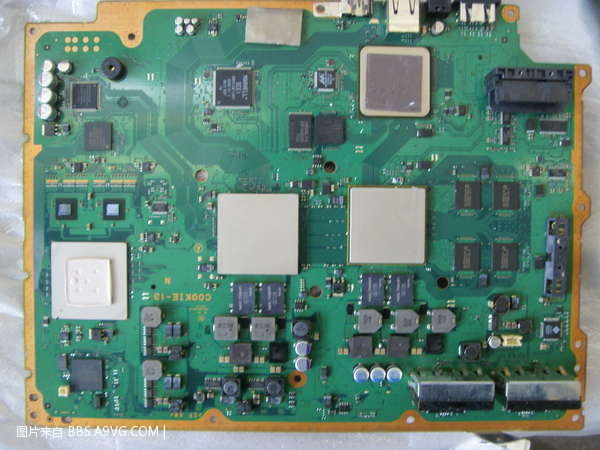
Im wondering if your PS3 is made with parts from other consoles and it have a COOKIE-13 motherboard
S73F0217.JPG
 
Ok, if at some point you open it take a look at the motherboard model "printed" in it, there are some rare models documented from around year 2006, the best way to see how many there are is in this table for the platform_id
https://www.psdevwiki.com/ps3/Platform_ID

Im wondering if your PS3 is made with parts from other consoles and it have a COOKIE-13 motherboard
S73F0217.JPG
Just checked with a torch through the transusent casing the on the B01 , the COOKIE-13 board has the SD card reader header on it, but my B01 is lacking that so im presuming that rules the chance of a cookie board
 
Where is the "BEVR" temperature sensor, southbridge or motherboard?
As far i now there is not a definitive confirmation of it, all the talks in this forum related with it was mostly speculative

Initially it was given the name BEVR (that means CELL BE Voltage Regulator) in a small C source code structure published by the team that found the syscon exploit/s
That code was very small, and not definitive because included some unknowns fields, it was mostly a intermediate version used in the research, and as far i understood the assignment to BEVR was a bit speculative (no offense intended)

So when i started making this images i respected that decission and im displaying it as BEVR in the actual version of my images... but i really thing is SouthBridge (not BEVR)
If at some point is confirmed i will modify my images to replace the name BEVR by SB


-------------------
The actual images i uploaded in this, and other threads in this forum are not definitive... in my oppinion are good enought as an overview, but im still waiting for more samples to complete the collection
The next ones i would like to add to the collection are: CECH-21xx and CECH-25xx
 
As far i now there is not a definitive confirmation of it, all the talks in this forum related with it was mostly speculative

Initially it was given the name BEVR (that means CELL BE Voltage Regulator) in a small C source code structure published by the team that found the syscon exploit/s
That code was very small, and not definitive because included some unknowns fields, it was mostly a intermediate version used in the research, and as far i understood the assignment to BEVR was a bit speculative (no offense intended)

So when i started making this images i respected that decission and im displaying it as BEVR in the actual version of my images... but i really thing is SouthBridge (not BEVR)
If at some point is confirmed i will modify my images to replace the name BEVR by SB


-------------------
The actual images i uploaded in this, and other threads in this forum are not definitive... in my oppinion are good enought as an overview, but im still waiting for more samples to complete the collection
The next ones i would like to add to the collection are: CECH-21xx and CECH-25xx
Got one from scrap (2100 can be repaired, I have tested before cpu is still fine, rsx was ported probably ia a complet 3000 unit where rsx was killed by heat gun). For what is worth I will try to dump it.
Second ss is dead cpu (2 ohms), rsx went fine on a test board.
I will dump both and post link here with more photos. What info do you need from UART exactly?
3471e1c8893df9b36f8ee784415a346d.jpg
92d752b7dd3e990d08da93d99ec34763.jpg
8c80428ba66c15c470b71de5cb2b247e.jpg
17cadb5d0ac3261187fd3e3847c11918.jpg
 
Omg, you have a REX-001 with eMMC flash, is going to be very helpful because his syscon firmware is probably the "most wanted", inside it there are identifyers that belongs to the previous motherboard models and REX-001 is the last PS3 motherboard

--------------
Can you confirm that the REX-001 have a syscon SW3-304 ? (is located at the bottom side of the motherboard)
And please run this UART commands: "hversion" (is going to display the Platform ID), "revision" (is going to display the syscon SoftID, and "version" (is going to display the syscon firmware version)

Additionally i would like you to run the commands "fantbl get 0" and "fantbl get 1"... the reason why im asking this is because the values displayed by syscon are converted to "human readable" format (speed in hex ---to--> speed in %, etc...)
If at some point you give me a sample of the thermal config im able to make all that conversions with a calculator (to create the graph image in photoshop), but is a pita to do all this conversions manually, for me is a lot easyer to "copypaste" the output of the "fantbl" commands to photoshop

---------------------
There are some details of SUR-001 that are already documented, but is also very interesting for me because i dont have any sample of his thermal config in my collection (so i cant make a graph for in in photoshop yet)... soooo well... you can do the same i explained above to it (the commands to get the identifyers, and also the values displayed by the fantbl commands)

--------------------
And for both (SUR-001 and KTE-001) we need a dump of the syscon firmware (that "we" means the PS3 scene). Just to be clear, the priority here is to help m4j0r in completing the collection of all the PS3 syscon firmwares because he is helping us (that "us" means the PS3 scene) in understanding how the syscon works

Im going to create a private conversation to talk about this with both of you, and eventually i will publish the thermal configs of SUR-001 and REX-001 and i will make an image graph for them (of course giving credits for your help) :encouragement:
 
Aha, let's see if this one is a real unicorn this time hehe.

Assuming that sherwood syscon behaves like the other ones,

hversion will probably not work because it requires internal permissions.
And the thermal config area could be retrieved like this
EEP GET 0250 40
EEP GET 0290 40
EEP GET 02D0 40
EEP GET 0310 40
EEP GET 0350 40
EEP GET 0390 40
EEP GET 03D0 40
EEP GET 0410 40

Of course with a full syscon eeprom dump this may be redundant, but in general this is the first thing I do before tinkering with the fan tables.
tshutdown get 0
tshutdown get 1
Will also give you info in readable format

eepcsum also important
 
hversion will probably not work because it requires internal permissions.
Damn, i missed that detail, it really sucks because the Platform ID names is other of the "most wanted" things that needs to be completed in wiki. the problem is we have a big mess with the superslim motherboards because we dont know his "platform id", there are maaaaany wiki pages dependant of it and lot of innacuracies and speculations just because we dont know the complete list :(
Anyway, i think m4j0r is able to "read" it in a hexeditor from the syscon dump file, so in few days we are going to have one more in the collection :encouragement:

And the thermal config area could be retrieved like this
EEP GET 0250 40
EEP GET 0290 40
EEP GET 02D0 40
EEP GET 0310 40
EEP GET 0350 40
EEP GET 0390 40
EEP GET 03D0 40
EEP GET 0410 40
Yep, this is what i would suggest to do for someone that doesnt wants to create/share the complete syscon dump, but in this case i didnt mentioned it because @vyktormvmpay25 is going to share the dump and im going to be able to "crop" the "thermal config" area in a hexeditor
Btw, if you want to locate the "thermal config" area inside a complete syscon dump is located at absolute offset 0xA0250 (is the value i was suggesting to use in this post)

At some point i need to update the first post of this thread, right now is outdated and i only mentioned what to do with mullions

eepcsum also important
Yeah, this is very important right now, specially if he does it with the REX-001, because is the last PS3 motherboard so it could be an indication that the checksum is located at the same offset for all the sherwoods
Please run this 2 commands @vyktormvmpay25
Code:
> eepcsum
and...
Code:
> r 7FE 2

Both values (2 bytes length) should be identical (but swapped)
 
I just done rex board let me know if anymore data is req. @Pacorretaco ,@sandungas ?
http://s.go.ro/o6fg02aw
if tshutdown 1 is so greater then 0 ,why so often I see dead cpu in super slims ?
No worries about any id's as not sure if i will ever fix those.
just found few more mpx with emmc and without ,nxp ,all sw3-302
Aha, so it seems the checksum address I manually found on VER board (first Sherwood)

7fe

Actually is the same for REX board (last Sherwood)
So it's safe to assume that this was not changed and is the same for all sherwoods. So no need to dig for it again.
Good thing.
 
Yes seems like let me dig few more examples to be sure.
Edit
Wait sur link you would like this.
Recap REX SW3-304 emmc with panasonic nor http://s.go.ro/o6fg02aw
Sur001 SW2-302 http://s.go.ro/h8hxekn1
NPX SW3-302 http://s.go.ro/ef9p07t5
MPX SW3-302 with emmc http://s.go.ro/50axx4dm
MSX SW3-302 nor 29gl128 without emmc http://s.go.ro/s8zfi2ub
PQX SW3-304 without emmc http://s.go.ro/8rssbd9p
What is that on address 800 that I keep see it ? found is about B_AUTH = 0x0B00
EDIT ADDED
JTP001 http://s.go.ro/ak7qvbtu
KTE001 http://s.go.ro/octhldly
 
Last edited:

Similar threads

Back
Top