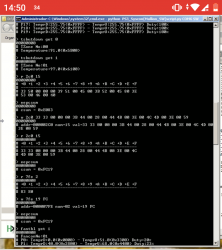
PS3 Syscon fan settings (Coordinate Graphs)

Yes seems like let me dig few more examples to be sure.
Edit
Wait sur link you would like this.
Recap REX SW3-304 http://s.go.ro/o6fg02aw
Sur001 SW2-302 http://s.go.ro/h8hxekn1
NPX SW3-302 http://s.go.ro/ef9p07t5
MPX SW3-302 with emmc http://s.go.ro/50axx4dm
MSX SW3-302 nor 29gl128 without emmc http://s.go.ro/s8zfi2ub
PQX SW3-304 without emmc http://s.go.ro/8rssbd9p
What is that on address 800 that I keep see it ? found is about B_AUTH = 0x0B00

Nice work! Do the REX and NPX board have eMMC or NOR?
I want to add them to this table: https://www.psdevwiki.com/ps3/Platform_ID#Examples_documented_by_users .
 
Nice work! Do the REX and NPX board have eMMC or NOR?
I want to add them to this table: https://www.psdevwiki.com/ps3/Platform_ID#Examples_documented_by_users .
Rex is that with emmc and Panasonic nor.
Can't remember Nxp, I will reply when I get back home later.
Looking at https://www.psx-place.com/threads/reball-ps3-cell-rsx.32376/page-2#post-290650
Nxp is that without emmc and nor mxic, 28nm rsx and 40nm cpu .
Also going to look over this have few more scrap boards as 2054 and 3000, 2000 series should complete set this week.
 
Last edited:
Yes seems like let me dig few more examples to be sure.
Edit
Wait sur link you would like this.
Recap REX SW3-304 http://s.go.ro/o6fg02aw
Sur001 SW2-302 http://s.go.ro/h8hxekn1
NPX SW3-302 http://s.go.ro/ef9p07t5
MPX SW3-302 with emmc http://s.go.ro/50axx4dm
MSX SW3-302 nor 29gl128 without emmc http://s.go.ro/s8zfi2ub
PQX SW3-304 without emmc http://s.go.ro/8rssbd9p
What is that on address 800 that I keep see it ? found is about B_AUTH = 0x0B00
Im taking a look at the files and this is like a bag of candies, thanks a lot :encouragement:
Aha, so it seems the checksum address I manually found on VER board (first Sherwood)

7fe

Actually is the same for REX board (last Sherwood)
So it's safe to assume that this was not changed and is the same for all sherwoods. So no need to dig for it again.
Good thing.
And he made the check for all that motherboards and in all them the experiment was successful :)

Btw, i realized a trick to bypass this restriction we was mentioning
...run this UART commands: "hversion" (is going to display the Platform ID)
The "hversion" command is not available by default... but the text string displayed by it is located at offset 0x1 length 0x6... so we can display the "Platform ID" this way :D
Code:
> r 1 6
The only annoyance is that is displayed in hex (not in ascii) but is easy to convert it to "human readable" just by copypasting it to a hexeditor, the text follows the format: "cokXyy" where the first 3 letters are always the same (cok), the X is like a revision, and the yy are either 10, 20, 30, 40, etc...
E.g: the REX-001 with eMMC is "CokR40"

This trick only works for superslim motherboards (and a couple of the previous motherboards)
 
Btw @vyktormvmpay25 im sorry to ask you about checking that motherboards again but there was an small misunderstanding, i need the output of the "fantbl" commands copyed to a TXT
In the same way you did in the files you uploaded from the PQX-001, that files are perfect because i can copypaste the texts directly to photoshop

Btw, i realized the motherboards MSX-001(nor) and MPX-001(emmc) shares the same thermal config

So i need you to run the "fantbl get 0" and "fantbl get 1" in 4 motherboards:
SUR-001
MSX-001 or MPX-001 (one of them, you choose)
NPX-001
REX-001

-------------
To be honest, what you did so far is going to help a lot... and i already have this texts in the screenshots you made... but if you save them as TXT is going to help me a lot (otherway i will need to type all that fantables manually)
 
Btw @vyktormvmpay25 im sorry to ask you about checking that motherboards again but there was an small misunderstanding, i need the output of the "fantbl" commands copyed to a TXT
In the same way you did in the files you uploaded from the PQX-001, that files are perfect because i can copypaste the texts directly to photoshop

Btw, i realized the motherboards MSX-001(nor) and MPX-001(emmc) shares the same thermal config

So i need you to run the "fantbl get 0" and "fantbl get 1" in 4 motherboards:
SUR-001
MSX-001 or MPX-001 (one of them, you choose)
NPX-001
REX-001

-------------
To be honest, what you did so far is going to help a lot... and i already have this texts in the screenshots you made... but if you save them as TXT is going to help me a lot (otherway i will need to type all that fantables manually)
Yes sure, let me sleep few hours then I will change it as pqx.
Got one of those days where everyone wants to fix something right now Running over different surgerys.
 
Last edited:
The "hversion" command is not available by default... but the text string displayed by it is located at offset 0x1 length 0x6... so we can display the "Platform ID" this way :D
Code:
> r 1 6
The only annoyance is that is displayed in hex (not in ascii) but is easy to convert it to "human readable" just by copypasting it to a hexeditor, the text follows the format: "cokXyy" where the first 3 letters are always the same (cok), the X is like a revision, and the yy are either 10, 20, 30, 40, etc...
E.g: the REX-001 with eMMC is "CokR40"
That's what I call the hardcoding, all boards released after the NPX-001 just use the same config but overwrite the platform id so you can identify them, we can change them to whatever we want, the PS3 doesn't care anymore.
If we had the product sub code of each board - that would be nice :rolleyes:.
 
Yes sure, let me sleep few hours then I will change it as pqx.
Got one of those days where everyone wants to fix something right now Running over different surgerys.
Nice, take this calmly btw, we have lot of days/weeks to continue this research, if at some point you are given a new motherboard not documented before it could help a lot if you do the same with it

But before that give us few time, personally im going to need some time to digest all the new things i did learn today from your files, and lot more time to create the images in photoshop, i have 5 new official thermal configs that are unique, you almost completed that collection of thermal configs in a single hit, lol

Give us some time and we will prepare a list of the "most wanted" motherboard models... and a more accurate list of the UART commands you can run in them, and if there is needed to report some other special info (like the flash type btw, this is very important to mention it in superslims)

Let me resume it a bit...
In the table that can be seen in the Platform ID in wiki you can see how the motherboards for PS3 fats and PS3 slims have a unique Platform ID, as example, motherboard COK-001 is "cok14" (only, there is no other posible name for it)
But this rule doesnt applyes for PS3 superslim motherboards... because all the PS3 superslim motherboards allows to install either a NOR or a eMMC flash (is optional, the circuit allows to choose)
I added a comment about it in this page Panasonic MN66840
And we was speculating about it at bottom of this page

Anyway, the point is you can find a motherboard REX-001 with NOR.... or REX-001 with eMMC... and his "Platform ID" are different (is the same motherboard model, but different Platform ID)
And visually is easy to identify if the motherboard have NOR or eMMC because the Panasonic MN66840 chip is soldered as a replacement of the NOR (exactly in the same location in the motherboard)

That's what I call the hardcoding, all boards released after the NPX-001 just use the same config but overwrite the platform id so you can identify them, we can change them to whatever we want, the PS3 doesn't care anymore.
If we had the product sub code of each board - that would be nice :rolleyes:.
As probably you already realized from the speculations i had to strike in wiki in the last days, it took me some time to understand what you was meaning with the "hardcoded". I been brainstorming about all this too much in the last days, but when i striked that texts is when got the concept :D
And today, after taking a look at the files uploaded by @vyktormvmpay25 it became a lot more clear to me
Btw, is located at that position since the first superslim motherboard model (MSX-001) and up to the last REX-001, this is why i mentioned that "this trick" (reading at offset 0x1 lenght 0x6) should display the "current" platform ID for all the superslims motherboards

You know... is just something that eventually could become handy incase of asking about it in forums and the other person doesnt wants to share the dump made with the python script
Lets say... doing a "r 1 6" command is not intrusive... is the kind of "tip" that can be added to some tutorial or somewhere in wiki

Btw, would you mind to change the name "hardcoded" to something more intuitive in wiki ?, for me was a bit confusing and i think it would be better to say something like "patched"
Or... some alternative of that to include more info... like "softpatched" (but not using the official patch format)... so... what about "eeppatched" ?... dunno something like that

 
Last edited:
For those who may be interested, here is how it is possible to modify the default SYSCON fan curves:

*For Mullion syscons (COK, SEM, and DIA boards) Is simple. All is needed is to use the setini commands to change the desired parameters in the EEPROM.
Code:
Usage: fantbl setini fanconNo pNo tempD tempU duty
Example:
fantbl setini 1 p0 00.00 40.00 3B
tshutdown setini 1 85

It is a reasonably intuitive way to do it and choose the desired values.
A nice thing is that is possible to copy a batch of these prepared commands and hit enter once to edit everything in a single sequence. For example I can share my modified tables so that you can copy and write them directly or modify them to your liking.

COK default 7115
Code:
fantbl setini 0 p0 00.00 74.00 0x33
fantbl setini 0 p1 60.00 75.00 0x40
fantbl setini 0 p2 61.00 76.00 0x48
fantbl setini 0 p3 67.00 77.00 0x4d
fantbl setini 0 p4 68.00 78.00 0x5a
fantbl setini 0 p5 71.00 79.00 0x66
fantbl setini 0 p6 71.50 80.00 0x73
fantbl setini 0 p7 72.00 81.00 0x80
fantbl setini 0 p8 72.50 82.00 0x99
fantbl setini 0 p9 73.00 85.00 0xff
tshutdown setini 0 85
fantbl setini 1 p0 00.00 83.00 0x33
fantbl setini 1 p1 48.00 84.00 0x40
fantbl setini 1 p2 71.00 85.00 0x48
fantbl setini 1 p3 77.00 86.00 0x4d
fantbl setini 1 p4 78.00 87.00 0x5a
fantbl setini 1 p5 80.00 88.00 0x66
fantbl setini 1 p6 80.50 89.00 0x73
fantbl setini 1 p7 81.00 90.00 0x80
fantbl setini 1 p8 81.50 91.00 0x99
fantbl setini 1 p9 82.00 95.00 0xff
tshutdown setini 1 95
eepcsum
COK modified 1155 Paco
Code:
fantbl setini 1 p0 00.00 44.00 0x33
fantbl setini 1 p1 40.00 58.00 0x40
fantbl setini 1 p2 44.00 64.00 0x47
fantbl setini 1 p3 48.00 68.00 0x48
fantbl setini 1 p4 61.00 72.00 0x4d
fantbl setini 1 p5 64.00 74.00 0x5a
fantbl setini 1 p6 66.00 76.00 0x66
fantbl setini 1 p7 72.00 81.00 0x80
fantbl setini 1 p8 72.50 82.00 0x99
fantbl setini 1 p9 73.00 85.00 0xff
tshutdown setini 1 85
fantbl setini 0 p0 00.00 58.00 0x33
fantbl setini 0 p1 48.00 68.00 0x40
fantbl setini 0 p2 58.00 70.00 0x47
fantbl setini 0 p3 60.00 72.00 0x48
fantbl setini 0 p4 67.00 75.00 0x4d
fantbl setini 0 p5 68.00 76.00 0x5a
fantbl setini 0 p6 71.00 77.00 0x66
eepcsum
SEM-001 default 86d6
Code:
fantbl setini 0 p0 00.00 76.0 0x33
fantbl setini 0 p1 56.00 77.0 0x4a
fantbl setini 0 p2 56.50 82.0 0x4d
fantbl setini 0 p3 57.00 83.0 0x50
fantbl setini 0 p4 57.50 84.0 0x52
fantbl setini 0 p5 58.00 85.0 0x57
fantbl setini 0 p6 58.50 86.0 0x5c
fantbl setini 0 p7 59.00 87.0 0x8d
fantbl setini 0 p8 79.50 88.0 0xa6
fantbl setini 0 p9 80.00 91.0 0xff
tshutdown setini 0 91.0
fantbl setini 1 p0 00.00 84.0 0x33
fantbl setini 1 p1 56.00 85.0 0x4a
fantbl setini 1 p2 56.50 86.0 0x4d
fantbl setini 1 p3 57.00 87.0 0x50
fantbl setini 1 p4 57.50 88.0 0x52
fantbl setini 1 p5 58.00 89.0 0x57
fantbl setini 1 p6 58.50 90.0 0x5c
fantbl setini 1 p7 59.00 91.0 0x8d
fantbl setini 1 p8 77.00 92.0 0xa6
fantbl setini 1 p9 78.00 95.0 0xff
tshutdown setini 1 95.0
eepcsum
SEM-001 RSX modified
Code:
fantbl setini 1 p0 00.00 44.00 0x33
fantbl setini 1 p1 40.00 54.00 0x3e
fantbl setini 1 p2 41.00 64.00 0x4a
fantbl setini 1 p3 42.00 68.00 0x4d
fantbl setini 1 p4 61.00 72.00 0x50
fantbl setini 1 p5 64.00 74.00 0x52
fantbl setini 1 p6 66.00 76.00 0x57
fantbl setini 1 p7 72.00 81.00 0x8d
fantbl setini 1 p8 72.50 82.00 0xa6
fantbl setini 1 p9 73.00 85.00 0xff
tshutdown setini 1 85
eepcsum

After making any changes, the checksum of the thermal config area (34fe) will no longer match, so it is necessary to fix it otherwise the console will refuse to work afterwards.


*For Sherwood Syscons (VER-001 and newer):
Unfortunately because the "setini" commands are not available, the process is a bit more involved and less user friendly. But it's still possible in an alternative way, by directly writing to the EEPROM manually.
The thermal config area is located at offset 0x250 in Sherwood syscons, so that's where we have to dig and make our changes.

What I did was to only edit the 4 first steps of the RSX curve (located at 0x2c0) and the shutdown temperature (0x3b8). It only changes a very small portion of the settings but is enough to get a very reasonable result.

However, if you want to skip the thinking part and just copy my settings, It's easy for you as well if you just copy my prepared EEP patch.

This also solves the max fan on startup bug with webman in VER-001 boards (CECHL)
VER-001 default RSX E083
Code:
r 2c0 1a
w 2c0 33 50 00 00 00 39 51 00 45 00 3B 52 00 45 80 3E 53 00 46 00 40 54 00 46 80 43
w 3b8 61
r 7fe 2
eepcsum
VER-001 modified RSX EEP patch 4726 Paco
Code:
r 2c0 1a
w 2c0 33 33 00 00 00 3B 44 00 28 00 44 4A 00 38 00 4C 4C 00 3E 00 59 54 00 46 80 FF
w 3b8 55
r 7fe 2
eepcsum

Remember the checksum will also break and needs to be fixed. But in sherwood it's a bit different. There's a single checksum for the whole EEPROM and its address is not obviously displayed.
But I manually found the address to be
Code:
7fe
Which means you are able to write to it and fix it too.
When everything is OK,
"r 7fe 2" should return the same as
eepcsum, but swapped.

Lastly, feel free to contribute your own customized settings. These are just mine and can surely be improved.

Good luck
 

Attachments

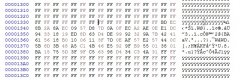
  • Screenshot_20210502-145038~2.png
    Screenshot_20210502-145038~2.png
    167.3 KB · Views: 132
Last edited:
got some work on a unit , magic error will come on second day , that error wasn't before reball it went after unit was assembled ,anyway gotit working again.http://s.go.ro/9zaqzt7z
going to edit rest of files
Edit
@sandungas all info xt have been added , just let me know if everthing is fine with same links
REX SW3-304 emmc with panasonic nor http://s.go.ro/o6fg02aw
Sur001 SW2-302 http://s.go.ro/h8hxekn1
NPX SW3-302 http://s.go.ro/ef9p07t5
MPX SW3-302 with emmc http://s.go.ro/50axx4dm
MSX SW3-302 nor 29gl128 without emmc http://s.go.ro/s8zfi2ub
PQX SW3-304 without emmc http://s.go.ro/8rssbd9p
 
Last edited:
got some work on a unit , magic error will come on second day , that error wasn't before reball it went after unit was assembled ,anyway gotit working again.http://s.go.ro/9zaqzt7z
going to edit rest of files
Edit
@sandungas all info xt have been added , just let me know if everthing is fine with same links
REX SW3-304 emmc with panasonic nor http://s.go.ro/o6fg02aw
Sur001 SW2-302 http://s.go.ro/h8hxekn1
NPX SW3-302 http://s.go.ro/ef9p07t5
MPX SW3-302 with emmc http://s.go.ro/50axx4dm
MSX SW3-302 nor 29gl128 without emmc http://s.go.ro/s8zfi2ub
PQX SW3-304 without emmc http://s.go.ro/8rssbd9p
Yes, now i have all the info i need, thx again :)
 
THE GOOD NEWS that mpx panasonic and emmc ,with rsx on it started,not sure which was faulty changed both AV/hdmi I didnt want to lose time ,now this will be an experimental board for further dumps.
It was full with an error 2024 .
 
and comparing all with this dump http://s.go.ro/9zaqzt7z
OUR patch/part of patch is applied here ?
@M4j0r ?

>$ patchinfo
00000000
#
# MAJOR :0001
# MINOR :0002
# REV :083E
# SYS_REV :0832
# TABLE :0000201A
# DATSIZ :0FAA
# DATSUM :02AB
# SUM :035D
# applyed

Is the only board until now with cfw 487 applied
 

Attachments

  • Untitled.jpg
    Untitled.jpg
    76.6 KB · Views: 103
That's the standard Sony patch for the DYN-001.
But it was an interesting one, actually, the "patchinfo" command (only available for sherwood syscons, right ?) is going to display valid info only for this specific patch, because this is the only official syscon patch for sherwoods, for me has been very clarifying to see how syscon reports his version :)

@vyktormvmpay25 or any other... if some of you have a COK, SEM, or DIA motherboard i would like to see the info displayed by this commands:
Code:
>$ revision
>$ version
>$ patchcsum
>$ patchvereep
>$ patchverram

Long story short... sony changed the patch format for sherwoods, they changed also the way how the patches are versioned (and the names of the patches), and they also changed the UART commands intended to display the patch info
The 3 patch commands i mentioned (patchcsum, patchvereep, and patchverram) are the old ones specific for mullion syscons and are going to display the info in a different way
By comparing how syscon identifyes the patches for mullion we can have a better understanding of how identifyes the patches for sherwoods

As you can imagine, im asking about this because there are 2 or 3 pages in wiki whre this is labeled as "partially uknown", if i figure how it works i will update that pages
One of them is this section, the notes at bottom of the table with the official patch names
https://www.psdevwiki.com/ps3/System_Controller_Firmware#Syscon_patches

As you can see i added the patch info you mentioned @vyktormvmpay25 from a shrewood, that was helpful :)
Now we need another example next to it with the patch info from a mullion

Btw, sorry if im not commenting much about the files you are uploading latelly (like the ones from your previous post of a JTP-001 and a KTE-001), is because i need some time (days) to review all them in detail... but are very helpful to me
The other day i created a new page in wiki with the collection of thermal configs, take a look at it too @Pacorretaco, is this link, i mean... this link by now is just a list of files but we can expand it later into some kind of tutorial (maybe not complete but an introduction), dunno, we will see but i have intention to wikify some of this tricks at some point
 
I really understand guys, I don't expect an answer right after I've just reply. Look at me I had time to test and got time those weeks. Its a bit free then usually.
Been looking for some errlog 0,1,2,etc A, B, I've tested 2 ps4 boards to see what is the reaction on mediacon UART. Not many options besides errlog, it seems like need an secure connection to respond over UART.
This is not in range of 128 bit aes.

About ps3 boards I will try to get dumps as info. Now looking for second cok002 board as previously was kind of a fail, without good cpu. Even I thought I will see any errlog not is full with ff. Probably more details over sb UART but neither that didn't get any of tests by now.
 
Last edited:
going first with cook002 .wtf does this?
>$ hversion
hversion
CokB10
>$ firmud
firmud
ID SETTING: FE FF FF 1F
------------------
0000 0000 0000 0000 0000 0000 0000 0000 0000 0000 0000 0000 0000 0000 0000 0000
0000 0000 0000 0000 0000 0000 0000 0000 0000 0000 0000 0000 0000 0000 0000 0000
0000 0000 0000 0000 0000 0000 0000 0000 0000 0000 0000 0000 0000 0000 0000 0000
0000 0000 0000 0000 0000 0000 0000 0000 0000 0000 0000 0000 0000 0000 0000 0000
0000 0000 0000 0000 0000 0000 0000 0000 0000 0000 0000 0000 0000 0000 0000 0000
0000 0000 0000 0000 0000 0000 0000 0000 0000 0000 0000 0000 0000 0000 0000 0000
0000 0000 0000 0000 0000 0000 0000 0000 0000 0000 0000 0000 0000 0000 0000 0000
0000 0000 0000 0000 0000 0000 0000 0000 0000 0000 0000 0000 0000 0000 0000 0000
0000 0000 0000 0000 0000 0000 0000 0000 0000 0000 0000 0000 0000 0000 0000 0000
0000 0000 0000 0000 0000 0000 0000 0000 0000 0000 0000 0000 0000 0000 0000 0000
0000 0000 0000 0000 0000 0000 0000 0000 0000 0000 0000 0000 0000 0000 0000 0000
0000 0000 0000 0000 0000 0000 0000 0000 0000 0000 0000 0000 0000 0000 0000 0000
0000 0000 0000 0000 0000 0000 0000 0000 0000 0000 0000 0000 0000 0000 0000 0000
0000 0000 0000 0000 0000 0000 0000 0000 0000 0000 0000 0000 0000 0000 0000 0000
0000 0000 0000 0000 0000 0000 0000 0000 0000 0000 0000 0000 0000 0000 0000 0000
0000 0000 0000 0000 0000 0000 0000 0000 0000 0000 0000 0000 0000 0000 0000 0000
0000 0000 0000 0000 0000 0000 0000 0000 0000 0000 0000 0000 0000 0000 0000 0000
0000 0000 0000 0000 0000 0000 0000 0000 0000 0000 0000 0000 0000 0000 0000 0000
0000 0000 0000 0000 0000 0000 0000 0000 0000 0000 0000 0000 0000 0000 0000 0000
0000 0000 0000 0000 0000 0000 0000 0000 0000 0000 0000 0000 0000 0000 0000 0000
0000 0000 0000 0000 0000 0000 0000 0000 0000 0000 0000 0000 0000 0000 0000 0000
0000 0000 0000 0000 0000 0000 0000 0000 0000 0000 0000 0000 0000 0000 0000 0000
0000 0000 0000 0000 0000 0000 0000 0000 0000 0000 0000 0000 0000 0000 0000 0000
0000 0000 0000 0000 0000 0000 0000 0000 0000 0000 0000 0000 0000 0000 0000 0000
0000 0000 0000 0000 0000 0000 0000 0000 0000 0000 0000 0000 0000 0000 0000 0000
0000 0000 0000 0000 0000 0000 0000 0000 0000 0000 0000 0000 0000 0000 0000 0000
0000 0000 0000 0000 0000 0000 0000
PWSEQ 00
WMZON 00
WMFAN 00
WMZON 0C
WMFAN 03
WMZON 01
WMZON 20
WMZON 22
ERRLG 12 A0A0 2031
WMFAN 01
SSM 80
S_SPM 03 0000 00F4
S_SPM 05 0000 00F4
S_SPM 69 FFFF FFFF
S_SPM 6B
SSM 00
CMRCV 34
CMRCV 33
CMRCV 22
CMRCV 22
CMRCV 33
CMRCV 22
CMRCV 22
CMRCV 22
CMRCV 33
CMRCV 22
CMRCV 33
CMRCV 22
CMRCV 22
CMRCV 33
CMRCV 22
CMRCV 22
CMRCV 22
CMRCV 22
CMRCV 22
CMRCV 22
CMRCV 22
CMRCV 22
CMRCV 22
CMRCV 22
CMRCV 22
CMRCV 22
CMRCV 22
CMRCV 22
CMRCV 22
CMRCV 22
CMRCV 22
CMRCV 22
CMRCV 22
CMRCV 22
CMRCV 22
CMRCV 22
CMRCV 22
CMRCV 22
CMRCV 33
CMRCV 22
CMRCV 22
CMRCV 22
CMRCV 32
CMRCV 60
CMRCV 61
S_DIG 00
CMRCV 36 0009
CMRCV 36 0010
CMRCV 36 0012
CMRCV 36 000F
CMRCV 36 000A
WMFAN 25 0003
WMFAN 25 0003
WMFAN 25 0003
CMRCV 36 000B
SSM 48
*** DATA ABORT ***
lr:0000E2DE
SPSR:0000007F
r0:03800000
r1:0000005F
r2:200000DF
r3:0000E2DB
r4:00044B23
r5:00000000
r6:0200344C
>$
i can't dump this I think is something wrong from 72ff, i can read until there but will be a pain to dump manualy.
something that i dont know as well

>$ hversion
hversion
CokB10
>$ portscan
portscan
|DATA.... ........ DIR..... ........ FUNC.... ........ PULLUP.. ........ HI
Z..... ........
|FEDCBA98 76543210 FEDCBA98 76543210 FEDCBA98 76543210 FEDCBA98 76543210 FE
DCBA98 76543210
-----+--------------------------------------------------------------------------
---------------
PortA|00000000 11001100 iiiiiiii ooiooioo pppppppp pppppppp -------- -------- nn
nnnnnn nnnnnnnn
PortB|00000000 00000011 iiiiiiii ooooooii pppppppp pppppppp -------- -------- nn
nnnnnn nnnnnnnn
PortC|00000000 00000000 iiiiiiii oooooooo pppppppp pppppppp -------- -------- nn
nnnnnn nnnnnnnn
PortD|00000000 00000000 iiiiiiii oioooooo pppppppp pppppppp -------- -------- nn
nnnnnn nnnnnnnn
PortE|00000000 11101100 iiiiiiii iiiiiiii pppppppp pppppppp -------- -------- nn
nnnnnn nnnnnnnn
PortF|00000000 11000100 iiiiiiii iiiiiioo pppppppp pppppppp -------- -------- nn
nnnnnn nnnnnnnn
PortG|00000000 00100110 iiiiiiii ooiiioio pppppppp pppppfpf -------- -------- nn
nnnnnn nnnnnnnn
PortH|00000000 11100100 iiiiiiii iiiiiiii pppppppp pppppppp -------- -------- nn
nnnnnn nnnnnnnn
PortI|00000000 11011001 iiiiiiii iooiooii pppppppp pppppppp -------- -------- nn
nnnnnn nnnnnnnn
PortJ|00000000 10000000 iiiiiiii iiiioooo ffffffff ffpfpppp -------- -------- nn
nnnnnn nnnnnnnn
PortK|00000000 00000000 iiiiiiii iiiiiioo pppppppp pppppppp -------- -------- nn
nnnnnn nnnnnnnn
PortL|00000000 00000000 iiiiiiio oooooooo pppppppp pppppppp -------- -------- nn
nnnnnn nnnnnnnn
PortM|00000000 00000000 iiiiiiii ooiiiiii pppppppp pppppppp -------- -------- nn
nnnnnn nnnnnnnn
PortN|00000000 00000000 iiiiiiii iooiiiii pppppppp pppppppp -------- -------- nn
nnnnnn nnnnnnnn
PortO|00000000 00001000 iiiiiiii oiiooiii pppppppp pppppppp -------- -------- nn
nnnnnn nnnnnnnn
PortP|00000000 11001111 iiiiiiii oiiiooio pppppppp fpppffpp -------- ----u--- nn
nnnnnn nnnnnnnn
PortQ|00000000 00001110 iiiiiiii iiooiiio pppppppp ppppffpp -------- -------- nn
nnnnnn nnnnnnnn
PortR|00000000 00000100 iiiiiiii iiiioiii pppppppp pppppppp -------- -------- nn
nnnnnn nnnnnnnn
[mullion]$
>$
[mullion]$

>$ patchcsum
patchcsum
r1 csum: [00030266] [018DB626] [90662679]
r2 csum: [000069C5] [0046B830] [5E535A06]
[mullion]$
>$ patchvereep
patchvereep
major:0x0001
minor:0x0001
patch:0x0003
revision:0x0003
[mullion]$
>$ patchverram
patchverram
major:0x0001
minor:0x0001
patch:0x0003
revision:0x0003
[mullion]$
>$ revision
revision
0C16
[mullion]$
>$ rrsxc
rrsxc
*** Invalid Argument ***
[mullion]$
>$ version
version
v1.1.3_k1
This is all i can get as don't know how to connect on SB or if its working with scrap board.No rsx and something wrong with clock generator even all 4 ic around sata were changed. water damage board .goood for experimental things.
Error
errlog
ofst[120]:err_code:0xffffffff, clock:0xffffffff
ofst[124]:err_code:0xa0092113, clock:0xffffffff
ofst[ 0]:err_code:0xa0092113, clock:0xffffffff
ofst[ 4]:err_code:0xa0092113, clock:0xffffffff
ofst[ 8]:err_code:0xa0092113, clock:0xffffffff
ofst[ 12]:err_code:0xa0092113, clock:0xffffffff
ofst[ 16]:err_code:0xa0092113, clock:0xffffffff
ofst[ 20]:err_code:0xa0092113, clock:0xffffffff
ofst[ 24]:err_code:0xa0092113, clock:0xffffffff
ofst[ 28]:err_code:0xa0092113, clock:0xffffffff
ofst[ 32]:err_code:0xa0092113, clock:0xffffffff
ofst[ 36]:err_code:0xa0003001, clock:0xffffffff
ofst[ 40]:err_code:0xa0003001, clock:0xffffffff
ofst[ 44]:err_code:0xa08014ff, clock:0xffffffff
ofst[ 48]:err_code:0xa0801701, clock:0xffffffff
ofst[ 52]:err_code:0xa0092113, clock:0xffffffff
ofst[ 56]:err_code:0xa0092113, clock:0xffffffff
ofst[ 60]:err_code:0xa0092113, clock:0xffffffff
ofst[ 64]:err_code:0xa0092113, clock:0xffffffff
ofst[ 68]:err_code:0xa0092113, clock:0xffffffff
ofst[ 72]:err_code:0xa0092113, clock:0xffffffff
ofst[ 76]:err_code:0xa0092113, clock:0xffffffff
ofst[ 80]:err_code:0xa0092113, clock:0xffffffff
ofst[ 84]:err_code:0xa0092113, clock:0xffffffff
ofst[ 88]:err_code:0xa0092113, clock:0xffffffff
ofst[ 92]:err_code:0xa0092113, clock:0xffffffff
ofst[ 96]:err_code:0xa0092113, clock:0xffffffff
ofst[100]:err_code:0xa0092113, clock:0xffffffff
ofst[104]:err_code:0xa0092113, clock:0xffffffff
ofst[108]:err_code:0xa0a02031, clock:0xffffffff
ofst[112]:err_code:0xa0a02031, clock:0xffffffff
ofst[116]:err_code:0xa0a02031, clock:0xffffffff
>$ eepcsum
eepcsum
Addr:0x000032fe should be 0x528c
Addr:0x000034fe should be 0x7115
Addr:0x000039fe should be 0x0038
Addr:0x00003dfe should be 0x00ff
Addr:0x00003ffe should be 0x00ff
>$
>$ r 72ff 2
r 72ff 2
+0 +1 +2 +3 +4 +5 +6 +7 +8 +9 +A +B +C +D +E +F
-----------------------------------------------
FF FF
[mullion]$
>$ r 73ff 2
r 73ff 2
+0 +1 +2 +3 +4 +5 +6 +7 +8 +9 +A +B +C +D +E +F
-----------------------------------------------
FF Error status : c6000006
*** MMIO Access Error ***
[mullion]$
>$ r 73fe 1
r 73fe 1
+0 +1 +2 +3 +4 +5 +6 +7 +8 +9 +A +B +C +D +E +F
-----------------------------------------------
FF
[mullion]$
>$ r 73fe 2
r 73fe 2
+0 +1 +2 +3 +4 +5 +6 +7 +8 +9 +A +B +C +D +E +F
-----------------------------------------------
FF FF
[mullion]$
>$
this is maximum
 
Last edited:
@vyktormvmpay25 i know is a scrap board for experiments... but i suggest to dont run the command "firmud" because is used to update the firmware, it could "brick" the syscon

Im going to copy the other commands you used to comment them:
Code:
>$ hversion
hversion
CokB10

>$ revision
revision
0C16

>$ version
version
v1.1.3_k1

>$ patchvereep
patchvereep
major:0x0001
minor:0x0001
patch:0x0003
revision:0x0003

>$ patchverram
patchverram
major:0x0001
minor:0x0001
patch:0x0003
revision:0x0003

>$ eepcsum
eepcsum
Addr:0x000032fe should be 0x528c
Addr:0x000034fe should be 0x7115
Addr:0x000039fe should be 0x0038
Addr:0x00003dfe should be 0x00ff
Addr:0x00003ffe should be 0x00ff

>$ patchcsum
patchcsum
r1 csum: [00030266] [018DB626] [90662679]
r2 csum: [000069C5] [0046B830] [5E535A06]
Platform ID = cokB10 (used by motherboard COK-002)
Syscon SoftID= 0C16 (used by syscon CXR713120-202GB)
Syscon firmware version = v1.1.3_k1

The "patchvereep" and "patchverram" with the same values indicates the patch data inside syscon EEPROM and syscon RAM is identical (i was not sure about this), also indicates you have a patch installed named SYS_CON_FIRMWARE_01010303.pkg (is a file inside the PS3UPDAT.PUP)
Ok, that was easy... but the reason why i was asking you about this is because the patchinfo for sherwoods is a bit different, note for mullions is indicated "major", "minor", "patch", and "revision". And for sherwoods is "major", "minor", "rev", and "sys_rev" (note the last 2 identifyers of the patch have a different name)... i guess is because represents different things
Compare it with how syscon displays the patch info in sherwoods, copyed from your previous post of a CECH-20xx with motherboard DYN-001:
>$ patchinfo
00000000
#
# MAJOR :0001
# MINOR :0002
# REV :083E <---------- the name and the value of this patch identifyer is different
# SYS_REV :0832 <---------- the name and the value of this patch identifyer is different
# TABLE :0000201A
# DATSIZ :0FAA
# DATSUM :02AB
# SUM :035D
# applyed
The patch filenames for sherwoods (inside the PS3UPDAT.PUP) also looks different SYS_CON_FIRMWARE_S1_00010002083E0832.pkg because it includes that identifyers, this weird filename for sherwood patches was something very confusing before

--------------------
About the checksums and the offsets where you can "read" and "write"... take a look at this image, is like a map of the syscon eeprom
sH57zde.png

The first thing you need to keep in mind (by looking at the column at left with the offsets) is all the areas are ordered in blocks of 0x100 bytes
Some of that areas have his own checksum... but other doesnt
The checksums are always located at the last 2 bytes of this areas

So as example, using something we know well... the "thermal config area" starts at 0x3300... his size is 2 * 0x100 (2 blocks of 0x100 bytes each) and his checksum is located at the last 2 bytes of the second block (at offset 0x3300 + 0x200 - 0x2)
Copyed from your command:
Code:
>$ eepcsum
eepcsum
Addr:0x000032fe should be 0x528c <--- this checksum is located at the last 2 bytes of the "XDR config" area
Addr:0x000034fe should be 0x7115 <--- this checksum is located at the last 2 bytes of the "Thermal config" area
Addr:0x000039fe should be 0x0038 <--- this checksum is located at the last 2 bytes of the "Board config" area
Addr:0x00003dfe should be 0x00ff <--- this checksum is located at the last 2 bytes of a "not used" area
Addr:0x00003ffe should be 0x00ff <--- this checksum is located at the last 2 bytes of a "not used" area

In this post written by @M4j0r they are telling where is located the "flag" that enables the southbridge UART access
https://www.psx-place.com/threads/f...and-error-reporting.30100/page-55#post-293558
Mullion 201GB, 202GB: 0x7202
Mullion 203GB + later : 0x4202
Sherwood : 0x1202

In the COK-002 motherboard the data is organized following the "cookie old" format that appears in the image, so that flags they are mentioning are located in the "system software config" area (starting at 0x7000 for the "cookie old")

-----------------------
In your tests you was able to "read" up to offset:
Code:
>$ r 73fe 2
Thats almost the end of the areas that can be seen in the image, you are only missing the last (big) chuck of data starting from 0x7400 up to 0x7FFF... but appears in the image as "not used" so i guess is pointless

As far i understand what can be seen in the image are the "NVS" areas (not volatile storage)
But there are other areas named "SNVS" (secured not volatile storage)
To access the SNVS areas is needed to apply a custom patch
 
Last edited:
@vyktormvmpay25 i know is a scrap board for experiments... but i suggest to dont run the command "firmud" because is used to update the firmware, it could "brick" the syscon
You can run it on ROM models without messing with anything.

The "patchvereep" and "patchverram" with the same values indicates the patch data inside syscon EEPROM and syscon RAM is identical (i was not sure about this), also indicates you have a patch installed named SYS_CON_FIRMWARE_01010303.pkg (is a file inside the PS3UPDAT.PUP)
The mullion Syscon does have a (debug) feature which allows you to only write the patch to RAM if there's no patch already applied, that's why there're two commands.

Ok, that was easy... but the reason why i was asking you about this is because the patchinfo for sherwoods is a bit different, note for mullions is indicated "major", "minor", "patch", and "revision". And for sherwoods is "major", "minor", "rev", and "sys_rev" (note the last 2 identifyers of the patch have a different name)... i guess is because represents different things
Interestingly Sony only changed the names in the print command, the internal names stayed the same. It only cares about the revision/sys_rev though.

About the checksums and the offsets where you can "read" and "write"... take a look at this image, is like a map of the syscon eeprom
Some of that areas have his own checksum... but other doesnt
Because Sony didn't change them between Shreck, Cytology and Cookie. Over the time the regions had different uses.

In your tests you was able to "read" up to offset:
Code:
>$ r 73fe 2
Thats almost the end of the areas that can be seen in the image, you are only missing the last (big) chuck of data starting from 0x7400 up to 0x7FFF... but appears in the image as "not used" so is pointless
You can access 0x2C00-0x7400 on CXR713 (or -0x4400 on CXR714), if there's no patch applied you can access 0x2800-(end of EEPROM).

As far i understand what can be seen in the image are the "NVS" areas (not volatile storage)
But there are other areas named "SNVS" (secured not volatile storage)
To access the SNVS areas is needed to apply a custom patch
Yes, 0x0000-0x2800 (or 0x3000-0x5800 on Sherwood) can only be accessed using a special patch.
 

Similar threads

Back
Top