Temperatures for Slim [CECH-2504B]?

I just paused tomb raider and the fan just went down to 34% cpu 56 rsx 57. Soon as i start playing again temps will go up again and fan will kick harder again until now this is the max speed ive reached in a game up to 50% fan speed.
Its all how you set it up .
If you set your max temp up it might ease the fan a bit more but the temp on chips will go higher.
If you set the temp limit lower the chips wont heat up as much but fan will kick bit harder.
Just find a good balance in between so one wont exert the other.
Up to 75c should be ok but your console will be running in the yellow. 80c and above and youre on red. 60-69 is green.
I set mine to 65 some users mentioned around 70s will degrade your console overtime and nobody wants that. Sony doesnt care about any of this because as long as the consoles last whatever lifespan they want its fine with them but I'm sure thats not the case with us because we love our ps3s and we can do a lot of things with it. I love to play a lot of retrogames and the ps3s the best.

The thermal paste has been changed not long ago, less than two months. The fan speed was okay after changing the thermal paste.
The air comnig out of the console isn't high. My problem is the fan speed. It's very loud. The console is on 4.82 Cobra Ferrox. Can the CFW be the cause?. Setting the webMan MOD fan speed to manual at 45% runs the fan normal but 70-82 (depends on the activity) degrees C just after playing PES2020. The AUTO mode runs the fan at 84-94% with 68 degrees C after playing a game.

My other SLIM console generates quite high temperature with less fan speed by default (without any fan control utility). The paste hasn't been changed as well. It's on 4.85 firmware.

Can I get help on setting the wMM such that it will reduce my noisy fan without damaging my console?
Ben i dont know why your console is running such a high speed nearly at full with just 64c temperature. I dont think thats normal as i dont think your fan should run at a low speed specially at levels of 70 to 82!
Check those webman settings!

For ex since my fan reached 60ish i just changed my max temp to 69c to ease off the fan a bit since this game is demanding.
This games got excellent graphics so it might push the system if i see the fans having a bit of a hard and starting to get louder i might set max to 75c and thats it but no higher than that.
 
Last edited by a moderator:
I've set it to 45 but that's the manual section. It's currently on AUTO at 68dC. The fan runs silent like normal only when I select the manual option.


I see. So SYSCON is the default fan setting by SONY?
Yeap.

As for the fan speeds i think if you set manual itll constantly run at that speed disregarding at what temp the chips are so i dont recommend that. Max 68c is good at automatic if you think the fans getting really loud set the max temp a bit higher some games demand a lot of the ps3 . i would set 75c max temp in automatic if thats really the case (which is default in sman) and not letting it go higher than that. Go above 80 and youll be killing the ps3.
Let me know how it goes. :)
 
unfortunately every ps3 have their own operating temperatures, after all not all ps3 have created equally, some of them cooled really well some of them are normal some of them are not.

for me, a good fan speed for ps3 is around 60% and this is for slim 3000 ps3. if i maintain the ps3 with 60-ish celcius temperature at 30-40% fan speed, some part of the ps3 is still getting hot (im using a thermal camera here, the thing that you can plug on a iphone), while the cell and rsx are being cooled down, some parts of the ps3 are still hot, specially the PSU, were reaching around 80-90c here specially on the right side back of the ps3, setting it to 60% fan speed eases all of this temperatures to normal 60ish celcius on the high side while the rsx and cpu is being cooled down to chill 45-48c.

if you want to keep your ps3 healthy, well raising the fan speeds is probably the best bet with a caveat that your shorting the lifespan of the ps3 fan (easily fixable, just buy it on ebay for like 5-10bucks) and a kinda load fan.

also dont go putting a bunch of holes on your ps3 as that will likely break the air flow inside the ps3 making some parts of the ps3 not being adequately cooled down.
 
unfortunately every ps3 have their own operating temperatures, after all not all ps3 have created equally, some of them cooled really well some of them are normal some of them are not.

for me, a good fan speed for ps3 is around 60% and this is for slim 3000 ps3. if i maintain the ps3 with 60-ish celcius temperature at 30-40% fan speed, some part of the ps3 is still getting hot (im using a thermal camera here, the thing that you can plug on a iphone), while the cell and rsx are being cooled down, some parts of the ps3 are still hot, specially the PSU, were reaching around 80-90c here specially on the right side back of the ps3, setting it to 60% fan speed eases all of this temperatures to normal 60ish celcius on the high side while the rsx and cpu is being cooled down to chill 45-48c.

if you want to keep your ps3 healthy, well raising the fan speeds is probably the best bet with a caveat that your shorting the lifespan of the ps3 fan (easily fixable, just buy it on ebay for like 5-10bucks) and a kinda load fan.

also dont go putting a bunch of holes on your ps3 as that will likely break the air flow inside the ps3 making some parts of the ps3 not being adequately cooled down.
Hi and thanks for this info. Its interesting to see how other ps3s run.
I agree. Every ps3 seems to run differently. Mine the rsx runs higher than the cpu others the cpu runs higher and so on .
Its all about finding the right balance between temps and not pushing the fan hard either but thats where the funs at when modding.
Ive set mine to 70c max which should balance things bit more in heavy games and if system strains 75c max no more than that. :)
 
Yeap.

As for the fan speeds i think if you set manual itll constantly run at that speed disregarding at what temp the chips are so i dont recommend that. Max 68c is good at automatic if you think the fans getting really loud set the max temp a bit higher some games demand a lot of the ps3 . i would set 75c max temp in automatic if thats really the case (which is default in sman) and not letting it go higher than that. Go above 80 and youll be killing the ps3.
Let me know how it goes. :)
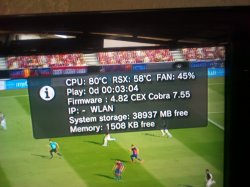
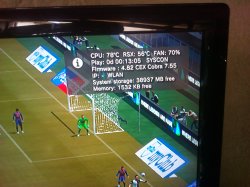
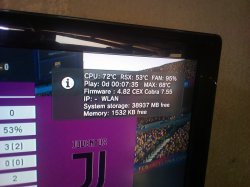
This is my recordings so far this morning. I recorded these readings getting to two(2) hours of using the console. I'll like you to see & pass your comment. Recommendation will be cool.
The console is CECH-2503B.
IMG_20190924_131259.jpg IMG_20190924_133316.jpg IMG_20190924_130415.jpg

I'll try your maximum temperature rate (ie 75dC) to see if it'll solve the noisy fan issue.
 
Last edited:
This is my recordings so far this morning. I recorded these readings getting to two(2) hours of using the console. I'll like you to see & pass your comment. Recommendation will be cool.
The console is CECH-2503B.
View attachment 20212 View attachment 20213 View attachment 20214

I'll try your maximum temperature rate (ie 75dC) to see if it'll solve the noisy fan issue.
From what i see is that the first photo the cpu is really high and i think the fan should've gone faster at that point.
You're probably using the manual setting at constant 45% which I don't recommend.

As you can see on the second photo youve set it on syscom and as you can see the fans going really fast because your cpu is running nearly at 80c.

On your last photo youve set temp max to 65c so your fan is working very hard to lower the temps down.

My opinion is that theres no exact formula.
My ps3 which is 2503b the exact same model , the rsx runs higher than the cpu mostly all the time. Even when idle it can reach the 75c temperature.
Truth is , most of our ps3s have ran a lot of time just with sonys firmware before we were able to do all this so who knows what kinda damage was done already unless i had a brand new one and jailbreak it instantly so i could avoid it to reaching dangerous temps.
I would just leave the normal settings that are on webman by default and dont worry too much about it else you'll not play anything at all.
In Sman the default temps are:
75c max in automatic.
22% minimum fan speed.
Let the system do the rest.
Maybe the same are on webman.
Have fun. ;)
 
From what i see is that the first photo the cpu is really high and i think the fan should've gone faster at that point.
You're probably using the manual setting at constant 45% which I don't recommend.

As you can see on the second photo youve set it on syscom and as you can see the fans going really fast because your cpu is running nearly at 80c.

On your last photo youve set temp max to 65c so your fan is working very hard to lower the temps down.

My opinion is that theres no exact formula.
My ps3 which is 2503b the exact same model , the rsx runs higher than the cpu mostly all the time. Even when idle it can reach the 75c temperature.
Truth is , most of our ps3s have ran a lot of time just with sonys firmware before we were able to do all this so who knows what kinda damage was done already unless i had a brand new one and jailbreak it instantly so i could avoid it to reaching dangerous temps.
I would just leave the normal settings that are on webman by default and dont worry too much about it else you'll not play anything at all.
In Sman the default temps are:
75c max in automatic.
22% minimum fan speed.
Let the system do the rest.
Maybe the same are on webman.
Have fun. ;)
I intentionally set those modes to illustrate a point & seek recommendation. I'll try the75dC AUTO to see if that'll help. "Medaase" (thank you) for all your time and energy put into this problem to assist me. I'm grateful. Stay safe.
 
Also Ben this is my second ps3. My first one died a few weeks ago. Same model.
Had temp set to 60c.
Before jailbreaking it played a lot of games on it.
Console just died. No Rsod no Ylod.
Just turned on and then off right after.
No hdd problem no powersupply problem no nothing really.
Last game i launched on it was alien isolation turned it off and next time turning it on thats what happened.
I never got to change the thermal paste on it.
Got another second hand one off ebay. Same model. Got it this last saturday. Changed thermal paste soon as i got it.
Been checking temps quite often and maybe i became quite obsessed with it because i love the ps3 and i want it to last big time. I'm also a bit more cautious now specially my other ps3 just died off which is crap really.
But then again if you're gonna obsess about this you're not gonna play anything.
Anyways our ps3s issue a warning if it becomes really hot. If it keeps persisting on that then it needs urgent maintnance.
Just keep it on 75c max auto should be alright. If the fans runs really loud theres nothing much that can be done except changing thermal paste or trying to find an expert that can perform ihs removal and repaste the chips.
All the best.
 
Last edited:
I intentionally set those modes to illustrate a point & seek recommendation. I'll try the75dC AUTO to see if that'll help. "Medaase" (thank you) for all your time and energy put into this problem to assist me. I'm grateful. Stay safe.
No problem happy to help.
75c auto max really and let the console do the rest. If the fan runs really high could be due to the game being heavy on it or there could be damage in the cpu due to the big difference in temp between the cpu and rsx or needs repasted. I never played the last Pes game might give it a whirl and see how my ps3 behaves. Ive still to play the last of us which should be the most heavy game on the system aswel.
My ps3s rsx is always running higher and the cpu isnt which could indicate some damage to it. My rsx is usually 6-7-8c higher but as long there isnt a big margin in between it should be ok. I'd worry if one of the chips would be running 10c or way more than the other.
Just do your best and enjoy your games if the consoles gonna die it just does nothing can be done about that.
There are many other components that might go aswel so really can't win this.
The main reason to avoid high temperatures is the yellow light of death as the temps go really high the solder points on the chips can start melting and the only way to fix it is a complete reball and its very expensive process to do and if thats the case just buy another one.
Keep temps lower than 80c and youll be ok.
All the best.
 
Last edited:
My CECH 25xx fan speed runs at 40% (while playing psx & ps3 games) with temperatures 48°-55° for the CPU and 45°-50° for the RSX.

And when playing ps2 games, temps are 51° for the CPU & 48° RSX. (still 40% fan speed)
 
My CECH 25xx fan speed runs at 40% (while playing psx & ps3 games) with temperatures 48°-55° for the CPU and 45°-50° for the RSX.

And when playing ps2 games, temps are 51° for the CPU & 48° RSX. (still 40% fan speed)
Those are really good temps your ps3 is very healthy imo.
Mine doesn't even do that its usually cpu round 60 and rsx around 70 with fan on default 22% even on idle but I'm not gonna worry about this.
The room temperature also plays a major role in this so long as its under 80c its alright.
 
No problem happy to help.
75c auto max really and let the console do the rest. If the fan runs really high could be due to the game being heavy on it or there could be damage in the cpu due to the big difference in temp between the cpu and rsx or needs repasted. I never played the last Pes game might give it a whirl and see how my ps3 behaves. Ive still to play the last of us which should be the most heavy game on the system aswel.
My ps3s rsx is always running higher and the cpu isnt which could indicate some damage to it. My rsx is usually 6-7-8c higher but as long there isnt a big margin in between it should be ok. I'd worry if one of the chips would be running 10c or way more than the other.
Just do your best and enjoy your games if the consoles gonna die it just does nothing can be done about that.
There are many other components that might go aswel so really can't win this.
The main reason to avoid high temperatures is the yellow light of death as the temps go really high the solder points on the chips can start melting and the only way to fix it is a complete reball and its very expensive process to do and if thats the case just buy another one.
Keep temps lower than 80c and youll be ok.
All the best.
Alright
 
Those are really good temps your ps3 is very healthy imo.
Mine doesn't even do that its usually cpu round 60 and rsx around 70 with fan on default 22% even on idle but I'm not gonna worry about this.
The room temperature also plays a major role in this so long as its under 80c its alright.


What i would recommend is to use a vacuum cleaner to clean all internal parts of the ps3 (most importantly the motherboard) and u know well the application of a good thermal paste obviously.

When all that is done, set the fan speed at 35% (Dynamic). Then u will be good ;)
 
What i would recommend is to use a vacuum cleaner to clean all internal parts of the ps3 (most importantly the motherboard) and u know well the application of a good thermal paste obviously.

When all that is done, set the fan speed at 35% (Dynamic). Then u will be good ;)
Yeah i did everything . My consoles different rsx runs higher but its fine i just set max temps to sman defaults 75c max 22 fan speed minimum its all good. Rsx peaks nearaly at 74c mostly cpu bit always less. Its all good :)
 
Yeah i did everything . My consoles different rsx runs higher but its fine i just set max temps to sman defaults 75c max 22 fan speed minimum its all good. Rsx peaks nearaly at 74c mostly cpu bit always less. Its all good :)

Normally, the cpu's temps must be higher than the rsx. I don't know where the problem is.
 
Back
Top