Josh Gaertig
Member
OK. 



did you set language to english?i have a ps2 SCPH-90010 DVD 3.11M dont work
Yes i did, i tried the 3.10 prebuild first but doesnt work. then i tried the hybrid prebuild same result. i burn the disk at slow speed and verify it and tried multiple attempts but to no result.DVD Player 3.10G?
Hmm... 3.10G is from Asia?
Did you set English language in system configuration?
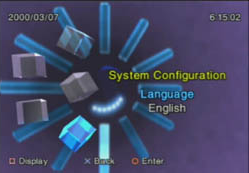

Yes i did, i tried the 3.10 prebuild first but doesnt work. then i tried the hybrid prebuild same result. i burn the disk at slow speed and verify it and tried multiple attempts but to no result.
i have been hearing the ps2 guys say that slow speed is not needed anymore. try to burn at half speed maybe full.Yes i did, i tried the 3.10 prebuild first but doesnt work. then i tried the hybrid prebuild same result. i burn the disk at slow speed and verify it and tried multiple attempts but to no result.
I will try that and some morei have been hearing the ps2 guys say that slow speed is not needed anymore. try to burn at half speed maybe full.
Will definitely try all of steps tq for the tipsTry this:
- Good media like Tayo Yuden or Verbatim from Mitsubishi Chemical Corp.
- Use IMGBurn
- Turn OPC in the write-settings ON
- Write at the mid-speed of the supported range... For 4-16x that's ~10x, but with OPC you can use 8x or try AWS.
DVD firmware ver: 3.10G
Oh... and Desktop-writers usually have a better Laser-power-range and calibration, hence I would try that, if you currently try it with a Laptop-Disc-writer!Will definitely try all of steps tq for the tips
G is for Asia?
E: Europe
U: North America
J: Japan
I didnt thought of that!!! alright i will try thatOh... and Desktop-writers usually have a better Laser-power-range and calibration, hence I would try that, if you currently try it with a Laptop-Disc-writer!

I was really hoping this could be done without the usb drive. Mine are broken so i'll have to wait and see if it can ever be done without the usb.
yeah it can be modded like that. ofc a pc tool that injects the elf and adds any file to iso you want would be nice.If I'm not mistaken, FDVDB can be modified to boot any elf. So, with some tinkering, it may be possible to boot straight into the FMCB installer from the disc.
