PS3 «Tutorial» PS3 CELL B/E Thermal Dissipation without removing the IHS

Yeah, you are right. time can tell what will happen. But we all don't want to lose another of our consoles in order to get experience guys. The internet is now full of knowledge and a lot of players are sharing very interesting ideas here, I have seen a lot of information for deliding the cpu, like paint knives, razor blades, tooth flush, fishing line, phone glass wire, beer or red bull cans, blades etc....

If you feel confident about delidding then have at it, but I certainly don't. One wrong move and you toast your PS3, and I've read enough posts about people being unsuccessful and regretting the attempt to know better.

As I stated, the pressure shouldn't be enough to damage anything and I would rather go the eraser route than try something and then fail. Delidding isn't exactly easy or for the faint of heart, it takes patience, skill, and a steady hand, otherwise you'll most likely ruin your cpu.
 
If you feel confident about delidding then have at it, but I certainly don't. One wrong move and you toast your PS3, and I've read enough posts about people being unsuccessful and regretting the attempt to know better.

As I stated, the pressure shouldn't be enough to damage anything and I would rather go the eraser route than try something and then fail. Delidding isn't exactly easy or for the faint of heart, it takes patience, skill, and a steady hand, otherwise you'll most likely ruin your cpu.


Your words are full of good advise, but evil didn't let me stay calmed and eventually i planned to do the dirty shit on my console. Started the process of deliding yesterday, used blades to do this, The blades we use in bathrooms for cleaning our underarms and etc and plus shoes sewing thread string, i had done deliding 2 times early on phat models and ruin both of that consoles, thanks god they were not mine Lol:grin:. And this was my own slim 2000A model. I tried to find paint knives but was not able to find any and started to do it again with that shamy blade and the sewing thread, Actually the process was very hard every time i did this. It is very different to watch a youtube video and do it physically and personally. This time i also scratched the cpu board again like i did with the previous two consoles, but the story is something different this time, i have not scratched the danger zones this time and the cpu is safe after checking it, but i was so close to damage my console. you can check from the photo which i will share below. i have scratched three areas and at the begining i was skeptical that i may have ruined my console, I fully advise not to delid your cpu in any case until you find someone professional to do it for you or as a last resort if you are going to throw away the console, in this case just try to do it and that also with the right tools, (not with a bathroom blade). You will get a little experience from what you are doing in the price of a console which you are going to throw away. That experience will be good for you when you will be going to delid another of your console. But instead of deliding this advise from nakedsnaked on first page is gold for people with cpu getting hot, no need to delid the cpu. I have no temperature difference with deliding or putting a rubber under the cpu, both results are the same. I got a very big risk and broke 3 smd capacitors from the motherboard, but was lucky that i soldered them back to the board and that also in a very ugly shape. Now the temperature is fine and i know this deliding will now be a successful solution for lifetime cpu temperature problem. One day i will also need to delid the RSX but is not a big deal i think, and that is times easy from deliding the cpu. This console can work for life time now and i will only need sometime to change the capacitors when they get to lose their capacitance and the deliding of RSX nothing more. Anyway I will enjoy this console in the long run. Don't forget to see the image after doing my delid and you can imagine how things could go wrong. I was so close to scratch it. I dont know how to post photo here and sharing the link to it.
https://imgur.com/a/XlsmkL5

XlsmkL5
 
Like many other users, and collectors, keeping you console clean its the number 1, priority, specialy when you own a Backwards-Compatible PlayStation3, which its a very neat machine to own, but can bring problems in the long run if not mantained properly.

One of the main concerns for any user, its replacing the thermal paste, after years of use, changing its essential for any console, but even thats not enough. So more experienced users, always remove the Integreated Heat-Spreaders from the RSX, which its a walk in the park, but when moving to the CELL Broadband Engine,its a different story.

Removing the CELL B/E, requires special tools, and cutting precision, but even more experienced users, and with the right tools, can go bad in a blink of an eye.

I myself, practiced with a couple of 90nm COK-002 boards, with some painters knifes size (1) and (3), but even with the most patience in the world, ended up scratching 5 examples, almost in the same spot.

So not worth taking a working board to have the same result,ive decided to search deep into some archives, and lord and behold, the solution that i am sure will work for anyone struggling with deliding the CELL B/E.

This procedure was preformed on a PlayStation3 CECHC04 with the mainboard COK-002,but it will work on the models mentioned below in this tutorial.

The goal with this tutorial, its for the CELL B/E Core to make contact with the IHS, as the paste inside its practically dry, with years of use, by making a bigger area of heat transfer, eliminating the need to delid the CELL B/E and take risks in damaging the whole system.


THINGS YOU WILL NEED:

*Office Eraser (White) - "soft erasers won´t work!"
*Knife or Scissors

*Good Pair of Eyes
*Patience


APPLICABLE MODELS:

*PHAT - CECHA/B/C/E/G/H/K/L/P
*SLIM - CECH-20XX/21XX/25XX

Side Note: Sony corrected this design flaw, with the preceding models (CECH-30XX and 40XX), so the CELL B/E is soldered to the IHS, pretty much like AMD CPUs, which gives them a thermal advantage and a good area of dissipation, so if you own one of these models, this tutorial will be pretty much usless, but you are always welcome to try!


STEP-1:

Disassembly your PlayStation3,until you reach to the mainboard.

STEP-2:

Take your Office Eraser, and cut a piece of it, now for the PS3 Phat Models, the optimal measurements are between 3.3/3.5mm, and for the PS3 Slim Models 3mm of thickness, will get the job done.

Once you cut the exact same thickness, cut it to fill the CELL B/E empty CPU hole, with the mainboard facing up, you will need to be careful with the CPU capacitors on the Slim Models, so for that,cut the sides of the rubber to cover the smaller capacitors, and not the bigger ones. "CELL B/E Diagram for the Eraser cut, on the example below".

STEP-3:

Once you cut your eraser flat and to the right measurements, replace the thermal paste, and reassembly the whole system, making sure that the CPU Clamps are tight,as they will make pressure with the CELL and the heatsink!

Done these procedures, inspect your CELL Temps,if you notice any improvements, congratulations, you successfully did the procedure with ease, if you didnt notice any improvements, make sure you cut the erased properly or increase the thickness!

Q&A:

Q1 - Are any risks envolved, when doing this procedure?


A1- No, this its a risk free procedure, follow the instructions and you are golden!

Q2- Wont the eraser, by appling pressure with the clamps, on top of the CPU, damage the CELL or the BGA?

A2- No, the eraser will create, pressure thowards the chip, and it will be compensated with the PS3 heatsink, so you are creating an even pressure, but enough that the CELL Core touches the IHS, thus making heat transfer and cooling more efficient!

Q3- After the procedure, did you notice any changes in temps?

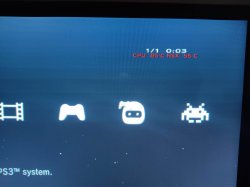
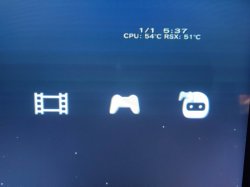
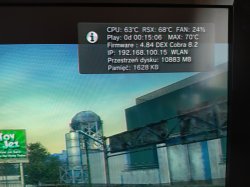
A3- Yes, without the eraser, my CPU would be around 71ºC at idle, and that was with fresh thermal paste at almost 40% Fan, today after the procedure,was sitting at 63ºC also with 40% Fan, after the procedure was done, its sitting to a threshold on 55/57ºC at 31% Fan, one thing to notice its that i havent changed the thermal paste, nor i had enough when i preformed this, but i am sure with clean thermal paste these results can be improved :)

Q4- Wont the eraser catch fire or burn with the heat?


A4- Dont worry, the eraser wont catch fire, rest assured with that, its non-conductive and heat resistant,making the perfect candidate :D

Q5- Why this procedure wont work on CECH-30XX and CECH-40XX?

A5- Sony corrected this design flaw, with the preceding models (CECH-30XX and 40XX), so the CELL B/E is soldered to the IHS, pretty much like AMD CPUs, which gives them a thermal advantage and a good area of dissipation, but this tutorial aims to replicate the same effect as a soldered CPU to the IHS!


View attachment 15434

Many thanks Snake. I will try this, step by step.
 
Success here with a CECHC04.
Before the modification the fans where at 35-40% with webman's standard fan auto setting. Now the fan is at 25% after circa 30min idle at XMB

24463cbbec686600a922f4ef4f9c1710.jpg
 
PS3 CECHA00 modded!
Had changed the thermal paste for arctic silver 5 and cleaned it but CPU temps rose quickly to circa 70C at XMB idle and the fan ran at 35-40% (webman fan auto setting)
Quite good temps and fan speeds now for a launch console.

Idle at XMB

23a20da6447dcf7283ece755b17f385f.jpg


In a game

5fd22dbe87f701c54486ef613de8b5e4.jpg
 
I did this on Cechh03 and this worked cpu 64 ° C but rsx get 70 ° C. Without mod cpu 85 ° C rsx 45 ° C.
 

Attachments

  • IMG_20210827_132101.jpg
    IMG_20210827_132101.jpg
    6.7 MB · Views: 138
They do not on the A through E models. The RSX cooler is slotted in and has wiggle room.
Sony used the same design concept in the heatsink of all retail PS3 models, one of the metal blocks of the heatsink is glued to the heatsink frame, and the other is "mobile" (it can move up and down in relationship with the heatsink frame)
Is a nice feature, allows the metal blocks of the heatsink to adjust his heights individually

Moral of the story is... if you have a PS3 heatsink where the "mobile" block is stucked (it cant move freely), you have a problem
The solution is to grab it with your hands and start moving it (in & out the heatsink frame) to loose it
 
Been doing this on both PS3 slim CECH-20k systems. As the OP said, soft erasers won't work. However, I'm putting soft erasers first then followed by stacking with copper shim at about 2mm. Rubber thickness not too thick but it should be strong enough to press down with the clamp alongside with the copper shim that stacked above the eraser pad.
 
Anyone see this?

https://www.reddit.com/r/PS3/comments/rw1kcs/i_guess_the_eraser_mod_isnt_always_a_good_idea/

It makes me unsure if I should use this mod or not. Was it user error, or is the method itself flawed?
It is reddit. Full of clowns that pretend to be "expert" in everything. Their "reddit culture" is so toxic that they even doing this on other sites eg. FB groups or other forums.

Heck, when you have "out-of-the-box" idea that you want to convey, you will met with full of downvotes, criticism and even harassment while they stole your idea and credit themselves as theirs.
 
Like many other users, and collectors, keeping you console clean its the number 1, priority, specialy when you own a Backwards-Compatible PlayStation3, which its a very neat machine to own, but can bring problems in the long run if not mantained properly.

One of the main concerns for any user, its replacing the thermal paste, after years of use, changing its essential for any console, but even thats not enough. So more experienced users, always remove the Integreated Heat-Spreaders from the RSX, which its a walk in the park, but when moving to the CELL Broadband Engine,its a different story.

Removing the CELL B/E, requires special tools, and cutting precision, but even more experienced users, and with the right tools, can go bad in a blink of an eye.

I myself, practiced with a couple of 90nm COK-002 boards, with some painters knifes size (1) and (3), but even with the most patience in the world, ended up scratching 5 examples, almost in the same spot.

So not worth taking a working board to have the same result,ive decided to search deep into some archives, and lord and behold, the solution that i am sure will work for anyone struggling with deliding the CELL B/E.

This procedure was preformed on a PlayStation3 CECHC04 with the mainboard COK-002,but it will work on the models mentioned below in this tutorial.

The goal with this tutorial, its for the CELL B/E Core to make contact with the IHS, as the paste inside its practically dry, with years of use, by making a bigger area of heat transfer, eliminating the need to delid the CELL B/E and take risks in damaging the whole system.


THINGS YOU WILL NEED:

*Office Eraser (White) - "soft erasers won´t work!"
*Knife or Scissors

*Good Pair of Eyes
*Patience


APPLICABLE MODELS:

*PHAT - CECHA/B/C/E/G/H/K/L/P
*SLIM - CECH-20XX/21XX/25XX

Side Note: Sony corrected this design flaw, with the preceding models (CECH-30XX and 40XX), so the CELL B/E is soldered to the IHS, pretty much like AMD CPUs, which gives them a thermal advantage and a good area of dissipation, so if you own one of these models, this tutorial will be pretty much usless, but you are always welcome to try!


STEP-1:

Disassembly your PlayStation3,until you reach to the mainboard.

STEP-2:

Take your Office Eraser, and cut a piece of it, now for the PS3 Phat Models, the optimal measurements are between 3.3/3.5mm, and for the PS3 Slim Models 3mm of thickness, will get the job done.

Once you cut the exact same thickness, cut it to fill the CELL B/E empty CPU hole, with the mainboard facing up, you will need to be careful with the CPU capacitors on the Slim Models, so for that,cut the sides of the rubber to cover the smaller capacitors, and not the bigger ones. "CELL B/E Diagram for the Eraser cut, on the example below".

STEP-3:

Once you cut your eraser flat and to the right measurements, replace the thermal paste, and reassembly the whole system, making sure that the CPU Clamps are tight,as they will make pressure with the CELL and the heatsink!

Done these procedures, inspect your CELL Temps,if you notice any improvements, congratulations, you successfully did the procedure with ease, if you didnt notice any improvements, make sure you cut the erased properly or increase the thickness!

Q&A:

Q1 - Are any risks envolved, when doing this procedure?


A1- No, this its a risk free procedure, follow the instructions and you are golden!

Q2- Wont the eraser, by appling pressure with the clamps, on top of the CPU, damage the CELL or the BGA?

A2- No, the eraser will create, pressure thowards the chip, and it will be compensated with the PS3 heatsink, so you are creating an even pressure, but enough that the CELL Core touches the IHS, thus making heat transfer and cooling more efficient!

Q3- After the procedure, did you notice any changes in temps?

A3- Yes, without the eraser, my CPU would be around 71ºC at idle, and that was with fresh thermal paste at almost 40% Fan, today after the procedure,was sitting at 63ºC also with 40% Fan, after the procedure was done, its sitting to a threshold on 55/57ºC at 31% Fan, one thing to notice its that i havent changed the thermal paste, nor i had enough when i preformed this, but i am sure with clean thermal paste these results can be improved :)

Q4- Wont the eraser catch fire or burn with the heat?


A4- Dont worry, the eraser wont catch fire, rest assured with that, its non-conductive and heat resistant,making the perfect candidate :D

Q5- Why this procedure wont work on CECH-30XX and CECH-40XX?

A5- Sony corrected this design flaw, with the preceding models (CECH-30XX and 40XX), so the CELL B/E is soldered to the IHS, pretty much like AMD CPUs, which gives them a thermal advantage and a good area of dissipation, but this tutorial aims to replicate the same effect as a soldered CPU to the IHS!


View attachment 15434

Im going to try this in monday when new thermal paste and termal pads arrive, my ps3 cechc04 was so fricking loud i booted up minecraft for maybe 3 minutes i set fans manual at 35% through webman it was a little loud but when i booted minecraft 2 minutes in it sounded like a jet plane probbably 75-80c maybe more idk, i did not do delid only thermal paste like 2 weeks ago other thing i didnt touch, so should i cut the eraser and put in the hole so it doesnt stick out at all, please answer me im trying to set up this full functional for my little brother as a suprise cause he loves minecraft and i like it mc was my childhood game so i want him to give the fun i did have with mc in the old days hope you understand me
 
Going to try it, hope it works. It already feels wrong when you try to put the metal plate back on top, because the eraser sticks out a bit which prevents the plate from sitting flat against the board as it did beforehand. After screwing the plate back on, I can definitely tell there is significant pressure going on top of that eraser against the CPU.

But apparently this is fine according to the fine folks on this website, so I'm trusting that this is normal and safe. I only did 3mm thickness and it's like this, I don't want to imagine what happened with the people that used 4-6mm!

Here's the picture of my handiwork, since I was unable to find a single picture on the internet of someone doing the mod - I THINK this is what it's supposed to be like?
20221011_005944.jpg
 
Back
Top