• PS3HEN is now supporting 4.93 Firmware

    View Official Release Post for additional information HERE

PS3HEN [Tutorial] [PS3HEN] The Great Ps3 HEN All in One Guide

Good day. CECH-4008C here.
Decided to update from 4.85 HFW to 4.86, don't ask me why.
So went on to install the 4.86 OFW and then HFW.
Now, when I got the hen/installer page it downloads the ps3hen.p3t, but doesn't install it after that. I remember that when I was installing the 4.85 it immediately prompted to install after downloading. Alternate method just fails everytime on 95%. I'm doing everything the same as before. Cookies and close confirmation stuff. If anyone can suggest anything, or knows what's i'm dealing with here, that would be much appreciated.

UPDATE:
I decided to take my own route and pressed Initialize Installer and then Install Hen on the hen/installer page. And it worked. Maybe I'm dumb or blind, but that option is not mentioned in the guide.

Very minor mistake. Guide edited to reflect
 
Very minor mistake. Guide edited to reflect
Hi i have a problem that when i want to enable it shows me that im on 3.0.1 and webman activated but it didn't shows that "do you want to close the navigateur" and then it freeze i try to make an empty text document and name it boot_plugins.txt it works for the first but then it didn't again please reply me and fix my problem
 
Hi i have a problem that when i want to enable it shows me that im on 3.0.1 and webman activated but it didn't shows that "do you want to close the navigateur" and then it freeze i try to make an empty text document and name it boot_plugins.txt it works for the first but then it didn't again please reply me and fix my problem

Disable Browser close message. Its in the settings of the browser.
 
Hi i have a problem that when i want to enable it shows me that im on 3.0.1 and webman activated but it didn't shows that "do you want to close the navigateur" and then it freeze i try to make an empty text document and name it boot_plugins.txt it works for the first but then it didn't again please reply me and fix my problem
Install webman again

Sent from my SM-J530Y using Tapatalk
 
Hi there, I'm a noob in modding/hacking ps3

I've got a few question about external hdd, Hen and psx/ps2 games.

First of all, I've got PS3 CECH-3004B. I used your method to hack ps3 and I'm using newest HEN( many thanks for the guide!!)
I cant figure out how to play games, mostly ps2 titles. I put them in PS2ISO folder on the root of my external hdd (MBR,NTFS)
I will write step by step what I'm doing, maybe someone will tell me what I'm doing wrong.
1. Enable Hen
2. Check in webMAN if it sees my external hdd
"my files"-> "webMAN functions" -> "files"
3. When I'm sure that hdd is recogniseable I close browser
4. Start PS2Classic placeholder
After playing tetris I close app which takes me back to xmb
5. I try to find any signs of ps2 games which I have on ext hdd ( bin.enc format)
webMAN doesnt show them in any folder
6. I try to start multiman and search for them, but most of the time result is the same ( no ps2 games) and sometimes console freezes on black screen

As for now I havent tried to launch any ps3 backups, only game that worked so far was from psx Harvest Moon

Can someone tell me how folder system should look like on my external hdd so files may be visible for webMAN or multiman
Also, are there any files that should be on hdd permanently ?

Right now file system on my hdd looks like this:
root
-exdata
-packages
-PSXISO
-PS2ISO
-PS3 ( folder with hfw)
- ROMS

Please help :)
 
Hi there, I'm a noob in modding/hacking ps3

I've got a few question about external hdd, Hen and psx/ps2 games.

First of all, I've got PS3 CECH-3004B. I used your method to hack ps3 and I'm using newest HEN( many thanks for the guide!!)
I cant figure out how to play games, mostly ps2 titles. I put them in PS2ISO folder on the root of my external hdd (MBR,NTFS)
I will write step by step what I'm doing, maybe someone will tell me what I'm doing wrong.
1. Enable Hen
2. Check in webMAN if it sees my external hdd
"my files"-> "webMAN functions" -> "files"
3. When I'm sure that hdd is recogniseable I close browser
4. Start PS2Classic placeholder
After playing tetris I close app which takes me back to xmb
5. I try to find any signs of ps2 games which I have on ext hdd ( bin.enc format)
webMAN doesnt show them in any folder
6. I try to start multiman and search for them, but most of the time result is the same ( no ps2 games) and sometimes console freezes on black screen

As for now I havent tried to launch any ps3 backups, only game that worked so far was from psx Harvest Moon

Can someone tell me how folder system should look like on my external hdd so files may be visible for webMAN or multiman
Also, are there any files that should be on hdd permanently ?

Right now file system on my hdd looks like this:
root
-exdata
-packages
-PSXISO
-PS2ISO
-PS3 ( folder with hfw)
- ROMS

Please help :)

You cant play ps2 or psp backups from external HDD.
They are not compatible. They are only compatible on internal HDD.
 
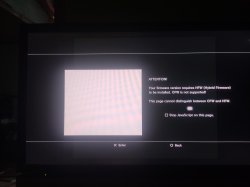
i follow the tutorial part 1 complete (no error) but in part 2 in method 1 or method 2, appears the same as pictured

Need enlightment ...!

nb.
- FW before is 4.84.2 with hen enable
- superslim CECH 4003A
 

Attachments

  • IMG_20200505_085322.jpg
    IMG_20200505_085322.jpg
    6.4 MB · Views: 107
i follow the tutorial part 1 complete (no error) but in part 2 in method 1 or method 2, appears the same as pictured

Need enlightment ...!

nb.
- FW before is 4.84.2 with hen enable
- superslim CECH 4003A

This is fine. It is just a messege reminding you that HEN needs HFW. it's not detecting you have otherwise, it is just a reminder.

Select OK, and carry on as normal.
 
Hey guys, I got an issue. When I try install a pkg file from the root of my usb drive, it keeps loading for a long time and then I get back to the XMB menu, but the game is not installed. Anyone have an idea how to solve this? Or could help? Everything else seems working properly.
Obs: I allready installed a game this way when I first installed the Hen.
Thx for any help.
 
Hey guys, I got an issue. When I try install a pkg file from the root of my usb drive, it keeps loading for a long time and then I get back to the XMB menu, but the game is not installed. Anyone have an idea how to solve this? Or could help? Everything else seems working properly.
Obs: I allready installed a game this way when I first installed the Hen.
Thx for any help.

Go to package manager, then PSN Content. Your games install will be there.
 
The "latest HEN pkg " link in method 2, Part 2 of the guide, downloads HEN for 4.84 CEX, installing that on 4.85.1 or higher?, causes the console to freeze after enabling HEN... I've learned that the hard way...
 
The "latest HEN pkg " link in method 2, Part 2 of the guide, downloads HEN for 4.84 CEX, installing that on 4.85.1 or higher?, causes the console to freeze after enabling HEN... I've learned that the hard way...

Thanks for the heads up, bro.
Link updated to HEN 3.0.1 for 4.86
 
Last edited:
Hey guys, I am pretty new here and I'm about to hack my first console, its a CECH-3004B ss. The console auto updated to the 4.86 few days before (may be a week), and my question is: is it possible to skip first step ''Part One - HEN Prerequisites'' and start with step 2, or it is better to install it again. And my second question: is there any good tutorial (like this one :) ) for installing games on console with HEN, step by step for beginners, the problem is that i find the games in different formats and that is a little difficult for me, thank you!
 
Back
Top