PS3 [Tutorial] (Read Warning) Installing Red Ribbon Linux on Rebug 4.81.2 - 4.84.2 D / REX

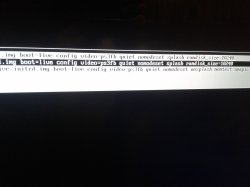
Yes I restored the ps3 from safe mode and checked the ps version it was correct 4.82.1 if I'm not mistaken (I edited this message to post the error it gave)
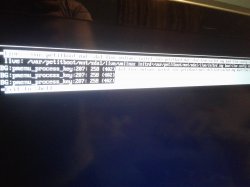
I can only assume that the .ISO of Linux wasn't extracted properly, try re-extracting the .iso with 7-zip or winrar.
 
Still gave me the same error, I had downloaded all the files twice before so I tried from both but still gave me the same error (this also happens when I scroll between the options given in petitboot) would be fine when I enter petitboot
 

Attachments

  • 20190522_215704.jpg
    20190522_215704.jpg
    1.5 MB · Views: 232
  • 20190522_215736.jpg
    20190522_215736.jpg
    1.1 MB · Views: 240
Last edited:
Hello hello!! Just thought about my first error the QA flag and was wondering if I may have some wrong settings maybe if you could let me know what should be on or off... what do you think is it relevant?
 
Hello hello!! Just thought about my first error the QA flag and was wondering if I may have some wrong settings maybe if you could let me know what should be on or off... what do you think is it relevant?
All you need is QA flags to be enabled, nothing else pertains to the tutorial except when you resize your flash to then install petitboot.
 
All you need is QA flags to be enabled, nothing else pertains to the tutorial except when you resize your flash to then install petitboot.
Oh alright I'll just try again when I get home with the ones I downloaded and extracted from the computer at my job. I'll post the update afterwards.
Y'all have a great day or night
 
I'll probably make a link for the REX version that is patched also for those on CEX systems. Or maybe just a seperate tut for patching the firmware so people can do it themselves with whatever firmware they want to use it with.
Does this guide apply to REBUG 4.84.1 REX?
 
Does this guide apply to REBUG 4.84.1 REX?
It works on any Rebug firmware, as i've stated before, once you've followed the tutorial and successfully installed Linux using my patched 4.82 Rebug firmware, you can just upgrade using normal Rebug firmware and it will automatically detect the installation and continue as normal.

The only reason you have to install my patched firmware to begin with is so that it tells the ps3 to allocate a few gigabytes of hard drive space for OtherOS++.
 
No you didn't, having petitboot installed already hasn't got anything to do with the HDD but you are going to have to install the patched firmware i've linked if you plan on installing it to your Internal HDD because it reserves space for OtherOS to go onto.
REBUG_4.81.2_D-REX_EMER_INIT_PS3UPDAT.PUP and REBUG_4.81.2_REX_EMER_INIT_PS3UPDAT,What's the difference?
 
REBUG_4.81.2_D-REX_EMER_INIT_PS3UPDAT.PUP and REBUG_4.81.2_REX_EMER_INIT_PS3UPDAT,What's the difference?
REX is for retail PS3 models, also known as CEX
D-REX is for debug PS3 models, also known as DEX

The hardware of this PS3 models is the same, and you can convert a PS3 CEX to DEX by changing the Target ID
There is an option in rebug toolbox to change the target ID, is easy but before using it search and learn about how to use it, is considered a risky modification because it writes inside flash chip and could cause a software brick if made wrong
 
REX is for retail PS3 models, also known as CEX
D-REX is for debug PS3 models, also known as DEX

The hardware of this PS3 models is the same, and you can convert a PS3 CEX to DEX by changing the Target ID
There is an option in rebug toolbox to change the target ID, is easy but before using it search and learn about how to use it, is considered a risky modification because it writes inside flash chip and could cause a software brick if made wrong

convert a PS3 CEX to DEX by changing the Target ID?Please give a relevant operation guide, THX.
 
I'm on CEX my ps model is CECH-2504b
I was getting the same error by trying to install the CEX version provided in the opening of this post. Instead I switched my console from CEX to DEX and then used the DEX Rebug version provided here and it worked.
 
Linux is really slow and laggy is there a simple way to optimise it. (I think it could just be the 256MB RAM). I originally wanted to install Kodi on it but I dont think it has enough RAM. It was fun just to put it on there though. Ty for the guide.

(Also I too had a problem where I have the fatboy ps3. I had to use sda1 when create hdd region command. sdd1 didnt work. When I did that it wouldnt load the linux install until i rebooted system, then everything went ok.)

But to uninstall linux and repartiion HDD do I just install latest 4.84 firmware and then do a system restore? Also Do you think I could try MAC OS install or another install from petitboot considering the hdd is already partitioned??
 
But to uninstall linux and repartiion HDD do I just install latest 4.84 firmware and then do a system restore?
To get rid of linux, you'd most likely have to reformat the entire drive. All installing 4.84 Rebug would do is update the firmware, Linux would still remain on the drive as well as petitboot since Slim PS3's have VFLASH thats stored also on the Hard Drive.

Do you think I could try MAC OS install or another install from petitboot considering the hdd is already partitioned??
It'd have to be an operating system that is for the PPC architecture, never really tried anything besides Linux but in the past, even other Linux distros that were made for the ps3 have problems detecting the OtherOS partition due to the fact that its made using other means and not the official way the distro expects so i'd assume maybe the installer would launch, but have difficulty finding the partition to install onto.
 
Hmm but I thought step 5 in your tute was the step that partitioned the hdd? If that was the case I thought installin rebug 4.84 and doing system restore would restore the whole hdd, cos I assumed your rebug was patched to partition hdd at this stage?

  • When in safe mode, you are gonna want to choose the "Restore PS3 System" option. It should do it's thing and reboot to a huge SONY logo like the PS3 is brand new, go through the screens until your back at the XMB. This is the step where it formats the HDD so make sure you've backed up your data!
Sorry for noobiesness but at what step was the hdd partitioned? was it after petitboot
 
Also Dazza youve been rly helpful over the course of this thread which has run so long.. its ok if you don't answer the questions. If I had to respond to every person on a thread running over a year and a half I wouldve pulled my hair out and done a sky dive thinking maybe i dont pull the shooot!!

Much thnks!!
 
Hmm but I thought step 5 in your tute was the step that partitioned the hdd? If that was the case I thought installin rebug 4.84 and doing system restore would restore the whole hdd, cos I assumed your rebug was patched to partition hdd at this stage?

That is correct yes, that is the step where it tells the ps3 to partition the drive. But, once its been done, the partition stays on the drive unless fully formatted by the system itself or by using a pc. For instance once you install Linux and want to upgrade to 4.84 Rebug, once upgraded to 4.84, Linux would still remain.

All the patched firmware does is subtract 20GB of your drive to use for OtherOS, once done it doesnt need to be done again unless you do indeed fully format the drive, either through the ps3 itself or using a pc.

Also Dazza youve been rly helpful over the course of this thread which has run so long.. its ok if you don't answer the questions. If I had to respond to every person on a thread running over a year and a half I wouldve pulled my hair out and done a sky dive thinking maybe i dont pull the shooot!!

Much thnks!!

Also it's fine haha, i'll help anyone as best i can :-p
 
Please help: (have a PS3 Slim) i am on step 12. but wen i want to type in: cd /tmp/petitboot/mnt/sda1/ ore enything it says not found, waht i have to do now?
 
Back
Top