
Developer Joel16 is back with a recent update to VITAident, with new version of both the GUI edition and the classic Standard version. VITAident is a homebrew application that is capable of running on both the PS Vita & PlayStation TV devices (running HENkaku on 3.60 FW) and provides a vast amount of information of our devices such as VITA CID & PSID, Motherboard, CEX/DEX Unit, ARM, BUS and GPU clock frequency are just a few of the features that reside in this useful utility.

-
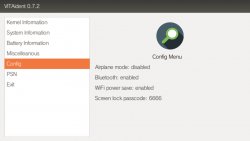
VITAident GUI Version Changes
NEW - v0.7.2
- Fixed USB power supply status (Previously it showed as disabled, even when it was enabled).
- Now uses proper enter button to exit. (X or O depending on your region).
- New config menu (GUI exclusive) - Displays various settings info (enabled/disabled) and lock screen code.
- New psn menu (GUI exclusive) - Displays PSN info, username pass. (Thanks some1 for the registry info)
- Removed the need for external data. Now uses official PVF font, and you'll no longer need the "VID00016" folder in ux0:data.
- All changes in original version are now also in GUI.
- Removed ID.DAT functionality since you can easily open this with vitashell. No need for extra bulk.
- All of the above changes.
- New ID.DAT menu (GUI exclusive) - Tbh I couldn't fit this in the original anyway.
- Changes font color during selection, and also includes title. (As always, please update your VID00016 folder).
- All of the above^.
- New Ubuntu like design. (Cleaner, faster and more user friendly).
- Includes all of the above except doesn't use any key to exit.
- Added a minimal customization option to change the font color. (please update your ux0:/data/VID000016 folder)
-
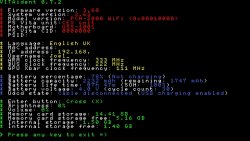
VITAident Original Version Changes
NEW - v0.7.2
- Fixed minor misalignment issues.
- Fixed USB power supply status (Previously it showed as disabled, even when it was enabled).
- Removed screenshot function since it can be done natively by holding PS button + start.
- Now displays brightness and volume.
- Slightly re-organized, and fixed some misspelt words.
v0.7
- Minor code cleanup
- Added a few battery functions that I've missed from scepower:
- Battery SOH (State of health) - That is your battery condition in percentage.
- Battery cycle count
- Battery full capacity (Previously only remaining capacity was shown)
- UDCD cable state (Can test if your battery port or cable might be malfunctioning)
- UDCD charging state
- Detect spoofed system version, and actual firmware version.
System Version -> System software version (spoofed)
Firmware Version -> Actual firmware version. - Remove automatic screenshot upon exit. (Not necessary since the VITA allows us to take screenshots natively.)
This in turn improves the speed upon exiting the original version.
v0.5
- More accurate model detection for PTEL and PDEL models.
- Includes fself compression. (Please switch to Taihen)
- Displays values in their respectful colored category (example red star = red values, just like 3DSident)
- Detects whether the model supports 3G/WiFi.
- Display battery charging status.
- Now uses any key to exit the app (just like 3DSident)
-
Features:
- Displays firmware (spoof/actual) and model info (Vita fat/slim/TV/PTEL/PDEL).
- Displays PS Vita Unit (Cex/Dex).
- Displays Vita motherboard.
- Displays PS VITA CID (Console ID).
- Displays PSID.
- Displays language.
- Displays MAC address.
- Displays IP address.
- Displays PSN username.
- Displays ARM, BUS and GPU clock frequency.
- Displays GPU Xbar clock frequency.
- Displays battery life time.
- Displays battery percentage, and charging status.
- Displays battery capacity.
- Displays battery temperature in both degrees C and F.
- Displays battery voltage and cycle count.
- Displays USB/adapter connection state. (UDCD)
- Displays enter button (Cross/Circle).
- Displays current brightness and volume.
- Displays SD free and total capacity (Thanks TheOfficialFloW).
Last edited:







