PS3 VSH Menu (REBUG) v0.2 + Custom Backgrounds

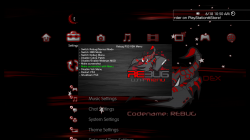
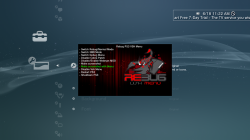
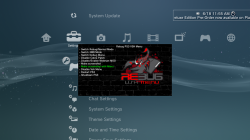
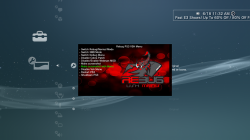
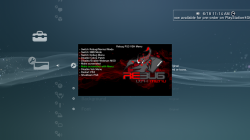
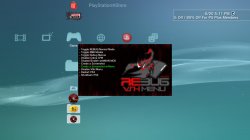
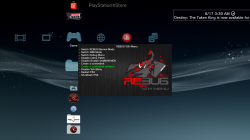
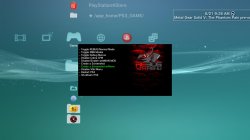
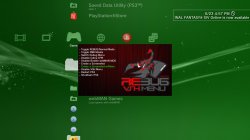
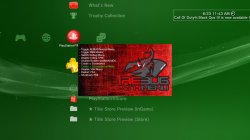
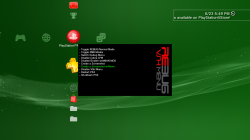
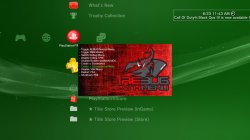
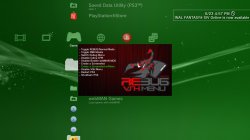
Orion is back with an update to the VSH Menu for REBUG with the release of v0.2. This VSH Menu is really handy for REBUG user's as you can easily perform various REBUG functions with ease from the XMB. No button combinations or going into REBUG Toolbox to perform these simple task. Now simply hit SELECT and this menu as you see pictured will appear on your XMB. The VSH Menu's have been progressing nicely since[break]s[/break] the initial POC from developer 3141card, Since that POC we have seen the SEN Enabler plugin (by Evilnat) adopt the a new VSH Menu and also Orion has started this VSH Menu for REBUG. . See all the details of the latest developments of this plugin below
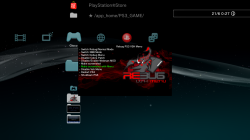

Also, bitsbubba and myself have created a number of Custom Backgrounds for Orion's VSH Menu that are super easy to install. See the small collection below with instructions on how to swap out these different looks for your XMB.


1434904007.png


Orion said:
Rebug PS3 Vsh menu v0.2 by Orion

Thanks to @3141card @Evilnat @STLcardsWS @bitsbubba and Team Rebug for this relase

Changelog Plugin

  • Code to remove patches cobra rewritten and is now fully functional (thanks to @bitsbubba for the tip).
  • Added code to detect patches Cobra (Coming from Gamesonic Manager)
  • Fixed code draw_png () (Thanks to developer @3141card for this fix)
  • New background for Vsh Menu (Thank @STLcardsWS to have made it)

Changelog Installer

  • Added code that goes to write to the file boot_plugins.txt, if there is, the string to start the Vsh menu.
  • Fixed code for Restart (thank @bitsbubba for the tip)
  • New icon for the installer (Thanks to @STLcardsWS to have made it)
Functions the VSH Menu (REBUG) can perform:

  • Switch Rebug/Normal Mode
  • Switch XMB Mode
  • Switch Debug Menu
  • Disable Cobra Patch
  • Disable/Enable webMAN MOD
  • Make Screenshot
  • Make Screenshot with Menu
  • Disable VSH Menu
  • Restart PS3
  • Shutdown PS3
Checkout these Other Custom Background Menus by @bitsbubba & @STLcardsWS
STLcardsWS said:
How to install these custom backgrounds:
  1. After Installing the REBUG VHS Menu
  2. By FTP or File Manager go to this location: /dev_hdd0/vsh_menu/
  3. Replace the current "background.png" with one of the ones from the included pack. (/dev_hdd0/vsh_menu/background.png)
  4. Enjoy!

Custom BackgroundXMB Preview
background2.png
Horizontal Black Wood (by STLcardsWS)
screenshot_2015_06_18_10_51_06.PNG
bg.png
Vertical Red Lines (by STLcardsWS)
screenshot_2015_06_18_11_22_20.PNG
backgr.png
Black Brick (by STLcardsWS)
screenshot.PNG
BG2.png
Red Bubbles (by STLcardsWS)
screenshot_2015_06_18_11_32_57.PNG
Background3.png
Red Fire (by STLcardsWS) (default bg in v0.2)
screenshot_2015_06_18_11_15_36.PNG
background2.png
Vertical Lines v2 (by bitsbubba)
screenshot_2015_06_20_17_11_43.jpg
Background3.png
Red/Black (by bitsbubba)
screenshot_2015_06_20_18_20_22.jpg
background.png
Vertical Black Wood (by bitsbubba)
screenshot_2015_06_17_03_30_59.png
Old Fashioned Rebug (normal).jpg
Old Fashion Rebug (by Berion)
background4.png
Rebug Stone (by bitsbubba)
screenshot_2015_06_21_09_26_32.jpg
background6.png
Another Vertical Red Lines (by bitsbubba)
screenshot_2015_06_23_16_57_41.jpg
background5.png
Red Chalk (by bitsbubba)
screenshot_2015_06_23_11_43_11.jpg
background7.png
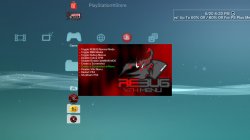
Rebug Side (by bitsbubba)
screenshot_2015_06_23_17_50_16.png


UPDATE SEE NEW BACKGROUNDS ->->-> HERE

Downloads:

Source:
GameSonic.it / PSX-Place.com


View our newly created VSH Menu forum here at PSX-Place.com via this link
 
Last edited by a moderator:
not sure why it would reboot you in pseudo-recovery mode [MENTION=17]Orion[/MENTION] can you shed some light on this, please? Is it compatible REBUG 4.46 (haven't had a chance to try the new version myself yet)?

I have tested the last build of Vsh menu in CFW 4.21.2 REX Cobra v7.1-4.46.1 REX Cobra v7.03-4.53.1 REX COBRA v7.02-4.65.2 REX COBRA v7.03-4.70.1 REX COBRA v7.10 and all work very well
If anyone can send me the CFW 4.46 v7.1 i can test and see the bug

This is the code used by vsh menu to shutdown and reboot ps3 and there are not errors
Code:
static void reboot(void)
{
	cellFsUnlink((char*)"/dev_hdd0/tmp/turnoff");
	{system_call_3(379, 0x8201, NULL, 0);}
    sys_ppu_thread_exit(0);
}

static void shutdown_system(void)
{
	cellFsUnlink((char*)"/dev_hdd0/tmp/turnoff");
	{system_call_3(379, 0x8201, NULL, 0);}
	{system_call_4(379, 0x1100, 0, 0, 0);}
    sys_ppu_thread_exit(0);
}
 
Last edited:
Hoping for the same as I can't ever use Mega. I have a member here that grabs all the pkg files from Mega for me. As soon as he post the link I will share it not done prior to that.

same here i could never grab anything there wtf?
thx for your help
 
I have tested the last build of Vsh menu in CFW 4.21.2 REX Cobra v7.1-4.46.1 REX Cobra v7.03-4.53.1 REX COBRA v7.02-4.65.2 REX COBRA v7.03-4.70.1 REX COBRA v7.10 and all work very well
If anyone can send me the CFW 4.46 v7.1 i can test and see the bug

This is the code used by vsh menu to shutdown and reboot ps3 and there are not errors
Code:
static void reboot(void)
{
	cellFsUnlink((char*)"/dev_hdd0/tmp/turnoff");
	{system_call_3(379, 0x8201, NULL, 0);}
    sys_ppu_thread_exit(0);
}

static void shutdown_system(void)
{
	cellFsUnlink((char*)"/dev_hdd0/tmp/turnoff");
	{system_call_3(379, 0x8201, NULL, 0);}
	{system_call_4(379, 0x1100, 0, 0, 0);}
    sys_ppu_thread_exit(0);
}

Unfortunatly i have no acces to my pc due to broken screen,i cant get the the file 446/71
U think it could be something to do with psnpatch or sen enabler,
Ill see if i can find the pup when i get my pc back but its in parts,what part of the pup do u need i can get dev_flash/hdd0 list sprx's through multiman if u need it etc... After work
 
Last edited:
Like the top one AL OT!!

me too, it's my favorite so far :) Only problem is it's got alot more detail than the rest so it's a larger file :p

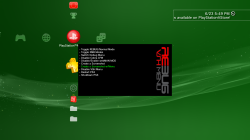
Edit: as soon as [MENTION=17]Orion[/MENTION] adds the latest fix (background) I'll probably start rounding corners (and other transparent details)
 
Last edited:
Hahaha now stop posting I'm trying to play catch up and surpass you as #2 top poster hehehe but really it looks nice with my red/black theme I have going on. Loving it!!

the real deal would be catching up to @STLcardsWS :p, this reminds me of when @tthousand was trying to catch up to me on "Scene"

Edit: plain black

background7.png screenshot_2015_06_23_17_50_16.png
 
Last edited:
Yea catching up to him would just mean I would have to become a troll and nobody likes those hehe but for real now may fav is the last one above me you posted.
 
Yea catching up to him would just mean I would have to become a troll and nobody likes those hehe but for real now may fav is the last one above me you posted.

if you have any recommendations let me know

Edit: also if you like the wording in my menu above I can pass that along to you :p
 
Last edited:
the real deal would be catching up to @STLcardsWS :p, this reminds me of when @tthousand was trying to catch up to me on "Scene"

Edit: plain black

View attachment 3370 View attachment 3371

I will update the post and downloads with your NICE new additions here soon (have alot i need to do tonight in regards to the scene).
I also have a few news ones but i have not polished them off yet. Might create a thread just for these as well.

Lol we are going to have to edit the plugin for a random one by day haha:
Monday.png
Tuesday.png
......
 

Trending content

Back
Top