webMAN MOD

PS3 webMAN MOD - General Information Thread 1.47.48q

I've tried it. the result is that the file is not mapped.

Code:
map /dev_flash/vsh/resource/explore/xml/category_network.xml=/dev_hdd0/tmp/wm_remap/category_network.xml
map /dev_flash/vsh/resource/explore/xml/category_user.xml=/dev_hdd0/tmp/wm_remap/category_user.xml
map /dev_hdd0/another/hen/hen_xmb.xml=/dev_hdd0/tmp/wm_remap/hen_xmb.xml

Did i write it wrong?

You can't remap these xml files, i remember @bguerville said the reason once, something related to how cobra uses open_path, it would require a improved method.

Btw you paths are wrong it's /dev_flash/vsh/resource/explore/xmb/ not .../xml

but this one should work

/dev_hdd0/another/hen/hen_xmb.xml=/dev_hdd0/tmp/wm_remap/hen_xmb.xml
 
You can't remap these xml files, i remember @bguerville said the reason once, something related to how cobra uses open_path, it would require a improved method.

So to remap file to dev_flash won't work huh.

but this one should work

/dev_hdd0/another/hen/hen_xmb.xml=/dev_hdd0/tmp/wm_remap/hen_xmb.xml

This also doesn't work.
If it works then the enable HEN menu should disappear after reloading the xmb. So the display on the XMB will be like CFW.
 
This also doesn't work.
If it works then the enable HEN menu should disappear after reloading the xmb. So the display on the XMB will be like CFW.

Try it via web browser using the web command, see if it returns an error.

I use lot of remaps on hen and they work just fine

See i use rco remaps, sprx, pngs and xmls.

oFKetiM.png
 
Last edited:
hello, i love webman since its inception, but since version 1.47.36, the option to reload the last game when you restart or shutdown does not work, the window where it says loaded is shown, but in the xmb it does not appear, someone but does this happen to you?
 
hello, i love webman since its inception, but since version 1.47.36, the option to reload the last game when you restart or shutdown does not work, the window where it says loaded is shown, but in the xmb it does not appear, someone but does this happen to you?

Thank you for your feedback. Please try updating to the latest build using the online updater on webMAN Games > webMAN Setup > Update webMAN > install.

I couldn't reproduce your issue. If you still get the issue, please provide details about the path of the last game, current configuration, etc.

Also try deleting /dev_hdd0/tmp/wm_config.bin then go to /setup.ps3, configure the settings again and save.
 
To report an issue @aldostools . After .39 update, when i press r3+l3+r2 combo to regain psn access from psnpatch plugin autoloading, which you use the same combo on webman mod, my console freezes up immediately. Haven't tested it on .38 update, since i went directly to .39 using the webman mod updater. Would you kindly ( ;) ) check it out? Using evilnat 4.88.2 on a slim 2504a
 
Hi, I'm really struggling to edit the order of my games on the XMB, hoping someone might be able to help. I'm trying to do this by editing /dev_hdd0/xmlhost/game_plugin/mygames.xml. I don't change my games too often, so I don't mind that I would lose the changes every time that I re-scanned the content, so I have "Disable content scan at startup" checked in setup.

I have transferred mygames.xml to my PC and formatted it using aldostools' FormatXML.exe. I renamed the outputted file back to mygames.xml, and then opened it in Notepad++, but I do not know how to edit the xml correctly to reorder the games.

I think that each game appears to have been assigned a key, and the section below appeared to correspond to order of the games, so I though that maybe editing the numbers in each string to match my desired order might do the trick.

So, for example,
<I class="type:x-xmb/module-action" key="0037" attr="0037"/>
<I class="type:x-xmb/module-action" key="
0000" attr="0000"/>
...

Became,
<I class="type:x-xmb/module-action" key="0000" attr="0000"/>
<I class="type:x-xmb/module-action" key="
0037" attr="0037"/>
...


I then copied mygames.xml back to my PS3, deleted the contents of /dev_hdd0/tmp/wmtmp and restarted the console, but no luck.

I assume I'm doing something wrong, but I can't find a guide anywhere to edit mygames.xml.
Can anyone help?
 
@monologued you need to check the option "Disable the scan for content on startup" in /setup.ps3

Any change that you make to the xml will be replace if you have that option selected.

You can test editing the XML, then going to Remote Play and exiting to get the XMB reloaded without reboot.

If you changed the order of the items the way you described, the order of items should appear changed.

Do not delete /dev_hdd0/tmp/wmtmp after make the changes the XML. That folder stores the icons and other information used by the XML.
 
To report an issue @aldostools . After .39 update, when i press r3+l3+r2 combo to regain psn access from psnpatch plugin autoloading, which you use the same combo on webman mod, my console freezes up immediately. Haven't tested it on .38 update, since i went directly to .39 using the webman mod updater. Would you kindly ( ;) ) check it out? Using evilnat 4.88.2 on a slim 2504a

The combo R2+L3+R3 is used by webMAN MOD to unload it and by psnpatch to enable PSN access.

In 1.47.39 there is a new combo L3+R3 that is used to toggle VshFpsCounter,sprx

That combo could enter in conflict with R2+L3+R3 if you don't press R2 first. So L3+R3+R2 can be interpreted as L3+R3.

VshFpsCounter,sprx still has some random issues that may cause a freeze the system when it is loaded.

In /setup.ps3 there is a check box in XMB/In-Game PAD SHORTCUTS that let you disable the check for the combo L3+R3.
 
thanks for answering, my PS3 is a fat, in cfw 4.88, and it happens to me with the games on the external drive, reinstall the cfw, I don't understand very well what happens, since I couldn't determine a behavior in which it fails, say , I never had problems until now, I will continue testing, and I will format the external hard drive
 
thanks for answering, my PS3 is a fat, in cfw 4.88, and it happens to me with the games on the external drive, reinstall the cfw, I don't understand very well what happens, since I couldn't determine a behavior in which it fails, say , I never had problems until now, I will continue testing, and I will format the external hard drive

The first thing is that you should try when there is a bug in webMAN MOD, is update to the latest build using the online updater in webMAN Games > webMAN Setup > Update webMAN MOD > Install

If that doesn't fix the issue, then go to https://github.com/aldostools/webMAN-MOD/releases
Download one or 2 previous versions (e.g. .37, .34, etc.) just in case the latest build has issues.
NOTE: The latest builds are constantly updated every time a new commit is published.

If the issue is still present in the previous builds, the issue could be caused by other elements:
1- It could be a bad configuration or corrupted. Try deleting /dev_hdd0/tmp/wm_config.bin and configure it again in /setup.ps3
2- Other plugins or mods could be preventing the proper operation of wMM (test without other plugins loaded)
3- Mods to the system files done by users or homebrews often cause issues (a fresh FW update is usually suggested)
4- Some issues could be related with external devices (disk, enclosure, cable, power, etc) or internal failures
 
@monologued you need to check the option "Disable the scan for content on startup" in /setup.ps3

Any change that you make to the xml will be replace if you have that option selected.

You can test editing the XML, then going to Remote Play and exiting to get the XMB reloaded without reboot.

If you changed the order of the items the way you described, the order of items should appear changed.

Do not delete /dev_hdd0/tmp/wmtmp after make the changes the XML. That folder stores the icons and other information used by the XML.

Thank you for replying! I have restored /dev_hdd0/tmp/wmtmp, ensured that "Disable the scan for content on startup" is checked, edited the xml, and went into Remote Play and exited, and the order remains unchanged. Any ideas what I am doing wrong?
PdBfvqU.png

sBaWHxr.png

Sxv7n36.png
 
hello again, after trying things, I found the problem, the option: "Disable content scanning at startup", marking it, I have not had any more problems with the games on the external drive, the last game used, it loads perfectly when starting now, and they are not deleted from webman either, it is strange, I have never disabled it until now, thanks for the help
 
webMAN MOD 1.47.40 is out!

Changelog:
  • Includes FPS counter plugin 2.2 by @TheRouletteBoi. Use L3+R3 to load/unload it.
  • Internal prepNTFS now extracts PARAM.SFO / ICON0.SFO directly from ISO. Updated prepISO 1.30.
  • Added combo L1+R1+△ to toggle between LITE / FULL editions
  • Scanning of content on subdirectories of remote folders using ps3netsrv 20220330
  • Added support for mounting remote games & open sLaunch from XMB menu in LITE edition
  • Added display of progress overlay for refresh XML, search, dump, copy through FPS counter plugin
  • Added PS3 GETSYSINFO to ps3mapi server commands, +24 informations available through the tag @info<id>
  • Updated German language (thanks to @ozapft)
  • Bug fixes: delete cached ISO, unload wMM from memory, label in /netstatus.ps3
  • PS2 config database updates with fixes by @mrjaredbeta, @agrippa, @kozarovv
  • Cumulative update (includes over 33 commits to the suite of tools after 1.47.39)
If you like webMAN MOD, then feel free to contribute with a *small donation* at:
paypal.me/aldostools or donate.aldostools.org (funds are mainly to cover the high server costs).
 
Last edited:
hello i share my 4g connection with android hotspot, a way for use netserv via Android? i can share directory with movian.. same way? all kind of iso backup can be loaded via netserv (psp/ps2/psx?) roms too?
 
hello i share my 4g connection with android hotspot, a way for use netserv via Android? i can share directory with movian.. same way? all kind of iso backup can be loaded via netserv (psp/ps2/psx?) roms too?

Yes. Mount the remote directory with the ROMS or MOVIES. Load them from /dev_bdvd on your PS3.

Use the web file manager to navigate the remote directories. Click on the size column next to the name to mount the folder. Or enter to the folder and click on the last part of the remote path at the top of the page.
 
After updating Webman to 1.47.40, the save button doesn't work. Becuase of this my IDPS doesn't set at boot and i have to set it manually every time and the page also seems supper buggy when collapsing menus example https://secupload.io/file/8TZFgs
 
Last edited:
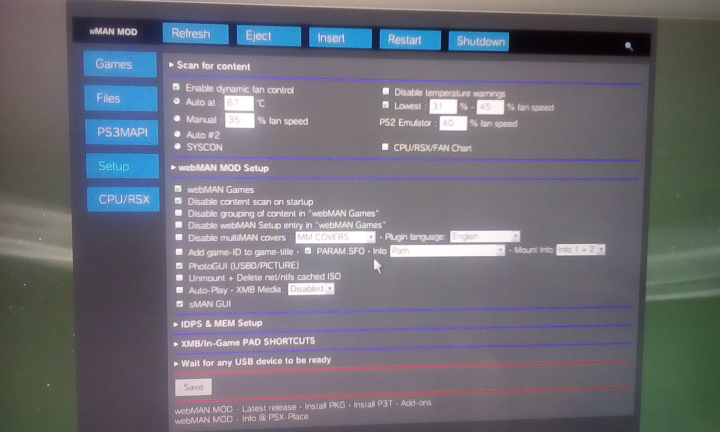
In webMAN MOD v1.47.40 I have set English language, but...
While everything is fine in the Browser:
english.png

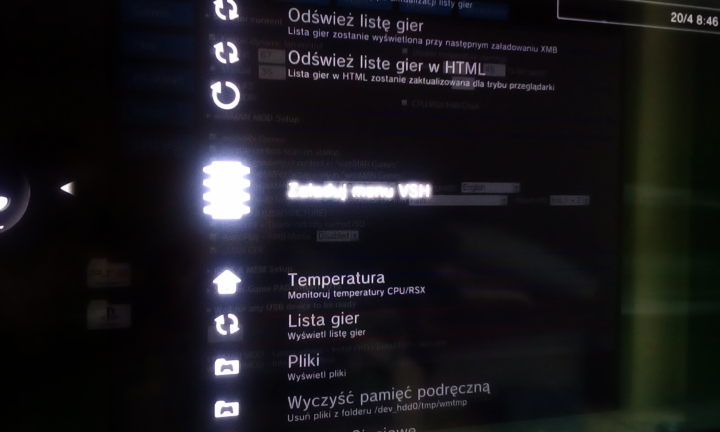
In XMB I still have Polish language:
set.png

I tried to turn off the console, reboot it, I even change the console's language (from PL -> EN),
but nothing has changed.


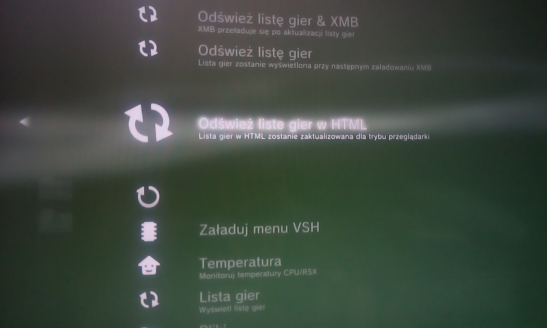
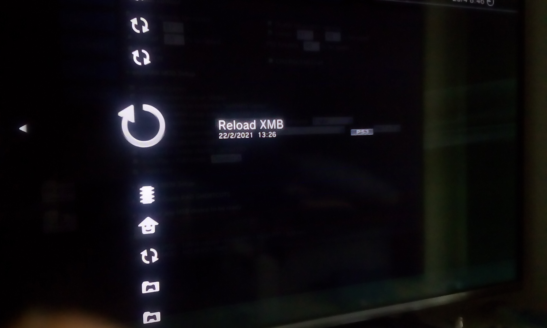
Additionally the Reload XMB text is only visible when you highlight\select it:
reload-2.png

reload.png

I mean only this option has this behavior.
 
In webMAN MOD v1.47.40 I have set English language, but...
While everything is fine in the Browser:
english.png

In XMB I still have Polish language:
set.png

I tried to turn off the console, reboot it, I even change the console's language (from PL -> EN),
but nothing has changed.


Additionally the Reload XMB text is only visible when you highlight\select it:
reload-2.png

reload.png

I mean only this option has this behavior.
1. Reload XMB is spearated app if you want change entry to PL you must edit SFO file in game folder HDD.
2. Mixing language ist glitch propably you must delet all files from WMM and reinstall or maybe you change something in txt or xml files, this thing to glitch language if you do something wrong.
3. Visibility of reload xmb, look ad 1, is a app and behavior like installed apps and games in xmb
 
I am not sure if you understand me.
1. I uninstalled a previous version of webMAN MOD (v1.47.38 I think) from its menu (webMAN Games -> webMAN Setup -> Uninstall webMAN MOD).
2. I rebooted the console.
3. I installed webMAN MOD v1.47.40.
4. Changed language from PL to EN.
5. Once again rebooted the console.
6. I have mixed text. When I enter PS3 webMAN MOD [Setup] everything is in English.
In XMB everything is in Polish.
7. I did NOT change anything in txt or in xml files.

I did not have this issue with v1.47.38.

As for the Reload XMB option.
I do not want to translate it.
The thing is that the text is only visible when you highlight\select it.
Only this option has this that kind of a behavior.
 
Last edited:
Back
Top