
You are using an out of date browser. It may not display this or other websites correctly.
You should upgrade or use an alternative browser.
You should upgrade or use an alternative browser.
What do I need to start making Homebrew for the PS3?
- Thread starter ISAK.M
- Start date


1. DEX mode on Rebug lets you use your retail console as if it was a debugging unit.Wait, how do I get the PS3 SDK?
2. ROP means Return Oriented Programming. It's a technique in which we use small portions (called gadgets) of existing executables in memory, chain them together & get the processor to execute the chain. It is a hijack of existing code snippets that we put together in order to perform the jobs we require.
3. The ps3 sdk is under official expensive license like I said before & we have a no piracy guideline in this forum. You will need to Google it I am afraid.
Psl1ght however is widely available on github.
Joonie has this repo for instance
https://github.com/Joonie86/PSDK3v2
Last edited:

Louay
Senior Member
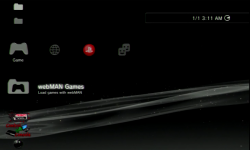
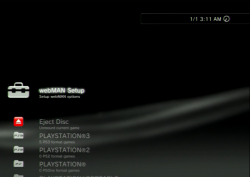
@aldostools how can i edit the webman i mean changing name and icons like i want to change Load webMan Games to PS3 Games or Any Name and the others and how can i remove the setup of webman i like just to have the PS3 PS2 PSP BD Movies Folder only with no setup ...To start making homebrews you will need:
1- Very important: A good background in software development (specially in C/C++).
I think it is possible to use C# or its IDE, however most of the examples that you will find in the Internet are mainly for C/C++.
2- The tools (compiler, PS3 SDK, text/hex editors, ps3tools like scetool, ps3 keys, etc)
3- Examples of source code from other devs (e.g. Estwald, deank, Zar, andoma, flat_z, mysis, jjolano, etc.) and read a lot of articles from http://www.psdevwiki.com/ps3/
4- A PS3 console with CFW (DEX is suggested, although I only have used CEX) and a PC in the same network
5- Free time... a lot! Also enthusiasm and dedication.
6- Some friends with knowledge to ask questions in skype, whatsapp or discord
You will need a design of what you want to create. There are different kind of homebrews (tools, games, mods, apps, etc.) and different ways to implement them (as a sprx plugin, EBOOT, via browser, LUA, etc.)
I follow various PS3 devs in github. You can find excellent resources in their repos.
Here are some good examples:
https://github.com/Estwald?tab=repositories
https://github.com/Joonie86?tab=repositories
https://github.com/Zarh/ManaGunZ
http://deanbg.com/sMAN_1.12.zip
http://deanbg.com/webMAN_1.47.zip
https://github.com/twinaphex/multiman-slim (src of old version of multiMAN)
https://github.com/Dnawrkshp/ArtemisPS3
https://github.com/andreus-sebes/xmb-manager-plus-installer
https://github.com/moh-sakhaii/Moh-s-Open-manager (very old app but good example)
https://github.com/drizzt/GaiaManager (another old example of a backup manager)
https://github.com/aldostools/webMAN-MOD
How to build
Requirements for Windows:
Requirements for GNU/Linux:
- git, clone this repository with the following command: git clone https://github.com/aldostools/webMAN-MOD.git
- Official PS3 SDK v3.40 or 4.00 complete leaked version, google is your friend to find it
- GCC (for Windows MinGW with mingw32-base will be fine) or Cygwin (x86/x64)
- Open Source PSL1GHT SDK to compile prepNTFS and PKG Updater only
- An x86 linux distribution, Fedora 20 is tested working
- git, clone this repository with the following command: git clone https://github.com/aldostools/webMAN-MOD.git
- Official PS3 SDK v400.001 leaked version
- Official Cell OS Lv-2 leaked toolchain (a 4.1M patched GCC 4.1.1 version)
- wine for the missing linux tools
- A compiled Scetool binary, ps3 keys
- Open Source PSL1GHT SDK to compile prepNTFS and PKG Updater only
TIP: Generally it is much more easier to modify gradually an existing project than start one from scratch.

Attachments

pinky
Retired
@aldostools how can i edit the webman i mean changing name and icons like i want to change Load webMan Games to PS3 Games or Any Name and the others and how can i remove the setup of webman i like just to have the PS3 PS2 PSP BD Movies Folder only with no setup ...
not sure if it's in there, but a lot of webman files are in the tmp directory iirc.
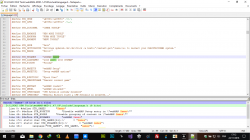

so i can't change them by decompiling the sprx then edit it ??
The majority of the text displayed in webMAN MOD can be customized editing the respective language file found in:
/dev_hdd0/tmp/wm_lang/LANG_**.TXT
The text shown on XMB for the webMAN Setup menu can found in the XML files stored in:
/dev_hdd0/game/XMBMANPL/USRDIR/FEATURES/webMAN_**.xml
Also there are some hard-coded text that only can be changed hex-editing the decrypted .sprx (.elf) or recompiling the source code with the modifications.
There are some text files installed also in /dev_hdd0/xmlhost/game_plugin and other folders.
The easiest way to modify the icons and the text files is replacing the XML and TXT found in the PKG. Then rebuild the PKG and re-install it. The updater will copy the files to the proper location.
CAUTION: If the replaced text in LANG_**.TXT or in the sprx is longer than the original text, it may result on a system freeze on startup or other unexpected/unwanted results.

TuNiSiAnOO
Member
bgurville why dont you foks on the kernel exploit and stop working on 4.0 update cuz han is hard for noobs resign rif and rap pkglinker and all that stuff is hard to understand sorry for my english
Louay
Senior Member
so the LANG_**.txt must be the same in the sprx and how can i remove the webman setup !!The majority of the text displayed in webMAN MOD can be customized editing the respective language file found in:
/dev_hdd0/tmp/wm_lang/LANG_**.TXT
The text shown on XMB for the webMAN Setup menu can found in the XML files stored in:
/dev_hdd0/game/XMBMANPL/USRDIR/FEATURES/webMAN_**.xml
Also there are some hard-coded text that only can be changed hex-editing the decrypted .sprx (.elf) or recompiling the source code with the modifications.
There are some text files installed also in /dev_hdd0/xmlhost/game_plugin and other folders.
The easiest way to modify the icons and the text files is replacing the XML and TXT found in the PKG. Then rebuild the PKG and re-install it. The updater will copy the files to the proper location.
CAUTION: If the replaced text in LANG_**.TXT or in the sprx is longer than the original text, it may result on a system freeze on startup or other unexpected/unwanted results.
so the LANG_**.txt must be the same in the sprx and how can i remove the webman setup !!
Go to /setup.ps3, mark the option "Disable webMAN Setup entry in webMAN Games", save, re-scan the content for XMB (select+L3) and restart.
Or delete webMAN.xml and all webMAN_**.xml from the folder /dev_hdd0/game/XMBMANPLS/USRDIR/FEATURES
Also do not include them in the PKG (and delete the updater if it was previously installed, before install the new PKG).
Louay
Senior Member
thank you sir i will try thatGo to /setup.ps3, mark the option "Disable webMAN Setup entry in webMAN Games", save, re-scan the content for XMB (select+L3) and restart.
Or delete webMAN.xml and all webMAN_**.xml from the folder /dev_hdd0/game/XMBMANPLS/USRDIR/FEATURES
Also do not include them in the PKG (and delete the updater if it was previously installed, before install the new PKG).

Louay
Senior Member
i try the solution you tell me about but the webMan setup it was in folder and with shortcuts options but now it in one link when i click webman setup it goes to 127.... setup.ps3 i want to remove that permently i want just eject disc an games folder only how can i recreate webman ? or edit the sprx using hex like you say how can i edit the source donwloaded from your github to remove unwanted things and recompile it !!Go to /setup.ps3, mark the option "Disable webMAN Setup entry in webMAN Games", save, re-scan the content for XMB (select+L3) and restart.
Or delete webMAN.xml and all webMAN_**.xml from the folder /dev_hdd0/game/XMBMANPLS/USRDIR/FEATURES
Also do not include them in the PKG (and delete the updater if it was previously installed, before install the new PKG).
Last edited:
Similar threads
-

-
PS3 Is there any homebrew or method to force RGB out for DVD/Blu-Ray playback?
- Started by J Boy
- Replies: 5
-
-
 PS3 looking for recommendations for systems to homebrew
- Started by Boog
- Replies: 0