
You are using an out of date browser. It may not display this or other websites correctly.
You should upgrade or use an alternative browser.
You should upgrade or use an alternative browser.

PS4 PS4-Xplorer (File Manager) v1.33
- Author STLcardsWS
- Creation date
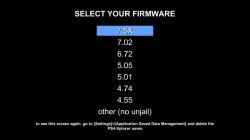
- Added a hybrid solution to the FW selection screen for those users who still have problems with the FW autodetection.
- Added multiple PKG installation at a time (Select All or some PKG and press X to install them in a single action). Please wait for them to be sent to the queue before close the app.
- Fixed text encoding in the Text Editor.
- Updated the Image Viewer, now you can move between pictures with the Left or Rigth Dpad.
- Support to 7.50, 7.51 and 7.55 FW. - and significant reduction in PKG size. * As promised, no more KP to those who forget to delete the savegame.
PS4-Xplorer 1.27 - @Lapy05575948
Hey, remember delete the PS4-Xplorer savegame if you update from a previews FW.
- Added support to 7.02 FW
- Credits and thanks to @notzecoxao

PS4-Xplorer 1.26 via Lapy@Twitter
- Add the option to download a file from a url (HTTP direct links only).
- Minor bugs fixed.

PS4-Xplorer 1.25 via Lapy@Twitter:
- New File option (@notzecoxao request)
- In the Text Editor, hold down square to delete multiple characters continuously.
- Fixed a bug in SFO reader (find by @DouglasSampai15)
- Korean translation fixed (by @HanBangComBo)
- Beta Test @Wr0zen

PS4-Xplorer - @Lapy05575948
1.24 change log:

- Now you can see the GPU temperature in the upper-right corner (updated every 3 seconds). If you want to see the degrees in Fahrenheit, copy a file with the name "F.txt" in the /data/ folder of your PS4
- Added the Korean translation.
- Minor bugs fixed.
1.23 change log:
- Multi-selection option and select all now work with the folders too.
1.22 change log:
- Added support to 6.72 FW.
1.21 change log:
- Added a simple Text Editor. Use the Left Stick or the DPad to move around the keys and the Rigth Stick to move the cursor. You can close the text editor with circle, but only if you have not edited anything yet. Once you have edited you will have to use the close button or save the text in order to close it and avoid accidental closed.
1.20 change log:
- Minor bugs fixed.
1.19 change log:
- Supported Avatars (.xavatar files from the "PS4-Xplorer Theme Maker + Avatar Maker 1.5" windows app). Works like themes, but it is to install avatars in your PS4 user profile in a very simple way.
- Fixed a bug in the Overwritten All button.
1.18 change log:
- Supported Themes (.xtheme files from the "PS4-Xplorer Theme Maker" windows app). To avoid applying a theme by mistake, you need to touch the X button twice in a row over a theme file (.xtheme) to apply it.
- Supported unprotected .zip .rar .tar files (read and extract, except: multipart files and rar5). Note: for .tar.xxx files, you need to rename the file and remove the 2nd extension, leave only the .tar
- Added a shortcut to the FTP with L3.
- After more than a year of use in our scene, the period of Beta ends.
1.17 change log:
- Improved accuracy by showing the size of the files (including 0 kb files).
- Minor bugs fixed.
1.16 change log:
- Fixed an error in the calculation of the percentage in the new progress bar when copying very large files.
- Added a Cancel button to the new progress bar (square).
- Fixed an FTP and RW bug (the options were inverted).
1.15 change log:
- Experimenting with a true progress bar. Only works when COPY a SINGLE file. (No in cut, folder or multiple files)
1.14 change log:
- Added the possibility of making a "_copy" of a file or folder (just copy and paste a file or folder in its own path). This only works with a single file or folder.
- When copying or moving files, they will no longer be overwritten automatically, now a message box will appear to choose the correct option.
- Now show the number of elements in each folder in the lower left corner.
- Support to .cfg files as plain text.
- New option in the Advanced Options menu to configure the "Home" path. After that, you can go back to it whenever you want by pressing R3.
- Some visual flaws fixed.
1.13 change log:
- Experimenting with new ways to play videos.
- Fixed an error when you cut a folder, advance, paste and then try to go back.
1.12 change log:
- Changed the Title ID.
- Updated the PS4_Tools.dll for better and accurate info.
- Added the Dutch translation.
- Some bugs fixed.
1.11 change log:
- Changed the keyboard handmade by the native keyboard of PS4.
- Fixed some bugs with the text encoding in flat text files.
1.10 change log:
- Supported lower firmwares besides 5.05 (4.55, 4.75, 5.01)
- Supported read info from .sfo and .pkg files.
- Supported .dds images.
- Fixed some Polish phraces.
1.09 change log:
- Support to .json files as flat text.
- Added the Persian translation.
- Added the Russian translation.
- Added the Turkish translation.
- Added the Polish translation.
- Added the Swedish translation.
- Added the Catalan translation.
- Added the Danish translation.
- Added the Greek translation.
- Added the Indonesian translation.
- Fixed some Chinese characters.
1.08 change log:
- Language selection screen (this will show only the first time you open the application). If you want to change the language later, go to [Settings]>[Application Saved Data Management] and delete the PS4-Xplorer saves.
- When you move backward in the folders, the app remembers the folder where it comes from.
- Finished the Advance Menu translations.
- More bugs fixed.
1.07 change log:
- New Instruction page design.
- Added notification sound when cut/copy and paste finish.
- Added error sound when some error happens.
- New Folder option.
- Slow down the speed a bit, and a little more in the opciones menu.
- Super speed to move. Hold L2 pressed and move with DPad or Analog Stick.
- Advances Options menu (Hold L2 pressed + triangle to show it) to Activate FTP (port 21) and Full R/W over system folders (danger, be careful !)
- Some keyboard bugs fixed (maybe there are still some more to fix).
1.06 change log:
- Added the file multi-selection option and select all (files only for now). Press R1 to mark files and start the multiselection. You can press R1 again to unmark the files.
- L1 to cancel the multiselection. The multiselection will cancel if you abandon the actual folder too.
- Press R1 over a file while you hold down R2 to Select All the files in the actual folder.
- Ghosting files when cut like the real MS Windows Explorer.
- Some bugs fixed.
1.05 change log:
- Change the name to PS4-Xplorer.
- Black list the folder "/dev" and "mnt/sandbox/pfsmnt/" to avoid problems. The options in these folders will not be opened.
- Mark in green the folders towards the usb to facilitate the way to the less advanced users.
- Shortcut to usb0 with Left DPad and to usb1 with Right DPad.
- Support to .xml files as flat text.
- Added the Chinese translation.
- Added the Arabic translation.
- Added the Vietnamese translation.
1.04 change log:
- Show the file size in Kb, Mb or Gb.
1.03 change log:
- Added the France translation.
- Added the German translation.
- Added the Ukrainian translation.
- Added the Italian translation
- Fixed some Japanese characters.
1.02 change log:
- Added the Japanese translation.
1.01 change log:
- Prevent the application from freezing when a cut/copy/paste error occurs.
- Added the Portuguese translation.
1.00 change log:
- Initial release with spanish and english translation.