-by Jochen Schleu
-
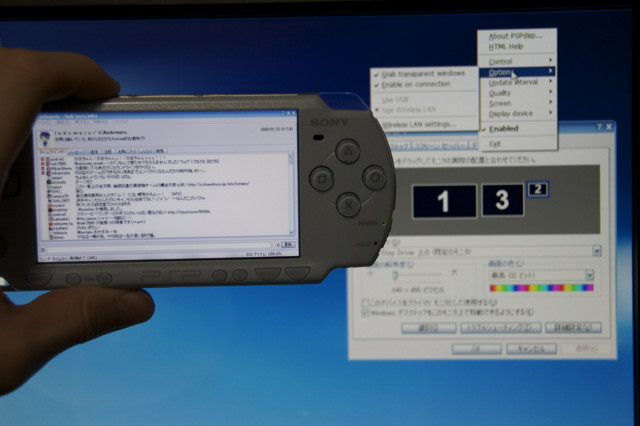
This program enables the use of a Playstation Portable as an additional monitor in Windows.
You can also remotely send keyboard and mouse commands to the PC.
The newest version implements sound streaming, too.
-
v0.6
New features:
- settings can be saved in "presets"
- multiple instances of PSPdisp can be started to connect more than one PSP in WLAN mode
- support for Wake-On-Lan
- WLAN LED can be switched off
Bug fixes:
- not being able to restart USB mode on 6.20 TN-C
- backlight turning off completely in USB power save mode instead of dimming on new PSP models
- freezing when changing PC settings from the PSP while in USB mode with libusb
- fixed 12 hour clock display
- various other fixes
v0.5.1
New features on the PSP:
- support for Half Byte Loader, but with these limitations
-- only WLAN mode usable, no USB mode
-- image streaming is about 30-50 % slower than on Custom Firmware
-- audio sample rates other than 44 kHz not available on all firmwares
-- screen brightness cannot be changed through the menu
-- HOME button must be pressed twice for the menu to appear
New features on the PC:
- libusb driver updated to the latest version, it now works on 64 bit systems with active driver signature enforcement
v0.5
New features on the PSP:
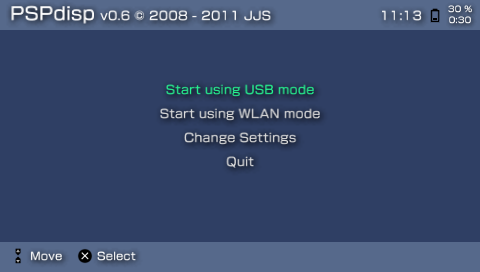
- new menu system
- all options can be customized in the menu
- it is now possible to switch between WLAN and USB mode without restarting the game
- up to 5 server IP addresses can be stored
- more CPU speed options
- screen brightness can be fully customized
- most PC settings can now be changed from the PSP
New features on the PC:
- WLAN and USB mode can be enabled at the same time
- new option for scaling the mouse cursor
- new viewport sizes for magnifying the screen content (2x, 4x, 8x)
- basic password system for WLAN mode
- restructured menu with less submenus
- display driver now working on 32 and 64 Bit Vista / 7 (Aero Glass theme will be disabled)
- audio streaming now possible in SideShow mode and when display streaming is disabled
- audio sample rate can now be configured (11 kHz, 22 kHz and 44 kHz)
- new option for less CPU intensive, but also less pretty image stretching
- new control file option for simulating a double click
Bug fixes:
- restored functionality on 3.71 M33 and 5.50 GEN-B
- various other small fixes
v0.4
New features:
- new USB driver based on WinUSB, that is compatible with 64 Bit versions of Windows (no driver signature check problem)
- previous libusb based USB driver still supported
- new audio recording mode for Vista / Windows 7 which uses software loopback, no longer requiring a "Stereomix" or "What you hear" device
- increased USB transfer speeds (60 fps reachable with all compression quality settings)
- new "Uncompressed" quality mode, doesn't apply any compression to the images resulting in less CPU load and best image quality
- PSP CPU speed now configurable for USB mode
- increased character limit for the IP address / server name dialog
- IP address is now also shown on the WLAN tab of the options window
- audio streaming can now be completely disabled in case of problems
- new option to hide the mouse cursor on inactivity
- new control file option for analog mouse cursor movement with the analog stick
- added intaller option for creating a Windows-Firewall exception for PSPdisp
Bug fixes:
- CPU speed control for WLAN mode fixed
- fixed WLAN timeout problem mentioned in the v0.3 known issues
- PSPdisp now stays in SideShow mode when the screen resolution or geometry changes
- various interface bugs fixed
- rapidly enabling/disabling or attaching/detaching of the PSP in USB mode would trigger an exception
v0.3
New features:
- SideShow driver for Vista and Windows 7
- speed improvements / CPU load reduction
- CPU load reduction (down to 0 % without screen changes) when using the PSPdisp display driver
- rotation is now performed on the PSP, no increase in CPU load on the PC
- quality and delay settings now customizable through the UI
- completely revamped Wlan mode (switched server to the PC, can now recover from a lost connection etc.)
- added option to disable display streaming (only transmitting controls)
- new option to always switch the PSP display to the screen containing the mouse cursor
- new control file command to display an onscreen keyboard for entering text on the PSP
- new control file command to display the PSPdisp menu at the current mouse position
- added support for the assignment of key combinations to PSP buttons (e.g. ALT+F4 can be mapped to one button)
- various settings regarding PSP power saving in USB mode (turning off screen, reducing clock speed, etc. after a user defined idle timeout)
- PSP clockspeed can be configured for Wireless LAN mode (default, 111, 222, 333 Mhz)
- all user defined files (configuration data and control files) now stored in the application data path
- experimental audio streaming
Bug fixes:
- case of analog stick movements not being registered
- the two longest delay settings are now clickable
- "grab transparent windows" now actually works (only for 480x272 viewport)
Known issues:
- there are cases where the PSP waits for a Wlan timeout infinitly, making it seem to hang without any message (always fixed by restarting the PSP game, often fixed by turning the Wlan switch off and on again)
- audio will stutter if data cannot be transmitted fast enough either because of the network conditions or low PC specs
- some applications issue drawing commands without apparent screen changes, in that case there is no CPU load reduction available when using the PSPdisp display driver
v0.2
New features:
- can now mirror any existing display
- works on 64 bit systems now
- display driver for Windows XP x64
- display driver supports several display modes from 480x272 to 1920x1080
- all resolutions also available rotated by 90° (portrait mode)
- additional "Follow mouse" mode
- selectable viewport size for "Follow mouse" and "Static" view
- viewport may be rotated by 90, 180 or 270 degree
- reacts on display settings changes, no restart necessary
- multi-threaded, opening the menue will no longer freeze the display
- PSP can be unplugged and replugged while PSPdisp is enabled
- added option to automatically enable PSPdisp when the PSP is plugged in
- installer can now copy the game files to the PSP
- mapping mouse and keyboard buttons to the PSP controls
- experimental Wlan support
Bug fixes:
- installer bug marking the display driver for uninstall
- stuttering display on some usb chipsets
- "libusb0.dll not found" error when the usb driver is only preinstalled
- display miniport driver failing to load on Windows 2000 (Thanks Raul!)
- failure to retrieve the display positions when enabling the PSPdisp display the first time
Known issues:
- if the Wlan connection is interrupted it will hang the PSP and Windows application
- enabling PSP control may interfere with mouse and keyboard operation
v0.1
Initial release.
-