PS3 4.78 Starbucks + COBRA v7.30 by Habib

{UPDATE - FEB.16) The new COBRA V7.30 has arrived and its included in Habib's latest cfw release 4.78 STARBUCKS (COBRA), comes equipped with the latest version of COBRA (v7.30). With this latest version of Cobra developer's Habib & Mysis were able to finally eliminate some of the limitation and annoyances in Cobra's PS2emu, such as the controller sync issue when launching PS2ISO from the XMB's disc icon. While habib himself provided a workaround using the PS2 Launcher, this bug has finally been squashed. There was also some other changes in this update to Cobra's PS2emu [break]ss[/break] that should improve the overall experience. Habib firmware comes with his usual patches and features such as OtherOS compatibility & CINAVIA patches, view all the details of this firmware in the release details provided by developer habib.


4.78Cobra.PNG
CFW Release
CFW TypeDeveloper4.78 CFW/Apps
Download


STARBUCKS 4.78 - COBRA 7.30

A 4.78 COBRA CFW by Habib


[video=youtube;yQ0s4rFj5lk]
[/video]


Features & Patches

1. MADE OUT OF 4.78 OFW
2. HAVE INSTALL PACKAGE FILES AND APP_HOME
3. HAVE REACTPSN COMPATIBILITY
4. PATCHED LV0 TO DISABLE COREOS ECDSA CHECK
5. PATCHED LV2 TO ADD PEEK/POKE SUPPORT
6. PATCHED LV1 TO DISABLE LV2 PROTECTION
7. PATCHED LV1 TO ADD PEEK/ POKE SUPPORT
8. IT CAN RUN GAMES SIGNED WITH KEYS UP TO 4.78
9. CAN BE UPDATED OVER ANY CFW.
10. CAN BE UPDATED OVER 3.55 OFW
11. NOT ADDED NO BT/BD PATCHES
12. RSOD BYPASS
13. REACTPSN OFFLINE PATCH ADDED
14. BETTER SYSTEM STABILITY
15. REMOVED CINAVIA DRM FOR HDD CONTENT
16. REMOVED CINAVIA FOR BDMV
17. REMOVED CINAVIA FOR BDVD
18. QA FLAG ENABLED BY DEFAULT IF PS3 WAS QA ON 3.55

19. COBRA 7.30

20. OtherOS
21. psx compatibility same as habib 4.65(which people loved lol)(cobra)
22. SYSTEM ACTS AS A COMPLETELY NORMAL CFW WHEN COBRA DISABLED


COBRA 7.30 CHANGELOG:

1.) Fixed wireless sync issue on 4.46++
2.) Fixed issue where going to non-cobra after playing iso would cause ps2 iso reload
3.) Improved optical disc xmb error of data disc, if hangs, reinsert disc(data disc error was present since 4.46)
4.) BC and Semi-BC PS2 works without cobra, no emu swap needed
5.) Fixed possible bug where games with config would fail since 4.46

UPDATE

COBRA TOGGLER (Released on Feb. 16):

1.) Supports standard cobra location(/dev_flash/sys/stage2.bin) and /dev_flash/sys/stage2.cex
2.) Renamed files are supported by webman(e.g stage2_disabled.bin)
MD5 Checksum: 9B98D2D57129838E3A2F5CAF78F2ED75 - USE ANY CFW AT YOUR OWN RISK

Download(s)
 
COBRA 7.30 CHANGELOG:
1.) Fixed wireless sync issue on 4.46++
2.) Fixed issue where going to non-cobra after playing iso would cause ps2 iso reload
3.) Improved optical disc xmb error of data disc, if hangs, reinsert disc(data disc error was present since 4.46)
4.) BC and Semi-BC PS2 works without cobra, no emu swap needed
5.) Fixed possible bug where games with config would fail since 4.46

http://www.psx-place.com/forum/ps3-...bra-v7-30-habib-9144-post38861.html#post38861
 
Ill just make a toggler then [MENTION=1720]self_slaughter[/MENTION]

Sweet as. If you ever need a tester Im great at breaking things lol.
Trying to set up a dev environment on my linux box at the moment, but my nets capped so its taking a while. :/
 
Do you have any gamedata currently on your ps3 that was installed while your ps3 was on a cobra 7.0 or 7.1 firmware? If the answer is no then you can update to habib's 4.78 and you shouldn't have to reinstall anything.:)

I have NOTHING Cobra installed to HDD at all. I should be good to go right? Thanks!
 
I have NOTHING Cobra installed to HDD at all. I should be good to go right? Thanks!

No need to be so paranoid. You will be fine. At worst you might have to delete game data (just game data, not the game or saves), and reinstall. No need to do them all at once, just whenever you go to play a game and it doesn't work. Or you might just have to download the latest game update (e.g. v1.26), as a .pkg and install it.

Also, there might be a couple games that you will have to create an ISO with mmcm. Not many need that though.

But in my honest opinion, I doubt you will have to do any of that.
 
I have NOTHING Cobra installed to HDD at all. I should be good to go right? Thanks!

I have jumped from each cobra revision and never had to do any of that either and i installed many diffrent games at diffrent times during, i'd agree with [MENTION=1879]playerkp420[/MENTION] on this,
 
I'll just put it down as another cechlxx mystery then.
Something funky about these models.

Still suffers from the webman dynamic fan control bug causing my fan to ramp up to 100% in recovery if enable it.
Btw have you tried using vsh_menu (included with wMM) to disable Cobra?

I had a quick look, the code snippet used by vsh_menu to rename stage2.bin is different from the one used by the combo, even though it basically achieves the same thing.
It should only work on Rebug (stage2.bin in rebug folder) & on any Cobra based CFW if stage2.bin is located in sys folder.

Sent from my GT-I9305 using Tapatalk
 
Last edited:
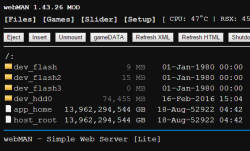
Hi [MENTION=20]habib[/MENTION], [MENTION=89]aldostools[/MENTION]! I found a bug in 4.78 (Habib) and webMAN-MOD 1.43.26 LITE. Incorrectly shows size and date of these files (app_home, root_host). On a firmware 4,76 (Habib) all were correct.

Скриншот 2016-02-17 18.53.17.png
 
Last edited:
Hi [MENTION=20]habib[/MENTION], [MENTION=89]aldostools[/MENTION]! I found a bug in 4.78 (Habib) and webMAN-MOD 1.43.26 LITE. Incorrectly shows size and date of these files (app_home, root_host). On a firmware 4,76 (Habib) all were correct.

View attachment 4869

I think i know why it happens
But its pretty useless to fix since its just redirection
Rebug lite has this since 4.46
 
What is the root_host anyway ?. Ive seen it before mentioned in different files of the firmware, but what does exactlly and how can be used ?

[MENTION=89]aldostools[/MENTION] [MENTION=20]habib[/MENTION] [MENTION=29]Joonie[/MENTION] ... some idea how can we use root_host for our benefit ?... some trick you imagine ?
 
I found very annoying thing with emulation PS1 games on firmware 4.78 cobra from Habib . Absolutely any NTSC ( American or Japanese ) game through your mounted multiMAN or running from CD will come with audio bugs, sound and music in the game will be broken that very annoying and makes the game sound almost impossible. PAL ( Europeans ) games work fine. However, if the mount NTSC through gamesonic manager, then everything works fine .

Thanks
 
I found very annoying thing with emulation PS1 games on firmware 4.78 cobra from Habib . Absolutely any NTSC ( American or Japanese ) game through your mounted multiMAN or running from CD will come with audio bugs, sound and music in the game will be broken that very annoying and makes the game sound almost impossible. PAL ( Europeans ) games work fine. However, if the mount NTSC through gamesonic manager, then everything works fine .

Thanks

That was choosing between bugs because of a bug in vsh created by sony
Use cobra psx launcher or as you said gamesonic or irisman and compatibility will be better for some games
 
What is the root_host anyway ?. Ive seen it before mentioned in different files of the firmware, but what does exactlly and how can be used ?

[MENTION=89]aldostools[/MENTION] [MENTION=20]habib[/MENTION] [MENTION=29]Joonie[/MENTION] ... some idea how can we use root_host for our benefit ?... some trick you imagine ?

I think root host is also just app_home used by dex or something...
 
That was choosing between bugs because of a bug in vsh created by sony
Use cobra psx launcher or as you said gamesonic or irisman and compatibility will be better for some games

I download PSX Launcher from brewology and dont work black screen after execute, can you place a link for working version just for tests? :D

Hey i think "solve" the problem. I Like to have only one program to manage all my ISOs in PS3´s HDD so i choose the Webman Mod and your CFW, with the Ferrox FW i have to install PS2 Classics placeholder, PSP Launcher, PSN Enabler with webman mod plugin and finaly install Webman Mod upadater before that i have to encrypt all my PS2 games (35 isos) to BIN.ENC. To solve the PSX inssue i simple convert the region of all PSX isos to PAL so the hickups on sound and music stoped. Just to clarify things the ferrox FW do not have this inssue with PSX isos but just only run PS2 at the encrypited format and your FW dont so i choose CFW HABIB + Webman Mod to manage all my stuf without many app instaled on PS3.

To convert the PSX iso is simple just get a game in .cue + .bin format, download the patch-it.zip place the .bin in same folder as patch-it choose the .bin, select PAL in country selection and click on "GO" button and place the modified .bin + .cue on PSXISO folder and no more bugs in sound or music.
 
Last edited:
I install it from rebug, but had an error can't install the cobra swap... Can't go back directly to rebug.... Had to rebuild database first... Just telling
 
guys i have some questions if you don't mind.
I havent used my ps3 for years and right now i am standing on rogero 4.55 and i want to upgrade to this CFW.
1.is this CEX cfw?
2.to upgrade from rogero i just rename the file to UPDATE and flash via XMB?
3.will any dlcs/game data and etc will get erased after updating to this cfw from rogero?
4.how to i make sure that QA is enabled from the start?
5.what is cobra toggler?
thx!!
 
guys i have some questions if you don't mind.
I havent used my ps3 for years and right now i am standing on rogero 4.55 and i want to upgrade to this CFW.
1.is this CEX cfw?
2.to upgrade from rogero i just rename the file to UPDATE and flash via XMB?
3.will any dlcs/game data and etc will get erased after updating to this cfw from rogero?
4.how to i make sure that QA is enabled from the start?
5.what is cobra toggler?
thx!!

1. Yes, this is CEX firmware.
2. Yes just rename to PS3\UPDATE\PS3UPDAT.PUP and install from XMB or recovery.
3. Potentially some game data may be corrupted and have to be re downloaded.
4. Highlight network settings in the XMB and hold L1, L2, R1, R2, L3 and down on the D-pad and see if you get an extra menu to check QA.
5. Cobra Toggler is for turning cobra mode on/off. Best just to leeave it on anyway for easy auto loading of plugins and iso support etc.

ummm, that should be it I reckon.
Someone else will correct me if I screwed up. (It's getting late here)
 
1. Yes, this is CEX firmware.
2. Yes just rename to PS3\UPDATE\PS3UPDAT.PUP and install from XMB or recovery.
3. Potentially some game data may be corrupted and have to be re downloaded.
4. Highlight network settings in the XMB and hold L1, L2, R1, R2, L3 and down on the D-pad and see if you get an extra menu to check QA.
5. Cobra Toggler is for turning cobra mode on/off. Best just to leeave it on anyway for easy auto loading of plugins and iso support etc.

ummm, that should be it I reckon.
Someone else will correct me if I screwed up. (It's getting late here)
Thanks also and yes i can see Edy Viewer debug settings and other that means QA is enabled?
 
Back
Top