4.93 EVILNAT (Cobra 8.5)

PS3 4.93 Evilnat w/ Cobra v8.5 - (CEX/PEX/D-PEX) 4.93

@Evilnat , I saw this error again when installing EvilNat 4.91.2 Cobra 8.5 [BETA 3] [PEX]. Same thing happened where halfway through it failed with the below error, it reboot and finished the install after auto attempting it a second time:

  • Error: An error occurred during the update operation. Restart the system and perform the update again. (8002F155)
  • Model: CHECHA01
  • HDD: Upgraded to 1TB HDD
  • Before Update FW: EvilNat 4.91.2 [BETA 2] [PEX] Cobra 8.5
  • Before Update CEX/DEX: Network > * Custom Firmware Tools > CEX2DEX > Show Information:
    • Firmware: 4.91 CEX
    • IDPS: Original
    • TargetID: CEX
    • VSH: DEX
    • XMB Host: CEX
    • Debug Settings: CEX
  • QA: Network > * Custom Firmware Tools > QA Tools > Check QA Flags
  • QA Flags are enabled
I am not sure how to validate that it is actually running BETA 3, last time I could tell because Cobra had updated to 8.5 on the system.
made a account to also state the same thing happen to me while upgrade a 250GB HDD to 500GB HDD auto 2nd attempt completed though


  • Error: An error occurred during the update operation. Restart the system and perform the update again. (8002F155)
  • Model: CECH-2101B
  • HDD: Upgraded to 500GB HDD
  • Before Update FW: EvilNat 4.91.2 [BETA 3] [PEX] Cobra 8.5
  • Before Update CEX/DEX: Network > * Custom Firmware Tools > CEX2DEX > Show Information:
    • Firmware: 4.91 CEX
    • IDPS: Original
    • TargetID: CEX
    • VSH: DEX
    • XMB Host: CEX
    • Debug Settings: CEX
  • QA: Network > * Custom Firmware Tools > QA Tools > Check QA Flags
  • QA Flags are enabled
 
made a account to also state the same thing happen to me while upgrade a 250GB HDD to 500GB HDD auto 2nd attempt completed though


  • Error: An error occurred during the update operation. Restart the system and perform the update again. (8002F155)
  • Model: CECH-2101B
  • HDD: Upgraded to 500GB HDD
  • Before Update FW: EvilNat 4.91.2 [BETA 3] [PEX] Cobra 8.5
  • Before Update CEX/DEX: Network > * Custom Firmware Tools > CEX2DEX > Show Information:
    • Firmware: 4.91 CEX
    • IDPS: Original
    • TargetID: CEX
    • VSH: DEX
    • XMB Host: CEX
    • Debug Settings: CEX
  • QA: Network > * Custom Firmware Tools > QA Tools > Check QA Flags
  • QA Flags are enabled
My chech2501a i updated from 4.90 evilnat to the 4.91 beta 3. I was having freezing issues. So I updated the hard drive to a small ssd I had laying around. Went to reflash the firmware and got the same error when I tried to flash the first time. Second attempt after it rebooted succeeded.
 
My chech2501a i updated from 4.90 evilnat to the 4.91 beta 3. I was having freezing issues. So I updated the hard drive to a small ssd I had laying around. Went to reflash the firmware and got the same error when I tried to flash the first time. Second attempt after it rebooted succeeded.
Also happened to me while updating a DECH2500A. First attempt failed, then succeeded second try. Worked fine after that, no probably nothing to worry about.
 
My chech2501a i updated from 4.90 evilnat to the 4.91 beta 3. I was having freezing issues. So I updated the hard drive to a small ssd I had laying around. Went to reflash the firmware and got the same error when I tried to flash the first time. Second attempt after it rebooted succeeded.
Many thanks for the feedback and glad that it ultimately succeeded following the 2nd automatic attempt following reboot.
We've seen several reports of this particularly when changing/upgrading/downgrading original partition size and/or HDD to SDD conversions. One question though, are you able to confirm VSH state before flashing? Were you on CEX firmware or PEX variant when on 4.90?

Check out this post:
  • Allowed installing of retail PKG on DEX
That's super weird, I was able to successfully flash BETA 3 no problem, however, as mentioned, this was with a full changeover of all options from DEX to CEX beforehand. I have done this consistently since BETA 1, again without issue. I see that in Evilnat's BETA 3 release, it appears as though support was added to flash either way or 'from DEX', however, with these practices in action each time for me on strictly CEX, no issues or errors were encountered at any point throughout all BETAs, so has become common practice for me.
Maybe worth a shot... VSH does start out default as DEX, but an easy toggle with XMB option from CEX2DEX options. Give it a try next go and report back, would be curious to know if you still run into issues.

As for confirming BETA 3, you should see your games list sortable in Alphabetical order now,
Or with XML Host enabled, I have noticed that it displays a bit lower in right hand corner this time around.

Recommended settings before flashing PEX:
  • Firmware: 4.91 CEX
  • IDPS: Original
  • TargetID: CEX
  • VSH: CEX
  • XMB Host: CEX
  • Debug Settings: CEX

We have had one user report of successful attempts irregardless of VSH being on DEX@Frosthaxx, however this was admittedly with errors also, see his post here:
Honestly I don't even change the xmb mode. It runs on all cex but xmb dex and I don't encounter issues even installing the new firmwares.

As far as this goes, if you get this error which I have once before it reloads and will try installation of the pup that was selected. If it's successful the second time around no need to worry. It won't switch the pup you previously loaded with a different one. Your more than likely on beta 3 if that is indeed the pup you tried to install.id be more worried if it constantly fails and no success

However, I can confirm that I personally have upgraded to a 1TB HDD, and have repeatedly flashed and reflashed from version 4.90 to 4.91, and throughout all three BETAs [1,2,&3] without a single error or second boot attempt. For now, it seems to me that the best bet is to ensure a full changeover of all options from DEX to CEX for those of us on retail consoles before flashing a new PEX update, despite VSH being on DEX as default on our PEX variants from start.
**If you started on a CEX variant (not PEX or HYBRID) and you still encountered this error (8002F155 - seems to be a flash memory error, unsure), please advise and thank you for the feedback!

[
My Model: PHAT CECHK-01]
 
Last edited:
Apologies if my question is self-explanatory, but I'm still finding my way around how to utilize the CFW tools on my console and understanding what any given term means, and everyone's been very kind on here to me thus far.

Is there any tool on CFW 4.90 CEX that displays what VSH version I'm on? I don't have the 'Show Information' option that I assume is only availabe in other variants of the CFW that make use of dev tools and such?

Would be thankful for your input.
 
Apologies if my question is self-explanatory, but I'm still finding my way around how to utilize the CFW tools on my console and understanding what any given term means, and everyone's been very kind on here to me thus far.

Is there any tool on CFW 4.90 CEX that displays what VSH version I'm on? I don't have the 'Show Information' option that I assume is only availabe in other variants of the CFW that make use of dev tools and such?

Would be thankful for your input.
If you are on an exclusively CEX firmware, than VSH should also be CEX. If you were on a PEX or REX firmware, than this should be made available via Cobra or Rebug tools >>show information, as you noted.
CEX = Retail console version - Majority of commercially bought Ps3s from the store
DEX = Development Console - Exclusive Development consoles, used by developers for debug
PEX/REX = A rendition of hybrid CEX firmware, with ported over implementations of DEX options, providing us the ability to utilize developer options and mimic behaviors of a Development console (DEX)

Because PEX is a hybrid and some of its features are experimental IMO, it is suggested to change all options back to CEX before jumping to a new FW; this can be disregarded if on a CEX firmware.
I hope this helps, and I am still new to the space also, still trying to learn all that I can. I hope this helps!
 
Last edited:
If you are on an exclusively CEX firmware, than VSH should also be CEX. If you were on a PEX or REX firmware, than this should be made available via Cobra or Rebug tools >>show information, as you noted.
CEX = Retail console version - Majority of commercially bought Ps3s from the store
DEX = Development Console - Exclusive Development consoles, used by developers for debug
PEX/REX = A rendition of hybrid CEX firmware, with ported over implementations of DEX options, providing us the ability to utilize developer options and mimic behaviors of a Development console (DEX)

Because PEX is a hybrid and some of its features are experimental IMO, it is suggested to change all options back to CEX before jumping to a new FW.
I hope this helps, and I am still new to the space also, still trying to learn all that I can. I hope this helps!

Thank you for that breakdown - that all makes sense for sure and is very helpful! Still intend to remain on CEX until the final build of CEX 4.91 is out as I really don't want to throw any wrenches into the works (hah). Am really apprecitiave of this community and all of the work @Evilnat and @aldostools have done as it relates to the tools and applications that help make the CFW what it is.

Being that this is integrated into CEX versions, I'm assuming then that there isn't any tool at the CFW level that would still display this information even though it is known, along with everything else that's included in the 'Show Information' option in the other variants? Just was looking for something in the menu that would give detailed information about the specifications of the CFW, but if not, then that is certainly understandable.

I would also be curious to learn what HDD you use as I've been on the lookout for one to use externally.

Apprecate all your input as always!
 
Thank you for that breakdown - that all makes sense for sure and is very helpful! Still intend to remain on CEX until the final build of CEX 4.91 is out as I really don't want to throw any wrenches into the works (hah). Am really apprecitiave of this community and all of the work @Evilnat and @aldostools have done as it relates to the tools and applications that help make the CFW what it is.

Being that this is integrated into CEX versions, I'm assuming then that there isn't any tool at the CFW level that would still display this information even though it is known, along with everything else that's included in the 'Show Information' option in the other variants? Just was looking for something in the menu that would give detailed information about the specifications of the CFW, but if not, then that is certainly understandable.

I would also be curious to learn what HDD you use as I've been on the lookout for one to use externally.

Apprecate all your input as always!
No tool that I am aware of on CEX versions, however, I could be mistaken as I am still quite new to the space.
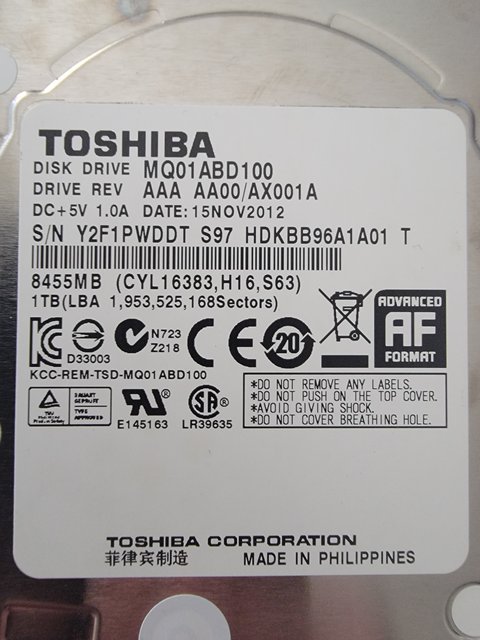
As for the current drive I am using, its a Toshiba 1 TB, albeit this is internal. If I come across any good recommendations for external options, I will be certain to share in the like.

1TB.jpg
 
Many thanks for the feedback and glad that it ultimately succeeded following the 2nd automatic attempt following reboot.
We've seen several reports of this particularly when changing/upgrading/downgrading original partition size and/or HDD to SDD conversions. One question though, are you able to confirm VSH state before flashing? Were you on CEX firmware or PEX variant when on 4.90?

Check out this post:


We have had one user report of successful attempts irregardless of VSH being on DEX@Frosthaxx, however this was admittedly with errors also, see his post here:


However, I can confirm that I personally have upgraded to a 1TB HDD, and have repeatedly flashed and reflashed from version 4.90 to 4.91, and throughout all three BETAs [1,2,&3] without a single error or second boot attempt. For now, it seems to me that the best bet is to ensure a full changeover of all options from DEX to CEX for those of us on retail consoles before flashing a new PEX update, despite VSH being on DEX as default on our PEX variants from start.
**If you started on a CEX variant (not PEX or HYBRID) and you still encountered this error (8002F155 - seems to be a flash memory error, unsure), please advise and thank you for the feedback!

[
My Model: PHAT CECHK-01]
I can confirm that before the 4.91 beta 3 update, I was on 4.90 pex and vsh was cex. Also I want to add that before hard drive swap. I updated to 4.91 beta 3 with original hard drive without errors from xmb. But as I stated before, I was having freezing issues with original hdd (standard drive, not ssd). However, after update with new hdd. The system was running smooth. After I installed webman mod, it froze again. But just once, hasn't froze since.
 
Last edited:
This feature does not work I'm not sure what I'm doing wrong or this is a issue I keep getting a air error message for this Spoof MAC: Spoofs MAC in LV1 with a valid MAC from "/dev_usb/MAC.txt
Make sure you are using a FAT32 USB device and MAC.txt file is in the root of it, and check if the new MAC is in plain text

@Chubs I have tried installing DB 4.91 and it let me install it and return to my CFW without problems. Did you check if you have anything in the Debug Settings that could be causing conflicts? Like Debug Update, etc... Or if you are using the DEX kernel
 
I am also getting the error code 8002F155 on first attempt with new beta 4. I am using an ssd for my main drive but it never had issues with 4.90 cfw or 4.91 until the betas. Will there be a fix for this?
 
Make sure you are using a FAT32 USB device and MAC.txt file is in the root of it, and check if the new MAC is in plain text

@Chubs I have tried installing DB 4.91 and it let me install it and return to my CFW without problems. Did you check if you have anything in the Debug Settings that could be causing conflicts? Like Debug Update, etc... Or if you are using the DEX kernel

@Evilnat I wish I had better response with the latest BETA 4 firmware but I have tested 4.91.1, 4.91.2 Betas 1-4 in the following way and none of them are allowing me to use Dual Boot firmware from the System Update Debug Menu options (/dev_hdd0/updater/01/DualBoot-Hybrid_4.91.PUP).

I am however able to use this workflow to install the dual Boot Firmware via the System Update Debug Menu:
  • Use Case: This allows me to move between CFW, Dual Boot + Hybrid and HEN without having to constantly update files on USB or plug in / remove multiple USB drives.
  • Internal HDD: Evilnat 4.91.1+ [PEX] > Evilnat 4.90.1 [CEX] or [PEX] > littlebalups Dual Boot + Hybrid 4.91
    • This allows to move to OFW type OS for messing around with HEN or just staying as close to OFW as I dare to be for doing things on PSN.
  • USB Drive: 4.91.2 [PEX] [BETA 4]
    • This allows me to revert back to latest CFW.
    • Note: The "Final Note" error below is also seen here when installing from USB drive during this process.
Question:
  • Is there any other settings or logs I can provide to troubleshoot this further? I am not sure if I am doing something wrong on my side.
Additional Details:
  • Model: CHECHA01
  • HDD: Upgraded to 1TB HDD (not SSD, but HDD)
  • Firmwares allowing Dual Boot installation via System Update Debug Menu:
    • 4.90.1 [CEX]
    • 4.90.1 [PEX]
  • Firmwares NOT allowing Dual Boot installation via System Update Debug Menu:
    • EvilNat 4.91.2 [BETA 4] [PEX]
    • EvilNat 4.91.2 [BETA 3] [PEX]
    • EvilNat 4.91.2 [BETA 2] [PEX]
    • EvilNat 4.91.2 [BETA 1] [PEX]
    • EvilNat 4.91.1 [D-PEX converted to PEX] (Updated 03-12-2024 [11.14pm])
    • EvilNat 4.91.1 [PEX] (Updated 03-12-2024 [11.14pm])
  • Error Message: The data type is not supported. (80029C9C)
  • CEX/DEX: Network > * Custom Firmware Tools > CEX2DEX > Show Information:
    • Firmware: 4.91 CEX
    • IDPS: Original
    • TargetID: CEX
    • VSH: CEX & DEX (Tried with both on "4.91.2 [BETA 4] [PEX]" & "4.91.1 [PEX]")
    • XMB Host: CEX
    • Debug Settings: CEX
  • QA: Network > * Custom Firmware Tools > QA Tools > Check QA Flags
    • QA Flags are Enabled
  • System Update Settings: Settings > Debug Settings > System Update Debug: On
    • Note: The System Update debug options appear in Settings > System Update for 4.90.1 [CEX], however I am unable to enable VSH DEX to toggle any debug settings as there is no CEX2DEX menu after installing (I assume this is a PEX specific feature and I also assume it was left as enabled as a leftover from PEX firmware(s) previously installed).
  • @Coro mentioned that some settings had to be adjusted by you to allow the DualBoot firmware to install properly via 4.87 firmware, not sure if this is applicable here: https://www.psx-place.com/threads/littlebalups-4-91-dual-boot-firmwares.39799/page-3#post-384610
Final Note:

On all 4.91.2 firmware [BETA's 1-4] I received the below error message during update and the update had to install 2 times, successfully completing on the second attempt each time. I can confirm this was whether I had VSH set to CEX or DEX and only for the 4.91.2 firmwares. It also happens whether I installed from Debug System Update menu (/dev_hdd0/updater/01/<firmware.pup>) or USB drive directly (/dev_usb000/PS3/Update/PS3UPDAT.PUP). I did not see this error message when installing 4.91.1 or 4.90.1 firmwares (retested again today).
 
Beta 4 is out.
Thanks mate I forgot to mention it

BETA 4: https://mega.nz/folder/8YF2RCiB#YVDxV2LYLURPa3RxlCAvrQ
@Evilnat I wish I had better response with the latest BETA 4 firmware but I have tested 4.91.1, 4.91.2 Betas 1-4 in the following way and none of them are allowing me to use Dual Boot firmware from the System Update Debug Menu options (/dev_hdd0/updater/01/DualBoot-Hybrid_4.91.PUP).

I am however able to use this workflow to install the dual Boot Firmware via the System Update Debug Menu:
  • Use Case: This allows me to move between CFW, Dual Boot + Hybrid and HEN without having to constantly update files on USB or plug in / remove multiple USB drives.
  • Internal HDD: Evilnat 4.91.1+ [PEX] > Evilnat 4.90.1 [CEX] or [PEX] > littlebalups Dual Boot + Hybrid 4.91
    • This allows to move to OFW type OS for messing around with HEN or just staying as close to OFW as I dare to be for doing things on PSN.
  • USB Drive: 4.91.2 [PEX] [BETA 4]
    • This allows me to revert back to latest CFW.
    • Note: The "Final Note" error below is also seen here when installing from USB drive during this process.
Question:
  • Is there any other settings or logs I can provide to troubleshoot this further? I am not sure if I am doing something wrong on my side.
Additional Details:
  • Model: CHECHA01
  • HDD: Upgraded to 1TB HDD (not SSD, but HDD)
  • Firmwares allowing Dual Boot installation via System Update Debug Menu:
    • 4.90.1 [CEX]
    • 4.90.1 [PEX]
  • Firmwares NOT allowing Dual Boot installation via System Update Debug Menu:
    • EvilNat 4.91.2 [BETA 4] [PEX]
    • EvilNat 4.91.2 [BETA 3] [PEX]
    • EvilNat 4.91.2 [BETA 2] [PEX]
    • EvilNat 4.91.2 [BETA 1] [PEX]
    • EvilNat 4.91.1 [D-PEX converted to PEX] (Updated 03-12-2024 [11.14pm])
    • EvilNat 4.91.1 [PEX] (Updated 03-12-2024 [11.14pm])
  • Error Message: The data type is not supported. (80029C9C)
  • CEX/DEX: Network > * Custom Firmware Tools > CEX2DEX > Show Information:
    • Firmware: 4.91 CEX
    • IDPS: Original
    • TargetID: CEX
    • VSH: CEX & DEX (Tried with both on "4.91.2 [BETA 4] [PEX]" & "4.91.1 [PEX]")
    • XMB Host: CEX
    • Debug Settings: CEX
  • QA: Network > * Custom Firmware Tools > QA Tools > Check QA Flags
    • QA Flags are Enabled
  • System Update Settings: Settings > Debug Settings > System Update Debug: On
    • Note: The System Update debug options appear in Settings > System Update for 4.90.1 [CEX], however I am unable to enable VSH DEX to toggle any debug settings as there is no CEX2DEX menu after installing (I assume this is a PEX specific feature and I also assume it was left as enabled as a leftover from PEX firmware(s) previously installed).
  • @Coro mentioned that some settings had to be adjusted by you to allow the DualBoot firmware to install properly via 4.87 firmware, not sure if this is applicable here: https://www.psx-place.com/threads/littlebalups-4-91-dual-boot-firmwares.39799/page-3#post-384610
Final Note:

On all 4.91.2 firmware [BETA's 1-4] I received the below error message during update and the update had to install 2 times, successfully completing on the second attempt each time. I can confirm this was whether I had VSH set to CEX or DEX and only for the 4.91.2 firmwares. It also happens whether I installed from Debug System Update menu (/dev_hdd0/updater/01/<firmware.pup>) or USB drive directly (/dev_usb000/PS3/Update/PS3UPDAT.PUP). I did not see this error message when installing 4.91.1 or 4.90.1 firmwares (retested again today).
Thank you very much for all the details my friend!

I have tried the same steps that you mentioned and it did let me install DB 4.91 from the internal HDD with System Update Debug enabled

This is my current configuration:
  • Model: CHECL04
  • HDD: 80GB (Original)
  • CEX/DEX: Network > * Custom Firmware Tools > CEX2DEX > Show Information:
    • Firmware: 4.91 CEX
    • IDPS: Original
    • TargetID: CEX
    • VSH: DEX
    • XMB Host: CEX
    • Debug Settings: CEX
  • QA: Network > Custom Firmware Tools > QA Tools > Check QA Flags
    • QA Flags are Enabled
  • System Update Settings: Settings > Debug Settings > System Update Debug: On
Have you used any PUP downgrader 9.99? Have you tried being in CEX and disabling and re-enabling the QA flags?
 
Hi Evilnat, I also installed the beta 4 and have noticed that update works for me only in the 2nd run. 8002F155. I just noticed that I can't open the developer settings in Cex mode. Before it worked
 
Thanks mate I forgot to mention it

BETA 4: https://mega.nz/folder/8YF2RCiB#YVDxV2LYLURPa3RxlCAvrQ

Thank you very much for all the details my friend!

I have tried the same steps that you mentioned and it did let me install DB 4.91 from the internal HDD with System Update Debug enabled

This is my current configuration:
  • Model: CHECL04
  • HDD: 80GB (Original)
  • CEX/DEX: Network > * Custom Firmware Tools > CEX2DEX > Show Information:
    • Firmware: 4.91 CEX
    • IDPS: Original
    • TargetID: CEX
    • VSH: DEX
    • XMB Host: CEX
    • Debug Settings: CEX
  • QA: Network > Custom Firmware Tools > QA Tools > Check QA Flags
    • QA Flags are Enabled
  • System Update Settings: Settings > Debug Settings > System Update Debug: On
Have you used any PUP downgrader 9.99? Have you tried being in CEX and disabling and re-enabling the QA flags?

Have you used any PUP downgrader 9.99?:
  • I personally have not, but I bought this console used a couple years back. It already had and older version of EvilNat installed on it when I purchased it, not sure if they ever used this tool at some point or another.
Have you tried being in CEX and disabling and re-enabling the QA flags?
  • I just tried the following:
    • 4.91.1 [PEX]
      • Disable QA Flags, Hard reboot
      • Enable QA Flags, Hard reboot
      • Install Dual Boot + Hybrid: Same error blocks me from installing.
      • Install 4.91.2 [BETA 4] [PEX]: Same error that halts the install, reboots and installs a second time successfully.
    • 4.91.2 [BETA 4] [PEX]
      • Disable QA Flags, Hard reboot
      • Enable QA Flags, Hard reboot
      • Install Dual Boot + Hybrid: Same error blocks me from installing.
      • Note: I see new flags for Advanced QA Flag, however this seems new and states to use with caution.
Also, reading through the other people that have mentioned they see the installation issues, they seem to have a combination of Phat and Slim models of various types.

I was running on D-PEX for a long time before I started testing 4.91 CFW's, could any settings be leftover from when that was installed that I should double check? Is there any dumps from my device or logs from my device that I should obtain and share with you?
 
made a account to also state the same thing happen to me while upgrade a 250GB HDD to 500GB HDD auto 2nd attempt completed though


  • Error: An error occurred during the update operation. Restart the system and perform the update again. (8002F155)
  • Model: CECH-2101B
  • HDD: Upgraded to 500GB HDD
  • Before Update FW: EvilNat 4.91.2 [BETA 3] [PEX] Cobra 8.5
  • Before Update CEX/DEX: Network > * Custom Firmware Tools > CEX2DEX > Show Information:
    • Firmware: 4.91 CEX
    • IDPS: Original
    • TargetID: CEX
    • VSH: DEX
    • XMB Host: CEX
    • Debug Settings: CEX
  • QA: Network > * Custom Firmware Tools > QA Tools > Check QA Flags
  • QA Flags are enabled
Just wanted to add i just now updated from "CFW 4.91.2 Evilnat Cobra 8.5 [PEX] [BETA 3]" -to- "CFW 4.91.2 Evilnat Cobra 8.5 [PEX] [BETA 4]" with no issues with my upgraded 500GB HDD

What caused the error "(8002F155)" i believe for me before was my HDD upgrade but then again i do remember clicking to enable QA Flags at least once sometime before my HDD swap

I was on "CFW 4.91.2 Evilnat Cobra 8.5 [PEX] [BETA 3]" i swapped my 250GB (OEM) out for a 500GB HDD "Blank" the PS3 then told me the HDD was corrupted and needed to be formatted the PS3 completed the format then proceeded to install "CFW 4.91.2 Evilnat Cobra 8.5 [PEX] [BETA 3]" from my usb that was in the right usb port which then led to the error "8002F155" which then the PS3 proceeded to a 2nd attempt which completed successfully.

This PS3 was a virgin until i installed "CFW 4.91 Evilnat Cobra 8.4 [PEX]" to it
 
Last edited:
Thanks mate I forgot to mention it

BETA 4: https://mega.nz/folder/8YF2RCiB#YVDxV2LYLURPa3RxlCAvrQ

Thank you very much for all the details my friend!

I have tried the same steps that you mentioned and it did let me install DB 4.91 from the internal HDD with System Update Debug enabled

This is my current configuration:
  • Model: CHECL04
  • HDD: 80GB (Original)
  • CEX/DEX: Network > * Custom Firmware Tools > CEX2DEX > Show Information:
    • Firmware: 4.91 CEX
    • IDPS: Original
    • TargetID: CEX
    • VSH: DEX
    • XMB Host: CEX
    • Debug Settings: CEX
  • QA: Network > Custom Firmware Tools > QA Tools > Check QA Flags
    • QA Flags are Enabled
  • System Update Settings: Settings > Debug Settings > System Update Debug: On
Have you used any PUP downgrader 9.99? Have you tried being in CEX and disabling and re-enabling the QA flags?

I was able to run another smoke test this morning. When trying to install 4.90 dual boot on top of EvilNat 4.90.1 PEX I get the same error message (80029C9C). It seems if I try to install on top of the same firmware version # it doesn't work, but if I am "upgrading" it works just fine. This leads me to some questions…
  • Is there something wrong with my QA settings?
  • Is this something that can be fixed with some sort of new option in the CFW custom settings?
    • Is the 9.99 downgrader that you mentioned a potential fix or something that could be added to EvilNat CFW?
 
Is the 9.99 downgrader that you mentioned a potential fix or something that could be added to EvilNat CFW?
9.99 downgrader is a pup file that says that it is firmware version 9.99 but is actually a 3.55 cfw pup. he was asking if you tried to install it then the dualboot pup as a work around.
 
Back
Top