PS3 Artemis PS3 (r6.3): Cheating system updated with 4.8x CFW Support & New Features added

Developer @dnawrkshp originally ported Lazy Bastards's Artemis to the PS3. The PlayStation 3 port is a cheating system for applying cheat to games utilized on CFW/HEN enabled console's that also comes with a companion plugin (sprx) for additional functionality. @bucanero who you may recall is the developer who ported PKGi recently to the PS3. has now turned attention to updating Artemis-PS3 for 4.85 use and the developer has added two new features to go along. First, we have an Online Cheat Database that will allow you keep your cheats up to date with a simple online download and also a Local Database Update feature has also been incorporated into the system. Also a shoutout to @Berion who's designs still looks great in the GUI :) .
-STLcardsWS

main.png

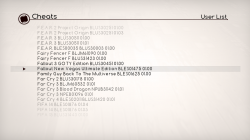
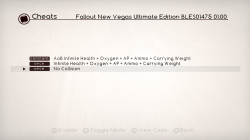
  • games.png cheats.png

    Hello,

    As a little side project, I've forked Artemis PS3 and added the following network features:
    • Online Cheat Database: access to the latest cheats for over +2300 games online.
    • Local Database Update: download and update your local cheat database with the latest codes.

    on the UI, these are the new features available:
    • Added Online DB option (main menu)
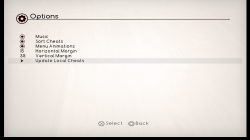
    • Added Update local cheats (options menu)
    • Added :but l1:/:but r1: triggers to improve game list browsing
    • Added user confirmation dialog when unloading the plugin ( :but square: on the main menu)
    • Added exit to XMB without changes ( :but cir: on the main menu)

    I've also included the modded Artemis plugin from vr5 (by @haxxxen ).

    Find more information at https://bucanero.github.io/ArtemisPS3/

    Submitting cheat codes to the online database

    To share new games and cheat codes with the community:
    1. Fork the repository and add your changes to this folder.
    2. Submit a pull request so the updated cheats are available to every Artemis user.

    Source code available on GitHub

  • Artemis r6.3
    https://github.com/bucanero/ArtemisPS3/releases/tag/r6.3

    Added

    • Alternative Joker Select plugin
    • Code Type 5 support using Joker plugin (See notes)
    Fixed

    • Fix online database URL
    Misc

    • Update offline cheat database with latest codes

    .Artemis r6.2
    https://github.com/bucanero/ArtemisPS3/releases/tag/r6.2

    Added
    • Analog stick support
    • Uses PS3MAPI for plugin management
      • Detects if internal/external plugin is loaded
      • External plugin can be loaded via boot_plugins.txt, wMM, etc.
    • New and updated cheat codes
    • Added "Installed games" filter option
    Removed
    • Remove MAMBA/PRX Loader
    Changes
    • Uses original Artermis r5 plugin as default

    .Artemis r6.1
    https://github.com/bucanero/ArtemisPS3/releases/tag/r6.1

    Added
    • Local Cheat DB installer on first run
    • New version check and auto-update
    • New "Clean local cache" option
    • New plugin selector option
    • New loading screen transitions
    • Shortcut to Main screen from Cheats screen by pressing START
    Fixed
    • Improved game list parsing (detect Title-IDs and versions)

    .Artemis r6.net
    https://github.com/bucanero/ArtemisPS3/releases/tag/r6.net

    Added
    • Added network features:
      • Online Cheat Database: online access to the latest cheats for over +2300 games.
      • Local Database Update: download and update your local cheat database with the latest codes.
    • Added L1/R1 triggers to improve game list browsing
    • Added user confirmation dialog when unloading the plugin (SQUARE on the main menu)
    • Added exit to XMB without changes (CIRCLE on the main menu)
    • Updated to MAMBA PRX Loader 4.84.2
    • Updated Artemis .sprx plugin to vr5 version by @haxxxen

  • ArtemisPS3
    options.png
    An Open Source Playstation 3 Hacking System created under the Project Artemis initiative (http://www.gamehacking.org/artemis)​

    Your PS3 must be running CFW 3.55 or above (DEX and CEX supported)!

    Installing Artemis PS3


    Installing cheat codes

    • Choose between installing the .ncl file on a flash drive or in the Artemis installation directory
    • For the flash drive make a new folder on the root called USERLIST
    • Inside the folder place any .ncl files inside it
    • Insert the usb drive into the right usb slot of your PS3 and launch Artemis PS3
    • For the installation directory method launch an FTP server on your PS3 (multiman)
    • Navigate to /dev_hdd0/game/ARTPS3001/USRDIR/USERLIST/
    • Place any .ncl files inside the folder and launch Artemis PS3

    Using Artemis

    • Launch Artemis from the XMB and selected your codes
    • Once you have selected your codes Press X on Start in the main menu
    • You should hear a single beep (if you hear three MAMBA failed to install)
    • From here you can launch the game or launch homebrew to mount the game
    • When the game has launched, a notification will appear telling you to press Start to attach
    • Once you are ready to use your codes in the game, open the in game XMB by pressing the PS button
    • HOLD Start until Artemis says that it has attached
    • At this point any codes chosen to constant write will be constantly writing
    • For any single write codes you wish to write again, just enter the in game XMB again and hold Start
    • If you wish the detatch (and therefore stop constant writing), enter the in game XMB and HOLD Select

    Creating cheat lists (.ncl)

    • NetCheat List Files are built into NetCheat PS3
    • Download and run NetCheatPS3
    • In the codes tab create a new code and name it as you wish
    • Within the textbox enter any NetCheat PS3 codes (or use the Codelist by clicking the square on the bottom left)
    • Finally click Save All and specify a save location for the new .ncl

    Creating advanced cheat lists (.ncl)


    New in Artemis PS3 is the ability to add option tags.
    These tags enable you to specify options for a code that has multiple effects for one address.
    Using tags instead of multiple codes condenses the overall cheats list.
    The format for an option tag is very specific and must be used exactly as described.
    A tag begin with brackets that surround an ID ([Z]).
    This ID must be a collection of capital Z's.
    For instance, a tag such as [ZZZZ] has an ID of ZZZZ. [zz] is not a valid ID.
    Following the opening tag are the elements, or options.
    Each element begins with the value that the option represents, an equal sign (=), and the name of the option.
    Elements are separated by semicolons (;).
    So right now an option tag would look something like this: [ZZ]0010=This is 0x10;0020=This is 0x20
    But now we have to end the tag. To end an option tag you simply add a forward slash (/) in front of the ID and surround that with brackets ([/Z]).
    Finally to actually implement this as a value for a code, simply put the ID of the tag anywhere in the code you'd like.
    For instance, in Jak 1 there are 4 different types of eco states you can be in. Red, blue, green, and yellow.
    Each uses the same line. So the appropriate code using option tags would be:
    0 201FEE08 ZZ
    0 201FEE18 FFFFFF7F
    0 201FEE0C 00000040
    [ZZ]01=Yellow;02=Red;03=Blue;04=Green[/ZZ]


Last edited:
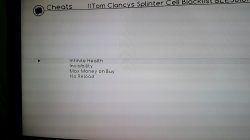
Hello guys good morning do you know if there are codes available for tom clancys splinter cell blacklist? Thanks in advance
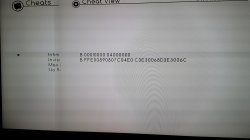
Tom Clancys Splinter Cell Kara Listesi BLES01766 v1.00 v1.01 v1.02 v1.03 sonsuz hp
0
B 00010000 04000000
B FFE00890807C04E0 C3E30068D3E3006C
#
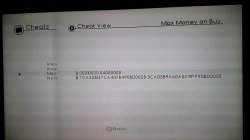
Yeniden Yükleme Yok
0
B 00010000 04000000
B 93BC00042C1E0000 907C00042C1E0000
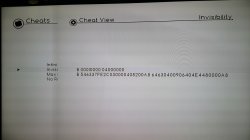
# Invisibility
0
B 00010000 04000000
B 546337FE2C030000408200A8 64630400906404E4480000A8
#
 
Last edited:
Tom Clancys Splinter Cell Kara Listesi BLES01766 v1.00 v1.01 v1.02 v1.03 sonsuz hp
0
B 00010000 04000000
B FFE00890807C04E0 C3E30068D3E3006C
#
Yeniden Yükleme Yok
0
B 00010000 04000000
B 93BC00042C1E0000 907C00042C1E0000
# Invisibility
0
B 00010000 04000000
B 546337FE2C030000408200A8 64630400906404E4480000A8
#
Thanks a Lot rambo i Will try to add those manually, have a Nice one
 
Ohh and rambo by any chance donyou have the ones from BLUS31025 Tom Clancy's splinter cell blacklist? I Will really appreciate it
 
Ohh and rambo by any chance donyou have the ones from BLUS31025 Tom Clancy's splinter cell blacklist? I Will really appreciate it
0
B 00010000 04000000
B FFE00890807C04E0 C3E30068D3E3006C
#
Yeniden Yükleme Yok
0
B 00010000 04000000
B 93BC00042C1E0000 907C00042C1E0000
# Invisibility
0
B 00010000 04000000
B 546337FE2C030000408200A8 64630400906404E4480000A8
#
BLES01766
BLUS31025
NPUB31248
NPEB01379
works on all
 
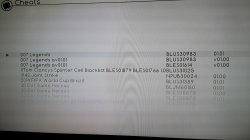
great thanks a lot rambo, by the way i tried to use netcheat to create the ncl file, do you know on this case this is a joker command code or a standard ncl one?
 
ohh great thanks a lot have a wondeful day at work, i was trying to create it on my end but artemis it crashed jaja i will really appreciate it
 

Attachments

  • 20220304_202332.jpg
    20220304_202332.jpg
    676.9 KB · Views: 54
  • 20220304_202342.jpg
    20220304_202342.jpg
    557.1 KB · Views: 52
  • 20220304_202350.jpg
    20220304_202350.jpg
    582.7 KB · Views: 54
  • 20220304_202357.jpg
    20220304_202357.jpg
    565.4 KB · Views: 55
  • 20220304_202404.jpg
    20220304_202404.jpg
    545.1 KB · Views: 55
also rambo i wanted to ask you as well, when i checked there is also an another game that if possible i would like to check with you if there is a chance that the existing codes for the current version can be also applicable into the updated version, the game that i was wondering about it is dead rising 2, i saw that the codes form the version 1.00 those are working fine and its pretty cool jeje, but on the update 1.02 those are not longer working, however i saw some of them available on the 1.02 version, the game code is BLUS30439 and if you compare on the 1.00 version there are multiple codes more than on the 1.02 version, thanks a lot i will really appreciate it and have a nice day as well
 
also rambo i wanted to ask you as well, when i checked there is also an another game that if possible i would like to check with you if there is a chance that the existing codes for the current version can be also applicable into the updated version, the game that i was wondering about it is dead rising 2, i saw that the codes form the version 1.00 those are working fine and its pretty cool jeje, but on the update 1.02 those are not longer working, however i saw some of them available on the 1.02 version, the game code is BLUS30439 and if you compare on the 1.00 version there are multiple codes more than on the 1.02 version, thanks a lot i will really appreciate it and have a nice day as well
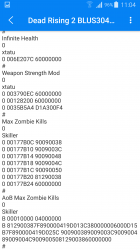
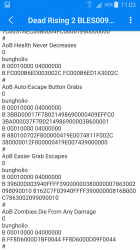
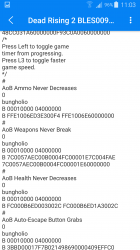
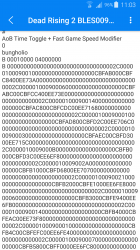
There are 11 codes that work in 1.02, aob codes, I think they will work in 1.02, have you tried these codes?
 

Attachments

  • Screenshot_2022-03-05-11-04-13.png
    Screenshot_2022-03-05-11-04-13.png
    226.3 KB · Views: 38
  • Screenshot_2022-03-05-11-03-46.png
    Screenshot_2022-03-05-11-03-46.png
    241.1 KB · Views: 37
  • Screenshot_2022-03-05-11-03-42.png
    Screenshot_2022-03-05-11-03-42.png
    225.7 KB · Views: 35
  • Screenshot_2022-03-05-11-03-29.png
    Screenshot_2022-03-05-11-03-29.png
    270.6 KB · Views: 38
yes rambo i tried those but somehow those ones do not work, however as far as you are showing me this information i will give them a try to see if those can work properly, thanks a lot again and have a nice day
 
yes rambo i tried those but somehow those ones do not work, however as far as you are showing me this information i will give them a try to see if those can work properly, thanks a lot again and have a nice day
yes sir you are correct jaja those codes worked properly into the 1.02 version thanks a lot rambo
 
Far Cry 3
BLUS30687
BLES01137
BLJM60532
NPEB01096
NPUB30825 1.00 1.05 GOD MODE
0
B 00010000 04000000
B C043001038600000FC02080041810008386000014E800020F821FF91 6000000038600000FC02080041810008600000014E800020F821FF91
#
Infinite Ammo
0
B 00010000 04000000
B 4181000C386000004800005C 60000000600000004800005C
#
Max Skill Points on Use
0
B 00010000 04000000
B 80BF00382C0500004182000C30A5FFFF 38A000632C0500004182000C30A5FFFF
#
Max money
0
B 00010000 04000000
B 7C8428102C04000040800008 388027102C04000040800008
#
 
NPUB30817 max Infinite All Weapons
0
B 00010000 04000000
B 910A0010992B000498AA000490CA0008 910A0010992B000498AA000438E00063
#
i like this game
 
Far Cry Classic NPUB30737 01.00 Ammo + Health + Armor Modifiers
0
ramazan oluc
0 00CAFCA0 3FA00129
0 00CAFCA4 83BDF010
0 00CAFCA8 2B9D0000
0 00CAFCAC 419E0040
0 00CAFCB0 381D00A0
0 00CAFCB4 7F9E0040
0 00CAFCB8 419E003C
0 00CAFCBC 381D00A4
0 00CAFCC0 7F9E0040
0 00CAFCC4 419E0030
0 00CAFCC8 381D00A8
0 00CAFCCC 7F9E0040
0 00CAFCD0 419E0024
0 00CAFCD4 381D00AC
0 00CAFCD8 7F9E0040
0 00CAFCDC 419E0018
0 00CAFCE0 381D00B0
0 00CAFCE4 7F9E0040
0 00CAFCE8 419E000C
0 00CAFCEC 7C20F7AE
0 00CAFCF0 4E800020
0 00CAFCF4 801E0000
0 00CAFCF8 2B800000
0 00CAFCFC 419D000C
0 00CAFD00 38000001
0 00CAFD04 901E0000
0 00CAFD08 7C20F7AE
0 00CAFD0C 83BE0000
0 00CAFD10 7F9D0040
0 00CAFD14 419D0008
0 00CAFD18 901E0000
0 00CAFD1C 4E800020
0 009B8080 48CAFCA3
#
Player Data Location Dump
0
ramazan oluc
0 00C884F0 3C600129
0 00C884F4 93E3F010
0 00C884F8 807F00A0
0 00C884FC 4E800020
0 0031530C 48C884F3
# bucunero
can you change my name not rambo9000 can you write my real name ramazanoluc 99vidas serious sam battlefield hardline Tom Clancys Splinter Cell Blacklist farcry psn
 
@bucanero

Is there a way (button combo) to completely unload Artemis from RAM after patching in ASM/AoB codes?

The reason is because some games crash upon exiting and also plugins like the joker plugin causes XMB input lag.
 
@bucanero

Is there a way (button combo) to completely unload Artemis from RAM after patching in ASM/AoB codes?

The reason is because some games crash upon exiting and also plugins like the joker plugin causes XMB input lag.

if you have webman mod, you can try unloading it using the PS3MAPI web interface.

Go to your http://ps3.ip , click on the PS3MAPI menu and you should see Artemis loaded on the Slot #5 ... Then click on "unload" and ps3mapi will remove the Artemis plugin.
 
if you have webman mod, you can try unloading it using the PS3MAPI web interface.

Go to your http://ps3.ip , click on the PS3MAPI menu and you should see Artemis loaded on the Slot #5 ... Then click on "unload" and ps3mapi will remove the Artemis plugin.

So not possible with a button. Thanks for letting me know.

I'll keep that in mind and may give it a try sometime.
 

Similar threads

Featured content

Trending content

Back
Top