• Official PS3 Toolset is now supporting 4.92 Firmware

    View Official Release Post for additional information HERE

PS3 [BG Toolset] User Issues and Dump Submissions

I don't understand why your console is not booting to xmb still. I do not think it is patch related, but not 100% sure.

I sent you a pm for a pup to try that @Evilnat created out of Rebug 4.86.1 lite.

If it don't work, we can try getting one made that does


I'll try it right now. Give you feedback in a few. Thanks

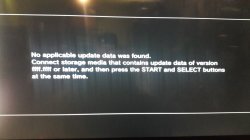
Unfortunately it keeps giving the same error asking for ffff.ffff version or higher.:mad new:

I change the file from Rebug 4.86.1 LITE (SYSCON 9999.9999).PUP to PS3UPDAT.PUP. It's like that, correct?
 
Last edited:
I'll try it right now. Give you feedback in a few. Thanks

Unfortunately it keeps giving the same error asking for ffff.ffff version or higher.:mad new:

I change the file from Rebug 4.86.1 LITE (SYSCON 9999.9999).PUP to PS3UPDAT.PUP. It's like that, correct?

PM sent with a new PUP
 
I'll try asap and give you feedback. Thanks

Already try it mate and result was the same.

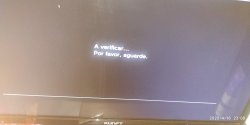
These are the steps I do.

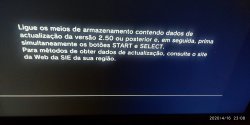
Go into Recovery mode.
Choose option 6 with the pen (file renamed to PS3UPDAT.PUP) plugged in the right usb door near to blue-ray.
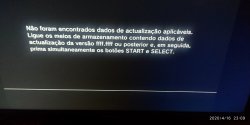
Press start and select at the same time.
The I receive a message asking for ffff.ffff or above.

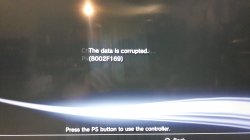
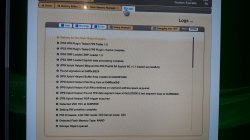
Leave you the images to check. Sorry to be in portuguese.
 

Attachments

  • IMG_20200416_230834.jpg
    IMG_20200416_230834.jpg
    3.3 MB · Views: 784
  • IMG_20200416_230846.jpg
    IMG_20200416_230846.jpg
    4.6 MB · Views: 488
  • IMG_20200416_230905.jpg
    IMG_20200416_230905.jpg
    3.1 MB · Views: 777
  • Firmware Version: OFW 4.86
i just actually noticed this, but your firmware version in the original dump is 4.85, not 4.86. This in itself does not matter concerning your issue, but i thought i would mention it because this illustrates another issue, which is submission reports of problems are not always correct and that can lead to more work being done or things looked at that are not needed.

There are a few major issues here:
  • You did not make a dump after patched, so we cannot verify what was written or not written (this is not the fault of the user, as we never suggested users should have to do this)
  • You formatted the hard drive (this should not actually affect your situation with NAND because the XMB should still load with NO HDD or a fresh formatted one)
  • You cannot access XMB (this is a mystery to most of us and is uncertain just why your NAND is not acting the way it should in this situation, but without access to XMB, you have no access to Web Browser, and no access to use the fix)
  • The hex and high version (FFFF.FFFF, 9999.9999) PUPs are pretty much unheard of and untested by the community as a whole, and to a further extent, how the ps3 makes its determination to be able to even install such a PUP

We are trying to figure out what can be done for you, but as of right now, there are no viable paths for you, unless XMB can be loaded or the PUP can be installed with such an awkward versioning

EDIT #1:
by chance did you try using or use the old writer on 4.85 with the orange screen at any point before toolset? All of those links have been removed from ps3xploit site when toolset released. Only asking because that would screw things up

EDIT #2:
Did you click the "Strict Mode" button in toolset? If no, then good. If you did, then anything could have been written

EDIT #3:
Have you ever installed or enabled PS3HEN on this system, prior to using toolset or during? This one is a stretch, i know, but we need to know exact conditions and as much history as possible, without a patched dump to check anything, it's almost impossible to know

 
Last edited:
i just actually noticed this, but your firmware version in the original dump is 4.85, not 4.86. This in itself does not matter concerning your issue, but i thought i would mention it because this illustrates another issue, which is submission reports of problems are not always correct and that can lead to more work being done or things looked at that are not needed.

There are a few major issues here:
  • You did not make a dump after patched, so we cannot verify what was written or not written (this is not the fault of the user, as we never suggested users should have to do this)
  • You formatted the hard drive (this should not actually affect your situation with NAND because the XMB should still load with NO HDD or a fresh formatted one)
  • You cannot access XMB (this is a mystery to most of us and is uncertain just why your NAND is not acting the way it should in this situation, but without access to XMB, you have no access to Web Browser, and no access to use the fix)
  • The hex and high version (FFFF.FFFF, 9999.9999) PUPs are pretty much unheard of and untested by the community as a whole, and to a further extent, how the ps3 makes its determination to be able to even install such a PUP

We are trying to figure out what can be done for you, but as of right now, there are no viable paths for you, unless XMB can be loaded or the PUP can be installed with such an awkward versioning

EDIT #1:
by chance did you try using or use the old writer on 4.85 with the orange screen at any point before toolset? All of those links have been removed from ps3xploit site when toolset released. Only asking because that would screw things up

EDIT #2:
Did you click the "Strict Mode" button in toolset? If no, then good. If you did, then anything could have been written

EDIT #3:
Have you ever installed or enabled PS3HEN on this system, prior to using toolset or during? This one is a stretch, i know, but we need to know exact conditions and as much history as possible, without a patched dump to check anything, it's almost impossible to know


First of all sorry for bad information, in fact the version is OFW 4.85 and not 4.86.

"make sure full path to PUP file on USB is /PS3/UPDATE/PS3UPDAT.PUP" --> Yes that's the way I'm doing it.

EDIT#1
No. When I try to jailbreak it, it was with the latest toolset.

EDIT#2
No. I don't even know that mode.

EDIT#3
Yes. Didn't rebember this, but in fact after try the toolset and think it didn't work, I try the PS3HEN method that didn't also work to unlock the PS3, after that then formatted the HDD and then try with a new HDD. I only stopped access the xmb after formatting HDD, before that I always can access to it.

Thanks for all of your work. You and @Evilnat have been relentless on this.
 
First of all sorry for bad information, in fact the version is OFW 4.85 and not 4.86.

"make sure full path to PUP file on USB is /PS3/UPDATE/PS3UPDAT.PUP" --> Yes that's the way I'm doing it.

EDIT#1
No. When I try to jailbreak it, it was with the latest toolset.

EDIT#2
No. I don't even know that mode.

EDIT#3
Yes. Didn't rebember this, but in fact after try the toolset and think it didn't work, I try the PS3HEN method that didn't also work to unlock the PS3, after that then formatted the HDD and then try with a new HDD. I only stopped access the xmb after formatting HDD, before that I always can access to it.

Thanks for all of your work. You and @Evilnat have been relentless on this.
When you tried to install HEN, it was not successful? What method did you use? On ps3xploit site?

If HEN did load, did you run any homebrew?

Did the HEN package get installed?

There is no reason I can fathom still why your console not boot to xmb
 
When you tried to install HEN, it was not successful? What method did you use? On ps3xploit site?

If HEN did load, did you run any homebrew?

Did the HEN package get installed?

There is no reason I can fathom still why your console not boot to xmb

Yes, I try to do it on ps3xploit, choose the option PS3HEN and then HEN Installer/ Enabler. I get error and it didn't install, after that I formatt the HDD and nothing else
 
hi guise, i try to do this procedure with a CECHC04 60gb NAND PS3...
as bailey said, the url is not more online, so i follow the classic ps3xploit flash url.
All the dump i made with ps3 tools, coming with txt you see in the attachment.
Before, i've installed 2 time OFW and 2 time HFW. (only then, i read that is not more necessary)

Now the point, i've https downloaded the patch and applyed. it took up just only 5 seconds... the message is positive correct, and now i hjave to reboot for CFW installation.... but.... 5/6 seconds to patch... do you think that ist ok?
 

Attachments

now the dump is notice that 3 warning.
i think that the patch has made a little mess...? both ROS0/1 hash in warning.

******* Checking CoreOS_region *******
009.00 ROS Header : OK
009.01 ROS0 Header : OK
009.02 ROS0 Hash : WARNING!
Size = 0x6FFFE0
MD5 = 0669179877AE23F5C918E6E62E930BAC
Version = (unknown)
009.03 ROS1 Header : OK
009.04 ROS1 Hash : WARNING!
Size = 0x6FFFE0
MD5 = 0669179877AE23F5C918E6E62E930BAC
Version = (unknown)
011.03 cell_ext_os_area Break Section : WARNING!
At offset : 0xE740200
Actual data :
> 00 00 00 00 FF FF FF FF FF FF FF FF FF FF FF FF
00 00 00 03 FF FF FF FF FF FF FF FF FF FF FF FF
00 00 00 00 38 6E 5D 90 02 01 FF FF FF FF FF FF
00 00 00 00 00 00 00 00 00 00 00 00 FF FF FF FF
00 00 00 00 00 00 00 00 FF FF FF FF FF FF FF FF
Expected data :
> 00 00 00 00 FF FF FF FF FF FF FF FF FF FF FF FF
00 00 00 03 FF FF FF FF FF FF FF FF FF FF FF FF
00 00 00 00 00 00 00 00 00 00 FF FF FF FF FF FF
00 00 00 00 00 00 00 00 00 00 00 00 FF FF FF FF
00 00 00 00 00 00 00 00 FF FF FF FF FF FF FF FF

DUMP download here.
 
Last edited:
now the dump is notice that 3 warning.
i think that the patch has made a little mess...? both ROS0/1 hash in warning.

******* Checking CoreOS_region *******
009.00 ROS Header : OK
009.01 ROS0 Header : OK
009.02 ROS0 Hash : WARNING!
Size = 0x6FFFE0
MD5 = 0669179877AE23F5C918E6E62E930BAC
Version = (unknown)
009.03 ROS1 Header : OK
009.04 ROS1 Hash : WARNING!
Size = 0x6FFFE0
MD5 = 0669179877AE23F5C918E6E62E930BAC
Version = (unknown)
011.03 cell_ext_os_area Break Section : WARNING!
At offset : 0xE740200
Actual data :
> 00 00 00 00 FF FF FF FF FF FF FF FF FF FF FF FF
00 00 00 03 FF FF FF FF FF FF FF FF FF FF FF FF
00 00 00 00 38 6E 5D 90 02 01 FF FF FF FF FF FF
00 00 00 00 00 00 00 00 00 00 00 00 FF FF FF FF
00 00 00 00 00 00 00 00 FF FF FF FF FF FF FF FF
Expected data :
> 00 00 00 00 FF FF FF FF FF FF FF FF FF FF FF FF
00 00 00 03 FF FF FF FF FF FF FF FF FF FF FF FF
00 00 00 00 00 00 00 00 00 00 FF FF FF FF FF FF
00 00 00 00 00 00 00 00 00 00 00 00 FF FF FF FF
00 00 00 00 00 00 00 00 FF FF FF FF FF FF FF FF

DUMP download here.

Your pyPS3checker version is outdated. Update it and it will solve the two ROS hash warnings.
For the third warning, don't care. It's related to OtherOS.
 
Your pyPS3checker version is outdated. Update it and it will solve the two ROS hash warnings.
For the third warning, don't care. It's related to OtherOS.

really? i've download this one https://github.com/littlebalup/PyPS3tools sems to be the only one...
thanks.
then, i've patched a nor too, and it has needed like 2 minute to patch. (all its ok with it, it have a CFW now) but this nand... 5/6 seconds to patch...and positive message, its ok?
 
When I try to install rebug 4.86.1 I get error 8002F997 if I do it via XMB and error 8002F2C5 if I go via Recovery Mode

I think I've filled this in correctly:

PS3 Model: CECH-C03
Firmware Version: 4.86
Firmware Type: OFW CEX
IDPS Is Masked: Yes
Have Original Dump: Yes
Dump 1 URL: https://ufile.io/i4tw0e60
Have Patched Dump: Yes
Dump 2 URL: https://ufile.io/qk16mtsi
System Boots To XMB: Yes
System Boots To Recovery: Yes
Firmware Version Displayed In Recovery: 4.86
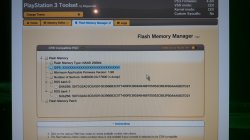
Minimum Firmware Version Displayed In Toolset: 1.0
Disc In Drive: No
 
When I try to install rebug 4.86.1 I get error 8002F997 if I do it via XMB and error 8002F2C5 if I go via Recovery Mode

I think I've filled this in correctly:

PS3 Model: CECH-C03
Firmware Version: 4.86
Firmware Type: OFW CEX
IDPS Is Masked: Yes
Have Original Dump: Yes
Dump 1 URL: https://ufile.io/i4tw0e60
Have Patched Dump: Yes
Dump 2 URL: https://ufile.io/qk16mtsi
System Boots To XMB: Yes
System Boots To Recovery: Yes
Firmware Version Displayed In Recovery: 4.86
Minimum Firmware Version Displayed In Toolset: 1.0
Disc In Drive: No
It seems like maybe you never clicked "Apply Patch" when using toolset. I can check dumps when I get home, but your report seems to point to you not actually applying patch.

Make sure you see the green toast that says reboot console after using https option and apply.
 

Attachments

  • 94101785_549777339279398_3307319336988835840_n.jpg
    94101785_549777339279398_3307319336988835840_n.jpg
    671.5 KB · Views: 104
  • 94240584_268115437560852_5161113709698875392_n.jpg
    94240584_268115437560852_5161113709698875392_n.jpg
    389.9 KB · Views: 97
  • 94429647_526206564613611_664667719727054848_n.jpg
    94429647_526206564613611_664667719727054848_n.jpg
    324.9 KB · Views: 99
  • 93940962_221939972411940_660321994507550720_n.jpg
    93940962_221939972411940_660321994507550720_n.jpg
    844.5 KB · Views: 103
It seems like maybe you never clicked "Apply Patch" when using toolset. I can check dumps when I get home, but your report seems to point to you not actually applying patch.

Make sure you see the green toast that says reboot console after using https option and apply.

I've loaded the patch but it only seems to take 6 seconds to load which seems odd to me but I know other users have said the same thing and still got it to work
 
I've loaded the patch but it only seems to take 6 seconds to load which seems odd to me but I know other users have said the same thing and still got it to work
6 seconds is normal for NAND.
NOR takes about 1:38


EDIT #1:
@art89 @OwlphaAce i am downloading dumps now and will send pm's with correct link to fix

EDIT #2:
PM's have been sent. Please follow the instructions and link, then use HTTPS Patch option and Apply ONE TIME! Install Rebug from recovery after success
 
Last edited:
Hi, I'm having issues similar to few users around here. Cannot install any OFW/HFW/CFW and patch on bgtoolset only seems to take 6 or 7 seconds to apply.
The phat Ps3 I'm working was used for HEN at some point.
Also I can only dump the flash memory before patching. After applying the patch it gives me an error.

PS3 Model: CECH-A01
Firmware Version: 4.85
Firmware Type: OFW CEX or HFW CEX (I cannot tell)
IDPS Is Masked: Yes
Have Original Dump: yes [REMOVED]
Have Patched Dump: No
Dump 2 URL:
System Boots To XMB: Yes
System Boots To Recovery: Yes
Firmware Version Displayed In Recovery: States FW 2.50 and then ask for ffff.ffff file
Minimum Firmware Version Displayed In Toolset: 1.0
Mounted Devices: None
Disc In Drive: No

If there is any more info you need, let me know.
Thanks for all your work
 
Last edited by a moderator:
Back
Top