PS3 Compatibility List - PS2 on PS3

someone tested this title ?
I dont know why , after recent events i was tempted to play it
but no luck , console force shut off (with no error when restarting)

PS2 SECRET SERVICE
SLUS_218.36
SLES_553.30
...need a confirmation if a config file can fix the issue or if its totally unplayable
...cannot find any information on psdevwiki , the game is not even listed there lol
 
someone tested this title ?
I dont know why , after recent events i was tempted to play it
but no luck , console force shut off (with no error when restarting)

PS2 SECRET SERVICE
SLUS_218.36
SLES_553.30
...need a confirmation if a config file can fix the issue or if its totally unplayable
...cannot find any information on psdevwiki , the game is not even listed there lol

Game is not on compatibility list,if it don't work,it is not playable try the Different version of the game,if none works,game is unplayable.
 
Last edited:
@aldostools , @kozarovv , @mrjaredbeta , @DeViL303 @Berion
I only have ONE request for 2021 , since it appear it exist Custom & GX CONFIG for [SLUS_211.06] , did you think its possible to create one for the same title but for the PAL (because of french subtitles) [SLES_538.18] , that would be so great...

It would be my single & last request for 2021 , if its that possible...

Thanks :)
 
Does any one have a save for Shadow Hearts Covenant that's currently in Disc 2? I want to see if the experimental config works for it. Thanks.
 
Does any one have a save for Shadow Hearts Covenant that's currently in Disc 2? I want to see if the experimental config works for it. Thanks.
I sometimes grab some saves from gamefaqs if I need to test: https://gamefaqs.gamespot.com/ps2/915253-shadow-hearts-covenant/saves

Maybe HolyRaiderZ's save is disc 2? Not sure. You'll have to do some conversion to PS3 VM2 file though. You can transfer your VM2 to PC, use an application like mymc to convert a save like this and add it to your VM2 file, and then transfer your VM2 back to PS3. That's probably the best you're gonna get for now.
 
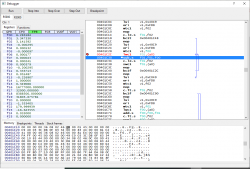
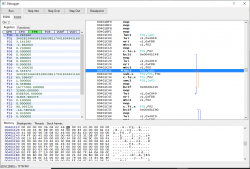
Shadow Hearts: From the New World seems to call an exit to PS3 XMB when a similar loop break fix to Covenant is implemented. In this case, it gets stuck in a loop 00401c40 until the f01 register becomes a negative number. There's obviously some wrong operation before this that makes the float in f01 ridiculously big, so it takes forever for the subtraction loop to be over. However, just breaking the loop at 00401c40 causes a straight up PS3 XMB exit, unlike Covenant which just causes momentary flickering of the character. Nautilus must have put in some error handling this time around.

Here's a snapshot of the loop via pcsx2 (it's working properly):
upload_2021-1-10_11-0-39.png

Here's a snapshot of the loop with a pseudo-similar reason to why netemu freezes (take note of f01 register):
upload_2021-1-10_11-11-35.png

Loop has to keep going until number is negative, which causes the freeze. FtNW does not fix itself though, and will permanently leave your character frozen, even when the full freeze is over after 10 or so seconds. This probably isn't *exactly* what is happening in netemu, but it is very similar.

This is where my knowledge of the matter ends. This bug isn't fixable in the same way as Covenant it seems. The only possible fix (in my inexperienced eyes) would be to implement a custom 0x41 "overlay" at 00405A88 where this particular function is called, and make sure the number is always negative to prevent a loop. Or find exactly where the number is going wrong and fix it from the root. I guess I will keep on testing, but I am reaching a stalemate here.

 
@Rafaelrios There's no softlock on Monster Rancher 3. I created a monster just fine. There's only a softlock if you choose to insert a disc into the virtual PS2 drive (Saucer Stone) which you cannot do. Maybe there's a way to create a config and insert another ISO via multidisc? That's something to look into later, but creating a monster from encyclopedia works fine 100%.
 
Shadow Hearts: From the New World seems to call an exit to PS3 XMB when a similar loop break fix to Covenant is implemented. In this case, it gets stuck in a loop 00401c40 until the f01 register becomes a negative number. There's obviously some wrong operation before this that makes the float in f01 ridiculously big, so it takes forever for the subtraction loop to be over. However, just breaking the loop at 00401c40 causes a straight up PS3 XMB exit, unlike Covenant which just causes momentary flickering of the character. Nautilus must have put in some error handling this time around.

Here's a snapshot of the loop via pcsx2 (it's working properly):
View attachment 29846

Here's a snapshot of the loop with a pseudo-similar reason to why netemu freezes (take note of f01 register):
View attachment 29847

Loop has to keep going until number is negative, which causes the freeze. FtNW does not fix itself though, and will permanently leave your character frozen, even when the full freeze is over after 10 or so seconds. This probably isn't *exactly* what is happening in netemu, but it is very similar.

This is where my knowledge of the matter ends. This bug isn't fixable in the same way as Covenant it seems. The only possible fix (in my inexperienced eyes) would be to implement a custom 0x41 "overlay" at 00405A88 where this particular function is called, and make sure the number is always negative to prevent a loop. Or find exactly where the number is going wrong and fix it from the root. I guess I will keep on testing, but I am reaching a stalemate here.
Can you try that still freeze game?
Edit: Actually updated in case of neg loop.

Code:
3d 00 00 00 11 11 00 00 0a 00 00 00 02 00 00 00
2c 1c 40 00 00 00 81 c4 00 08 83 44 70 1c 40 00
00 00 80 c4 00 00 83 44 00 00 00 00
 
Last edited:
Is that for From the New World?
It is, and I can confirm it works! @kozarovv always know how to solve the problem. ;)

Issue now exists in camera calculations because this particular function also deals with the camera. I am writing a config based on this one to correct only the analog control calculation. I should have it posted in a bit.

EDIT:
Shadow Hearts: From the New World (SLUS-21326) (experimental)
Code:
3D 00 00 00 11 11 00 00 09 00 00 00 13 00 00 00
88 5A 40 00 98 02 A4 27 00 07 10 0C 98 02 A4 27
80 FE 03 0C 00 FA 0F 00 00 00 00 00 00 00 00 00
49 43 03 3C 00 00 81 C4 08 FA 0F 00 00 00 00 00
00 00 00 00 00 10 83 44 D8 0F 63 34 10 FA 0F 00
00 00 00 00 00 00 00 00 36 08 02 46 00 00 00 00
18 FA 0F 00 00 00 00 00 00 00 00 00 00 00 00 00
0B 00 01 45 20 FA 0F 00 00 00 00 00 00 00 00 00
D8 0F 63 34 C9 40 03 3C 28 FA 0F 00 00 00 00 00
00 00 00 00 00 08 83 44 00 00 83 44 30 FA 0F 00
00 00 00 00 00 00 00 00 36 08 02 46 41 08 00 46
38 FA 0F 00 00 00 00 00 00 00 00 00 00 00 00 00
00 00 81 E4 40 FA 0F 00 00 00 00 00 00 00 00 00
00 00 00 00 FA FF 00 45 48 FA 0F 00 00 00 00 00
00 00 00 00 D8 0F 63 34 49 C0 03 3C 50 FA 0F 00
00 00 00 00 00 00 00 00 00 00 00 00 00 10 83 44
58 FA 0F 00 00 00 00 00 00 00 00 00 0C 00 00 45
34 08 02 46 60 FA 0F 00 00 00 00 00 00 00 00 00
C9 40 03 3C 00 00 00 00 68 FA 0F 00 00 00 00 00
00 00 00 00 00 08 83 44 D8 0F 63 34 70 FA 0F 00
00 00 00 00 00 00 00 00 00 00 01 46 00 00 83 44
78 FA 0F 00 00 00 00 00 00 00 00 00 00 00 80 E4
34 00 02 46 80 FA 0F 00 00 00 00 00 00 00 00 00
FA FF 01 45 00 00 00 00 90 FA 0F 00 00 00 00 00
00 00 00 00 00 00 00 00 08 00 E0 03
Fix analog stick freeze. All credit for the fix goes to @kozarovv! I merely found where it was happening and just wrote a hook for it.

I will write a better config in 0x42 command later...I just wanna post something for now. :) @pokegts90 can you test this to see if there are absolutely no freezes?
 
Last edited:
It is, and I can confirm it works! @kozarovv always know how to solve the problem. ;)

Issue now exists in camera calculations because this particular function also deals with the camera. I am writing a config based on this one to correct only the analog control calculation. I should have it posted in a bit.

EDIT:
Shadow Hearts: From the New World (SLUS-21326) (experimental)
Code:
3D 00 00 00 11 11 00 00 09 00 00 00 13 00 00 00
88 5A 40 00 98 02 A4 27 00 07 10 0C 98 02 A4 27
80 FE 03 0C 00 FA 0F 00 00 00 00 00 00 00 00 00
49 43 03 3C 00 00 81 C4 08 FA 0F 00 00 00 00 00
00 00 00 00 00 10 83 44 D8 0F 63 34 10 FA 0F 00
00 00 00 00 00 00 00 00 36 08 02 46 00 00 00 00
18 FA 0F 00 00 00 00 00 00 00 00 00 00 00 00 00
0B 00 01 45 20 FA 0F 00 00 00 00 00 00 00 00 00
D8 0F 63 34 C9 40 03 3C 28 FA 0F 00 00 00 00 00
00 00 00 00 00 08 83 44 00 00 83 44 30 FA 0F 00
00 00 00 00 00 00 00 00 36 08 02 46 41 08 00 46
38 FA 0F 00 00 00 00 00 00 00 00 00 00 00 00 00
00 00 81 E4 40 FA 0F 00 00 00 00 00 00 00 00 00
00 00 00 00 FA FF 00 45 48 FA 0F 00 00 00 00 00
00 00 00 00 D8 0F 63 34 49 C0 03 3C 50 FA 0F 00
00 00 00 00 00 00 00 00 00 00 00 00 00 10 83 44
58 FA 0F 00 00 00 00 00 00 00 00 00 0C 00 00 45
34 08 02 46 60 FA 0F 00 00 00 00 00 00 00 00 00
C9 40 03 3C 00 00 00 00 68 FA 0F 00 00 00 00 00
00 00 00 00 00 08 83 44 D8 0F 63 34 70 FA 0F 00
00 00 00 00 00 00 00 00 00 00 01 46 00 00 83 44
78 FA 0F 00 00 00 00 00 00 00 00 00 00 00 80 E4
34 00 02 46 80 FA 0F 00 00 00 00 00 00 00 00 00
FA FF 01 45 00 00 00 00 90 FA 0F 00 00 00 00 00
00 00 00 00 00 00 00 00 08 00 E0 03
Fix analog stick freeze. All credit for the fix goes to @kozarovv! I merely found where it was happening and just wrote a hook for it.

I will write a better config in 0x42 command later...I just wanna post something for now. :) @pokegts90 can you test this to see if there are absolutely no freezes?
This is just for analog stick, not the cutscenes correct?

EDIT: I did up to the first battle real quickly. No crashing when moving with the analog stick, no character flickering, and the battle ran fine and game saved fine. Didn't test any farther than that, however, so I can't tell you if the cutscenes have been fixed.
 
Last edited:
This is just for analog stick, not the cutscenes correct?

EDIT: I did up to the first battle real quickly. No crashing when moving with the analog stick, no character flickering, and the battle ran fine and game saved fine. Didn't test any farther than that, however, so I can't tell you if the cutscenes have been fixed.
Nice! Cutscene freezes should still be there as they haven't been touched. I'll look into that next.
 

Similar threads

Back
Top