PS3 Fault finding YLOD with the SYSCON - First steps and Error reporting

Sounds like flux residue, meaning they might have been replaced before. But why? Did you notice any refurbishment stickers? Was it a sealed console?
I would't put it down as flux, it was way too milky in colour, almost smoke-like residue. The system has definitely been opened before, but I don't believe someone has gotten anywhere past opening the top shell and giving up, all the screws were pretty firm in there and the heads don't look like they have been tampered with. Prying out the board from the radiators has proven an absolute challenge too, so I'm quite positive I was the first one wrestling it out.

If it's bad enough to cause a 2-10s YLOD however, it'll definitely show the bad waveform. You can begin reading about it here...
Will have a look into the other thread, cheers.

The immediate idea is to toss a couple TaPol caps around the Tokens (without removing anything) to see if anything changes in the startup sequence. If not, it's hunting around tracing the volates at FETS and bucks, while waiting for a scope to show up, if I do decide to go down that rabbit hole.
 
Alright, i've had a look at multiple of my PS3's, two of them have 403034, one of them alternates between that and 404401, and the other alternates with 404402. From the looks of it - this could be a poor BGA connection? Is that a fair assessment? A different PS3 has a lot of 1001 and a few 1200 which signifies somethings wrong with the thermal sensor but I'm unsure of how to proceed with that one.
 
Alright, i've had a look at multiple of my PS3's, two of them have 403034, one of them alternates between that and 404401, and the other alternates with 404402. From the looks of it - this could be a poor BGA connection? Is that a fair assessment? A different PS3 has a lot of 1001 and a few 1200 which signifies somethings wrong with the thermal sensor but I'm unsure of how to proceed with that one.
Have you tried the obvious thing with the third system?
Error 1200 is severe CELL CPU overheating. Quite common actually.
Delid and replace thermal paste didn't fix it?

It's possible that this machine is perfectly fine, just need to keep the CPU from overheating.

The 1001 non-errors are very natural to be there because when the console is sounding like a jet engine, people normally panic and cut the power before the system flies away out of the window or explodes.
Instead of waiting for the automatic safety shutdown. (Error 1200)

So look at it the simple way first. There may be other explanations but you don't start building a house from the roof. First things first.
 
There is something i could not understand well, inside the "thermal config" area there are some values that indicates if the data is loaded from syscon ROM or from syscon RAM
The changes we make to syscon RAM are volatile, only valid for the current session, if you cut power to syscon it resets, this is good for testing thermal profiles
Could this be the difference between
fantbl set
and fantbl setini?
Set changing only the volatile RAM settings (without altering checksum)
Setini actually writing to the EEPROM, messing with the checksums (on the old models)
So... you can start using all that commands to start configuring things individually... or (the best option in my oppinion)... you can prepare the whole data of the "thermal config" area (0x200 bytes) with custom valules in your PC in a hexeditor and then overwrite it completly, this way you are changing hundreds of values in a single action
But is this actually doable? Is what I'm trying to understand.
Isn't the thermal config area just too big to write in one operation? 0x200 instead of 0x40

If it's possible, then yes sure it would be very easy; something anyone can copy and paste without understanding anything. And easy to easily fall back on if something gets screwed. Even possible to add to SysconReader utility.

But of course this are just my thoughts pretending to have a clue of anything.
 
Could this be the difference between
fantbl set
and fantbl setini?
Set changing only the volatile RAM settings (without altering checksum)
Setini actually writing to the EEPROM, messing with the checksums (on the old models)
I think setini is used for the initial setting when the console boots up before any temperature gets read (before the system is fully booted), like a default value.

Isn't the thermal config area just too big to write in one operation? 0x200 instead of 0x40
Yes
 
This is really good! Looking forward to try this method very soon to diagnose cecha01 sudden ylod after having temps at web man limited at 68.

Just a question regarding this diagram, do I have to connect one point of the cable from "diag" solder to "Ground" at the 3.5V board so I can unlock internal mode? That way I don't need regular "Ground" cable from ground socket of the 3.5V board pointed at the PS3 board "ground" at all?

Asking because there are some photos in the guide that has both "GND" and "diag" connected, but aren't they both uses the "GND" socket from the 3.5V board? I"m a little bit confused.

I hope that makes sense what I'm asking.
 

Attachments

  • diagram.png
    diagram.png
    572.6 KB · Views: 70
I would't put it down as flux, it was way too milky in colour, almost smoke-like residue. The system has definitely been opened before, but I don't believe someone has gotten anywhere past opening the top shell and giving up, all the screws were pretty firm in there and the heads don't look like they have been tampered with. Prying out the board from the radiators has proven an absolute challenge too, so I'm quite positive I was the first one wrestling it out.
Flux residue can appear white. Alot of people think spraying with IPA and brushing is all that's needed, but they are not removing the flux. They're just dissolving it in the IPA. If you don't soak up the IPA/Flux solution with a paper towel, the flux residue will appear as a smoky white layer after all the IPA evaporates. It often takes a couple of spray, scrub, soak-up rounds to remove all of the flux residue.

I would like to see a picture of what your talking about though. Also, you can pop the plastic protective cover off the tokin without affecting it's function. Sometimes they appear visibly burned in the corers, but work fine. Other times they are clearly bad on the scope, but there is no scorching whatsoever. So, there really is no way to tell by just looking at them.
Will have a look into the other thread, cheers.

The immediate idea is to toss a couple TaPol caps around the Tokens (without removing anything) to see if anything changes in the startup sequence. If not, it's hunting around tracing the volates at FETS and bucks, while waiting for a scope to show up, if I do decide to go down that rabbit hole.
Save the destructive tasks for last. I tried adding parasite caps and didn't see any benefit. Others have. The issue with doing this is that the heat of soldering them in can cause different behavior that you might interpret as progress, when it isn't.

Again I suggest you verify the voltages, check fuses, get the resistance +/GND on the tokins, read resistances of the capacitors around the RSX, etc...
I didn't get time to finish pinout, tomorrow morning I will post some work that I've stated.
Well explained @RIP-Felix
Mostly what I've seen so far on 90nm is either ram power line with blue short or VCC of ic with red, can check but this was good enough for me on all 65 and 40.
Edit
@RIP-Felix got scrambled on pc today and added more schematic tests points from that old forum
http://s.go.ro/ax49drsu
Excel file http://s.go.ro/6t2tncbo
is only with one point atm, some of you may continue with this, scrap any dead gpu ram and solder to missing points of ram one tiny wire and turn rsx back for measuring.
77699989ed809bc80620ba5a89c55095.jpg
7a3fc386bb2c9a06ed4478876e69aa34.jpg
5002fdb44f1f5766d9beed5d3c21fb37.jpg
93bb5a87b0debd1a9f237a57620e0d0b.jpg
659f7f9141be6919af33f424820686a3.jpg
Just check all the non destructive stuff first. Record the voltages and resistances for later comparison. It's best to do this before you start soldering or removing tokins. And if you remove a tokin, I suggest you remove all four and replace with tantalum. Mixing different value caps has odd behavior that can be counter productive, like anti-resonance peaks that result in worse filter performance.
 
...do I have to connect one point of the cable from "diag" solder to "Ground" at the 3.5V board so I can unlock internal mode? That way I don't need regular "Ground" cable from ground socket of the 3.5V board pointed at the PS3 board "ground" at all?

Asking because there are some photos in the guide that has both "GND" and "diag" connected, but aren't they both uses the "GND" socket from the 3.5V board? I"m a little bit confused.

I hope that makes sense what I'm asking.
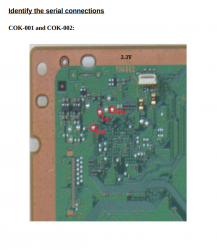
If you don't want to go through the extra steps to enable internal access mode, or are accessing the SYSCON on a model that doesn't support it, then you only need RX and TX wires to access the errlog.

RX and TX always get connected to your UART USB adapter. Diag only gets connected to ground, if you want to enable internal access mode (CXRF). To enable it, you have to to change a bit in the eeprom, which causes the checksum to fail. So you have to fix the checksum. This is a 2 step process and is not that difficult if you follow the guide carefully. Once that's done, you always ground diag, and use CXRF.

I hook up a ground wire from my UART USB adapter to the motherboard ground, just so that both are using the same reference ground, but it's an extra safe step. Then when I need to ground DIAG, my computer and PS3 have the exact same potential to GND. If you don't do this, GND can be different between devices causing a short while you connect them. If both devices are connected to earth reference ground, the 3rd prong on a 3 prong plug, then that shouldn't be a problem. But sometimes certain areas of the board might not be electrically connected through that plug. You can check with a multimeter if they have continuity with the 3rd prong, or just hook up a wire so both devices grounds are tied together. It just avoids problems.
 
Hey everyone,
I was able to get the error output logs of my system here:

errlog
ofst[ 64]:err_code:0xffffffff, clock:0x27dfc0d0 2021/03/13 18:28:32
ofst[ 68]:err_code:0xa0404322, clock:0x27dfe804 2021/03/13 21:15:48
ofst[ 72]:err_code:0xa0403034, clock:0x27dfe804 2021/03/13 21:15:48
ofst[ 76]:err_code:0xa0404322, clock:0x27dfe810 2021/03/13 21:16:00
ofst[ 80]:err_code:0xa0403034, clock:0x27dfe810 2021/03/13 21:16:00
ofst[ 84]:err_code:0xa0404322, clock:0x27e01247 2021/03/14 00:16:07
ofst[ 88]:err_code:0xa0403034, clock:0x27e01247 2021/03/14 00:16:07
ofst[ 92]:err_code:0xa0404322, clock:0x27e01253 2021/03/14 00:16:19
ofst[ 96]:err_code:0xa0403034, clock:0x27e01253 2021/03/14 00:16:19
ofst[100]:err_code:0xa0404322, clock:0x27e017d4 2021/03/14 00:39:48
ofst[104]:err_code:0xa0403034, clock:0x27e017d4 2021/03/14 00:39:48
ofst[108]:err_code:0xa0902120, clock:0x27e017d4 2021/03/14 00:39:48
ofst[112]:err_code:0xa0404322, clock:0x27e017ec 2021/03/14 00:40:12
ofst[116]:err_code:0xa0403034, clock:0x27e017ec 2021/03/14 00:40:12
ofst[120]:err_code:0xa0902120, clock:0x27e017ec 2021/03/14 00:40:12
ofst[124]:err_code:0xa0404322, clock:0x27e1b861 2021/03/15 06:17:05
ofst[ 0]:err_code:0xa0403034, clock:0x27e1b861 2021/03/15 06:17:05
ofst[ 4]:err_code:0xa0902120, clock:0x27e1b861 2021/03/15 06:17:05
ofst[ 8]:err_code:0xa0404322, clock:0x27f587dd 2021/03/30 06:55:25
ofst[ 12]:err_code:0xa0403034, clock:0x27f587dd 2021/03/30 06:55:25
ofst[ 16]:err_code:0xa0902120, clock:0x27f587dd 2021/03/30 06:55:25
ofst[ 20]:err_code:0xa0404322, clock:0x27f587e8 2021/03/30 06:55:36
ofst[ 24]:err_code:0xa0403034, clock:0x27f587e8 2021/03/30 06:55:36
ofst[ 28]:err_code:0xa0902120, clock:0x27f587e8 2021/03/30 06:55:36
ofst[ 32]:err_code:0xa0404322, clock:0x2814b644 2021/04/22 22:33:40
ofst[ 36]:err_code:0xa0403034, clock:0x2814b644 2021/04/22 22:33:40
ofst[ 40]:err_code:0xa0404322, clock:0xffffffff
ofst[ 44]:err_code:0xa0403034, clock:0xffffffff
ofst[ 48]:err_code:0xa0404322, clock:0xffffffff
ofst[ 52]:err_code:0xa0403034, clock:0xffffffff
ofst[ 56]:err_code:0xa0404322, clock:0xffffffff
ofst[ 60]:err_code:0xa0403034, clock:0xffffffff
[mullion]$
Looking at the table, it looks like the 4322 error is an RSX error and the 3034 is a BE error. It sounds to me like this motherboard will need a reball? Is that accurate? The 2120 error is an HDMI error which I can attribute to not having the HDMI plugged in.
 
It's located at 0x200 (length 0x200).
So you would run something like "EEP GET 0200 40", "EEP GET 0240 40", ....
I been talking with jeff the animal and we realized the thermal config area starts at 0x250
The "r" command was not working for some reason, returns an invalid argument, not sure why
Code:
>$ r 200 200
F0000006
# [UCMD] Invalid arg.

So he dumped the thermal config area repeating the EEP GET command 8 times, this way:
Code:
>$ EEP GET 0250 40
>$ EEP GET 0290 40
>$ EEP GET 02D0 40
>$ EEP GET 0310 40
>$ EEP GET 0350 40
>$ EEP GET 0390 40
>$ EEP GET 03D0 40
>$ EEP GET 0410 40

After joining all the data together it looks like this, JTP-001 (crc B9FF6FD4) :encouragement:
Code:
Offset(h) 00 01 02 03 04 05 06 07 08 09 0A 0B 0C 0D 0E 0F

00000000  33 3B 00 00 00 39 3C 00 2F 00 3B 3D 00 31 00 3E
00000010  3E 00 31 80 40 3F 00 33 80 43 40 00 34 00 45 41
00000020  00 36 80 48 46 00 37 00 4A 4A 00 3D 80 50 4C 00
00000030  3E 00 55 4D 00 3E 80 5A 4E 00 3F 00 66 4F 00 3F
00000040  80 80 50 00 40 00 B3 51 00 41 00 FF 55 00 43 00
00000050  FF FF FF FF FF FF FF FF FF FF FF FF FF FF FF FF
00000060  FF FF FF FF 33 FF 01 00 FF FF FF FF FF FF FF FF

00000070  33 53 00 00 00 39 54 00 44 00 3B 55 00 45 00 3E
00000080  56 00 45 80 40 57 00 46 00 43 58 00 46 80 45 59
00000090  00 47 00 48 5A 00 47 80 4A 5B 00 48 00 50 5C 00
000000A0  48 80 55 5D 00 49 00 5A 5E 00 49 80 66 5F 00 4A
000000B0  00 80 60 00 4A 80 B3 61 00 4B 00 FF 64 00 4E 00
000000C0  FF FF FF FF FF FF FF FF FF FF FF FF FF FF FF FF
000000D0  FF FF FF FF 33 FF 01 00 FF FF FF FF FF FF FF FF

000000E0  FF FF FF FF FF FF FF FF FF FF FF FF FF FF FF FF
000000F0  FF FF FF FF FF FF FF FF FF FF FF FF FF FF FF FF
00000100  FF FF FF FF FF FF FF FF FF FF FF FF FF FF FF FF
00000110  FF FF FF FF FF FF FF FF FF FF FF FF FF FF FF FF
00000120  FF FF FF FF FF FF FF FF FF FF FF FF FF FF FF FF
00000130  FF FF FF FF FF FF FF FF FF FF FF FF FF FF FF FF
00000140  FF FF FF FF FF FF FF FF FF FF FF FF FF FF FF FF

00000150  FF FF 00 00 40 14 FF FF FF FF FF 84 8B 84 8B FF
00000160  54 00 55 00 02 00 63 00 64 00 02 00 FF FF FF FF
00000170  FF FF FF FF FF FF FF FF FF FF FF FF FF FF FF FF
00000180  FF FF FF FF FF FF FF FF FF FF FF FF FF FF FF FF
00000190  FF FF FF FF FF FF FF FF FF FF FF FF FF FF FF FF
000001A0  FF FF FF FF FF FF FF FF FF FF FF FF FF FF FF FF
000001B0  FF FF FF FF FF FF FF FF FF FF FF FF FF FF FF FF
000001C0  FF FF FF FF FF FF FF FF FF FF FF FF FF FF FF FF
000001D0  FF FF FF FF FF FF FF FF FF FF FF FF FF FF FF FF
000001E0  FF FF FF FF FF FF FF FF FF FF FF FF FF FF FF FF
000001F0  FF FF FF FF FF FF FF FF FF FF FF FF FF FF FF FF

And the graph :)
q8MrDdh.jpg
 
Last edited:
Rules of troubleshooting are:
  1. Inspect board for damage! Look for corroded parts, scortch marks, physical damage, missing parts, delamination, etc.
  2. Multi-meter everything! Check every fuse for continuity. Replace with exact part if open. Check every cap for shorts. Replace with exact part if closed (verify resistance with known good board. Sometimes they read short when they are supposed to have low resistance).
  3. SYSCON (if 3034 reball and ignore other errors until then, BGA causes all kind of errors on other devices and you can't know they're bad until you know the BGA is fine).
  4. Verify voltages from MOSFETS, regulators and etc. Ofter requires power test as the voltages are switched on after PWR on. Trace PWR from the PSU to components on the board.
  5. Verify clock signals, oscillators, crystals (Oscilloscope).
  6. Verify CPU/GPU filter noise/ripple is acceptable (Oscilloscope).
  7. Touch up solder joints suspected of colds joints.
  8. Replace suspect ICs.
I think you guys are skipping to that last step WAY too soon,.

Reading through this entire thread, looks like I've got to do a reball to bring possibly bring my motherboard back to life. Reballing seems not for the faint of heart.
 
I been talking with jeff the animal and we realized the thermal config area starts at 0x250
The "r" command was not working for some reason, returns an invalid argument, not sure why
Code:
>$ r 200 200
F0000006
# [UCMD] Invalid arg.

So he dumped the thermal config area repeating the EEP GET command 8 times, this way
Code:
>$ EEP GET 0250 40
>$ EEP GET 0290 40
>$ EEP GET 02D0 40
>$ EEP GET 0310 40
>$ EEP GET 0350 40
>$ EEP GET 0390 40
>$ EEP GET 03D0 40
>$ EEP GET 0410 40

After joining all the data together it looks like this, JTP-001 (crc B9FF6FD4) :encouragement:
Code:
Offset(h) 00 01 02 03 04 05 06 07 08 09 0A 0B 0C 0D 0E 0F

00000000  33 3B 00 00 00 39 3C 00 2F 00 3B 3D 00 31 00 3E
00000010  3E 00 31 80 40 3F 00 33 80 43 40 00 34 00 45 41
00000020  00 36 80 48 46 00 37 00 4A 4A 00 3D 80 50 4C 00
00000030  3E 00 55 4D 00 3E 80 5A 4E 00 3F 00 66 4F 00 3F
00000040  80 80 50 00 40 00 B3 51 00 41 00 FF 55 00 43 00
00000050  FF FF FF FF FF FF FF FF FF FF FF FF FF FF FF FF
00000060  FF FF FF FF 33 FF 01 00 FF FF FF FF FF FF FF FF

00000070  33 53 00 00 00 39 54 00 44 00 3B 55 00 45 00 3E
00000080  56 00 45 80 40 57 00 46 00 43 58 00 46 80 45 59
00000090  00 47 00 48 5A 00 47 80 4A 5B 00 48 00 50 5C 00
000000A0  48 80 55 5D 00 49 00 5A 5E 00 49 80 66 5F 00 4A
000000B0  00 80 60 00 4A 80 B3 61 00 4B 00 FF 64 00 4E 00
000000C0  FF FF FF FF FF FF FF FF FF FF FF FF FF FF FF FF
000000D0  FF FF FF FF 33 FF 01 00 FF FF FF FF FF FF FF FF

000000E0  FF FF FF FF FF FF FF FF FF FF FF FF FF FF FF FF
000000F0  FF FF FF FF FF FF FF FF FF FF FF FF FF FF FF FF
00000100  FF FF FF FF FF FF FF FF FF FF FF FF FF FF FF FF
00000110  FF FF FF FF FF FF FF FF FF FF FF FF FF FF FF FF
00000120  FF FF FF FF FF FF FF FF FF FF FF FF FF FF FF FF
00000130  FF FF FF FF FF FF FF FF FF FF FF FF FF FF FF FF
00000140  FF FF FF FF FF FF FF FF FF FF FF FF FF FF FF FF

00000150  FF FF 00 00 40 14 FF FF FF FF FF 84 8B 84 8B FF
00000160  54 00 55 00 02 00 63 00 64 00 02 00 FF FF FF FF
00000170  FF FF FF FF FF FF FF FF FF FF FF FF FF FF FF FF
00000180  FF FF FF FF FF FF FF FF FF FF FF FF FF FF FF FF
00000190  FF FF FF FF FF FF FF FF FF FF FF FF FF FF FF FF
000001A0  FF FF FF FF FF FF FF FF FF FF FF FF FF FF FF FF
000001B0  FF FF FF FF FF FF FF FF FF FF FF FF FF FF FF FF
000001C0  FF FF FF FF FF FF FF FF FF FF FF FF FF FF FF FF
000001D0  FF FF FF FF FF FF FF FF FF FF FF FF FF FF FF FF
000001E0  FF FF FF FF FF FF FF FF FF FF FF FF FF FF FF FF
000001F0  FF FF FF FF FF FF FF FF FF FF FF FF FF FF FF FF
There is an automated script to take 40 by 40 released by M4j0r, isn't there in his thread?
Block size 40 and numbers of blocks 1400
In SW models we can 'r' only 40 bits at once. This is how it works and I remember maximum length of memory is 1400 if I'm right.
Kind of limit at 1400 address
 
Last edited:
There is an automated script to take 40 by 40 released by M4j0r, isn't there in his thread?
Block size 40 and numbers of blocks 1400
In SW models we can 'r' only 40 bits at once. This is how it works and I remember maximum length of memory is 1400 if I'm right.
Kind of limit at 1400 address
I realized about the script that dumps the whole eeprom other day, that dump takes more time and contains per-console identifyers
But is better if we dump the thermal config area separatedly because is generic (shared by lot of PS3's), we can post the data here in the forum, or discuss how to modify the original values, etc...
I guess the python script can be modifyed in the "for" loop to dump only the thermal config area (and is needed another script to write it) but i didnt wanted to enter in that forest :D

----------
Btw, i updated my previous post with the graph of the thermal config found in a JSP-001 motherboard (thx to jeff the animal for dumping it)
 
I think setini is used for the initial setting when the console boots up before any temperature gets read (before the system is fully booted), like a default value.
No, those are the EEPROM values (at least in COK). After setting new values with it, the eepcsum will fail, but if fixed, in the next boot it will remember and use those. Unlike values set with plain set.
There are full tables in the setini/getini and the first values in every table are always the one with idle/not much temp.
There IS a spin-up in the pre-boot somewhere but I think that is hardwired somewhere (just to test if the fan spins?)
(also, these is a bug in the COK's eepcsum code, sometimes produces weird numbers:
Code:
> eepcsum
eepcsum
Addr:0x000032fe should be 0x528c
Addr:0x000034fe should be 0x7115
sum:0x0100
Addr:0x000039fe should be 0x0038
Addr:0x00003dfe should be 0x00ff
Addr:0x00003ffe should be 0x00ff
> r 34f0 10
r 34f0 10
+0 +1 +2 +3 +4 +5 +6 +7 +8 +9 +A +B +C +D +E +F
-----------------------------------------------
FF FF FF FF FF FF FF FF FF FF FF FF FF FF 15 71
[mullion]$
> w 34fe 71 15
w 34fe 71 15
w complete!
[mullion]$
> r 34f0 10
r 34f0 10
+0 +1 +2 +3 +4 +5 +6 +7 +8 +9 +A +B +C +D +E +F
-----------------------------------------------
FF FF FF FF FF FF FF FF FF FF FF FF FF FF 71 15
[mullion]$
> eepcsum
eepcsum
Addr:0x000032fe should be 0x528c
sum:0xa45c
Addr:0x000034fe should be 0xffff7115
sum:0x0100
Addr:0x000039fe should be 0x0038
Addr:0x00003dfe should be 0x00ff
Addr:0x00003ffe should be 0x00ff
)
 
Hey everyone,
I was able to get the error output logs of my system here:

errlog
ofst[ 28]:err_code:0xa0902120, clock:0x27f587e8 2021/03/30 06:55:36
ofst[ 32]:err_code:0xa0404322, clock:0x2814b644 2021/04/22 22:33:40
ofst[ 36]:err_code:0xa0403034, clock:0x2814b644 2021/04/22 22:33:40
ofst[ 40]:err_code:0xa0404322, clock:0xffffffff
ofst[ 44]:err_code:0xa0403034, clock:0xffffffff
ofst[ 48]:err_code:0xa0404322, clock:0xffffffff
ofst[ 52]:err_code:0xa0403034, clock:0xffffffff
ofst[ 56]:err_code:0xa0404322, clock:0xffffffff
ofst[ 60]:err_code:0xa0403034, clock:0xffffffff
[mullion]$
Looking at the table, it looks like the 4322 error is an RSX error and the 3034 is a BE error. It sounds to me like this motherboard will need a reball? Is that accurate? The 2120 error is an HDMI error which I can attribute to not having the HDMI plugged in.

Measure the resistance on the RSX - the nec tokins GND and VCC points.

Judging from your errors, your BGA solder points on the RSX are bad. The reason i say measure the resistance on the RSX, is because if the reading is 1.2ohms or below, then dont bother, as you will find the reheat will kill the RSX anyway.

Otherwise do a proper reflow for now - IR machine or preheater.
 
No, those are the EEPROM values (at least in COK). After setting new values with it, the eepcsum will fail, but if fixed, in the next boot it will remember and use those. Unlike values set with plain set.
There are full tables in the setini/getini and the first values in every table are always the one with idle/not much temp.
There IS a spin-up in the pre-boot somewhere but I think that is hardwired somewhere (just to test if the fan spins?)
(also, these is a bug in the COK's eepcsum code, sometimes produces weird numbers:
Code:
> eepcsum
eepcsum
Addr:0x000032fe should be 0x528c
Addr:0x000034fe should be 0x7115
sum:0x0100
Addr:0x000039fe should be 0x0038
Addr:0x00003dfe should be 0x00ff
Addr:0x00003ffe should be 0x00ff
> r 34f0 10
r 34f0 10
+0 +1 +2 +3 +4 +5 +6 +7 +8 +9 +A +B +C +D +E +F
-----------------------------------------------
FF FF FF FF FF FF FF FF FF FF FF FF FF FF 15 71
[mullion]$
> w 34fe 71 15
w 34fe 71 15
w complete!
[mullion]$
> r 34f0 10
r 34f0 10
+0 +1 +2 +3 +4 +5 +6 +7 +8 +9 +A +B +C +D +E +F
-----------------------------------------------
FF FF FF FF FF FF FF FF FF FF FF FF FF FF 71 15
[mullion]$
> eepcsum
eepcsum
Addr:0x000032fe should be 0x528c
sum:0xa45c
Addr:0x000034fe should be 0xffff7115
sum:0x0100
Addr:0x000039fe should be 0x0038
Addr:0x00003dfe should be 0x00ff
Addr:0x00003ffe should be 0x00ff
)
Is mentioned in wiki for the "fantbl" command but this rule seems to apply to 5 commands in total (fanconpolicy, fantbl, hyst, trp, and tshutdown)
The "get/set" subcommands applyes the commands in syscon RAM, so are volatile, only applyes to the current session
And the "getini/setini" applyes the changes in EEPROM permanently

I guess this is related with how the syscon loads the data from the EEPROM, at some early point of the syscon boot sequence it copyes the contents of the syscon EEPROM to syscon RAM... and then it uses the data from syscon RAM (in other words, the real data from EEPROM is not used on runtime)
Lets say... when they was configuring it they was using the "get/set" subcommands more frequently to make tests on runtime

----------
That "pre-boot spin-up" you refer is the value named "initial_fan_duty" (with a time lenght of "initial_fan_time")
Is represented in my graphs with the horizontal lines dotted at left, because i could not figure any better way to represent it, is tricky because the graph doesnt represents time... when looking at my graphs you can imagine that transition in between the dotted lines have a lenght of 2 seconds

All the PS3 models equal or older than CECH-20xx (or so, i dont have samples of the thermal config of CECH-21xx/SUR-001 motherboards yet, so im not sure exactly when it happened) uses an "initial_fan_duty" of 30% fan speed, and after a couple of seconds (indicated by the value of "initial_fan_time") decreases to the speed indicated in the step named "P0" in the fantables (that seems to be always 20% fan speed for all the PS3 models)
And the PS3 models equal or newer than CECH-21xx works in the same way, the only difference is the "initial_fan_duty" is 25% fan speed instead of 30%


Edit:
Think in it this way... the fan speed values from inside the tables are dependant of the value of the thermal sensors (if the temperature of the sensor varies then the fan speed varies)
But in the first 2 seconds when we boot the PS3 the syscon is keeping the fan speed "locked" to the "initial_fan_duty" that is not dependant of the thermal sensors
Lets say... in the first 2 seconds syscon is controlling the fan in a "brainless" way and is ignoring the thermal sensors :D
 
Last edited:
I been talking with jeff the animal and we realized the thermal config area starts at 0x250

The "r" command was not working for some reason, returns an invalid argument, not sure why
Code:
>$ r 200 200
F0000006
# [UCMD] Invalid arg.

The "r 200" command only worked when i tried
>$ r 200 40

the data was the same as doing the EEP GET, so we just used the EEP GET like you said.
 
Is mentioned in wiki for the "fantbl" command but this rule seems to apply to 5 commands in total (fanconpolicy, fantbl, hyst, trp, and tshutdown)
The "get/set" subcommands applyes the commands in syscon RAM, so are volatile, only applyes to the current session
And the "getini/setini" applyes the changes in EEPROM permanently

I guess this is related with how the syscon loads the data from the EEPROM, at some early point of the syscon boot sequence it copyes the contents of the syscon EEPROM to syscon RAM... and then it uses the data from syscon RAM (in other words, the real data from EEPROM is not used on runtime)
Lets say... when they was configuring it they was using the "get/set" subcommands more frequently to make tests on runtime

----------
That "pre-boot spin-up" you refer is the value named "initial_fan_duty" (with a time lenght of "initial_fan_time")
Is represented in my graphs with the horizontal lines dotted at left, because i could not figure any better way to represent it, is tricky because the graph doesnt represents time... when looking at my graphs you can imagine that transition in between the dotted lines have a lenght of 2 seconds

All the PS3 models equal or older than CECH-20xx (or so, i dont have samples of the thermal config of CECH-21xx/SUR-001 motherboards yet, so im not sure exactly when it happened) uses an "initial_fan_duty" of 30% fan speed, and after a couple of seconds (indicated by the value of "initial_fan_time") decreases to the speed indicated in the step named "P0" in the fantables (that seems to be always 20% fan speed for all the PS3 models)
And the PS3 models equal or newer than CECH-21xx works in the same way, the only difference is the "initial_fan_duty" is 25% fan speed instead of 30%


Edit:
Think in it this way... the fan speed values from inside the tables are dependant of the value of the thermal sensors (if the temperature of the sensor varies then the fan speed varies)
But in the first 2 seconds when we boot the PS3 the syscon is keeping the fan speed "locked" to the "initial_fan_duty" that is not dependant of the thermal sensors
Lets say... in the first 2 seconds syscon is controlling the fan in a "brainless" way and is ignoring the thermal sensors :D

Hmm, Ok. So I was actually right? Mystery solved then.
@M4j0r probably was trying to say the same thing in a different way?

"Setini" modifying the "initial/default" table that is stored in the EEPROM and is loaded everytime at the beginning (initially).

"Set" modifying only for the current session, on the fly (the table that is already loaded into volatile RAM).


Because the fan spinup at the first seconds has nothing to do. This probably is just something for reliability on all kinds of devices and fans. In general in order for a fan to begin spinning from a stationary position, it needs more power than to simply remain spinning at a lower speed.
So they normally give the fan a powerful spin first, to make sure it doesn't stay jammed.

With that mystery solved I'm ready now to modify the fan curves manually.

Setini is really the important one and the only one you need to edit. The changes will take effect not on the fly, but after power off and on as expected.
I already tested this on a funny board I have.

Still would have been nice a 1 operation solution

Cheers
 
Measure the resistance on the RSX - the nec tokins GND and VCC points.

Judging from your errors, your BGA solder points on the RSX are bad. The reason i say measure the resistance on the RSX, is because if the reading is 1.2ohms or below, then dont bother, as you will find the reheat will kill the RSX anyway.

Otherwise do a proper reflow for now - IR machine or preheater.
@UlteriorMethod If you decide to attempt a reflow instead of a reball, then do yourself a favor and get some electronics contact clear. Go to town spraying it underneath the RSX to remove any dust, grease, and old flux residue. Tilt the motherboard at an angle and allow the cleaner to flow under the RSX and drain out into a paper towel. Turn 90-degrees and repeat multiple times. Finish off spraying the entire board board with 99% IPA. If you notice any white residue, that's flux that didn't get completely cleaned off. Repeat with the IPA and paper towels.

Being sure the RSX BGA is completely clean to begin with will better your chances of a longer lasting Reflow. But old oxidized pads will make wetting and adhesion of the old solder difficult. During a reball the oxidation can be removed and new solder is used, so this is a longer lasting bond. This is why a reball is superior to a reflow. The fewer reflow cycles the console sees, the better. So choosing a reball is better, but it's way easier to reflow. The choice is yours.
 

Similar threads

Back
Top