PS3 FERROX 4.82 v1.01 COBRA 7.55 by Alexander

New CFW build released from developer @Alexander, in this build we can find the introduction of the new 7.55 COBRA This updated version of COBRA includes a bug fix for deleting PKGs and Game Updates that was present in v7.54. Alexander & Beta Tester's (@ CyberModding,it) discovered this problem during a late test session before release of FERROX v1.01. There are also other fixes contained in this new build as outlined in the release note provided below for 4.82 FERROX COBRA (v7.55) CFW v1.01

ferrox2017.png


  • CHANGELOG v1.01:
    • COBRA 7.54 - Fixed the installation of Packages and game updates with Syscalls disabled. Credits to Alexander, Aldo Vargas, Joonie
    • COBRA 7.55 - Fixed deleting Homebrews / Apps / Game updates with Syscalls disabled. Credits to Alexander
    • Fix PSP DRM & Fix PSX. So now PSP PKGs and PSX PKGs runs correctly
    • Fix BlueRay ISO
    • Added support to download unsigned PKG from XMBPD - Credits to DeViL303, Bobby_Downgrades

  • CFW Features are the same as v1.00.
    • Built from the base of OFW 4.82
    • Can be installed from every CEX CFW and 3.55 OFW and 4.82 OFW via PS3Xploit
    • QA Flags enabled if already enabled, so there is the possibility to Downgrade to every Fw version
    • COBRA 7.55
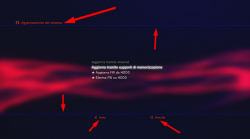
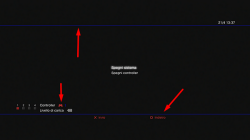
    • Optional Graphic mods can be installed, along with HB Store. Read under the features.
    • PS2, PSX, PSP ISO / Minis / Remasterred Compatibility
    • ReactPSN Compatibility
    • RSOD Screen Bypass
    • App_home/PS3_GAME
    • XMB In-Game Screenshot
    • Remote Play Compatibility
    • Package Manager replaces the classic Install Install Package Files
    • CPU & RSX Temperature are now shown on XMB In-Game while playing PS2 Games
    • LV1: Patched to remove PS2 LV2 Protection
    • LV1: Patched coreOS Hash Check to prevent Brick non non-Dehashed consoles
    • LV1: Peek & Poke
    • LV2: Peek & Poke
    • Disabled Epilepsy message
    • CINAVIA completely Disabled

  • Optional Install (FERROX MOD Installer): You will find the PKG always available in Package Manager - Internal Storage. Thanks to XMBM+ for the installer base!

    Here is a video (from Ferrox 4.80) showing the mods available .

    Results after installing Mods (Click pic for larger view)
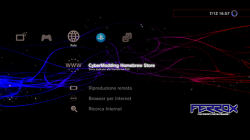
    1.png 2.png 3.png
    The custom wave is not included.

Many tests have been done before release this version. Tested PS3, PS2, PSP, PSX and BD in various formats. If you find any bugs, please report in the comments!! Do you want to install this CFW but you have an Original Firmware (4.82 OFW)? Follow this guide and you will able to install it (ONLY if your model is Compatible): PS3Xploit Guide

Ah, and in the future there will be good news for Ferrox users. ;)
- LizZo


MD5: 4ea0375a93cd888afbdf8797bb1a9d4f

Update: bug fixed in version 1.01
Link
 
Last edited by a moderator:

I am very new to PS3 jailbreak scene, however I managed to jailbroke my PS3 slim and updated with
(4.82 FERROX - Standard Edition). I had an error saying that I needed Cobra firmware when I tried running an PS3 ISO.

1. Can I update this version (FERROX 4.82 v1.01 COBRA 7.55 by Alexander) over the standard edition (4.82 FERROX - Standard Edition)?

2. Anything I must be careful of?

Thanks.
 
I am very new to PS3 jailbreak scene, however I managed to jailbroke my PS3 slim and updated with
(4.82 FERROX - Standard Edition). I had an error saying that I needed Cobra firmware when I tried running an PS3 ISO.

1. Can I update this version (FERROX 4.82 v1.01 COBRA 7.55 by Alexander) over the standard edition (4.82 FERROX - Standard Edition)?

2. Anything I must be careful of?

Thanks.
A bit the same i replyed t you i this message http://www.psx-place.com/threads/re...x-2-02-15-cobra-v7-54.15687/page-5#post-99826

Because all them are 4.82 custom firmwares... you can install any of them, and after that install any other... back and forth as many times you want (is not a good idea to abuse of firmwares installations though)

The problem is if at some point you want to install a version smaller than the one you have (a.k.a... a downgrader), but this is another story, right now there is no reason for you to downgrade


So you have to choose one of the released 4.82 custom firmwares, and if you dont like it you can install another, the talk about which one is better for you could be very long, there are a lot of features in them
 
Thanks again. Appreciate your helps a lot, especially to a newbie like me. There are simply too much information to digest with...it will take months for me if I were to try to understand by myself before actually doing it.
 
Hello amazing peoples!!

I'm with a problem.
I downloaded FERROX 4.82 v1.01 COBRA 7.55

My PS3 it's Habib 4.81 Cobra...

While in updating options it''s says
FERROX 4.82 v1.01 COBRA 7.55 etc and everything goes fine!

But my Friend's PS3 it's 4.81 but don't know what kind CFW he uses.

While in updating options it''s says
4.82 PS3UPDAT.PUP

Some options that i never saw before and give me a error
Corrupted Data.

It's a CFW console. Everything working fine multiMAN, webMAN etc.

We used the same HDD with same file!

Thank you all in advance!
 
Have you checked if is a PS3 that was converted to DEX @Redirr ?
WOW, after i posted it i was thinking about this!!

Well i don't know if it's CEX ou DEX. But it's confirm my suspicious! Now you say it's more clear to me.

But please tell me what safe way to converto to CEX? Or point me a good link, i was looking for about this minutes ago!
 
WOW, after i posted it i was thinking about this!!

Well i don't know if it's CEX ou DEX. But it's confirm my suspicious! Now you say it's more clear to me.

But please tell me what safe way to converto to CEX? Or point me a good link, i was looking for about this minutes ago!
Copyed from here (i did remember someone wrote it in the forum the other day, heheh)
http://www.psx-place.com/threads/rebug-4-78-dex-i-need-help.16020/#post-98878
DEX to CEX conversion:

1)open Rebug Toolbox and "dump eid root key" from "Utilities" column
2)after reboot open Rebug Toolbox again, now "Rewrite Target ID in Flash" from the "DEX/CEX" column
 
Where do I download this from? I am clicking the new link for version 1.01 but it keeps bringing me back to this page. ???
 
Try one of these mirrors (the link was obtained from an external site, so I suggest you that check the MD5 after download to be sure)

EDIT: Sorry the link was for NoBD PUP...

EDIT2: Try this
http://www.eurasia.nu/modules.php?n...lid=12366&ttitle=REBUG_4.82.1_Cobra_7.54_LITE

No Problem... I have to create an acount before I can download. Well I tried to make an account but it is asking me for this... "You can get New User Password (NUP) in the #eur channel on EFnet IRC"... Ohhhh so much work just to DL a file... LOL

Do you have a download source for "FERROX 4.82 v1.01 COBRA 7.55"?
 
Where is the download link at for FERROX 4.82 V1.01 COBRA 7.55 at because when I click underneath

Update: bug fixed in version 1.01

Where it says Link it just sents me back to this
page .

Is the links that are crossed out the one I use?
 
Last edited:
OK, I now have this file "REBUG_4.82.1_LITE_c5da00d59e4d1a7aa599e5d0e21415f8 _PS3UPDAT.PUP" is this still the No BD?
that should be it, you could always make sure by doing a md5 hash check it's MD5: c5da00d59e4d1a7aa599e5d0e21415f8 (listed in the file name and also the text file you got from rebug.me)
 

Similar threads

Back
Top