


jolek
Senior Member
Here is a FMCB\FHDB Noobie Package that comes with four* versions.
* - More info can be found in FHDB tab.
If an installer will ask:
Do you want to keep "FREEMCB.CNF" or "FREEHDB.CNF", select "No".
Without updating these settings, you'll not have shortcuts for new apps (e.g. OPL v1.0.0).
How to update OPL:
https://www.psx-place.com/threads/how-to-update-opl.49115/.
What is BDM Assault:
https://www.psx-place.com/threads/bdmassault.42352/.
In short:
exFAT USB driver for PS2.
I decided not to put (for now) apps for HDD in APP-HDD.
Apps for HDD will be in BOOT-HDD.
All apps will be copied into "hdd0:/__sysconf/FMCB/".
Source of the package:
-
V1 (Simple) takes ~1850 KB on Memory Card, it has:
- FMCB v1.966 from 13\04\2019
- wLaunchELF 41e4ebe (14\01\2019)
- Open PS2 Loader v1.0.0
- ESR r10f direct
Download V1:
-
V2 (Basic) takes ~1950 KB on Memory Card, it has:
- FMCB v1.966 from 13\04\2019
- wLaunchELF 41e4ebe (14\01\2019)
- Open PS2 Loader v1.0.0
- ESR r10f direct
- GSM 0.38
Download V2:
-
V3 (Extended) takes ~3350 KB on Memory Card, it has:
- FMCB v1.966 from 13\04\2019
- wLaunchELF 41e4ebe (14\01\2019)
- Open PS2 Loader v1.0.0
- ESR r10f direct
- GSM 0.38
- Simple Media System 2.9 rev. 4 to work with latest PS2SDK
Download V3:
-
V4 (Extended+) takes ~3510 KB on Memory Card, it has:
- FMCB v1.966 from 13\04\2019
- wLaunchELF 41e4ebe (14\01\2019)
- Open PS2 Loader v1.0.0
- ESR r10f direct
- GSM 0.38
- Simple Media System 2.9 rev. 4 to work with latest PS2SDK
- PS2 controller tester
Download V4:
-
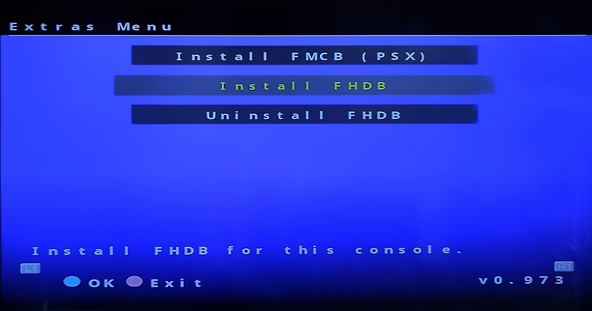
FHDB is bundled in all versions (V1, V2, V3, V4), it has:
- FMCB v1.966 from 13\04\2019
- wLaunchELF 41e4ebe (14\01\2019)
- Open PS2 Loader v1.0.0
- ESR r10f direct
- GSM 0.38
- Simple Media System 2.9 rev. 4 to work with latest PS2SDK
- PS2 controller tester
-
uLaunchELF v4.38 boot DVD:
http://www.mediafire.com/file/9zb7d1tbaa8rrdo/uLE+v4.38+boot+DVD+ISO.zip.
wLaunchELF from 14\01\2019:
https://www.psx-place.com/threads/wlaunchelf-release-thread.13727/page-10#post-214428.
uLaunchELF v4.40 boot CD:
http://www.mediafire.com/file/c2db1vfh2c4byo4/uLaunchELF_v4.40_CD.zip.
uLaunchELF v4.37 boot DVD:
http://www.mediafire.com/file/ut1dju7jdff2bfz/uLaunchELF_v4.37_DVD.zip.
uLaunchELF v4.37 boot CD:
http://www.mediafire.com/file/v1fsxk6i03520zn/uLaunchELF_v4.37_CD.zip.
** - Requires modchip or any other way to run homebrew from disc.
-
Here are 2 versions for modchip users.
V1 (Simple) takes ~1850 KB on Memory Card, it has:
- FMCB v1.965 from 08\12\2018 with USB drivers from 14\01\2019
- wLaunchELF 41e4ebe (14\01\2019)
- Open PS2 Loader v1.0.0
- ESR r10f direct
Download V1:
V4 (Extended+) takes ~3510 KB on Memory Card, it has:
- FMCB v1.965 from 08\12\2018 with USB drivers from 14\01\2019
- wLaunchELF 41e4ebe (14\01\2019)
- Open PS2 Loader v1.0.0
- ESR r10f direct
- GSM 0.38
- Simple Media System 2.9 rev. 4 to work with latest PS2SDK
- PS2 controller tester
Download V4:
- FMCB v1.965 from 08\12\2018 with USB drivers from 14\01\2019
* - More info can be found in FHDB tab.
If an installer will ask:
Do you want to keep "FREEMCB.CNF" or "FREEHDB.CNF", select "No".
Without updating these settings, you'll not have shortcuts for new apps (e.g. OPL v1.0.0).
-
V1 (Simple) takes ~1850 KB on Memory Card, it has:
- FMCB v1.966 from 13\04\2019
- wLaunchELF 41e4ebe (14\01\2019)
- Open PS2 Loader v1.0.0
- ESR r10f direct
- BDMAssault v1.0.0
Download V1:
-
V2 (Basic) takes ~1950 KB on Memory Card, it has:
- FMCB v1.966 from 13\04\2019
- wLaunchELF 41e4ebe (14\01\2019)
- Open PS2 Loader v1.0.0
- ESR r10f direct
- GSM 0.38
- BDMAssault v1.0.0
Download V2:
-
V3 (Extended) takes ~3350 KB on Memory Card, it has:
- FMCB v1.966 from 13\04\2019
- wLaunchELF 41e4ebe (14\01\2019)
- Open PS2 Loader v1.0.0
- ESR r10f direct
- GSM 0.38
- Simple Media System 2.9 rev. 4 to work with latest PS2SDK
- BDMAssault v1.0.0
Download V3:
-
V4 (Extended+) takes ~3510 KB on Memory Card, it has:
- FMCB v1.966 from 13\04\2019
- wLaunchELF 41e4ebe (14\01\2019)
- Open PS2 Loader v1.0.0
- ESR r10f direct
- GSM 0.38
- Simple Media System 2.9 rev. 4 to work with latest PS2SDK
- PS2 controller tester
- BDMAssault v1.0.0
Download V4:
-
FHDB is bundled in all versions (V1, V2, V3, V4), it has:
- FMCB v1.966 from 13\04\2019
- wLaunchELF 41e4ebe (14\01\2019)
- Open PS2 Loader v1.0.0
- ESR r10f direct
- GSM 0.38
- Simple Media System 2.9 rev. 4 to work with latest PS2SDK
- PS2 controller tester
- BDMAssault v1.0.0
1. If you choose a package with BDM
run wLaunchELF from the PS2 Browser.
2. Select Configure:

3. Look for Startup Settings... and enter it:

4. Look for USB IRX and enter it:

5. Now browse through your memory card to search for USBD.IRX.
Your file should be in:
- mc0:/SYS-CONF/USBD.IRX or
- mc1:/SYS-CONF/USBD.IRX:

6. Look for USB Mass and enter it:

7. Now browse through your memory card to search for USBHDFSD.IRX.
Your file should be in:
- mc1:/SYS-CONF/USBHDFSD.IRX or
- mc1:/SYS-CONF/USBHDFSD.IRX:

8. Once you set these files you can press RETURN:

9. Press OK:

10. Your config should be saved:

run wLaunchELF from the PS2 Browser.
2. Select Configure:
3. Look for Startup Settings... and enter it:
4. Look for USB IRX and enter it:
5. Now browse through your memory card to search for USBD.IRX.
Your file should be in:
- mc0:/SYS-CONF/USBD.IRX or
- mc1:/SYS-CONF/USBD.IRX:
6. Look for USB Mass and enter it:
7. Now browse through your memory card to search for USBHDFSD.IRX.
Your file should be in:
- mc1:/SYS-CONF/USBHDFSD.IRX or
- mc1:/SYS-CONF/USBHDFSD.IRX:
8. Once you set these files you can press RETURN:
9. Press OK:
10. Your config should be saved:
How to update OPL:
https://www.psx-place.com/threads/how-to-update-opl.49115/.
What is BDM Assault:
https://www.psx-place.com/threads/bdmassault.42352/.
In short:
exFAT USB driver for PS2.
I decided not to put (for now) apps for HDD in APP-HDD.
Apps for HDD will be in BOOT-HDD.
All apps will be copied into "hdd0:/__sysconf/FMCB/".
Source of the package:
- FMCB v1.966 from 13\04\2019:
http://www.psx-place.com/threads/fmcb-fhdb-v1-9-series-release-thread.13413/page-8#post-152415. - wLaunchELF 41e4ebe (14\01\2019)
http://www.psx-place.com/threads/wlaunchelf.20791/#post-152433. - Open PS2 Loader v1.0.0 or higher:
https://github.com/ps2homebrew/Open-PS2-Loader/releases. - ESR r10f direct:
https://www.psx-place.com/threads/esr.30217/. - GSM 0.38:
http://www.psx-place.com/threads/graphics-synthesizer-mode-selector-gsm.19028/. - Simple Media System 2.9 rev. 4 to work with latest PS2SDK (with minor changes):
- http://psx-scene.com/forums/f111/work-progress-39778/index124.html#post1211170.
- PS2 controller tester:
http://www.psx-place.com/threads/ps2-controller-tester.19086/. - BDMAssault v1.0.0:
https://www.psx-place.com/threads/bdmassault.42352/.
Last edited:



 Kinda yes, but rom0:OSDSYS is still launched by the cracked & decrypted hosdsys elf from uLE it doesn't just inject it's code directly into the osdsys like funtuna or fmcb, idk why maybe it's incase the fsck fails so it can still load the original browser if the hosdsys assets can't be found on the hdd.

