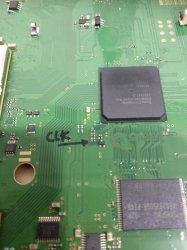
PS3 Frankenstein PHAT PS3: CECHA with 40nm RSX

i think you're doing ok with the translations! I'm still confused, however. If the actual voltage is not needed, how do you know you a pulse phase started, or that you went from pulse 1 to pulse 2?
simply the IC will not work if:
1. The voltage is mismatched
2. bad contactor
3. There is damage inside the IC
cellbe ic gets 4 voltage inputs, ramcellbe ic gets 2 voltage inputs, rsx ic gets 5 voltage inputs of which 1 voltage input is specifically for ramRsx ic. to bypass "rules no.1 and 2
the input voltage that cellbe and rsx can have must be good, otherwise it cannot enter "rule" no.3, The needle "clk pulse" will only reach around 1.5v then drop the shotdown.
if you pay attention later when entering "rule" no.3, you will be able to measure the incoming voltage.
 
Last edited:
Super interesting stuff here guys. I love watching the minds at work. The knowledge this thread has gained over its 40 pages has been amazing to read as it unfolds. Has anyone heard from squeept? Haven't seen him post here for a bit.
 
simply the IC will not work if:
1. The voltage is mismatched
2. bad contactor
3. There is damage inside the IC
cellbe ic gets 4 voltage inputs, ramcellbe ic gets 2 voltage inputs, rsx ic gets 5 voltage inputs of which 1 voltage input is specifically for ramRsx ic. to bypass "rules no.1 and 2
the input voltage that cellbe and rsx can have must be good, otherwise it cannot enter "rule" no.3, The needle "clk pulse" will only reach around 1.5v then drop the shotdown.
if you pay attention later when entering "rule" no.3, you will be able to measure the incoming voltage.
Hello thank you for sharing great info with us.
I have few questions if you don't mind to answer.
How often do you do reball units and if so do you reball both (cpu/gpu)?
How often do you change nek tokins on phat models?
 
Hello thank you for sharing great info with us.
I have few questions if you don't mind to answer.
How often do you do reball units and if so do you reball both (cpu/gpu)?
How often do you change nek tokins on phat models?
how many cellbe + rsx reball? hahaha, I didn't count it, it's too much to saturate me to a high degree
If you change nec tokin? it seems that i rarely change nec tokin ...
I explain a little about nec tokin ..., nec tokin is one of the components that can be said based on life span, when he has a problem, he actually only decreases or drops his mf, so we just need to reinforce his mf by adding tantalum, tantalum (470mf or other) the addition of 1 or 2 seeds of tantalum (470mf) is enough, hahaha but don't ask me how much it decreased, because I'm lazy to measure it, only based on estimates and habits.
are cellbe and rsx direball both?
of course not, only the problematic parts, according to the "rules"
if you pay attention to the nec tokin 108 which often drops compared to nec tokin 128 because the mf is smaller
108 (1000mf) x 4 = 4000mf
128 (1200mf) x 4
= 4800mf
hahaha sorry if it's wrong
 
Last edited:
No I know this for myself all I've been fixing all this years I know is deformation of boards and I just simple reball both over 6 years. About nek tokins I don't even bother to think to change as well. I just didn't want to argue with everyone around forum.
Now aside ps3, how often do you get ps4 working, or same thing as here, APU will die . How often do you change APU?
 
No I know this for myself all I've been fixing all this years I know is deformation of boards and I just simple reball both over 6 years. About nek tokins I don't even bother to think to change as well. I just didn't want to argue with everyone around forum.
Now aside ps3, how often do you get ps4 working, or same thing as here, APU will die . How often do you change APU?
for ps4 it's still a little bit, maybe a few hundred, I haven't got accurate data that helps me, the "rules" that are made for ps4 are still vague, because of limited knowledge and it seems that "clk pulses" can only be for phat types, some slim already use The new ic seems like "pulse clk" is blocked, for APU replacement it is still rare because the average APU part is the problem, and it is very difficult to get a good APU spartpart
 
Yes quite same situation. I just ordered in China one APU for test. I don't know exactly if it will come nor memory, syscon and his bdp ic, or just simple APU. I have seen few people posting on that product is working and just bought without asking for rest of parts. I will report back if only apu can be changed or it needs all parts tied with it. I've been quite confused and thought all years APU should be paired like in ps3. Probably I will get same status of blod. Will be reported once I have it here and testing.
 
Yes quite same situation. I just ordered in China one APU for test. I don't know exactly if it will come nor memory, syscon and his bdp ic, or just simple APU. I have seen few people posting on that product is working and just bought without asking for rest of parts. I will report back if only apu can be changed or it needs all parts tied with it. I've been quite confused and thought all years APU should be paired like in ps3. Probably I will get same status of blod. Will be reported once I have it here and testing.
APU here you mean 1 set of APU, right?
for phat type: consists of APU, IC Nor, Syscon, EEProm which is in the Mechanic Module, the replacement must be 1 set, otherwise it won't work, I often change APU sets both phat and slim types, even though in the amount I think not much
 
Yes I meant whole set for phat and. I have done same test before where a board did not work, just to exclude probability of ram problems, swapped APU set to blod board. I have tested before only APU but it didn't start fully on screen until whole set of ic was replaced. I'm just trying one more time to find a solution for ps4 and my services, meantime I will move myself to another area as business backup.
About apu ordered not sure if it is coming hole set or simply APU. We will see.
 
Last edited:
I decided to simplify and clarify the explanation that @botakompong wrote. Of course, all credits go to him.

Below is a boot sequence that must be completed in order to get output on display. Let's call these booting stages "rules". If one of them fails to execute correctly, the system will not work (you will get RLOD, YLOD, GLOD etc).

Rule 1. CellBe to Syscon, --no-- shutdown
Rule 2. Rsx to Syscon, --no-- shutdown
Rule 3. CellBe to Rsx, --no-- shutdown
Rule 4. CellBe to RamCellBe, --no-- blank
Rule 5. Cell be to nor / nand (boot os) --no-- shutdown / blank
Rule 6. Rsx to RamRsx, --no-- blank
Rule 7. AV / HDMI output

There is a point on each motherboard where you can check these rules with an analog meter. Let's call it "clk pulse". In the picture below you can see its location on a dyn-001 board:

pic1.jpg

Below is an example of a "clk pulse" (dyn-001) from a working machine:


From the video above we can divide the clk pulse into 3 steps. The first pulse is active for some time, then slowly fades (step 1), the second pulse is quicker but noticeable (step 2), the third pulse is weak but still shows up before it fades (step 3).

Step 1: Rules 1-5.
Step 2: Rule 6.
Step 3: Rule 7.

Pulse clk for Rsx:

-Cxd2971x - there are only Step 1 and Step 2 (after that the image appears)
-Cxd2982x, Cxd2991x, Cxd530xx - have 3 Steps (after that the image appears)

Here is an example of a problematic clk pulse:


From the video above, you can see clk pulsing repeatedly or "looping".

The symptoms of looping are:

1. No display / blank screen.
2. When the reset is pressed, it cannot beep 1x.
3. The LED indicator on the HDD is not blinking.

These conditions match with Rule 4, so there is a problem with the connection from CellBe to RamCellBe. The reasons could be one or combination of the following:

1. RamCellBe didn't get the right voltage.
2. Bad solder balls, especially in the CellBe section (needs to be reballed).
3. Damage to RamCellBe IC or damage to IC CellBe.

In the next example, the problem occurs in the Rsx section:


Here you can see the pulse clk has passed step 1, step 2 barely tries to start, but quickly dies. So the pulse in step 2 was too weak/failed to start compared to the working machine example.The symptom is no display/ blank screen. Holding reset gives 1x beep, hdd light also blinks briefly, so we can cancel out Rule 4. Which means it only matches with Rule 6, and there is damage in the RSX section. Here are the potential reasons:

1. RamRsx is not getting the correct voltage.
2. Solder ball problems (need to reball).
3. Damaged RSX IC or RAMRSX IC.

And there will also be another pulse, if you are interested in finding it. (To be continued...)
 
Last edited:
I decided to simplify and clarify the explanation that @botakompong wrote. Of course, all credits go to him.

Below are the stages that run from start until shutdown, let's call them "rules".

Rule 1. CellBe to Syscon, --no-- shutdown
Rule 2. Rsx to Syscon, --no-- shutdown
Rule 3. CellBe to Rsx, --no-- shutdown
Rule 4. CellBe to RamCellBe, --no-- blank
Rule 5. Cell be to nor / nand (boot os) --no-- shutdown / blank
Rule 6. Rsx to RamRsx, --no-- blank
Rule 7. AV / HDMI output

There is a point on each motherboard where you can check these rules. I will call it "clk pulse". In the picture below you can see its location on a dyn-001 board:

View attachment 33218

Below is an example of a "clk pulse" (dyn-001) from a working machine:


From the video above we can divide the clk pulse into 3 steps. The first beat continues to stop briefly (step 1), the second pulse continues to stop briefly (step 2), the third pulse is active for little bit, but then goes silent (step 3).

Step 1: Rules No.1-5.
Step 2: Rule no. 6.
Step 3: Rule no. 7.

Pulse clk for Rsx:

-Cxd2971x - there are only Step 1 and Step 2 (after that the image appears)
-Cxd2982x, Cxd2991x, Cxd530xx - have 3 Steps (after that the image appears)

I will give an example of a problematic clk pulse:


From the video above, you can see clk pulses repeatedly, I usually call it "looping".

The symptoms of looping are:

1. No display / blank screen.
2. When the reset is pressed it cannot beep 1x.
3. The LED indicator on the HDD is not blinking.

These conditions match with Rule 4, so there is a problem with the connection from CellBe to RamCellBe. It could be one or combination of the following:

1. RamCellBe didn't get the right voltage.
2. Bad solder balls, especially in the CellBe section (needs to be reballed).
3. Damage to RamCellBe IC or damage to IC CellBe.

In the next example, the problem occurs in the Rsx section:


Here you can see the pulse clk has passed step 1, step 2 only goes up a little and then remains silent, the symptom is no display/ blank screen. Hold reset does 1x beep, hdd light blinks briefly. So this symptom is included in Rule 6, which means there is damage in the RSX section. Here are potential reasons:

1. RamRsx is not getting the correct voltage.
2. Solder ball problems (need to reball).
3. Damaged RSX IC or RAMRSX IC.

And there will be also another pulse, if are interested in finding it... To be continued.

Can also add this to my reball thread, I did not had time to explain it so this will be useful info for repair of boards. I should find good calibrated analog multimeter for better videos.
Thank you.


EH?

Just got bogged down on some commission work. Haven't checked in since I consider the TOKIN issue decided and I haven't crossed paths with another system that had a guaranteed dead GPU yet.

Nice work everyone!

Does this mean my 65nm GPU or the board is dead? Looks like there was no reason it shouldn't have worked. Or did I not need to swap those resistors around underneath the RSX like we originally thought?
 
Hey look at that, 2 weeks later he checks in. I'm also curious to see what happened with his swap that didn't work out. He must be busy he won't even acknowledge my a01 that needs love. Guess ill just have to take a paint knife to the tokins and then use my Dewalt heat gun to fry the rest of whatever I can melt with it.......
 
Last edited:
I guess I just killed a good 65nm chip. Happens to the best of us.

Anyway, @RIP-Felix is correct. I will absolutely not be offering the swap as a service. There are a few members here I will trust to trust me and I can do a non-stress tested, no warranty swap with just the boards sent in down the road a little. Otherwise, you'll have to pony up for the full systems, and trade in your junk parts for pennies.

Regardless, I need to get some working on my own before I'd even consider that.
 
I guess I just killed a good 65nm chip. Happens to the best of us.

Anyway, @RIP-Felix is correct. I will absolutely not be offering the swap as a service. There are a few members here I will trust to trust me and I can do a non-stress tested, no warranty swap with just the boards sent in down the road a little. Otherwise, you'll have to pony up for the full systems, and trade in your junk parts for pennies.

Regardless, I need to get some working on my own before I'd even consider that.
The only thing I can think of is that we didn't get the software side of it right. A 65nm RSX doesn't require any voltage adjustments, so we can ignore the MOSFET changes that optimize Voltage for 40nm RSX. The other changes are necessary using the mod chip too and we now have confirmed that process was correct. So the only thing that's not working is the either the FW or chip itself. Thing is the errors you were getting are consistent with what @DeadEnd was getting when he didn't have the MOD chip installed. It'll throw 3034s and 4002 after changing the resistors but not having the mod chip installed correctly, making you think maybe you got the reball wrong or killed the chip, when it's fine.
3034 and 4001 at once still. I can do a deeper dive tomorrow, but I have a date with some video games with some friends for now.

Did any of the experts ever verify I modified my syscon EEPROM correctly?
So that error is pretty consistant with what we would ecpect to see if the SYSCON EEPROM changes were not correct. However, @M4j0r confirmed the RSX changes looked right in your dump...
1) ...I checked the dump as soon as he posted it, the RSX part is fine.
 
I'm very interested in the 0.95V mod, but I'm confused how grounding pins 2 and 3 on Q6200 would create that voltage. It seems like those are source pins connected to pin 1, and that would just short out the whole device according to the schematic.
 
I'm very interested in the 0.95V mod, but I'm confused how grounding pins 2 and 3 on Q6200 would create that voltage. It seems like those are source pins connected to pin 1, and that would just short out the whole device according to the schematic.

Pin 4 is Gate and left floating. So firstly, there is not going to be any control from the MOSFET driver anymore. He's circumventing it's control, which must mean he wants it to always allow current from Drain to Source. The way you do that with MOSFETs is by applying voltage across the Source and Gate. He can't pull all the source pins out of circuit or it wouldn't get 1.7V from MISC anymore. which is why Pin 1 is left in place. Source Pins 2-3 are tied to GND, meaning that when voltage is applied across source and gate, current flows from drain to source. What you're asking is, 'doesn't that create a direct short to ground?'

That assumes that current can flow in from pin 1 and out pins 2-3. It can't if there are diodes to prevent reverse flow through the IC. It would be a short if it could. IDK, but I'm guessing it can't and that by tying S2 & S3 to GND he's creating a voltage potential between G and S. But then, why not just lift pin 4 (gate) and power it to force the MOSFET on? Wouldn't that be the cleaner solution? Why leave Gate floating and force all the current through pin 1, when you can power it directly and distribute the current through 3 pins?

This would make for a fun breadboard experiment if someone wants to play with it?
 
Actually I decided to pull Q6200 off my donor board (PS3#1 = COK-001). I applied 1.7v from a DC PWR supply to Source Pin 1, and read the voltage on source Pins 2 and 3. It was the same 1.7v. So they are electrically connected. However switching over to resistance, there is about 130 Ohms between them. So long as the resistance to the load (RSX RAM) is less than 130 Ohms, it shouldn't short. But I'm still concerned that it could heat up.

I need to do learn more about MOSFETs and try some breadboard experiments. Maybe @botakompong would explain why it's done that way.
 
Actually I decided to pull Q6200 off my donor board (PS3#1 = COK-001). I applied 1.7v from a DC PWR supply to Source Pin 1, and read the voltage on source Pins 2 and 3. It was the same 1.7v. So they are electrically connected. However switching over to resistance, there is about 130 Ohms between them. So long as the resistance to the load (RSX RAM) is less than 130 Ohms, it shouldn't short. But I'm still concerned that it could heat up.

I need to do learn more about MOSFETs and try some breadboard experiments. Maybe @botakompong would explain why it's done that way.
hello RIP-Felix, Q6200 which is on PS3-COK-001, not the same as Q6200 which is on JTP-001,
Q6200 (COK-001) pins 1,2,3 are connected internally, control pin4, pin5,6,7,8 are internally connected
while Q6200 (JTP-001) can be seen in the picture below
view

basically, I'm just looking for a component that can produce an output voltage of 0.95 volts in accordance with the voltage required by rsx cxd530xx, and I see a component that is on the PS3 type 250x-type300x-superslim, suitable for use on the PS3-Phat-COK-001- 002, because the shape is the same and how to change it is not too difficult
 
Back
Top