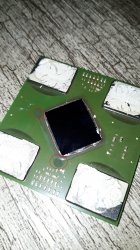
PS3 Frankenstein PHAT PS3: CECHA with 40nm RSX

I wouldn't exceed a board temperature of 100C (boiling point of water) while drying. If you do it creates steam pressure that can de-laminate layers of chips, popcorn caps, basically cause damage. The idea is to increase the rate of evaporation, not boil it! On my last board, I let it dry for about 2 hours @ 90-95C and it still wasn't enough to drive out the water. When I increased up to 150C to begin the preheat for the RSX pull, I noticed a stream of boiling liquid coming out of the die underfill! I think @squeept said the recommended minimum is like 4 hours.

So use a temperature sensor taped underneath the RSX. The setting on the preheater needed to get the board to 150-180C might be higher than it says. I started covering the entire board in aluminum foil. This reflects radiant heat from the topside back down, keeping the heat in, like baking a potato. It also insulates the board from the cool air above some. This way my unmodified preheater temperature and board temperature are actually pretty close. Most importantly it allows the board to heat evenly on bot sides, so it doesn't warp!

I just tape off a square hole around the RSX and place the second temperature probe next to the RSX. Then I cover it with a square of aluminum until I'm ready for the hot air nozzle.
 
IPC/JEDEC J-STD-033C-1 if anyone wants to pay for it and read straight from the horses mouth.

From the snippets I googled and what I remember, minimum 4 hours at 125C, maximum 48 hours. Depending on relative humidity, board thickness, duration of exposure to humidity, etc. Any longer begins to affect solder adversely (oxidation, brittleness, intermetallic growth).

In practice, I do 100C overnight. My oven was meant for powder coating, not for precision electronics work, so even with the PID controller I hacked in, it still gets hot spots and little bursts over the target sometimes so 100C keeps it from hitting a dangerous runaway temp when it hiccups.
 
Last edited:
For posterity I thought I should post a link to this thread. The OP found a COK-002 with a 65nm RSX. We haven't seen that before!

This got me thinking. For all we know, the modchip procedure for 65 nm RSX might not actually be the same as for 40 nm. That would explain Squeept's failure with the 65nm
 
Hey @squeept, which RSX did you try using with SONY's official method?

If it was a 65nm then which SYSCON SoftID did you use? The SoftID for the 40nm RSX and 65nm are different. This 65nm we're seeing now on a COK-002 uses a previously unknown SYSCON chip, a CXR-303GB, that has a SoftID (0F29). The 40nm RSX we saw before used 0F38. Reading back on @sandungas and @M4j0r posts it sounds like the SoftID tells the PS3 which patch to apply to the SYSCON from the Update package. Please correct me if I'm wrong guys, I'm not sure if I'm making sense here. However, if 0F38 applies the patch for a 40nm RSX, and 0F29 applies the patch for 65nm RSX, then if @aqueept used the wrong SoftID, then the update package applied the wrong patch to the SYSCON, explaining why it might not work even if he got the HW changes right. Is my ass making sense?
 
What about mod Xc2c32a, how it works, when it patches, where it should detect which rsx and location, this data is somehow stored in nand/nor? I don't really know nothing till now about programming but I'm sure each unit have rsx instructions in nand/nor.
If we may have to change simply instructions from a rsx to another?
Like PCI graphics card with patch of bios were gpu was a bit newer than the original version ?
Edit
When we install the PUP on unit it knows by soft id in syscon which instructions to choose for that unit. If we know rsx instructions in nand/nor on different units and those will remain fixed values could lead further.
 
Last edited:
Hey @squeept, which RSX did you try using with SONY's official method?

If it was a 65nm then which SYSCON SoftID did you use? The SoftID for the 40nm RSX and 65nm are different. This 65nm we're seeing now on a COK-002 uses a previously unknown SYSCON chip, a CXR-303GB, that has a SoftID (0F29). The 40nm RSX we saw before used 0F38. Reading back on @sandungas and @M4j0r posts it sounds like the SoftID tells the PS3 which patch to apply to the SYSCON from the Update package. Please correct me if I'm wrong guys, I'm not sure if I'm making sense here. However, if 0F38 applies the patch for a 40nm RSX, and 0F29 applies the patch for 65nm RSX, then if @aqueept used the wrong SoftID, then the update package applied the wrong patch to the SYSCON, explaining why it might not work even if he got the HW changes right. Is my ass making sense?
He didn't patch the firmware, there's no need for it.
The patches provided by Sony are only security patches, they don't fix any bug or add any feature, the syscon works perfectly fine without these. The "SoftID" is just the syscon firmware build id.
He changed values on the data eeprom to let syscon know what the actual hardware target is (using a 304GB syscon).

What about mod Xc2c32a, how it works, when it patches, where it should detect which rsx and location, this data is somehow stored in nand/nor? I don't really know nothing till now about programming but I'm sure each unit have rsx instructions in nand/nor.
If we may have to change simply instructions from a rsx to another?
Like PCI graphics card with patch of bios were gpu was a bit newer than the original version ?
Edit
When we install the PUP on unit it knows by soft id in syscon which instructions to choose for that unit. If we know rsx instructions in nand/nor on different units and those will remain fixed values could lead further.
It changes the syscon to rsx communication, the only thing which needs to be patched is the syscon firmware.
 
He didn't patch the firmware, there's no need for it.
The patches provided by Sony are only security patches, they don't fix any bug or add any feature, the syscon works perfectly fine without these. The "SoftID" is just the syscon firmware build id.
He changed values on the data eeprom to let syscon know what the actual hardware target is (using a 304GB syscon).

It changes the syscon to rsx communication, the only thing which needs to be patched is the syscon firmware.
Okay, maybe semantics is the issue. You'll have to translate my layman speak into Coder-ese, but did he change the RSX revision byte in the SC eeprom to 0x21 (302GB = v1.4) or 0x30 (303GB/304GB = v1.5)? Based on your posts, either way should be fine for a 65nm chip, right? Only a 40nm swap requires the latest chip revision (0x30)?

Edit, just found the post...
Okay, hardware swaps all went without incident. The CECHK01 was known working with no issues or errors. No delamination after all the rework cycles on the COK-001 board. Moved the resistor diagonal. I am now getting a nearly instant YLOD with syscon errors A0902120, A0403034, and A0404001 all at once.

Here is the original syscon dump: http://squeept.com/junk/second_try_dump.bin
Here is the fixed syscon that I wrote to the 302 syscon chip: http://squeept.com/junk/second_try_modified.bin

The checksums were fixed using the syscon script on board after the write, so ignore any wrong checksums.

Any ideas? Did I miss any more minor hardware changes somewhere in this thread? I'm HIGHLY confident that all of the hardware is good.
Looks like he used a 302GB off the K model. However, it wasn't clear if anyone reviewed his eeprom dump after making the changes. I have no idea how. Could someone do that maybe?
 
Last edited:
Hey @squeept, which RSX did you try using with SONY's official method?

If it was a 65nm then which SYSCON SoftID did you use? The SoftID for the 40nm RSX and 65nm are different. This 65nm we're seeing now on a COK-002 uses a previously unknown SYSCON chip, a CXR-303GB, that has a SoftID (0F29). The 40nm RSX we saw before used 0F38. Reading back on @sandungas and @M4j0r posts it sounds like the SoftID tells the PS3 which patch to apply to the SYSCON from the Update package. Please correct me if I'm wrong guys, I'm not sure if I'm making sense here. However, if 0F38 applies the patch for a 40nm RSX, and 0F29 applies the patch for 65nm RSX, then if @aqueept used the wrong SoftID, then the update package applied the wrong patch to the SYSCON, explaining why it might not work even if he got the HW changes right. Is my ass making sense?
Let me try to explain this in a different way...
The description i marked in bold is fine, inside the PUP file there is a "swu/swu2.self" file (software updater) that should be considered an executable program, that program does the check to the syscon SoftID, and based on the response it decides which syscon PKG is installed, from this table

The syson chips contains 2 areas to store data (ROM and EEPROM), in the info displayed in the More System Information screen (button combo) can be seen both, basically that line is displaying ROM . EEPROM @ SC

The contents of the ROM (identifyed by his SoftID) is static, we cant change it, is something "grabbed" statically together with the rests of the syscon circuitry, lets say... the ROM is not really "programmed" at any point of the manufacturing process, we could say that is "etched" chemically only 1 time

Except in the syscon models with the suffix "F", that "F" means "flash" (this is what @squeept was doing)
The syscon chips with the "F" are fully programmables, so you can give them whatever SoftID you want (by writing the contents of the ROM area from any other syscon model/version)

------------
And the other EEPROM area is intended to store the patch (from the PUP). That patch is applyed as an "overlay" (or a mask) on top of the ROM area
When the syscon reads this areas it reads the overlay first (and the data present in the overlay causes the syscon to ignore the data from the ROM)
But as @M4j0r said, this patches are not really needed, the base syscon firmware (from the ROM area) is enought
As far i remember... he "hack" they was trying was to use that overlay feature of the patches (EEPROM) to modify the ID of the RSX
In theory this should be enought, the SPI communications in between syscon and the RSX are going to take this ID and do what they was doing normally

-----------
Feel freee to correct me if i made some mistake, i realized about some of the things i said not much time ago :D
 
Last edited:
The syson chips contains 2 areas to store data (ROM and EEPROM), in the info displayed in the More System Information screen (button combo) can be seen both, basically that line is displaying ROM . EEPROM @ SC
Actually it gets the patch version from syscon ram, so it's ROM.RAM @ SC. So in theory after CELL sends a new patch to the syscon it will still display the older version until you reset it to apply it.

Except in the syscon models with the suffix "F", that "F" means "flash" (this is what @squeept was doing)
I think he just using a 304GB syscon.

As far i remember... he "hack" they was trying was to use that overlay feature of the patches (EEPROM) to modify the ID of the RSX
In theory this should be enought, the SPI communications in between syscon and the RSX are going to take this ID and do what they was doing normally
Accessing the complete EEPROM requires no patches if you have hardware access. It's only requires patches if you want to do it from CELL. And yes, the syscon decides based on the rsx revision byte how to initialize it.
 
When I finally soldered the 65 nm to the board, where I had desoldered syscon earlier (back when we were trying to patch it and all do all that fun stuff before we found out about the modchip). I messed up some resistors next to the oscillator, but managed to place them all back correctly. I also soldered the syscon itself back (failed to write anything on it in the end). Aaand now the system is dead to the point of no red lights and no response. I am not even sure if 5v standby is coming to it anymore. The UART thing won't show anything either, just that Auth1 is invalid. Maybe some part of the soldering went wrong, or the chip died completely... But at least I learned something in the process. Next time hopefully will go better on a board where syscon was untouched.
 
When I finally soldered the 65 nm to the board, where I had desoldered syscon earlier (back when we were trying to patch it and all do all that fun stuff before we found out about the modchip). I messed up some resistors next to the oscillator, but managed to place them all back correctly. I also soldered the syscon itself back (failed to write anything on it in the end). Aaand now the system is dead to the point of no red lights and no response. I am not even sure if 5v standby is coming to it anymore. The UART thing won't show anything either, just that Auth1 is invalid. Maybe some part of the soldering went wrong, or the chip died completely... But at least I learned something in the process. Next time hopefully will go better on a board where syscon was untouched.
Hmm, maybe wishful thinking but, take a look at this thread of mine and try and see if you get any response. After all I also thought my board was toasted. But who knows; doesn't hurt to try.

https://www.psx-place.com/threads/not-dead-c-ps3-nlod.31921/
 
Lifted another GPU today. The murdered GPU count is now 2, but i'm staying determined. The same corner i messed up had ripped pads again, but this time it was only 6 pads. I was very close.

I did not see any bumps on the GPU, but did hear some popping noises when my air temperature was raised to 250C. I think my mistake is not enough airflow, i was keeping airflow at a minimum while slowly increasing my temps till the GPU nudged on both sides. Hot air lamp was about 1/4 inch away from the die. The right side nudged way earlier than the left, so heat wasn't being distributed evenly. So next time i'm not raising my hot air past 230C, and will give it a bit more airflow. I also just bought a second temp sensor so i can monitor both sides of the GPU before attempting to nudge it.
 
Actually it gets the patch version from syscon ram, so it's ROM.RAM @ SC. So in theory after CELL sends a new patch to the syscon it will still display the older version until you reset it to apply it.
Thx, thats an small detail but worths to be mentioned, so i guess the order how is loaded the data is like this ?:
1) syscon ROM is copyed to syscon RAM
2) optionally... syscon EEPROM is copyed to syscon RAM (overwriting some of the data that was copyed from the ROM)
3) syscon "runs" the contents of syscon RAM

I think he just using a 304GB syscon.
Hmm, yep, im checking his old posts and he mentioned it here and here
For some reason i thought he was lucky and bought a CXR713F120A‎‎, i guess is because you was talking about exotic syscon models and i only considered exotics the "F" versions

So as a recap... the ingredients for that experiment was a CXR714120-304GB (that in theory supports the 65nm and 40nm, and can be considered exotic too, but is not fully "Flasheable")
Together with the EEPROM changes you mentioned here

Btw, im wondering if is really needed the step to delete with FF's the areas of the EEPROM dedicated to store the patches, im guessing that EEPROM areas should be empty when shipped directly from the syscon manufacturer (i guess are sold as "new", in other words... never used in a PS3)

Accessing the complete EEPROM requires no patches if you have hardware access. It's only requires patches if you want to do it from CELL. And yes, the syscon decides based on the rsx revision byte how to initialize it.
I remember he was using a external programmer, but im not sure if he was applying the patch that allows higher privileges from GameOS (i guess not because it was not needed)
Btw, is posible to do the same changes made by @squeept accessing syscon by UART/TTL ?
 
Last edited:
...Hmm, yep, im checking his old posts and he mentioned it here and here
For some reason i thought he was lucky and bought a CXR713F120A‎‎, i guess is because you was talking about exotic syscon models and i only considered exotics the "F" versions

So as a recap... the ingredients for that experiment was a CXR714120-304GB (that in theory supports the 65nm and 40nm, and can be considered exotic too, but is not fully "Flasheable")...
No, he got fake 304GB and didn't use it for the attempt. Instead he used the 302GB from the K model he harvested the 65nm RSX from (scroll up to my last post). In that post HE LINKED THE EEPROM DUMP FROM AFTER THE ATTEMPT. Someone needs to double check his changes!!! We have been waiting for confirmation ever since.
 
Hmm, maybe wishful thinking but, take a look at this thread of mine and try and see if you get any response. After all I also thought my board was toasted. But who knows; doesn't hurt to try.

https://www.psx-place.com/threads/not-dead-c-ps3-nlod.31921/

Thanks for the link. Very nice tip, but unfortunately seems like mine is pretty much ruined . The trick didn't work, although it did get the psu to click and produce a high pitch whine. Seems like there might be a short somewhere on the board.
 
By the way, I think Felix was on the right track with the moisture removal. I've been told that it's more about getting the board preheated to a certain higher temperature, more than 140 degrees. So I'm thinking in the range of 150-180. Once you do that, no need to bake it for 12 hours. And i've had one interesting observation. So board nr.1 is botched, and now I worked on board nr.2 (Oh the famous "cock" boards, untouched this time :D) and lifted the original 90nm rsx from it. The board got preheated quite well, went up to around 170 easily using only the preheater . Took maybe a few minutes to reach that, then switched on the top to get it to 220. As a result, no busted balls, no bulging (hilarious, I know). All went fine and dandy, but then I needed to lift the rsx from a slim board again and here I am suspecting moisture had its fun. First of all, once it got to 140 degrees on the preheater, it was struggling hard to get any higher. 10 min later, finally got to 150, 10 min more, 160. Well, I couldn't stand the smell anymore and had to just switch on the top already. Now, the chip seems to be alright, however there are two spots that raise suspicion a little bit. The layer around the die, seems like a cured resin of some kind with two raised spots/drops . Now it could either be - bulging or the resin drops themselves were cured like that. Remains to be seen....

bust.jpg
 
Last edited:
Thx, thats an small detail but worths to be mentioned, so i guess the order how is loaded the data is like this ?:
1) syscon ROM is copyed to syscon RAM
2) optionally... syscon EEPROM is copyed to syscon RAM (overwriting some of the data that was copyed from the ROM)
3) syscon "runs" the contents of syscon RAM
1) Syscon decrypts/verifies the patch and copies it from the EEPROM to RAM
2) It applies the patches using a special module directly on the ROM (using something like a MAT or Breakpoint without actually changing the ROM, since it's read only).

Btw, im wondering if is really needed the step to delete with FF's the areas of the EEPROM dedicated to store the patches, im guessing that EEPROM areas should be empty when shipped directly from the syscon manufacturer (i guess are sold as "new", in other words... never used in a PS3)
The Syscon manufacturer is Sony and I only got a few models which have never been in a PS3, most of the others which you can buy have been harvested from dead systems.

I remember he was using a external programmer, but im not sure if he was applying the patch that allows higher privileges from GameOS (i guess not because it was not needed)
Btw, is posible to do the same changes made by @squeept accessing syscon by UART/TTL ?
If you exchange the syscon you can just use the direct EEPROM SPI interface, that's what Sony is using. You can also rewrite the complete non secure part of the EEPROM from the UART if you remove the Sony patch first - or access all of it from UART and CELL if you patch the syscon firmware.

No, he got fake 304GB and didn't use it for the attempt. Instead he used the 302GB from the K model he harvested the 65nm RSX from (scroll up to my last post). In that post HE LINKED THE EEPROM DUMP FROM AFTER THE ATTEMPT. Someone needs to double check his changes!!! We have been waiting for confirmation ever since.
Well, that shouldn't make a difference. I checked the dump as soon as he posted it, the RSX part is fine.
 
By the way, I think Felix was on the right track with the moisture removal. I've been told that it's more about getting the board preheated to a certain higher temperature, more than 140 degrees. So I'm thinking in the range of 150-180. Once you do that, no need to bake it for 12 hours. And i've had one interesting observation. So board nr.1 is botched, and now I worked on board nr.2 (Oh the famous "cock" boards, untouched this time :D) and lifted the original 90nm rsx from it. The board got preheated quite well, went up to around 170 easily using only the preheater . Took maybe a few minutes to reach that, then switched on the top to get it to 220. As a result, no busted balls, no bulging (hilarious, I know). All went fine and dandy, but then I needed to lift the rsx from a slim board again and here I am suspecting moisture had its fun. First of all, once it got to 140 degrees on the preheater, it was struggling hard to get any higher. 10 min later, finally got to 150, 10 min more, 160. Well, I couldn't stand the smell anymore and had to just switch on the top already. Now, the chip seems to be alright, however there are two spots that raise suspicion a little bit. The layer around the die, seems like a cured resin of some kind with two raised spots/drops . Now it could either be - bulging or the resin drops themselves were cured like that. Remains to be seen....

View attachment 32926
Could be resin, the easiest way to find add back leaded balls to test reball. Now maximum point of reball leaded is 205 (for safe) same process but last reflow at 205. I could say 195 at 30 seconds but it will reach 205 anyway, just stop and remove top heater, leave to drop like 150, remove motherboard aside from preheater (assuming you have mobo on mobile jig) and you can wait to cool down. A simple test of resistance of rsx power line and power side of ram will tell you if rsx is good before soldering back. 65 and 40 should be easy.
After reball always add new thermal paste under ihs on both cpu and gpu.
 
By the way, I think Felix was on the right track with the moisture removal. I've been told that it's more about getting the board preheated to a certain higher temperature, more than 140 degrees. So I'm thinking in the range of 150-180. Once you do that, no need to bake it for 12 hours. And i've had one interesting observation. So board nr.1 is botched, and now I worked on board nr.2 (Oh the famous "cock" boards, untouched this time :D) and lifted the original 90nm rsx from it. The board got preheated quite well, went up to around 170 easily using only the preheater . Took maybe a few minutes to reach that, then switched on the top to get it to 220. As a result, no busted balls, no bulging (hilarious, I know). All went fine and dandy, but then I needed to lift the rsx from a slim board again and here I am suspecting moisture had its fun. First of all, once it got to 140 degrees on the preheater, it was struggling hard to get any higher. 10 min later, finally got to 150, 10 min more, 160. Well, I couldn't stand the smell anymore and had to just switch on the top already. Now, the chip seems to be alright, however there are two spots that raise suspicion a little bit. The layer around the die, seems like a cured resin of some kind with two raised spots/drops . Now it could either be - bulging or the resin drops themselves were cured like that. Remains to be seen....

View attachment 32926
Uh, yeah! That's what happens when you don't let the board "dry" before the "preheat." Don't confuse the two terms. You must dry the board first, ortherwise the pressure of escaping moisture will force the undefill out and squeeze the solder/bumps out all over the place. I'm horrified by that photo!

I had one RSX that was fine with 1 hour at 100C and another that still had moisture at after 2 hours. If it's hard to get the temperature to increase, that means moisture is still present and evaporating. Evaporation sinks heat away in the phase change. So it's har to get above the boiling point with water still present. If the temperature is at 140C, that means the moisture is under pressure, which means the moisture remaining is probably in an enclosed space, such as the undefill. Dumping more heat into the board to drive out the water will cause the pressure to increase until it squeezes the undefill out onto the board and ruin the bumps. So don't do that. be sure your board is dry before beginning.

The point is this. If it's hard to get the board up to temp, something is wrong. Reduce the heat and let it dry longer!

Also, don't do this indoors without a fume extractor or ventilation. Cancer is bad! If you can smell it, it's entering your body!!!
 
Back
Top