PS3 Frankenstein PHAT PS3: CECHA with 40nm RSX

Thank you. But if the board supplies 1.2v and RSX wants 1.0 v, is it still ok? Still 0.2v difference?
If the voltage is less, it is likely that RSX will not work, but if it is too excessive it is also not good, because RSX will heat up easily, as long as the overvoltage is not too high it is still ok, during the installation of cxd2991, until now there has been no problem with the voltage
 
Well, I destroyed my 40nm RSX attempting to use the direct heat stencil. The stencil wouldn't lift off from the RSX after heating and I ended up tearing off pads trying to pry it off. Lol...I just can't ball an RSX. I can safely remove and install it, but I can't ball it! I need a source of working RSX's pre-balled. I've seen e-bay pages, but I hear that's a total crap shoot. I'd attempt this mod if I could attach a 40nm to a board first, but so long as I can't get past this hurdle, theres no point.
 
@RIP-Felix is there a way to test the RSX without removing it from the board? I have a dead JSD-001 board which I could try and salvage the RSX from, but I'd like to avoid removing it only to find out it's not working
 
Most likely it's fine, 40nm RSX's are quite reliable. But yes, you can read the resistance from +/GND on the bulk filter caps. If you see a resistance 2 ohms or higher it's probably okay. Less than 1.2 ohms and it'll probably die from the heat needed to remove and reball it. The problem is though, that the capacitors and solder balls can de defective and affect that resistance, so this method isn't as reliable as a direct Ohm test on the RSX itself once you remove it. But a 25xx model has AlPol caps and the RSX doesn't produce as much heat anyway, so the chances they are bad is minimal.
 
Greetings to all friends on the forum
This time I will share my experience in analyzing ps3 machines, the method I use is arguably very simple and uses simple tools too, I have been using this method for the last few years. I just started so that you don't feel bored. In the analysis that needs to be held:
1. understand the process / work stages of the machine
2. Understand the working of IC
Below is a process / steps that must run from the start of the engine until the engine comes out of the picture, in the future I will mention that as a "rule"
1. CellBe to Syscon, --no--, shotdown
2. Rsx to Syscon, --no--, shotdown
3. CellBe to Rsx, --no--, shotdown
4. CellBe to RamCellBe, --no - blank
5. Cell be to nor / nand (boot os) - no--, shotdown / blank
6. Rsx to RamRsx, --no--, blank
7. AV / HDMI output
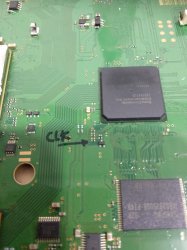
In the future, the "rules" could be added to be even more detailed (if someone is diligent in looking for them). This "rule" can be visualized, there is 1 point in each machine that I usually use to visualize the "rules", this point is the engine clk, in the future I will call it "clk pulse", I will take an example from the dyn-001 engine.
IMG_20210429_105357.jpg
Below is an example of a "clk pulse" (dyn-001) from a running / normal machine
view

view

view

From the video above we divide the clk pulse into 3 steps (the first beat continues to stop briefly (step1), the second pulse continues to stop briefly (step2), the third beat is just a little bit then silent (step3) -
Step 1: "Rules" No.1-5
Step 2: "Rule" no. 6
Step 3: "Rule" no. 7
Pulse clk for Rsx:
-Cxd2971x there are only step1 and step2 (after that the image comes out)
-Cxd2982x, Cxd2991x, Cxd530xx has 3 steps (after that comes out the picture) Hopefully you won't get confused
sorry wrongly pressing the post button, the explanation is still not finished, ok we will continue again, I will give an example of a problematic clk pulse
view

from the video above, you can see clk pulses repeatedly, I usually call it "looping"
the symptoms are when the engine is turned on:
1. no display / blank
2. When the reset is pressed it cannot beep 1x
3. The LED indicator on the HDD is not blinking.
Such conditions entered in "rule" no.4 there is a problem with the connection from CellBe to RamCellBe the problem can be:
1. the RamCellBe didn't get the right voltage
2. Bad tin ore that disturbs the connection, especially in the CellBe section (needs to be reballed)
3. damage to RamCellBe ic or damage to ic CellBe
I will give the next example, this time the problem occurs in the Rsx section
view

here you can see the pulse clk step1 has passed, step 2 only goes up a little and then remains silent, the symptoms will not display / blank, hold reset can be 1x beep, hdd light blinks briefly, this symptom is included in "rule" no.6 there is damage in the RSX section:
1. RamRsx is not getting the correct voltage
2.The tin ore that is already ugly (need to reball)
3. Damaged RSX IC or RAMRSX IC
and there will be another pulse, if we are diligent in looking for it.
Until here, the explanation that I made, hopefully it can help a little to analyze the damage to a ps3 engine, no one method is perfect, but at least it can lead us to fix engine damage more directed. I'm sorry if my explanation isn't clear, or the uploaded pictures and videos can't be opened, because this is the first time I'm trying to upload a video.
best wishes to all ...

view
 
Last edited:
Greetings to all friends on the forum
This time I will share my experience in analyzing ps3 machines, the method I use is arguably very simple and uses simple tools too, I have been using this method for the last few years. I just started so that you don't feel bored. In the analysis that needs to be held:
1. understand the process / work stages of the machine
2. Understand the working of IC
Below is a process / steps that must run from the start of the engine until the engine comes out of the picture, in the future I will mention that as a "rule"
1. CellBe to Syscon, --no--, shotdown
2. Rsx to Syscon, --no--, shotdown
3. CellBe to Rsx, --no--, shotdown
4. CellBe to RamCellBe, --no - blank
5. Cell be to nor / nand (boot os) - no--, shotdown / blank
6. Rsx to RamRsx, --no--, blank
7. AV / HDMI output
In the future, the "rules" could be added to be even more detailed (if someone is diligent in looking for them). This "rule" can be visualized, there is 1 point in each machine that I usually use to visualize the "rules", this point is the engine clk, in the future I will call it "clk pulse", I will take an example from the dyn-001 engine.
View attachment 33198
Below is an example of a "clk pulse" (dyn-001) from a running / normal machine
view

view

view

From the video above we divide the clk pulse into 3 steps (the first beat continues to stop briefly (step1), the second pulse continues to stop briefly (step2), the third beat is just a little bit then silent (step3) -
Step 1: "Rules" No.1-5
Step 2: "Rule" no. 6
Step 3: "Rule" no. 7
Pulse clk for Rsx:
-Cxd2971x there are only step1 and step2 (after that the image comes out)
-Cxd2982x, Cxd2991x, Cxd530xx has 3 steps (after that comes out the picture) Hopefully you won't get confused
sorry wrongly pressing the post button, the explanation is still not finished, ok we will continue again, I will give an example of a problematic clk pulse
view

from the video above, you can see clk pulses repeatedly, I usually call it "looping"
the symptoms are when the engine is turned on:
1. no display / blank
2. When the reset is pressed it cannot beep 1x
3. The LED indicator on the HDD is not blinking.
Such conditions entered in "rule" no.4 there is a problem with the connection from CellBe to RamCellBe the problem can be:
1. the RamCellBe didn't get the right voltage
2. Bad tin ore that disturbs the connection, especially in the CellBe section (needs to be reballed)
3. damage to RamCellBe ic or damage to ic CellBe
I will give the next example, this time the problem occurs in the Rsx section
view

here you can see the pulse clk step1 has passed, step 2 only goes up a little and then remains silent, the symptoms will not display / blank, hold reset can be 1x beep, hdd light blinks briefly, this symptom is included in "rule" no.6 there is damage in the RSX section:
1. RamRsx is not getting the correct voltage
2.The tin ore that is already ugly (need to reball)
3. Damaged RSX IC or RAMRSX IC
and there will be another pulse, if we are diligent in looking for it.
Until here, the explanation that I made, hopefully it can help a little to analyze the damage to a ps3 engine, no one method is perfect, but at least it can lead us to fix engine damage more directed. I'm sorry if my explanation isn't clear, or the uploaded pictures and videos can't be opened, because this is the first time I'm trying to upload a video.
best wishes to all ...
view
this is pretty amazing! I can follow the explanation fairly well, but the only image that loads for me is the first one, where you wrote down the location of the clock. Can anyone else see the other images ?

edit: one more question for @botakompong — during a boot sequence, the boot steps are numbered. Im thinking, for example, error code 803430 indicates error 3430 during step number 80 of the boot sequence. Do you know how these steps map out to the "rules" you explained in your post?
 
It's a video of him using an old school volt meter with an analog dial that shows voltage (like a spedometer). What I've always liked about thoes style meters is that you get more information from them that you do a digital readout. Sure it's nice to just read and record a digital number, but a dial can pulse up and down and you get a feel for what's happening over time. So in that way it's like an oscilloscope. It doesn't plot it on a graph, but the voltage pulses he's talking about are roughly equivelent to discrete steps you'd see on a graph of voltage over time, which is what an oscilloscope does.

Let me pull up an example of the startup sequence that I recorded on the CPU/RSX tokin testpoints I was using...
test-bench-1-jpg.31605
test-bench-2-jpg.31606
test-bench-3-jpg.31607
startup-behavior-png.30302
You can see there are discreet steps in the startup sequence, but the time base I'm looking at for this are very brief. He's using a different test point and talking about voltage pulses corresponding to different events. But the idea is the same.

The difference between a 40 and 80 step number is about half a second. The Startup Sequence (POST) normally takes less than half a second to complete and then the bootloader will startup the console. That last plateau (where the CPU voltage in Yellow drops) wont happen if ther's an error that prevents the console from starting. There is always a high voltage spike on the CPU just before shutdown, either caused by a YLOD or normal pwr down.

If there is a bitraining error (4034), it delays the startup sequence (POST). Usually a 40 3034 causes a 1-2s YLOD. If it takes longer, say 2-10s it could have made it past bittraining and is having problems in the "PWR ON" state, step number 80. So you'll get an 80 something error. I had a 2-10s YLOD that triggered 80 1002s. The SYSCON didn't show the startup sequence in the "lasterrlog" because it completed the startup sequence (POST) without error. It only returned the 80 1002 error, because the error occurred during normal operations (a voltage spike that triggered a 1002 and shutdown event). So step number 80 occurs after about half a second, unless there is a bittraining error that causes the startup sequence to be delayed.

Anyway, I just found it interesting that these "plateaus" as I called them and "pulses" as @botakompong calls them are useful in conceptualizing what the console is doing and where it might have messed up.
 
It's a video of him using an old school volt meter with an analog dial that shows voltage (like a spedometer). What I've always liked about thoes style meters is that you get more information from them that you do a digital readout. Sure it's nice to just read and record a digital number, but a dial can pulse up and down and you get a feel for what's happening over time. So in that way it's like an oscilloscope. It doesn't plot it on a graph, but the voltage pulses he's talking about are roughly equivelent to discrete steps you'd see on a graph of voltage over time, which is what an oscilloscope does.

Let me pull up an example of the startup sequence that I recorded on the CPU/RSX tokin testpoints I was using...
test-bench-1-jpg.31605
test-bench-2-jpg.31606
test-bench-3-jpg.31607
startup-behavior-png.30302
You can see there are discreet steps in the startup sequence, but the time base I'm looking at for this are very brief. He's using a different test point and talking about voltage pulses corresponding to different events. But the idea is the same.

The difference between a 40 and 80 step number is about half a second. The Startup Sequence (POST) normally takes less than half a second to complete and then the bootloader will startup the console. That last plateau (where the CPU voltage in Yellow drops) wont happen if ther's an error that prevents the console from starting. There is always a high voltage spike on the CPU just before shutdown, either caused by a YLOD or normal pwr down.

If there is a bitraining error (4034), it delays the startup sequence (POST). Usually a 40 3034 causes a 1-2s YLOD. If it takes longer, say 2-10s it could have made it past bittraining and is having problems in the "PWR ON" state, step number 80. So you'll get an 80 something error. I had a 2-10s YLOD that triggered 80 1002s. The SYSCON didn't show the startup sequence in the "lasterrlog" because it completed the startup sequence (POST) without error. It only returned the 80 1002 error, because the error occurred during normal operations (a voltage spike that triggered a 1002 and shutdown event). So step number 80 occurs after about half a second, unless there is a bittraining error that causes the startup sequence to be delayed.

Anyway, I just found it interesting that these "plateaus" as I called them and "pulses" as @botakompong calls them are useful in conceptualizing what the console is doing and where it might have messed up.

yeah, thats how i saw it too... i do like those analog meters (thats all we had back when i learned my electronics).

It looks to me that these rules would bring us closer to something I've brought up many times before — a better understanding of what the power up steps map to, at the hardware layer.
 
I wish my multimeter had an analog dial on it as well as the digital readout. I kinda like analog equipment better because you get to "feel" the circuit you're working on. It's more organic, alive...if you know what I mean. I love my digital scope, but an analog scope has it's advantages too...

Is it just me, or is the video game console the HAM radio of our generation?
 
I wish my multimeter had an analog dial on it as well as the digital readout. I kinda like analog equipment better because you get to "feel" the circuit you're working on. It's more organic, alive...if you know what I mean. I love my digital scope, but an analog scope has it's advantages too...

Is it just me, or is the video game console the HAM radio of our generation?
lol! so true. I love playing games, but I love tinkering with them just as much.
 
Greetings to all friends on the forum
This time I will share my experience in analyzing ps3 machines, the method I use is arguably very simple and uses simple tools too, I have been using this method for the last few years. I just started so that you don't feel bored. In the analysis that needs to be held:
1. understand the process / work stages of the machine
2. Understand the working of IC
Below is a process / steps that must run from the start of the engine until the engine comes out of the picture, in the future I will mention that as a "rule"
1. CellBe to Syscon, --no--, shotdown
2. Rsx to Syscon, --no--, shotdown
3. CellBe to Rsx, --no--, shotdown
4. CellBe to RamCellBe, --no - blank
5. Cell be to nor / nand (boot os) - no--, shotdown / blank
6. Rsx to RamRsx, --no--, blank
7. AV / HDMI output
In the future, the "rules" could be added to be even more detailed (if someone is diligent in looking for them). This "rule" can be visualized, there is 1 point in each machine that I usually use to visualize the "rules", this point is the engine clk, in the future I will call it "clk pulse", I will take an example from the dyn-001 engine.
View attachment 33198
Below is an example of a "clk pulse" (dyn-001) from a running / normal machine
view

view

view

From the video above we divide the clk pulse into 3 steps (the first beat continues to stop briefly (step1), the second pulse continues to stop briefly (step2), the third beat is just a little bit then silent (step3) -
Step 1: "Rules" No.1-5
Step 2: "Rule" no. 6
Step 3: "Rule" no. 7
Pulse clk for Rsx:
-Cxd2971x there are only step1 and step2 (after that the image comes out)
-Cxd2982x, Cxd2991x, Cxd530xx has 3 steps (after that comes out the picture) Hopefully you won't get confused
sorry wrongly pressing the post button, the explanation is still not finished, ok we will continue again, I will give an example of a problematic clk pulse
view

from the video above, you can see clk pulses repeatedly, I usually call it "looping"
the symptoms are when the engine is turned on:
1. no display / blank
2. When the reset is pressed it cannot beep 1x
3. The LED indicator on the HDD is not blinking.
Such conditions entered in "rule" no.4 there is a problem with the connection from CellBe to RamCellBe the problem can be:
1. the RamCellBe didn't get the right voltage
2. Bad tin ore that disturbs the connection, especially in the CellBe section (needs to be reballed)
3. damage to RamCellBe ic or damage to ic CellBe
I will give the next example, this time the problem occurs in the Rsx section
view

here you can see the pulse clk step1 has passed, step 2 only goes up a little and then remains silent, the symptoms will not display / blank, hold reset can be 1x beep, hdd light blinks briefly, this symptom is included in "rule" no.6 there is damage in the RSX section:
1. RamRsx is not getting the correct voltage
2.The tin ore that is already ugly (need to reball)
3. Damaged RSX IC or RAMRSX IC
and there will be another pulse, if we are diligent in looking for it.
Until here, the explanation that I made, hopefully it can help a little to analyze the damage to a ps3 engine, no one method is perfect, but at least it can lead us to fix engine damage more directed. I'm sorry if my explanation isn't clear, or the uploaded pictures and videos can't be opened, because this is the first time I'm trying to upload a video.
best wishes to all ...
view
Sorry, more questions, now that I watched the videos a few more times and understand them a bit better now. I noticed that the "pulse" happens at a certain threshold... On the 3 videos where things were normal, that threshold was reached 3 times (Just as you described). On the bad cellBe, it almost reached that threshold, but never quite made it, it just kept trying in a loop.. And on the bad rsx one, it got stuck at that value at the second pulse. What is the voltage value for the pulses?
 
Sorry, more questions, now that I watched the videos a few more times and understand them a bit better now. I noticed that the "pulse" happens at a certain threshold... On the 3 videos where things were normal, that threshold was reached 3 times (Just as you described). On the bad cellBe, it almost reached that threshold, but never quite made it, it just kept trying in a loop.. And on the bad rsx one, it got stuck at that value at the second pulse. What is the voltage value for the pulses?
If you pay attention again, the CLK pulse is still at the beginning of the "rule" no.4. the connection from cellbe to ramcellbe, later I will give an example of a clk pulse that is in "rule" no.5 at bootOS, we don't discuss the voltage here, so the actual voltage value is not needed
 
I have a little story, a few days ago I got a running machine (dyn-001) that had no HDD, then I entered the hdd and installed fw, but that machine only accepts fw ori dech, after installing fw (ori dech), when booting the machine dead, I suspect there is a software error in the machine, I disassemble the machine and I check for "clk pulse" like this
view

"clk pulse" falls under "rule" no.5
the steps i took to fix it
1. Read Nor
2. patch nor with patch355
3. the fsm dongle
4.usb fw debug rex (must)
5. lv2self out
after the machine is restarted, install the rebug tool box, the information section looks like the machine is:
Lv2 Kernel: CEX
Target Type: DEX
that is the reason why the machine has a problem, because someone is not perfect in changing the CEX machine to DEX, This condition also occurs on 3k and SS machines, when the wrong exploit is entered
that's all from me hopefully useful, warm greetings ....
nb: I apologize if I misunderstood the meaning of the question asked because I use google translate
 
Last edited:
we don't discuss the voltage here, so the actual voltage value is not needed

I apologize if I misunderstood the meaning of the question asked because I use google translate

i think you're doing ok with the translations! I'm still confused, however. If the actual voltage is not needed, how do you know you a pulse phase started, or that you went from pulse 1 to pulse 2?
 
i think you're doing ok with the translations! I'm still confused, however. If the actual voltage is not needed, how do you know you a pulse phase started, or that you went from pulse 1 to pulse 2?
Is kind of signal (frequency kind) a part of spi communication. Its kind when people tried to understand the problem looking at nec tokins with oscilloscope. A fluctuation/spikes related will say many things in different ways that op observed in his way and described.
 
Back
Top