@littlebalup
Hi.i have a ps3 slim console..its bricked and when turn on the error code 8002f2f0 appear..i dont have the backup dump and so dump the file by TNM5000..i found that the dump is reveresed..i want write it with TNM5000 again..if i reverse it and patch it with CosOFW486.BIN the problem solve?
or first patch it with CosOFW486.BIN and after that reverse it?which one is better?
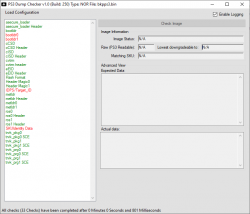
PyPS3checker v0.10.x. Check log.
Checked file : C:\Users\Amin\Desktop\PyPS3tools-master\PyPS3checker-standalone-package_2020-01-05_182610\0.bin
******* Getting flash type *******
Flash type : NOR
Reversed : YES
******* Getting SKU identification datas *******
idps = 0x09
metldr0 = 0xE890
metldr1 = 0x0E85
metldrkey = 0xBC78B8F02879A81184A0DA74
bootldr0 = 0x2F13
bootldr1 = 0x2F13
bootldrsize = 0x2F170
Matching SKU : OK
CECH-20xxx (DYN-001)
Minimum version 2.70
******* Getting SDK versions *******
ROS0 : 355.000
ROS1 : 355.000
******* Checking first_region_header *******
001.01 First Region Header 0x00 Filled Area 0 : OK
001.02 First Region Header Magic : OK
001.03 First Region Header 0x00 Filled Area 1 : OK
******* Checking flash_format *******
002.01 Flash Format String : OK
002.02 Flash Format Version : OK
002.03 Flash Format 0xFF Filled Area : OK
******* Checking flash_region_table *******
003.01 Flash Region Table Header : OK
003.02 asecure_loader Offset - Length : OK
003.03 asecure_loader Name : OK
003.04 eEID Offset - Length : OK
003.05 eEID Name : OK
003.06 cISD Offset - Length : OK
003.07 cISD Name : OK
003.08 cCSD Offset - Length : OK
003.09 cCSD Name : OK
003.10 trvk_prg0 Offset - Length : OK
003.11 trvk_prg0 Name : OK
003.12 trvk_prg1 Offset - Length : OK
003.13 trvk_prg1 Name : OK
003.14 trvk_pkg0 Offset - Length : OK
003.15 trvk_pkg0 Name : OK
003.16 trvk_pkg1 Offset - Length : OK
003.17 trvk_pkg1 Name : OK
003.18 ros0 Offset - Length : OK
003.19 ros0 Name : OK
003.20 ros1 Offset - Length : OK
003.21 ros1 Name : OK
003.22 cvtrm Offset - Length : OK
003.23 cvtrm Name : OK
003.24 Flash Region Table 0x00 Filled Area : OK
******* Checking asure_loader_region *******
004.01 asecure_loader Header : OK
004.02 metldr Offset : OK
004.03 metldr Length : OK
004.04 metldr Name : OK
004.05 metldr RevKey : OK
004.06 metldr Binary Size : OK
004.07 metldr Statistics : OK
004.08 asecure_loader 0x00 Filled Area : OK
******* Checking eEID_region *******
005.01 eEID Header : OK
005.02 EID0 Offset - Length : OK
005.03 EID1 Offset - Length : OK
005.04 EID2 Offset - Length : OK
005.05 EID3 Offset - Length : OK
005.06 EID4 Offset - Length : OK
005.07 EID5 Offset - Length : OK
005.08 EID0 IDPS0 : OK
005.09 EID0 IDPS1 : OK
005.10 EID0 Static : OK
005.11 EID2 BlockSize/Padding : OK
005.12 EID3 Static0 : OK
005.13 EID3 Static1 : OK
005.14 EID3 Static2 : OK
005.15 EID5 IDPS0 : OK
005.16 EID5 IDPS1 : OK
005.17 EID5 Static : OK
005.18 eEID Region 0xFF Filled Area : OK
005.19 eEID Statistics0 : OK
005.20 eEID Statistics1 : OK
******* Checking cISD_region *******
006.01 cISD Header : OK
006.02 cISD0 Offset - Length : OK
006.03 cISD1 Offset - Length : OK
006.04 cISD2 Offset - Length : OK
006.05 cISD0 0xFF Filled Area : OK
006.06 cISD1 IDLog Header : OK
006.07 cISD1 Semistatic 1 : OK
006.08 cISD1 Semistatic 2 : OK
006.09 cISD1 0xFF Filled Area 0 : OK
006.10 cISD1 Static : OK
006.11 cISD1 Semistatic 3 : OK
006.12 cISD1 0xFF Filled Area 1 : OK
006.13 cISD1 Statistics : OK
006.14 cISD2 : OK
006.15 cISD 0xFF Filled Area : OK
******* Checking cCSD_region *******
007.01 cCSD Header : OK
007.02 cCSD Entry Table : OK
007.03 cCSD 0xFF Filled Area : OK
******* Checking Revokation_region *******
008.01 trvk_prg0 SCE : OK
008.02 trvk_prg0 Hash : OK
Size = 0x2E0
MD5 = 78629D24BD721488F3A1E846938F87DF
Version = 3.55 (from PUP)
008.02 trvk_prg0 0xFF filled area : OK
008.03 trvk_prg1 SCE : OK
008.04 trvk_prg1 Hash : OK
Size = 0x2E0
MD5 = 78629D24BD721488F3A1E846938F87DF
Version = 3.55 (from PUP)
008.04 trvk_prg1 0xFF filled area : OK
008.05 trvk_pkg0 SCE : OK
008.06 trvk_pkg0 0xFF filled area : OK
008.07 trvk_pkg1 SCE : OK
008.08 trvk_pkg1 0xFF filled area : OK
******* Checking CoreOS_region *******
009.01 ROS0 Header : OK
009.02 ROS0 Hash : OK
Size = 0x6FFFE0
MD5 = F162E0D72EBA0F46B7FB36E6AAB63958
Version = 3.55 CEX Patched
009.03 ROS0 unused 0xFF Filled Area : OK
009.04 ROS1 Header : OK
009.05 ROS1 Hash : OK
Size = 0x6FFFE0
MD5 = F162E0D72EBA0F46B7FB36E6AAB63958
Version = 3.55 CEX Patched
009.06 ROS1 unused 0xFF Filled Area : OK
******* Checking cvtrm_region *******
010.01 Pre cvtrm 0xFF Filled Area : OK
010.02 cvtrm0 Header : OK
010.03 cvtrm0 0xFF Filled Area : OK
010.04 vtrm0 Magic : OK
010.05 vtrm0 Reserved Entries : OK
010.07 cvtrm1 Header : OK
010.08 cvtrm1 0xFF Filled Area : OK
010.09 vtrm1 Magic : OK
010.10 vtrm1 Reserved Entries : OK
******* Checking Second_Region_Header *******
011.01 Second Region Header 0x00 Filled Area 0 : OK
011.02 Second Region Header Magic : OK
011.03 Second Region Header Count : OK
011.04 Second Region Header 0x00 Filled Area 1 : OK
011.05 Second Region Unknown Block 0 : OK
011.06 Second Region Header 0x00 Filled Area 2 : OK
011.07 Second Region Unknown Block 1 : OK
011.08 Second Region Header 0x00 Filled Area 3 : OK
******* Checking Unreferenced_Area *******
012.01 unreferenced area 0xFF Filled : OK
******* Checking CELL_EXTNOR_AREA_Region *******
013.01 CELL_EXTNOR_AREA Header : OK
013.02 CELL_EXTNOR_AREA 0x00 Filled Area 0 : OK
013.03 CELL_EXTNOR_AREA 0x00 Filled Area 1 : OK
013.04 CELL_EXTNOR_AREA 0x00 Filled Area 2 : OK
013.05 CELL_EXTNOR_AREA 0x00 Filled Area 3 : OK
013.06 CELL_EXTNOR_AREA 0xFF Filled Area 0 : OK
013.07 CELL_EXTNOR_AREA 0x00 Filled Area 5 : OK
013.08 CELL_EXTNOR_AREA 0x00 Filled Area 6 : OK
013.09 CELL_EXTNOR_AREA 0xFF Filled Area 1 : OK
******* Checking bootldr_region *******
014.01 bootldr0 : OK
014.02 bootldr1 : OK
014.03 bootldr Rev key : OK
014.04 bootldr Statistics : OK
014.05 bootldr 0xFF Filled Area : OK
******* Checking datamatches *******
bootldr size : OK
per console nonce : OK
CELL_EXTNOR_AREA Hash1 : OK
CELL_EXTNOR_AREA Hash2 : OK
metldr size : OK
vtrm0 : OK
vtrm1 : OK
******* Checking repetitions *******
Header Magic0 Repetitions : OK
asecure_loader Repetitions : OK
eEID Repetitions : OK
cISD Repetitions : OK
cCSD Repetitions : OK
trvk_prg0 Repetitions : OK
trvk_prg1 Repetitions : OK
trvk_pkg0 Repetitions : OK
trvk_pkg1 Repetitions : OK
ros0 Repetitions : OK
ros1 Repetitions : OK
cvtrm Repetitions : OK
******* Additional information *******
HDD : Hitachi HTS545025B9SA00 090804PBY208QSHNS68A
******* Checks completed *******
Total number of checks = 155
Number of dangers = 0
Number of warnings = 0
All checks done in 10.79 seconds.
----------------------------------------------------------------------------
| IMPORTANT NOTICE ! |
| Checks of late CECH-25xxx, CECH-3xxxx and CECH-4xxxx consoles dumps still |
| under development and may return false results. If you feel it's the case, |
| please post your *.checklog.txt in a new issue on my github repository: |
|
https://github.com/littlebalup/PyPS3tools/issues |
| Thanks! It will help me a lot to improve that tool

|
----------------------------------------------------------------------------