
- Forums
- PlayStation 3 (PS3)
- PS3 Jailbreak CFW and PS3HEN
- Ps3Xploit [Official Forum's] PS3HEN & PS3 Toolset
- PS3Xploit HAN (nonCFW Compatable Models)
You are using an out of date browser. It may not display this or other websites correctly.
You should upgrade or use an alternative browser.
You should upgrade or use an alternative browser.
PS3 HELP WITH PKG LINKER ( ERROR 80710092 )
- Thread starter deezeewhytea
- Start date
-
- Tags
- pkg linker ps3xploit 3.0


deezeewhytea
Member
where do i type it in the ps3? sorry if im asking too many questions, im not really experienced with this kind of stuffname the folder on the pc PS3, then type that along with your ip address on the ps3.

henny56766
Member
this game give me issues aswell gta 3 vice city work fine
deezeewhytea
Member
.where do i type it in the ps3? sorry if im asking too many questions, im not really experienced with this kind of stuff

deezeewhytea
Member
this error sucks so much

deezeewhytea
Member
how do i run the py file?
deezeewhytea
Member
it still doesnt work :/
deezeewhytea
Member
does anyone else know what to do with this error?

Using xampp with pkg linker is easy, if you read the pkg linker thread first post you will see simple instructions by me to use it. You need to have your network set up correctly though, have you put in the manual IPs like I showed in the pics? and disabled firewalls.does anyone else know what to do with this error?
Then you need to:
- install xampp.
- run it
- press the top start button for apache
- put your pkgs and pkg linker exe into the c:\xampp\htdocs folder
- run the pkg linker exe there, but when it starts up, say no to using built in server.
- Install that package_list.pkg via usb
- reboot ps3
then hopefully it will work for you.

93simon
Member
This is a checklist I made and use whenever I need to transfer games in order to avoid the dreaded generic error:
Set pc ip to 10.1.1.2
Ps3 ip to 10.1.1.3
Gateway 10.1.1.1 on both
Use server port 8080 on pkglinker
DNS primary 10.1.1.0, secondary 10.1.1.10 (on both)
PC:
Set correct IP each time pkglink is launched (change it in ethernet settings too)
Save new package list after changing IP
Check that XML file in bin folder has the right ip
Launch server
PS3
Install new package list
Reboot
enable han
Set wired connection (ip 10.1.1.3, subnet 255.255.255.0, gateway 10.1.1.1)
download pkg
Set pc ip to 10.1.1.2
Ps3 ip to 10.1.1.3
Gateway 10.1.1.1 on both
Use server port 8080 on pkglinker
DNS primary 10.1.1.0, secondary 10.1.1.10 (on both)
PC:
Set correct IP each time pkglink is launched (change it in ethernet settings too)
Save new package list after changing IP
Check that XML file in bin folder has the right ip
Launch server
PS3
Install new package list
Reboot
enable han
Set wired connection (ip 10.1.1.3, subnet 255.255.255.0, gateway 10.1.1.1)
download pkg

victorxploit
Forum Noob
80710092 To resolve this error simply just disable the VPN adapters only leave the original enabled
example : hamachi hostspot
example : hamachi hostspot
Cheers, that can be another reason. But basically this error just means "no connection to server" , so it can be anything, if you stop server, or put in wrong IP it will give the same error.80710092 To resolve this error simply just disable the VPN adapters only leave the original enabled
example : hamachi hostspot
deezeewhytea
Member
it still gives me the error and i tried to use an ethernet cable and it showed the loading screen for a while and then it gave me the error. i think i didnt set up the ethernet cable correctly.This is a checklist I made and use whenever I need to transfer games in order to avoid the dreaded generic error:
Set pc ip to 10.1.1.2
Ps3 ip to 10.1.1.3
Gateway 10.1.1.1 on both
Use server port 8080 on pkglinker
DNS primary 10.1.1.0, secondary 10.1.1.10 (on both)
PC:
Set correct IP each time pkglink is launched (change it in ethernet settings too)
Save new package list after changing IP
Check that XML file in bin folder has the right ip
Launch server
PS3
Install new package list
Reboot
enable han
Set wired connection (ip 10.1.1.3, subnet 255.255.255.0, gateway 10.1.1.1)
download pkg
try use my image for settings IPs, maybe you made a mistake inputting other ones. Myself and lots of others have tested these.
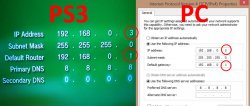
If you use the above settings then you need to have 192,168.0.2 set in the app, then save a new package_list.pkg, install that via usb and reboot.
If you use the above settings then you need to have 192,168.0.2 set in the app, then save a new package_list.pkg, install that via usb and reboot.
deezeewhytea
Member
i didtry use my image for settings IPs, maybe you made a mistake inputting other ones. Myself and lots of others have tested these.
View attachment 11455
If you use the above settings then you need to have 192,168.0.2 set in the app, then save a new package_list.pkg, install that via usb and reboot.
Well those settings work. So if you put them in you know you have that bit right at least. Can you access the server via the ps3 web browser? just put in http://IPaddress:port/ into address bar. Put in your IP address and port.i did
deezeewhytea
Member
will there ever be another way where we can transfer 4gb+ files without using a webserver?
On CFW we can use FTP to copy to internal, but its not much different really, you still need your devices to be seeing each other on the network, and you still need to have client and server set up. I don't know if you will ever get FTP on HAN tbh, maybe.will there ever be another way where we can transfer 4gb+ files without using a webserver?
Similar threads
-
-
PS3 Seeking Evilnat’s "DVD/BD Region Free" PKG or any alternative fix
- Started by Raj
- Replies: 0
-
 PS3 sony.com login error: Can't connect to the server. (0.da951eb8.1779534393.692b42eb)
- Started by imkira3
- Replies: 0
-
