PS3 HELP WITH PKG LINKER ( ERROR 80710092 )

hmm i think i found the problem to. write "allow an app through windows firewall" in the windows start menu and find "httpd.exe" turn the check box to the left on and turn on the "private" check box and press "OK". then try it again and i think it should work. i havnt tested it yet because my sis is admin and she hasnt woken up yet but i'll tell you if it works.

EDIT: yes it works!
 
Last edited:
hmm i think i found the problem to. write "allow an app through windows firewall" in the windows start menu and find "httpd.exe" turn the check box to the left on and turn on the "private" check box and press "OK". then try it again and i think it should work. i havnt tested it yet because my sis is admin and she hasnt woken up yet but i'll tell you if it works.

EDIT: yes it works!

ive already disabled firewall
 
Don't give up!!!
Try this:

I have a several problems to transfer via web server, first, I used a wifi network and not works, I connect the PS3 with ethernet cable to the router and not works, I connect the PS3 directly to PC and sometimes the PS3 shows me a error, sometimes after a 1% of transfer a pkg the times runs out and finaly stops and the PS3 shows me a 800XXXXXX error.
I disable firewall and no works.
I refresh the DNS via CMD in windows, and no works.
I disable the antivirus, no works.
I reinstall the network adapter and no works.
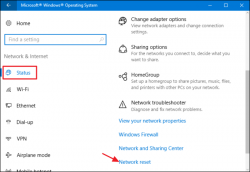
Then I RESET THE NETWORK, in windows 10 there is a option in settings/network and internet. After reset the network and restar the PC finnaly the xampp server works fine, I transfer 15GB pkg backup witout a single problem.
I use the tippical connection: PC---→ Router ←--PS3.
Don't give up and reset your network.
 

Attachments

  • wnr_2-650x449.png
    wnr_2-650x449.png
    74.3 KB · Views: 689
I finally found a fix! After a month of trying to get it to work, It finally works! So I have been using my 2 laptops back and forth for PKG LINKER but they never worked and gave me the error. So I asked my brother if I could use his laptop and it worked! I was trying to transfer Crysis HD which is 3.4gb ( i kno its under 4gb, I was just testing ) and after about an hour it was still on 50%. So, can anyone help me on a wired connection? Like how do I use it with an ethernet cable. Thanks!
 
I finally found a fix! After a month of trying to get it to work, It finally works! So I have been using my 2 laptops back and forth for PKG LINKER but they never worked and gave me the error. So I asked my brother if I could use his laptop and it worked! I was trying to transfer Crysis HD which is 3.4gb ( i kno its under 4gb, I was just testing ) and after about an hour it was still on 50%. So, can anyone help me on a wired connection? Like how do I use it with an ethernet cable. Thanks!
just connect your ps3 to the router. it fixed my connection cos the ps3's wifi is very slow.
 
to use xampp, create a folder (name it whatever you want), drop the exploit files into the folder, drop the folder into htdocs on the root of the xampp folder, then on the ps3 type the ip address of your pc followed by / and the folder that you just named. this is after installing xampp obviously. the xampp folder is likely located here: C:\xampp it's pretty easy. :)
Hey where do i go to type in my ps3? Did you mean the internet browser or something??
 
Is there literally any fix to this??? It's an year already guys cmon
No one is trying to fix 80710092 as its just an issue with the users network or their settings. No one can solve that except the user themselves. If you do not know how to set up a webserver on your LAN so your PS3 can access it then PKG Linker is not for you.
 
Yes I understand your concern sir, I managed to fix my port conflict with the pkg linker and it works well now.. however to add to the ftp for han topic; is it safe to update to the new hfw 4.84 as I'm a bit concerned to have my console bricked due to the amount of claims I have been reading online, I would sure love some insight on this as I'm practically looping on the pkg linker and all these outdated methods p.s I'm still on 4.82 like a caveman lol any help would be appreciated.
 
Yes I understand your concern sir, I managed to fix my port conflict with the pkg linker and it works well now.. however to add to the ftp for han topic; is it safe to update to the new hfw 4.84 as I'm a bit concerned to have my console bricked due to the amount of claims I have been reading online, I would sure love some insight on this as I'm practically looping on the pkg linker and all these outdated methods p.s I'm still on 4.82 like a caveman lol any help would be appreciated.
I do not think anyone has bricked installing HEN/HFW. Its a RAM patch so not really possible to brick, just like with HAN.

Is there really someone saying they have bricked with HEN?
 
is it safe to update to the new hfw 4.84 as I'm a bit concerned to have my console bricked due to the amount of claims I have been reading online, I would sure love some insight on this
It is perfectly safe to update to HFW 4.84 - which firmware version are you currently on?

HFW is essentially a slightly modified version of the official 4.84 firmware, and your PS3 will see it as exactly that. See the following link which will tell you everything you need to know about 4.84 HFW, download links, etc. Hope this helps.

https://www.psx-place.com/threads/u...lash-tools-restored-for-4-84-ofw-users.23094/
 
Back
Top