PS3 I did it! Offline HTML from the Browser

yeah, the Silk engine does not use JavaScript
True, seems to support alert() though.

from what i have experimented with this, it is indeed a placeholder. If this stub is removed, the "browser" loses flash support and will be replaced with Adobe Flash logo to get flash. The actual silk_npflashplayer9.sprx gets loaded from /vsh/modules/silk_npflashplayer9.sprx, and cannot be removed without crashing. Also, if we remove the silk_npflashplayer.sprx from /vsh/modules/, the PS3 still runs flash fine.
I notice this aswell. We can try renaming npflashplayer to npflashplayer9 and see what happens. The way I see it the Plugins diectory is scanned the the full filepath is replace with dev_flash/vsh/module. and then reads the file.
Most likely they did this because:
1. They do not want the Plugins folder to be outside the based dir of Silk and Silk_webkit
2. Adding a full copy in the Plugins folder would probably take more space.
3/ They want all sprx in one single folder for some reason.

I also tried putting other stubbed sprx in that directory to see if module would load from /vsh/modules/ and it does not work exactly like that, i guess lol
I tried that aswell but it did not work. Copying the full plugin and the placeholder aswell.

Right now, not sure on where to proceed. We have done a lot of discovery in this thread. Pretty sure a lot ot be added to the wiki. We can completely mod the browser. Pretty good.

I think that debug menu should worth finding a way to show. I have done numerous test and I have failed. It's all in the hands of that one guy with the funny MArio avatar... only his mind can give us some clue on what to do with RCO.
 
Yes, there is a hidden debug setting in webrender_plugin.rco and is missing a text string, but i guess "fixing" that string is not going to be enought, the .sprx is who need to enable it, and also i guess the setting is stored in xregistry.sys (so probably is one of the settings you was talking about in your previous messages)
What im going to post has been extracted with this version of rcomage

The debug setting is named "opt_tool_debug", located at bottom of this list
Code:
			<Page name="opt_tool_page" pageMode="0x1101" pageOnInit="nothing" pageOnCancel="event:native:/OptionMenuController::onPageCancel" pageOnContext="nothing" pageOnActivate="event:native:/OptionMenuController::onActivate">
				<Plane name="opt_tool_base" positionX="0" positionY="0" positionZ="0" colorScaleR="1" colorScaleG="1" colorScaleB="1" colorScaleA="1" sizeX="0" sizeY="0" sizeZ="0" sizeScaleX="1" sizeScaleY="1" sizeScaleZ="1" anchorMode="0x100" onInit="nothing" positionOverrideX="0x0" positionOverrideY="0x0" positionOverrideZ="0x0" sizeOverrideX="0x0" sizeOverrideY="0x0" sizeOverrideZ="0x0" planeImage="nothing" planeResizeMode="0x0">
					<Plane name="opt_tool_base_bg" positionX="0" positionY="0" positionZ="0" colorScaleR="1" colorScaleG="1" colorScaleB="1" colorScaleA="1" sizeX="0" sizeY="0" sizeZ="0" sizeScaleX="1" sizeScaleY="1" sizeScaleZ="1" anchorMode="0x100" onInit="nothing" positionOverrideX="0x0" positionOverrideY="0x0" positionOverrideZ="0x0" sizeOverrideX="0x0" sizeOverrideY="0x0" sizeOverrideZ="0x0" planeImage="nothing" planeResizeMode="0x0"></Plane>
					<MList name="opt_tool_list" positionX="0" positionY="0" positionZ="0" colorScaleR="1" colorScaleG="1" colorScaleB="1" colorScaleA="1" sizeX="0" sizeY="0" sizeZ="0" sizeScaleX="1" sizeScaleY="1" sizeScaleZ="1" anchorMode="0x1100" onInit="nothing" positionOverrideX="0x0" positionOverrideY="0x5e070100" positionOverrideZ="0x0" sizeOverrideX="0x0" sizeOverrideY="0x0" sizeOverrideZ="0x0" mlistItemNum="0xe" mlistUnk24="0x0" mlistItemDefault="0x1" mlistUnkInt26="0x0" mlistItemSpacing="0" mlistOverrideUnk28="0x69070000" mlistOverrideUnk29="0x63070000" mlistOverrideUnk30="0x0" mlistImage="nothing" mlistOnPush="event:native:/OptionMenuController::onSelect" mlistOnCursorMove="nothing" mlistOnFocusIn="nothing" mlistOnFocusOut="nothing" mlistOnFocusLeft="event:native:/OptionMenuController::onPageCancel" mlistOnFocusRight="event:native:/OptionMenuController::onFocusRight" mlistOnFocusUp="nothing" mlistOnFocusDown="nothing" mlistOnScrollIn="event:native:/OptionMenuController::onScrollIn" mlistOnScrollOut="nothing">
						<MItem name="opt_tool_cookie" mitemTextOrImage1="text:msg_cookie_received" mitemTextOrImage2="nothing" mitemTextOrImage3="nothing"></MItem>
						<MItem name="opt_tool_javascript" mitemTextOrImage1="text:msg_javascript" mitemTextOrImage2="nothing" mitemTextOrImage3="nothing"></MItem>
						<MItem name="opt_tool_overscan" mitemTextOrImage1="text:msg_display_area" mitemTextOrImage2="nothing" mitemTextOrImage3="nothing"></MItem>
						<MItem name="opt_tool_multi_dpi" mitemTextOrImage1="text:msg_resolution" mitemTextOrImage2="nothing" mitemTextOrImage3="nothing"></MItem>
						<MItem name="opt_tool_filter" mitemTextOrImage1="text:msg_anti_flicker" mitemTextOrImage2="nothing" mitemTextOrImage3="nothing"></MItem>
						<MItem name="opt_tool_confirmexit" mitemTextOrImage1="text:msg_browser_quit_confirm" mitemTextOrImage2="nothing" mitemTextOrImage3="nothing"></MItem>
						<MItem name="opt_tool_homepage" mitemTextOrImage1="text:msg_homepage" mitemTextOrImage2="nothing" mitemTextOrImage3="nothing"></MItem>
						<MItem name="opt_tool_del_cookie" mitemTextOrImage1="text:msg_cookie_delete" mitemTextOrImage2="nothing" mitemTextOrImage3="nothing"></MItem>
						<MItem name="opt_tool_del_search" mitemTextOrImage1="text:msg_searchhistory_delete" mitemTextOrImage2="nothing" mitemTextOrImage3="nothing"></MItem>
						<MItem name="opt_tool_del_cache" mitemTextOrImage1="text:msg_cache_delete" mitemTextOrImage2="nothing" mitemTextOrImage3="nothing"></MItem>
						<MItem name="opt_tool_del_check" mitemTextOrImage1="text:msg_authentication_info_delete" mitemTextOrImage2="nothing" mitemTextOrImage3="nothing"></MItem>
						<MItem name="opt_tool_browser_security" mitemTextOrImage1="text:msg_stop_browser_security" mitemTextOrImage2="nothing" mitemTextOrImage3="nothing"></MItem>
						<MItem name="opt_tool_debug" mitemTextOrImage1="nothing" mitemTextOrImage2="nothing" mitemTextOrImage3="nothing"></MItem>
					</MList>
				</Plane>
			</Page>
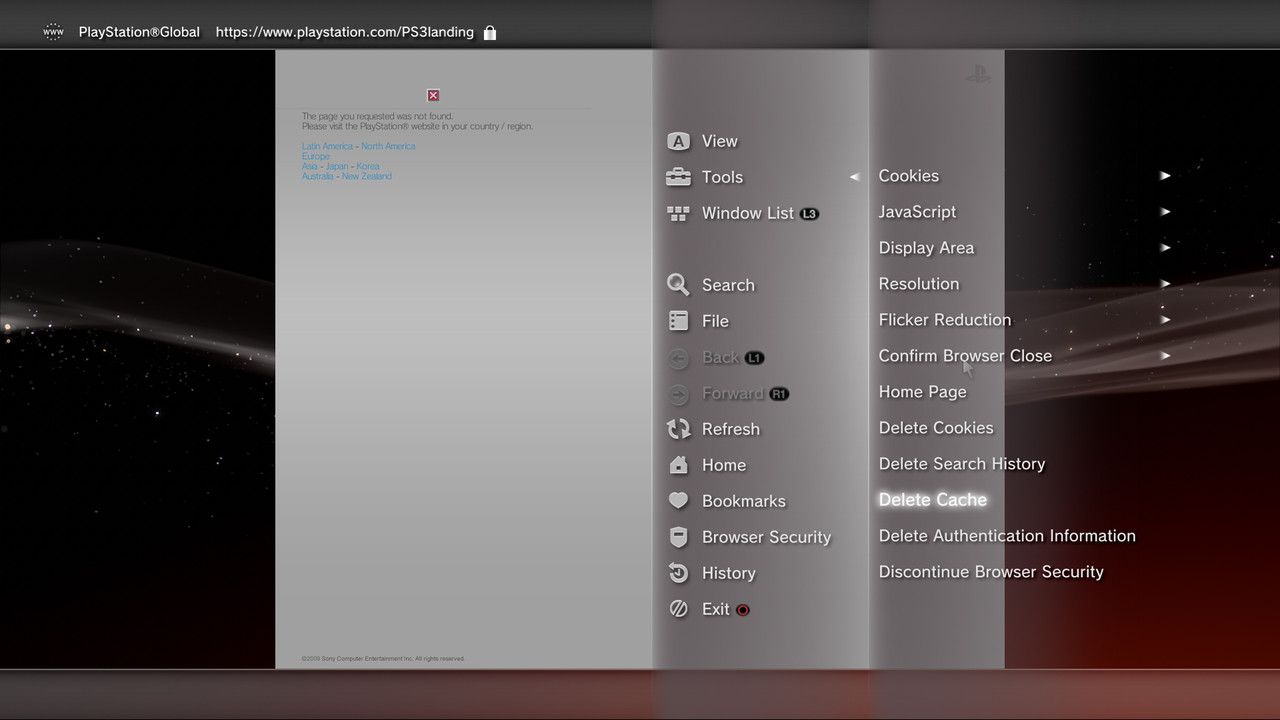
The code above (page "opt_tool_page") is the list most at right in this screenshot, see how it matches
browser_delete_cache.jpg


And it seems the "opt_tool_debug" (located most at bottom of the list) loads this page that displays a YES/NO
Code:
			<Page name="opt_tool11_page" pageMode="0x1101" pageOnInit="nothing" pageOnCancel="event:native:/OptionMenuController::onPageCancel" pageOnContext="nothing" pageOnActivate="event:native:/OptionMenuController::onActivate">
				<Plane name="opt_tool11_base" positionX="0" positionY="0" positionZ="0" colorScaleR="1" colorScaleG="1" colorScaleB="1" colorScaleA="1" sizeX="0" sizeY="0" sizeZ="0" sizeScaleX="1" sizeScaleY="1" sizeScaleZ="1" anchorMode="0x100" onInit="nothing" positionOverrideX="0x0" positionOverrideY="0x0" positionOverrideZ="0x0" sizeOverrideX="0x0" sizeOverrideY="0x0" sizeOverrideZ="0x0" planeImage="nothing" planeResizeMode="0x0">
					<Plane name="opt_tool11_base_bg" positionX="0" positionY="0" positionZ="0" colorScaleR="1" colorScaleG="1" colorScaleB="1" colorScaleA="1" sizeX="0" sizeY="0" sizeZ="0" sizeScaleX="1" sizeScaleY="1" sizeScaleZ="1" anchorMode="0x100" onInit="nothing" positionOverrideX="0x0" positionOverrideY="0x0" positionOverrideZ="0x0" sizeOverrideX="0x0" sizeOverrideY="0x0" sizeOverrideZ="0x0" planeImage="nothing" planeResizeMode="0x0"></Plane>
					<MList name="opt_tool11_list" positionX="0" positionY="0" positionZ="0" colorScaleR="1" colorScaleG="1" colorScaleB="1" colorScaleA="1" sizeX="0" sizeY="0" sizeZ="0" sizeScaleX="1" sizeScaleY="1" sizeScaleZ="1" anchorMode="0x1100" onInit="nothing" positionOverrideX="0x0" positionOverrideY="0x5e070100" positionOverrideZ="0x0" sizeOverrideX="0x0" sizeOverrideY="0x0" sizeOverrideZ="0x0" mlistItemNum="0xe" mlistUnk24="0x0" mlistItemDefault="0xd" mlistUnkInt26="0x0" mlistItemSpacing="0" mlistOverrideUnk28="0x69070000" mlistOverrideUnk29="0x63070000" mlistOverrideUnk30="0x0" mlistImage="nothing" mlistOnPush="event:native:/OptionMenuController::onSelect" mlistOnCursorMove="nothing" mlistOnFocusIn="nothing" mlistOnFocusOut="nothing" mlistOnFocusLeft="event:native:/OptionMenuController::onPageCancel" mlistOnFocusRight="nothing" mlistOnFocusUp="nothing" mlistOnFocusDown="nothing" mlistOnScrollIn="event:native:/OptionMenuController::onScrollIn" mlistOnScrollOut="nothing">
						<MItem name="opt_debug_item_on" mitemTextOrImage1="text:msg_on" mitemTextOrImage2="nothing" mitemTextOrImage3="nothing"></MItem>
						<MItem name="opt_debug_item_off" mitemTextOrImage1="text:msg_off" mitemTextOrImage2="nothing" mitemTextOrImage3="nothing"></MItem>
					</MList>
				</Plane>
			</Page>


-------------------
Edit:
The missing text string doesnt exists in the string lists (translated to 20 languages), i been looking at it and i cant find any string that could match... so i guess they removed it at some point (or it exists, but is loaded from a different rco)
The attribute needed to be "fixed" is the value of mitemTextOrImage1 in this line:
Code:
<MItem name="opt_tool_debug" mitemTextOrImage1="nothing"

For an easy wayaround i suggest to replace it by msg_tool, so the line will start like this:
Code:
<MItem name="opt_tool_debug" mitemTextOrImage1="text:msg_tool"

If it works the way to activate it will be by pressing triangle ---> Tools ---> Tools (the same string "msg_tool" loaded 2 times)
 
Last edited:
Im wondering if the CEHtmlBrowserAppXaiWidget.bin with the CEMenu added in firmware 4.82 are there because they was trying to debug how the ps3exploit published for 4.81 was working... but after the debugging they forgot to disable/remove all this files and menues and published 4.82 with it (thx, nice new feature, just in time)

It looks like the web configuration menu of a router with lot of checkboxes that can be enabled/disabled
But most probably is a debug config menu for the web browser (or more than one, made with several pages)

I don't want to ruin anyone's day but..
Let's hope Sony won't be pushing out 4.83 "update" as an x-mas present to all PS3 users...
-"Performance tweaks."
-"Security updates"
-Fixed major vulnerabilities in the web-browser.
-New anti-virus module in the web-browser for safer browsing...
:confused::eek:

I wouldn't be surprised about that, since there's every now and then some big games popping up, like FIFA2019 just a while back..
:P
 
Last edited:
I don't want to ruin anyone's day but..
Let's hope Sony won't be pushing out 4.83 "update" as an x-mas present to all PS3 users...
-"Security updates"
-Fixed major vulnerabilities in the web-browser.
To be perfectly honest, it makes no difference to us. The work still needs done whether an update ever comes out or not.
At the end of the day, I don't believe they will ever update the browser again. And If they do, we'll see, no point dreading something that may never come.
 
To be perfectly honest, it makes no difference to us. The work still needs done whether an update ever comes out or not.
At the end of the day, I don't believe they will ever update the browser again. And If they do, we'll see, no point dreading something that may never come.

You're right, and I hope i wasn't causing anyone to dread about it. :(
Thanks for everyone on this thread doing research about the offline option, btw..
 
There is another long list of debug settings btw, im wondering if the "opt_tool_debug" i mentioned above (that displays a simple YES/NO) is what enables them

By looking at the rco i know (or i think) this list is not a children of other list, so visually is located on a higher level of what i mentioned before, i think is located here:
ZYCwxAj.jpg


Code:
			<Page name="opt_debug_page" pageMode="0x1101" pageOnInit="nothing" pageOnCancel="event:native:/OptionMenuController::onPageCancel" pageOnContext="event:native:/OptionMenuController::onPageCancel" pageOnActivate="event:native:/OptionMenuController::onActivate">
				<Plane name="opt_debug_base" positionX="0" positionY="0" positionZ="0" colorScaleR="1" colorScaleG="1" colorScaleB="1" colorScaleA="1" sizeX="0" sizeY="0" sizeZ="0" sizeScaleX="1" sizeScaleY="1" sizeScaleZ="1" anchorMode="0x100" onInit="nothing" positionOverrideX="0x0" positionOverrideY="0x0" positionOverrideZ="0x0" sizeOverrideX="0x0" sizeOverrideY="0x0" sizeOverrideZ="0x0" planeImage="nothing" planeResizeMode="0x0">
					<Plane name="opt_debug_base_bg" positionX="0" positionY="0" positionZ="0" colorScaleR="1" colorScaleG="1" colorScaleB="1" colorScaleA="1" sizeX="0" sizeY="0" sizeZ="0" sizeScaleX="1" sizeScaleY="1" sizeScaleZ="1" anchorMode="0x100" onInit="nothing" positionOverrideX="0x0" positionOverrideY="0x0" positionOverrideZ="0x0" sizeOverrideX="0x0" sizeOverrideY="0x0" sizeOverrideZ="0x0" planeImage="nothing" planeResizeMode="0x0"></Plane>
					<MList name="opt_debug_list" positionX="0" positionY="0" positionZ="0" colorScaleR="1" colorScaleG="1" colorScaleB="1" colorScaleA="1" sizeX="0" sizeY="0" sizeZ="0" sizeScaleX="1" sizeScaleY="1" sizeScaleZ="1" anchorMode="0x1100" onInit="nothing" positionOverrideX="0x0" positionOverrideY="0x5e070100" positionOverrideZ="0x0" sizeOverrideX="0x0" sizeOverrideY="0x0" sizeOverrideZ="0x0" mlistItemNum="0x12" mlistUnk24="0x0" mlistItemDefault="0xffffffff" mlistUnkInt26="0x0" mlistItemSpacing="0" mlistOverrideUnk28="0x1f070000" mlistOverrideUnk29="0x0" mlistOverrideUnk30="0x0" mlistImage="nothing" mlistOnPush="event:native:/OptionMenuController::onSelect" mlistOnCursorMove="nothing" mlistOnFocusIn="nothing" mlistOnFocusOut="nothing" mlistOnFocusLeft="nothing" mlistOnFocusRight="event:native:/OptionMenuController::onFocusRight" mlistOnFocusUp="nothing" mlistOnFocusDown="nothing" mlistOnScrollIn="event:native:/OptionMenuController::onScrollIn" mlistOnScrollOut="nothing">
						<MItem name="opt_debug_group_feature" mitemTextOrImage1="nothing" mitemTextOrImage2="nothing" mitemTextOrImage3="nothing"></MItem>
						<MItem name="opt_debug_group_core" mitemTextOrImage1="nothing" mitemTextOrImage2="nothing" mitemTextOrImage3="nothing"></MItem>
						<MItem name="opt_debug_group_ui" mitemTextOrImage1="nothing" mitemTextOrImage2="nothing" mitemTextOrImage3="nothing"></MItem>
						<MItem name="opt_debug_group_selftest" mitemTextOrImage1="nothing" mitemTextOrImage2="nothing" mitemTextOrImage3="nothing"></MItem>
						<MItem name="opt_debug_group_test" mitemTextOrImage1="nothing" mitemTextOrImage2="nothing" mitemTextOrImage3="nothing"></MItem>
						<MItem name="opt_debug_group_trendmicro" mitemTextOrImage1="nothing" mitemTextOrImage2="nothing" mitemTextOrImage3="nothing"></MItem>
						<MItem name="opt_debug_item_measureconsole" mitemTextOrImage1="nothing" mitemTextOrImage2="nothing" mitemTextOrImage3="nothing"></MItem>
						<MItem name="opt_debug_item_debuglevel" mitemTextOrImage1="nothing" mitemTextOrImage2="nothing" mitemTextOrImage3="nothing"></MItem>
						<MItem name="opt_debug_item_check_focus" mitemTextOrImage1="nothing" mitemTextOrImage2="nothing" mitemTextOrImage3="nothing"></MItem>
						<MItem name="opt_debug_item_check_modules" mitemTextOrImage1="nothing" mitemTextOrImage2="nothing" mitemTextOrImage3="nothing"></MItem>
						<MItem name="opt_debug_item_default_shader" mitemTextOrImage1="nothing" mitemTextOrImage2="nothing" mitemTextOrImage3="nothing"></MItem>
					</MList>
				</Plane>
			</Page>
Every one of this options have other children pages where you can see the text string displayed in them and how many options have each... all this ones are located inmediatly after the code above


Edit:
Hmmm, funny/interesting, all the text strings of this debug settings are missing (note the mitemTextOrImage1="nothing") used in all them


Edit:
And this is the menu at left in the screenshots
Code:
			<Page name="optionmenu_image_page" pageMode="0x1101" pageOnInit="nothing" pageOnCancel="event:native:/OptionMenuController::onPageCancel" pageOnContext="event:native:/OptionMenuController::onPageCancel" pageOnActivate="event:native:/OptionMenuController::onActivate">
				<Plane name="group_option" positionX="0" positionY="0" positionZ="0" colorScaleR="1" colorScaleG="1" colorScaleB="1" colorScaleA="1" sizeX="0" sizeY="0" sizeZ="0" sizeScaleX="1" sizeScaleY="1" sizeScaleZ="1" anchorMode="0x100" onInit="nothing" positionOverrideX="0x0" positionOverrideY="0x0" positionOverrideZ="0x0" sizeOverrideX="0x0" sizeOverrideY="0x0" sizeOverrideZ="0x0" planeImage="nothing" planeResizeMode="0x0">
					<Plane name="group_option_bg" positionX="0" positionY="0" positionZ="0" colorScaleR="1" colorScaleG="1" colorScaleB="1" colorScaleA="1" sizeX="0" sizeY="0" sizeZ="0" sizeScaleX="1" sizeScaleY="1" sizeScaleZ="1" anchorMode="0x100" onInit="nothing" positionOverrideX="0x0" positionOverrideY="0x0" positionOverrideZ="0x0" sizeOverrideX="0x0" sizeOverrideY="0x0" sizeOverrideZ="0x0" planeImage="nothing" planeResizeMode="0x0"></Plane>
					<MList name="list_global_option_base" positionX="0" positionY="0" positionZ="0" colorScaleR="1" colorScaleG="1" colorScaleB="1" colorScaleA="1" sizeX="0" sizeY="0" sizeZ="0" sizeScaleX="1" sizeScaleY="1" sizeScaleZ="1" anchorMode="0x2100" onInit="nothing" positionOverrideX="0x0" positionOverrideY="0x5c070100" positionOverrideZ="0x0" sizeOverrideX="0x0" sizeOverrideY="0x0" sizeOverrideZ="0x0" mlistItemNum="0x3" mlistUnk24="0x0" mlistItemDefault="0xffffffff" mlistUnkInt26="0x2" mlistItemSpacing="0" mlistOverrideUnk28="0x69070000" mlistOverrideUnk29="0x0" mlistOverrideUnk30="0x0" mlistImage="nothing" mlistOnPush="event:native:/OptionMenuController::onSelect" mlistOnCursorMove="nothing" mlistOnFocusIn="nothing" mlistOnFocusOut="nothing" mlistOnFocusLeft="nothing" mlistOnFocusRight="event:native:/OptionMenuController::onFocusRight" mlistOnFocusUp="nothing" mlistOnFocusDown="event:native:/OptionMenuController::onFocusDown" mlistOnScrollIn="event:native:/OptionMenuController::onGlobalScrollIn" mlistOnScrollOut="nothing">
						<MItem name="image_optionmenu_list_view" mitemTextOrImage1="text:msg_display" mitemTextOrImage2="image:tex_view" mitemTextOrImage3="image:tex_view_s"></MItem>
						<MItem name="image_optionmenu_list_tool" mitemTextOrImage1="text:msg_tool" mitemTextOrImage2="image:tex_tool" mitemTextOrImage3="image:tex_tool_s"></MItem>
						<MItem name="image_optionmenu_list_tab" mitemTextOrImage1="text:msg_window_list_with_icon" mitemTextOrImage2="image:tex_tab" mitemTextOrImage3="image:tex_tab_s"></MItem>
					</MList>
					<MList name="list_option_base" positionX="0" positionY="0" positionZ="0" colorScaleR="1" colorScaleG="1" colorScaleB="1" colorScaleA="1" sizeX="0" sizeY="0" sizeZ="0" sizeScaleX="1" sizeScaleY="1" sizeScaleZ="1" anchorMode="0x1100" onInit="nothing" positionOverrideX="0x0" positionOverrideY="0x5b070100" positionOverrideZ="0x0" sizeOverrideX="0x0" sizeOverrideY="0x0" sizeOverrideZ="0x0" mlistItemNum="0xa" mlistUnk24="0x0" mlistItemDefault="0xffffffff" mlistUnkInt26="0x0" mlistItemSpacing="0" mlistOverrideUnk28="0x69070000" mlistOverrideUnk29="0x0" mlistOverrideUnk30="0x0" mlistImage="nothing" mlistOnPush="event:native:/OptionMenuController::onSelect" mlistOnCursorMove="nothing" mlistOnFocusIn="nothing" mlistOnFocusOut="nothing" mlistOnFocusLeft="nothing" mlistOnFocusRight="event:native:/OptionMenuController::onFocusRight" mlistOnFocusUp="event:native:/OptionMenuController::onFocusUp" mlistOnFocusDown="nothing" mlistOnScrollIn="event:native:/OptionMenuController::onScrollIn" mlistOnScrollOut="nothing">
						<MItem name="image_optionmenu_list_search" mitemTextOrImage1="text:msg_search_web" mitemTextOrImage2="image:tex_search" mitemTextOrImage3="image:tex_search_s"></MItem>
						<MItem name="image_optionmenu_list_file" mitemTextOrImage1="text:msg_file" mitemTextOrImage2="image:tex_file" mitemTextOrImage3="image:tex_file_s"></MItem>
						<MItem name="image_optionmenu_list_back" mitemTextOrImage1="text:msg_browser_back_with_icon" mitemTextOrImage2="image:tex_back" mitemTextOrImage3="image:tex_back_s"></MItem>
						<MItem name="image_optionmenu_list_forward" mitemTextOrImage1="text:msg_browser_forward_with_icon" mitemTextOrImage2="image:tex_forward" mitemTextOrImage3="image:tex_forward_s"></MItem>
						<MItem name="image_optionmenu_list_reload" mitemTextOrImage1="text:msg_refresh" mitemTextOrImage2="image:tex_reload" mitemTextOrImage3="image:tex_reload_s"></MItem>
						<MItem name="image_optionmenu_list_home" mitemTextOrImage1="text:msg_home" mitemTextOrImage2="image:tex_home" mitemTextOrImage3="image:tex_home_s"></MItem>
						<MItem name="image_optionmenu_list_bookmark" mitemTextOrImage1="text:msg_bookmark" mitemTextOrImage2="image:tex_bookmark" mitemTextOrImage3="image:tex_bookmark_s"></MItem>
						<MItem name="image_optionmenu_list_browsersecurity" mitemTextOrImage1="text:msg_browser_security" mitemTextOrImage2="image:tex_bsecurity" mitemTextOrImage3="image:tex_bsecurity_s"></MItem>
						<MItem name="image_optionmenu_list_history" mitemTextOrImage1="text:msg_history" mitemTextOrImage2="image:tex_history" mitemTextOrImage3="image:tex_history_s"></MItem>
						<MItem name="image_optionmenu_list_quit" mitemTextOrImage1="text:msg_finish_with_icon" mitemTextOrImage2="image:tex_quit" mitemTextOrImage3="image:tex_quit_s"></MItem>
					</MList>
				</Plane>
			</Page>
It seems the area i painted in yellow (located inmediatly after the "image_optionmenu_list_quit") doesnt exists
Im wondering if it existed at some point, or if im wrong and the list is not supposed to be displayed in the area i painted in yellow
 
Last edited:
hmmm thats weird :confused:
Indeed, plus some other JS function also seem to work.
Yes, there is a hidden debug setting in webrender_plugin.rco and is missing a text string, but i guess "fixing" that string is not going to be enought, the .sprx is who need to enable it, and also i guess the setting is stored in xregistry.sys (so probably is one of the settings you was talking about in your previous messages)
The text="nothing" was the first thing I noticed. I added one of the text:msg_refresh and it did not display.
The extracted xml for lannguages have no extra debug strings in them.

What im going to post has been extracted with this version of rcomage
The version I had would not import the images and instead of mitemTextOrImage1 i would simply get text=""

And it seems the "opt_tool_debug" (located most at bottom of the list) loads this page that displays a YES/NO
That's interesting. The only possible thing I can think of was that this can Yes,No, is related to /setting/browser/debugMenu, but we already have enabled that one.

The missing text string doesnt exists in the string lists (translated to 20 languages), i been looking at it and i cant find any string that could match... so i guess they removed it at some point (or it exists, but is loaded from a different rco)
I checked all the xml, and some old firmware rco, CEX and DEX and nothing appeared in there. If different RCO then from which one? From the screenshot of @esc0rtd3w it seems only webrender_plugin.rco is loaded.
However, opt_debug_tool and everything else can be found in webrender.sprx! And even all the msg_ but none of them for debug. Still, the full debug text like Debug Core Size, Test Features, in other wordds, the msg_xxxx for debug is in there.

The attribute needed to be "fixed" is the value of mitemTextOrImage1 in this line:
Code:
<MItem name="opt_tool_debug" mitemTextOrImage1="nothing"
For an easy wayaround i suggest to replace it by msg_tool, so the line will start like this:
Code:
<MItem name="opt_tool_debug" mitemTextOrImage1="text:msg_tool"
If it works the way to activate it will be by pressing triangle ---> Tools ---> Tools (the same string "msg_tool" loaded 2 times)
I think I tried this by replacing with msg_home (for homepage) and it did not work. No extra option appeared at all. The msg_xxxx is not related. The page name="xxxx" is what determines that the browser will open.

There is another long list of debug settings btw, im wondering if the "opt_tool_debug" i mentioned above (that displays a simple YES/NO) is what enables them
Can we swap names of pages? For example, since we can not get debug to show, how about making the debug options(YES/NO) to appear in the case of anohter setting, like Javascript for example.


By looking at the rco i know (or i think) this list is not a children of other list, so visually is located on a higher level of what i mentioned before, i think is located here:
Possible but not very clear on where should it be.

Edit:
Hmmm, funny/interesting, all the text strings of this debug settings are missing (note the mitemTextOrImage1="nothing") used in all them
I initially thogh that that'swhat it was causing them not to display, however, setting a text would change nothing, and the funny thing is that we set to "nothing" one of the other ones(like Cookies,Javacript,Cache) then the freeze will freeze as soon as we try to open the sidebar.
I guess these names are disabled by default.
 
Indeed, plus some other JS function also seem to work.
So it's safe to assume that there is some extremely limited js support in Silk? You mention other functions, no DOM ones though I assume? Even partially?

Can we swap names of pages? For example, since we can not get debug to show, how about making the debug options(YES/NO) to appear in the case of anohter setting, like Javascript for example.
Worth a try.
Currently, we have debug options elements we don't know how to display but are there any sign of javascript debug functions calls anywhere?
 
So it's safe to assume that there is some extremely limited js support in Silk? You mention other functions, no DOM ones though I assume? Even partially?
There is JS for sure. And I do not even think it is partially.
document.getElementbyID/title/url/location, works. Window.close works.
navigator.userAgent also works but it returns 1.00 meaning that the PS3Xploit site will alert that we are not not on a compatible version, and it also disables the buttons which means that JS works just fine.

Someone has to test JS here but it certainly supports JS, and I woould dare say, not that limited as we though.
To switch to Silk we must enable the debugMenu in xregistry and then set the Engine to Silk. The User Agent options seem to affect Silk engine only and are ingored in webkit.

In Webkit to find the supported function and attirbutes I would use:

Code:
for (var m in window/document) {
        alert(m);
}

This however, on Silk either seems to give nothing or just gives one of them. However, the functions do exists, maybe looping is not working properly.

On webkit we have navigator.plugins and navigator.pluginsarray Using this
Code:
var pluginsLength = navigator.plugins.length;
  for(var i = 0; i < pluginsLength; i++) {
  alert(navigator.plugins[i].name);
  alert(navigator.plugins[i].filename);
  //alert(navigator.plugins[i].description);
}
This would return 1 plugin , Shockwave Flash, with filename: silk_npflashplayer9.srpx and description as Macromedia Flash...
On Silk it does the same BUT for filename it returns: /dev_flash/vsh/module/silk_npflashplayer.srpx without the 9, so silk loads an older version and shows the full path.


Currently, we have debug options elements we don't know how to display but are there any sign of javascript debug functions calls anywhere?
Sadly we have to check for them. If I use for(.... document/window) it does not dispaly anything.
However, for var window.external it displays user and based on the documentation we ca nuse
window.external.user(msg) but I do not know the available command. Most possible there is window.external.system as well.

Plenty to explore here.
 
For an easy wayaround i suggest to replace it by msg_tool, so the line will start like this:
Code:
<MItem name="opt_tool_debug" mitemTextOrImage1="text:msg_tool"
I just tried this single edit only and nothing changed.

The debug setting is named "opt_tool_debug", located at bottom of this list
Code:
<MItem name="opt_tool_browser_security" mitemTextOrImage1="text:msg_stop_browser_security" mitemTextOrImage2="nothing" mitemTextOrImage3="nothing"></MItem>
<MItem name="opt_tool_debug" mitemTextOrImage1="nothing" mitemTextOrImage2="nothing" mitemTextOrImage3="nothing"></MItem>
I changed page name from opt_tool_browser_security to opt_tool_debug and nothing changed.

Will edit as I make tests.

Edit
Addinganother MItem with same page name make the Tool section empty. It was a copy of opt_tool_browser_security

Edit:
Change name="" for MITem in javascript enable/disable page for those of debug menu, opt_debug_ did not work! All worked fine and the browser still recognizes it as Javascript.

Edit: i swapped the Page name of debug and js options and the console freezed as soon as i tried to access the Javasript section.

Any ideas? @esc0rtd3w , @bguerville @sandungas
 
Last edited:
There is JS for sure. And I do not even think it is partially.
document.getElementbyID/title/url/location, works. Window.close works.
navigator.userAgent also works but it returns 1.00 meaning that the PS3Xploit site will alert that we are not not on a compatible version, and it also disables the buttons which means that JS works just fine.

Someone has to test JS here but it certainly supports JS, and I woould dare say, not that limited as we though.
To switch to Silk we must enable the debugMenu in xregistry and then set the Engine to Silk. The User Agent options seem to affect Silk engine only and are ingored in webkit.

In Webkit to find the supported function and attirbutes I would use:

Code:
for (var m in window/document) {
        alert(m);
}

This however, on Silk either seems to give nothing or just gives one of them. However, the functions do exists, maybe looping is not working properly.

On webkit we have navigator.plugins and navigator.pluginsarray Using this
Code:
var pluginsLength = navigator.plugins.length;
  for(var i = 0; i < pluginsLength; i++) {
  alert(navigator.plugins[i].name);
  alert(navigator.plugins[i].filename);
  //alert(navigator.plugins[i].description);
}
This would return 1 plugin , Shockwave Flash, with filename: silk_npflashplayer9.srpx and description as Macromedia Flash...
On Silk it does the same BUT for filename it returns: /dev_flash/vsh/module/silk_npflashplayer.srpx without the 9, so silk loads an older version and shows the full path.


Sadly we have to check for them. If I use for(.... document/window) it does not dispaly anything.
However, for var window.external it displays user and based on the documentation we ca nuse
window.external.user(msg) but I do not know the available command. Most possible there is window.external.system as well.

Plenty to explore here.
It's possible that they first used a proprietary fork of Webcore (u know something like their own blink). That would explain the differences in behaviour.
Maybe later they decided that it was easier to compile a limited webkit core than implement new features in their engine...?.?
 
There is JS for sure. And I do not even think it is partially.
document.getElementbyID/title/url/location, works. Window.close works.
navigator.userAgent also works but it returns 1.00 meaning that the PS3Xploit site will alert that we are not not on a compatible version, and it also disables the buttons which means that JS works just fine.
this makes me wonder how Silk could possibly work, and if so, many more apps can be manipulated for offline stuff. ultimately, this is a lot of work though just to find out haha :-p

On webkit we have navigator.plugins and navigator.pluginsarray Using this
Code:
var pluginsLength = navigator.plugins.length;
  for(var i = 0; i < pluginsLength; i++) {
  alert(navigator.plugins[i].name);
  alert(navigator.plugins[i].filename);
  //alert(navigator.plugins[i].description);
}
This would return 1 plugin , Shockwave Flash, with filename: silk_npflashplayer9.srpx and description as Macromedia Flash...
On Silk it does the same BUT for filename it returns: /dev_flash/vsh/module/silk_npflashplayer.srpx without the 9, so silk loads an older version and shows the full path.
this is neat, and works as you said :)

this also solves the silk_npflashplayer.sprx/silk_npflashplayer9.sprx debacle i was having
 
The way how works the stuff that appears on the xml under <ObjectTree> have a lot of unkowns, you can read about this objects here: http://www.psdevwiki.com/ps3/RCOXML_Objects

MList is actually the "rcoxml object" that builds the sidebar at right of XMB, in this webbrowser menus the sidebar appears 2 times, so we have a sidebar inside another sidebar
The page that displays the debug YES/NO is located at the children MList (in the sidebar most at right), this is why i said the other list with the debug settings should be "one level up" at the sidebar at left
There is not an entry for it though, maybe was deleted or maybe is displayed by the .sprx

And to swap page names it could work by patching the .sprx but by only making modifications in the rco im not so sure
 
here are a few interesting Silk tidbits...

using nginx/1.12.2

passing a js string var string1='Hello '; with xml/xmbl (using module_name and module_action) gets formatted to a URL style http://:var string1='Hello '; and issues a Bad Request. Using the javascript: prefix does allow this to work and set the string1 variable.

AtHT2vD.png


using either bookmark.xml/history.xml you can send the same string to produce this error. this error comes from CEPhWeb.bin with ID 12038 under /vsh/resource/silk/data. Using Webkit engine would produce the 12036 error coming from webcoreapp.bin.

hsLhjmC.png


if the request is cancelled, this error is produced

TREw6MG.png


Silk caches whole pages...that explains the different zip files in /dev_hdd0/home/[USER_ID]/webbrowser/silk/httpcache/ with full js/html/css in them from browsed pages, and cobra shows these being loaded

rGDUpk1.png


webkit handles this differently, and afaik does not read these httpcache zips, or maybe reads from /dev_hdd0/home/USER_ID/http/

but as @NewFile mentioned, alerts do work fine. tested with XML, XMBL, and normal loading, so there is limited JS support in Silk, indeed :)

how useful it is...who knows? haha

EDIT:

webkit does reference to what seems to be a symlinked path (/Silk/user/silk/httpcache/) for Silk, to read the httpcache. Haven't really bothered to check this though.

rZ1WCwc.png
 
Last edited:
here are more CE* names found in sprx

CEBinary
CEButton
CECheckBox
CEContentPane
CECustomComponent
CEDialog
CEFrameWindow
CELabeledPanel
CELineBorder
CEList
CEPanel
CERadioButton
CERaisedBorder
CERaisedBorderLight
CERecessedBorder
CERecessedBorderLight
CEScrollPane
CETab
CETruncatableLabel


Events?

CEComponentPeer
CEHtmlApiBrowserLibraryImpl
CEImageDecoderBMPImpl
CEPFRasterizerFontFactory
 
Thx, i added the CE names to the talk page, by now are mostly like a reminder to keep a record of them
I guess there is going to be some more tenths though, if the complete collection exceedes 40 or so i guess is going to be needed to make another wiki page only for this
Is also needed to try to see if there is some way to group them, so instead of a list i can convert it to a table with more info
Next thing i need to take a look is CEMenu, there are some samples in CEHtmlBrowserApp.bin and CEHtmlBrowserAppXaiWidget.bin

For the example in wiki i added today i tryed to use the smallest CEDialog posible. The example in wiki is doing this:
CEDialog (root)
CERectComponent
CELabel
CEButton (with the text Ok)
CEButton (with the text Cancel)
CEButton (with the text Retry)

Someone knows where is displayed that dialog ?, inside the files is used several times but i cant imagine where appears, a photo of it could help to try to imagine how it works
 
Last edited:
Some new findings:
The CEMenu have "childrens" too, and all them uses IDs (of the same kind than the IDs in the index)

There are 2 values in the CEDialog that indicates 2 colors, seems to be the typical web "color" and "bg_color"... and are the bytes of that area (very recognizable) with either FFFFFFFFFF or FFC0C0C0FF... but are longer, are actually:
0xFFC0C0C0 - This is the background of the menues, is one of the "safe web colors" for grey, if you take one of this images and open it in photoshop and use the option "color picker" you will see the background of it is exactly #C0C0C0 :)
gIF6tuZ.png

And the other color is 0XFF000000 (for black font i guess).. so is nice because we have identifyed some of the areas that are always zeroes, now the number of "unknowns" inside CEDialog are smaller

So basically... the "bg_color" is always 0XFFC0C0C0 (grey for backgrounds of the tabs, menues, etc...) or 0xFFFFFFFF (white for backgrond of the main window)
And "color" seems to be always 0xFF000000 for black... i guess there could be somewhere another color in blue (for the clickable urls) but i could not find it

And as you can imagine nothing of this was tested, is speculation but i consider is right because there are too many coincidences :)
 
Last edited:
Back
Top