PS3 [IDEA] Enabling Individual Gameboots for each emulator/system/homebrew

Ok, so lets forget about the sounds for now. Those are just complicating matters. Those can be sorted with a simple remap anyway so its nothing new or different.

So for the individual gameboot logos you only need my rco on flash and the RAM patch applied. This is how I am doing it here.

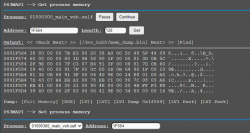
Step 1: go to http://192.168.8.52/home.ps3mapi/sman.ps3
Step 2: Press "get"
Step 3: Press "dump process"
Step 4: Press "find"
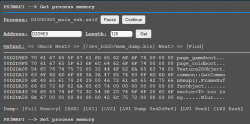
Step 5: Search for "page_gameboot"

wMM shows me this:
upload_2021-2-24_23-49-24.png

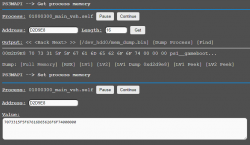
Step 6: In this example apply patch 7073315F5F67616D65626F6F74000000 for PS1 gameboot

wMM shows me this:
upload_2021-2-24_23-57-57.png

Step 7: Press "find"
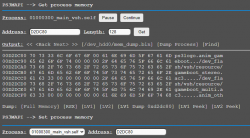
Step 8: Search for "ps3logo"

wMM shows me this:
upload_2021-2-25_0-1-53.png

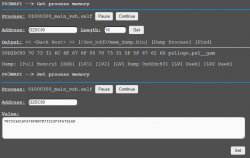
Step 9: In this example apply patch 7073316C6F676F007073315F5F67616D for PS1 gameboot

wMM shows me this:
upload_2021-2-25_0-5-14.png

That's it, it works here.

@DeViL303 How about using it for DVD/BDs too? using otherboot ( the way i'm doing) does not allows to use different audio, so making one for movies would be nice supporting another sound.


  • media_disc_boot_stereo.ac3....
Yeah, will add DVD and BD too. See my post before your one, I'm on it ;)
 
Yeah, the ISO is not touched. So will behave the same.
So, that's the problem. the two boots will appear, one, then the other. A way for the system to recognize the disc or ISO to be played would be more interesting in my opinion. Just like the original before fw 3.00.

Enviado de meu SM-J600GT usando o Tapatalk
 
So, that's the problem. the two boots will appear, one, then the other. A way for the system to recognize the disc or ISO to be played would be more interesting in my opinion. Just like the original before fw 3.00.

Enviado de meu SM-J600GT usando o Tapatalk
Its not a problem for me. :) These are different and separate to the normal logo built into games. You can just stick with the normal black screen boot up if you want, no one is making you use these patches. ;)
 
@aldostools: for the gameboot audio and to enable the animation of the logo this other patch to game_ext_plugin.sprx is also required. Without this patch the logo will show up, but it will not have the animation like shown in my video, it will just be a static logo with no fade or zoom effects. Its much better with this patch added too.

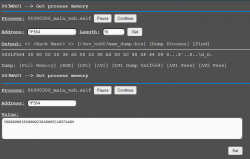
To do this patch I am pressing Find, and searching for this HEX string "388000007BE3002038A0005C485F4409"

wMM shows me this:

upload_2021-2-25_0-46-44.png

Then apply this patch "388000003860000238A0005C485F4409"

wMM shows me this:

upload_2021-2-25_0-52-39.png

This is also working fine here.


EDIT: I can confirm that DVD and BD gameboot can be replaced using the same method. The only difference is that the patch to anim_gameboot needs to be applied to anim_otherboot instead. It's in the same area of RAM, just a few bytes down.
 
Last edited:
Is it possible to patch the PS2 Logo?,
I made a few homebrew PS2 discs without a valid logo in the BINs/ISOs, so it's loaded entirely from the BIOS instead?
Can you skip the PS2 logo screen like PCSX2 fastboot or is it needed to hook the controller?,
I know there was this method FCA30000 to 00000000
 
Is it possible to patch the PS2 Logo?,
I made a few homebrew PS2 discs without a valid logo in the BINs/ISOs, so it's loaded entirely from the BIOS instead?
Can you skip the PS2 logo screen like PCSX2 fastboot or is it needed to hook the controller?,
I know there was this method FCA30000 to 00000000
I don't know about that really. This is all related to logos at firmware level, nothing in the ISO is patched here. Someone here might know about that kind of thing though.
 
Its not a problem for me. :) These are different and separate to the normal logo built into games. You can just stick with the normal black screen boot up if you want, no one is making you use these patches. ;)
I'm not criticizing your work, your work is incredible. I just wish there was a way to not show the original gameboot when any ps2 or ps1 game is started. I'm sorry if I offended your work, it was not my intention, honestly. it's because I'm a bit of a perfectionist.[emoji17]

Enviado de meu SM-J600GT usando o Tapatalk
 
No worries. My thinking is that these are very different to the logo included in a game, the logo in game is not HD for starters. Also the logo in the game can take ages to appear and can not be modified so easily and is not really animated in the same way etc.

You do not need to have this gameboot show the system icon the way I did in my example video, I think you are focusing too much on that, it can be anything at all. You can have it show something completely different if you wanted like this: (again just examples of the kind of thing that is possible, I am not saying you should have these I am just trying to show you how customizable it can be)


But anyway, enabling them is the hard part, disabling them for specific game types will not be difficult. All you will need is a modded rco to disable them.
 
Last edited:
So we need some testers of the console specific gameboots mod. You need to use the very latest version of webMAN MOD which you can get here: If you are already on 1.47.34 you need to update it https://github.com/aldostools/webMAN-MOD/releases/download/1.47.34/webMAN_MOD_1.47.34_Installer.pkg


There are 2 folders in the attached zip. The files from one go on the hdd, the rco in the other goes on flash. The paths are in the names of the folders:

upload_2021-2-25_20-22-49.png


This will play custom animations and sounds when you mount and start:
  • PS1 Games
  • PS2 games
  • PS3 Games
  • PSP Games
  • ROMs
  • DVDs (no sound)
  • BD (no sound)
Known limitations - Do not report these as bugs, its just the way it works :
  • When nothing is mounted you will get a custom "default" gameboot with a PS logo
  • The custom gameboot is only active the first time you boot a game after mounting it.
  • If you exit a game and boot it again then you will get the default gameboot logo.
  • If you mount one game type, but then boot another type, you will get the gameboot for the mounted gametype.
  • If you mount one game type, then change your mind and mount another, you will get the gameboot for the game you mounted first.

It might be possible to overcome some of these limitations with future tweaks, some probably wont ever be fixable.

The icons and sounds are only place holders really and for testing purposes, you can change those yourself if you want. So we do not really want reports like "I do not like this sound" etc. If you want to make your own ac3 sound files for PS3 you can convert from any filetype on this site. https://convertio.co/ For the output settings choose AC3, and make sure to choose 48000Hz.

This might work fully on HEN. Not tested yet. If you are on CFW you could optionally put the included sprx onto flash too, but webMAN MOD will remap it from HDD when something is mounted.

Please test and let us know if it works ok. Make sure you reboot after putting all the files on there.

Massive respect and thanks to @aldostools for all his work on this.


Edit: See latest version later on in the thread
 
Last edited:
Thanks for you hard work @DeViL303 and @aldostools , working good as expected :)

Just some reports

- The PS3 games are playing a PS4 logo like and the PS1 games are playing a distorced PS3 logo.
- Can PCE and NeoGeo be also included ?, they have already a different XMB tag would be nice if they act with another gameboot.
- Does webman searches for dvd and bd sounds? i know you have not included any sound for them, but does webman searches for sounds it's files if they are added by the user? if yes what's the name?

EDIT:

On the second try the ps1 game got the right gameboot, and the ps3 game got a ps3 gameboot but condensed
 
Last edited:
The PS3 games are playing a PS4 logo like and the PS1 games are playing a distorced PS3 logo.
That is the default logo, if you have nothing mounted it will use that one.
- Can PCE and NeoGeo be also included ?, they have already a different XMB tag would be nice if they act with another gameboot.
They can be I would say, adding them to the rco is easy enough. Aldostools would have to decide if he wants to support them.
Does webman searches for dvd and bd sounds? i know you have not included any sound for them, but does webman searches for sounds it's files if they are added by the user? if yes what's the name?
I do not think they do, But I am sure aldo could add it. I did have some sounds for them named dvd_boot_stereo.ac3 and bdv_boot_stereo.ac3. AFAIK those are not supported now but they could be added by aldo if he wants to support that.
On the second try the ps1 game got the right gameboot.
It has been working 100% of the time for me if I have just mounted a game, not sure why that happened. Had you rebooted after installing the new wMM and putting the rco and the sounds on there?
the ps3 game got a ps3 gameboot but condensed
No idea why that would have happened either, it works fine here.
 
Last edited:
That is the default logo, if you have nothing mounted it will use that one.

They can be I would say, adding them to the rco is easy enough. Aldostools would have to decide if he wants to support them.

I do not think they do, But I am sure aldo could add it. I did have some sounds for them named dvd_boot_stereo.ac3 and bdv_boot_stereo.ac3. AFAIK those are not supported now but they could be added by aldo if he wants to support that.

It has been working 100% of the time for me if I have just mounted a game, not sure why that happened. Had you rebooted after installing the new wMM and putting the rco and the sounds on there?

I just made a reboot now and everything is working good as intended.

You guys are awesome as usual
 
Can PCE and NeoGeo be also included ?, they have already a different XMB tag would be nice if they act with another gameboot.
Actually, now that I think about it. PKG games like this can not be supported. Only games that get mounted by webMAN are supported for custom gameboots.

The reason is that there is no way for wMM to know what XMB icon you are going to click on before you click on it, so therefore no way for the system to know what gameboot to use. This works with mounted games because wMM knows what it has mounted and changes the gameboot to suit.

In theory it might be possible if Cobra supported this feature, but I am not sure.
 
That is the default logo, if you have nothing mounted it will use that one.

They can be I would say, adding them to the rco is easy enough. Aldostools would have to decide if he wants to support them.

I do not think they do, But I am sure aldo could add it. I did have some sounds for them named dvd_boot_stereo.ac3 and bdv_boot_stereo.ac3. AFAIK those are not supported now but they could be added by aldo if he wants to support that.

It has been working 100% of the time for me if I have just mounted a game, not sure why that happened. Had you rebooted after installing the new wMM and putting the rco and the sounds on there?

No idea why that would have happened either, it works fine here.

I could add support for some retro logos (not all but the most popular ones: nes, snes, genesis, etc.)
I would need the 3 letter codes like "nes", "sns", "gba", "gen", "neo", "pce", etc. The rest would use the default "rom" animation.
I could add 73 supported ROMS folders if you use numbers and follow this order (but IMO that would be an overkill):
"2048", "CAP32", "MAME", "MAME078", "MAME2000", "MAME2003", "MAMEPLUS", "FBA", "FBA2012", "FBNEO", "ATARI", "ATARI2600", "STELLA", "ATARI5200", "ATARI7800", "JAGUAR", "LYNX", "HANDY", "HATARI", "BOMBER", "NXENGINE", "AMIGA", "VICE", "DOSBOX", "GW", "DOOM", "QUAKE", "QUAKE2", "JAVAME", "LUA", "O2EM", "INTV", "BMSX", "FMSX", "NEOCD", "PCE", "PCFX", "SGX", "NGP", "NES", "FCEUMM", "NESTOPIA", "QNES", "GB", "GBC", "GAMBATTE", "TGBDUAL", "GBA", "GPSP", "VBOY", "VBA", "MGBA", "PALM", "POKEMINI", "GENESIS", "GEN", "MEGAD", "PICO", "GG", "GEARBOY", "ZX81", "FUSE", "SCUMMVM", "SNES", "MSNES", "SNES9X", "SNES9X2005", "SNES9X2010", "SNES9X_NEXT", "THEODORE", "UZEM", "VECX", "WSWAM"
dvd and bdv sounds are mapped if they exist in gameboot folder; the same way the sound for ps3, ps2, ps1, etc. are mapped.

The "condensed PS3" effect may happen if game_ext_plugin.sprx is not installed in gameboot folder or in dev_flash.

I thought you would add the PS3 logo that I mentioned... That "PlayStation3" logo is ugly.
 
Actually, now that I think about it. PKG games like this can not be supported. Only games that get mounted by webMAN are supported for custom gameboots.

The reason is that there is no way for wMM to know what XMB icon you are going to click on before you click on it, so therefore no way for the system to know what gameboot to use. This works with mounted games because wMM knows what it has mounted and changes the gameboot to suit.

In theory it might be possible if Cobra supported this feature, but I am not sure.

But if the /dev_hdd/game scan option be enabled, wMM will list all the pkgs so if it can read the X0 and X1 attributes, it can be patched right?
 
Last edited:
hought you would add the PS3 logo that I mentioned... That "PlayStation3" logo is ugly.
Looks like i mixed up my rco at the last minute. The logo in the video is what I thought was included.


upload_2021-2-25_23-0-52.png

Oops. I will fix it.

Edit: v1.01 added to test file release post. That should be the one you wanted.

But if the GAME/scan be ticked, the pkgs will be listed on WMM, so it could read the X0 and X4 attr and apply the remap.
That is not how it works, Think about it, How is wMM meant to know what game you have clicked? webMAN is not watching the XMB waiting to see what you click.

I guess you mean if you launch the game with wMM, But most people do not do that for installed natively supported games.
 
]
I guess you mean if you launch the game with wMM, But most people do not do that for installed natively supported games.

You are right, most of people will not do it.

I was questioning it because i made a different approach in my mod, the x0 and x4 pkgs will be listed with the WMM retro folder.
 
Back
Top