imagefont.bin tool for PS3 and Vita

I have "completed" the buttons section. There were 9 spaces in around the buttons here:

upload_2019-7-11_18-34-14.png


upload_2019-7-11_18-34-48.png


So I filled them up with these extra few. Alternate select and start are cool as they are more realistic.

upload_2019-7-11_18-43-19.png


Also I have added these 11 disc icons:
upload_2019-7-11_19-38-18.png


upload_2019-7-11_19-33-40.png


Still working on more stuff. ;)
 
Last edited:
Removed BIN until we know best place to add icons.
 

Attachments

  • upload_2019-7-11_22-27-33.png
    upload_2019-7-11_22-27-33.png
    260.6 KB · Views: 237
  • upload_2019-7-11_23-14-25.png
    upload_2019-7-11_23-14-25.png
    79.1 KB · Views: 110
  • upload_2019-7-11_23-14-53.png
    upload_2019-7-11_23-14-53.png
    71.3 KB · Views: 113
  • upload_2019-7-11_23-18-25.png
    upload_2019-7-11_23-18-25.png
    6.1 KB · Views: 112
Last edited:
You can extract the contents of official imagefont.bin and take one of the animated icons as template for copypasting
Basically, is needed to add the ID of the new icon to the index.txt and to prepare the .cfg file for it
In the .cfg file you have the timings of the frame_duration

Also, if i rmember right... all frames of an animated icon should use the same indexed color palette, this is a restriction that cant be bypassed and could be problematic

To use this tool is needed to convert the custom images to "indexed color" before using the tool
https://pngquant.org/ does it very well because always creates PNG with indexed colors, it can be automatized with command line but there is also a very handy GUI for it named PNGoo
https://pngquant.org/PNGoo.0.1.1.zip
PNGoo-Reduce-PNG-File-Size.png

That PNGoo tool is very convenient because it have a preview where you can see the amount of pixelation... the problem (as far i remember) is you cant specify the colors of the palette accuratelly, this doesnt matters for an static icon, but for animated icons with multiple frames could be problematic
 
Last edited:
That cool, I might check that out. Up until now I have been using TinyPNG like @littlebalup suggested , it allows for 20 a time to be converted and you can download them all in a zip after, very convenient too, no way to mess it up, no options.

If anyone has ideas for more icons let me know. I still have a couple of aldostools suggestions to add too.
 
I thought this thread was about talking about which icons to add and discuss where are going to be located, his IDs, etc..
But instead of that you are adding a lot, and im not sure which order you are following :P
Is fine, is needed to experiment with this anyway, but i think is going to be needed to change some

I have all dualshock buttons made from scratch in photoshop shapes (that are like vectors), and honestly looks better than the officials, are going to be included in the next managunz version (and eventually in other stuff), after that i will be able to post them in public but by now i prefer not
Sorry for the hype, but i think is time to advise you, i have a long collection of nice dualshock icons that are candidate to replace the officials + a few more dualshock icons that doesnt exists inside the official imagefont.bin

 
I thought this thread was about talking about which icons to add and discuss where are going to be located, his IDs, etc..
But instead of that you are adding a lot, and im not sure which order you are following :P
Is fine, is needed to experiment with this anyway, but i think is going to be needed to change some

I have all dualshock buttons made from scratch in photoshop shapes (that are like vectors), and honestly looks better than the officials, are going to be included in the next managunz version (and eventually in other stuff), after that i will be able to post them in public but by now i prefer not
Sorry for the hype, but i think is time to advise you, i have a long collection of nice dualshock icons that are candidate to replace the officials + a few more dualshock icons that doesnt exists inside the official imagefont.bin

I just updated the zips, as there are 24 upgraded icons now.

I am not following any particular order, as all the spaces we have are dispersed randomly throughout the whole lot. We can not put icons all together in a certain order due to this. Up to now i have just added them as close as I can to similar icons. I have filled up all the gaps at the start up as far as the 2 spare slots in with the smileys (U+F419). Also I have added some at the end up until U+F6F3. It is very easy to move them, just rename the files.
 
Last edited:
But there could be some groups where the number of members of the group is very well defined, like... the "storage device" icons (flash, hdd, usb, ms, cf, sd, net, app_home, host_root)
Not sure how many are needed, but is a limited list (lets say are needed 12), then if we find a gap with 12 slots availables could be handy to place all them in it consecutivelly
 
Well if you have suggestions for different ways that is fine.

I have used these slots at the start for the added buttons. there were 9 free close to the buttons:

upload_2019-7-12_1-11-30.png


So I added these 9 buttons. ( they can be upgraded again when yours are public)

upload_2019-7-11_18-43-19-png.18985


Then the next free slots after that are 2 at:
upload_2019-7-12_1-13-0.png


I have left these free for now, it would be best if we add 2 more smileys there if/when we upgrade those.


The next free section after that is 30 free slots here:
upload_2019-7-12_1-14-28.png


I have added these 30 icons there:
upload_2019-7-11_19-33-40-png.18988

upload_2019-7-11_22-27-33-png.18991


Then there are your 8 icons, I picked a space for those with some more room, as i thought you would probably have some more icons. There are another 5 slots in that section.

upload_2019-7-12_1-25-55.png


upload_2019-7-11_7-16-47-png.18941


Then I started adding these 20 in this next section. We have 12 more slots in that section still free. I was thinking the ISO,NTFS, PKG, P3T etc etc could go there.

upload_2019-7-12_1-27-58.png


upload_2019-7-11_7-17-23-png.18942

upload_2019-7-11_7-17-42-png.18943


I'm happy to have them in any order tbh, the HEX codes mean nothing to me So which one i need to type for which icon makes no difference. I wont be remembering them or anything and will need to refer to the info anyway.
 
Last edited:
@aldostools @sandungas

what do you think about adding some of these. I'm not sure if there is any point, but maybe some of them would be useful:

tex_ac_dts_express.png tex_ac_dts_hd_hr.png tex_ac_dts_hd_lbr.png tex_ac_dts_hd_ma.png tex_ac_lpcm.png tex_ac_mp3.png tex_ac_mpeg.png tex_ac_nonlinearpcm.png tex_ac_wma.png tex_avc.png tex_codec_aac.png tex_codec_atrac.png tex_codec_cdda.png tex_codec_dsf.png tex_codec_mp3.png tex_codec_pcm.png tex_codec_sacd.png tex_codec_wma.png tex_divx.png tex_mjpg.png tex_mpg1.png tex_mpg2.png tex_mpg4.png tex_multiangle.png tex_original.png tex_playlist.png tex_vc_divx.png tex_vc_motionjpeg.png tex_vc_mpeg1.png tex_vc_mpeg2.png tex_vc_mpeg4.png tex_vc_mpeg4avc.png tex_vc_mvc.png tex_vc_none.png tex_vc_vc_1.png tex_vc_vc1.png tex_wmv.png item_tex_ps4format.png music_tex_aac.png music_tex_atrac.png music_tex_cdda.png music_tex_dsf.png music_tex_mp3.png music_tex_pcm.png music_tex_sacd.png music_tex_wav.png music_tex_wma.png tex_3D.png tex_ac_aac.png tex_ac_atrac.png tex_ac_dd.png tex_ac_ddhd.png tex_ac_ddp.png tex_ac_dts.png tex_ac_dts_96.png tex_ac_dts_96_es.png tex_ac_dts_es_disc.png tex_ac_dts_es_mtrx.png
 

Attachments

  • item_tex_ps1mc.png
    item_tex_ps1mc.png
    12.3 KB · Views: 34
  • item_tex_ps1vmc.png
    item_tex_ps1vmc.png
    13.3 KB · Views: 36
  • item_tex_ps1vmcbroken.png
    item_tex_ps1vmcbroken.png
    14.1 KB · Views: 40
  • item_tex_ps2vmc.png
    item_tex_ps2vmc.png
    12.7 KB · Views: 38
  • item_tex_ps2mc.png
    item_tex_ps2mc.png
    3.5 KB · Views: 43
  • item_tex_ps2vmc_color.png
    item_tex_ps2vmc_color.png
    10.1 KB · Views: 40
  • item_tex_ps2vmcbroken.png
    item_tex_ps2vmcbroken.png
    13.8 KB · Views: 43
Dunno, but maybe are too much, we could hit with some kind of limitation of total imagefont.bin size at some point

Yeah, there probably is a limit. I have tested a bin over 1MB though, so we are ok for a while. Should be able to add another 400 icons approx at least.
 
View attachment 18991

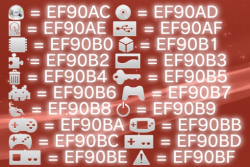
U+F42D to U+F43F (EF90AD to EF90BF)

That's it for now. Will have another look after the weekend.

Upgraded these slightly too.

Original:
View attachment 18994

Upgraded:
View attachment 18995


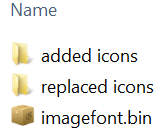
Imagefont.bin v003 has 24 icons upgraded, and 67 icons added. I have included the compiled bin, and the icons individually too so its easy to see what has changed. This bin is now 100kb bigger than the original.


View attachment 18996


Is this the one you sent me already or has it been updated?
 
@DeViL303 There is also UMD in metalification.

Yes, but I do not run any scene tools on my trusted machine. ;p

About colour reduction: the best tool is OPTPIX Image Studio. But it is VERY expensive (there is build with crack of course for few of 3.xx). Squaresoft was using it in almost all their games BTW. ^^
 
@DeViL303 I didn't want to be sounded like someone who doesn't trust those app authors. I just don't trust anyone, even myself>>my memory sometimes. ;p I have two machines, one is trusted used for work and with small percentage of private data; and one which is war zone on which I do not care about any infections because there is no valuable data on it. All scene experiments and fun, I'm doing on untrusted PC and both cannot communicate with each other, even if need to move some files, I'm doing it via Linux (because Windows letting anything for everything if ask properly). You can call this paranoia. :D Oh, and before I work and release something which include some executable, I restoring my disk image (BTW I'll strongly recommending CloneZilla), so don't worry also that I do not care about someone's computer. Main problem is, not always I have access to "untrusted machine".

So. If You need some gfx to me to edit, I need precise information which, what kind of modification it should have, and be in format which doesn't require extra tools to extracting.
 
Back
Top