PS3 IRISMAN 4.86 + MAMBA v8.3 update by Aldostools

Update v4.86.1: see below for changes
.Developer @aldostools whom we recently interviewed in The Power Supply Series, if you have not seen that interview yet, it can be seen >here<. Now the developer is back with a new update for the popular IRISMAN (AIO) manager for homebrew enabled PS3 consoles to support the new 4.86 (firmware) update.

The developer has not just added new FW support but has also made an update (v8.3) to MAMBA payload (an alternative for Cobra on non Cobra CFWs) . This update to MAMBA (that's injected from IRISMAN) has added support for @DeViL303 PoC of loading games from a modified Photo Column that appears in "Games". There are some other neat MAMBA features, like when you disable CFW syscalls they can be re enabled without a restart to the PS3 Console, This mamba update also provides some other tweaks and enchantments that the developer has outlined in the changelog below:


Irisman_V3.jpg

  • IRISMAN 4.86
    (Videos is of an older version of IRISMAN)


    Update: IRISMAN 4.86.1

    • Integrates exFAT File Manager by lmirel
    What's new in IRISMAN 4.86?
    • Detection of firmware 4.86
    • Updated Movian 5.0.700 by deank / andoma
    • Added MAMBA 8.3 for 4.84 to 4.86 (this is the main feature that needs to be tested)
    • Fixed blackscreen loading IRISMAN if webMAN was running on nonCobra mode

    New features in MAMBA 8.3:
    • Restore disabled CFW Syscalls without Reboot just entering to Settings > System Update on XMB by aldo
    • Auto-enable dev_blind by aldo
    • Integrated fan controller (to control fan when webMAN is unloaded) by aldo
    • Support Photo GUI integration with webMAN MOD (mount games from Photo column) by aldo/DeViL303
    • Extended API with additional opcodes for developers by aldo
      • LV1 Pokes (8bit, 16bit, 32bit, 64bit)
      • LV2 Pokes (8bit, 16bit, 32bit, 64bit)
      • Map Path Callback (experimental)
      • Get Map Path info
      • Get / Set fan speed
      • Enable/disable features: Photo GUI, Auto mount dev_blind, Restore Syscalls
      • Create CFW Syscalls (6,7,8,9,10,11,15,389,409)
      • Updated ps3mapi_load_process_modules to load custom modules and system modules (by haxxxen)
      • Added ps3mapi_get_process_module_info
    • Increased from 24 to 32 the max number of map paths by aldo
    New features in MAMBA 8.2:
    • On-the-fly reActPSN for activation of PSN content (rap files, edat, act.dat) by habib
    • Load Kernel Plugins on startup or on demand (static & dynamic addresses) by habib
    • Advanced QA Flag & Debug Settings Enabler by habib
    • Custom Syscalls for set / get fan policy by habib
    • LV2 module patches for download_plugin, autodownload_plugin, nas_plugin, psp remote play, etc. by Joonie/DeViL303
    • Improvements to PS3MAPI by TheRouletteBoi
      • Added a better set process memory by using the function used to actually write to process, this will allow user to write to memory where writing permissions are disabled.
      • Added ps3mapi_process_page_allocate this function will allocate memory into the eboot process allowing your to write/read/execute code into start_address parameter
      • Added ps3mapi_get_process_module_segments which will get the name, module path, module segments, module start and module stop address all in one function
      • Added ps3mapi_create_process_thread to create thread into the process, This is useful if you want to load a small function into the process without needed make and load a sprx module


    The equivalent "Cobra 8.3" (untested version) is available in this fork:

    DISCLAIMER: These payloads are experimental and it's advised to not install these versions of Cobra or Mamba payloads permanently if you don't have a firmware flasher.

    IRISMAN-v2.93-9-mod.jpg File Manager.png

Download:

Source (release post): psx-place.com
 
Last edited:
I'm having problems with launching new IRISMAN_4.86.
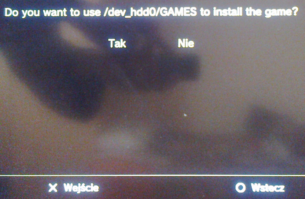
After installation and setting the screen, message appear to install IRISMAN on /dev_hdd0/GAMES:
iris.png

After that console freezes.

Currently I'm on Rebug 4.85.1 LITE CEX with Cobra 8.2 - CECH-2004A.
 
Hi guys n00b here,
So, I have here mmCM on my 4.85 CFW jailbroken ps3.
What will change if I update to 4.86 through this IRISMAN/MAMBA version?
I don't know nothing about MAMBA/COBRA.
I just want to play online, get my trophies and make the "update your system" sh**t message disappear. (Is this possible with that?)

The thing is, will be as easy as mmcm/cobra to load my games (which are on internal hdd)?

Thanks guys.
Sorry for my rusty english.
 
Hi, i have the latest version of irisman and after backing up like 6 games i can only see the last one. The disk space was eaten away during the process, so the other games should be there. Any ideas?
TIA
 
I'm having problems with launching new IRISMAN_4.86.
After installation and setting the screen, message appear to install IRISMAN on /dev_hdd0/GAMES:
iris.png

After that console freezes.

Currently I'm on Rebug 4.85.1 LITE CEX with Cobra 8.2 - CECH-2004A.
It freezes because you have too many backups on HDD0 ;) Just joking, try again after restar, reinstall Irisman or update rebug to 4.86.1.
 
I'm having problems with launching new IRISMAN_4.86.
After installation and setting the screen, message appear to install IRISMAN on /dev_hdd0/GAMES:
iris.png

After that console freezes.

Currently I'm on Rebug 4.85.1 LITE CEX with Cobra 8.2 - CECH-2004A.
Looks like a language innacuracy
That screen is asking you the path of your PS3 JB game backups
It offers several paths, if you tell NO to "/dev_hdd0/GAMES" is going to offer you to use "/dev_hdd0/GAMEZ" instead... and so on


Edit:
I mean.... the innacuracy is in the word "install" because you are not installing the game backups... you are just "storing" them
 
Hi, i have the latest version of irisman and after backing up like 6 games i can only see the last one. The disk space was eaten away during the process, so the other games should be there. Any ideas?
TIA

Check the path where you stored your games: /GAMES or /PS3ISO (all uppercase)

Use the file manager (SELECT+START) to find the games and move them if it's necessary.
 
It freezes because you have too many backups on HDD0 ;) Just joking, try again after restar, reinstall Irisman or update rebug to 4.86.1.

Looks like a language innacuracy
That screen is asking you the path of your PS3 JB game backups
It offers several paths, if you tell NO to "/dev_hdd0/GAMES" is going to offer you to use "/dev_hdd0/GAMEZ" instead... and so on

Edit:
I mean.... the innacuracy is in the word "install" because you are not installing the game backups... you are just "storing" them

Thanks for suggestions, due the lack of time I'll try to re-test it in Friday.
 
I mean.... the inaccuracy is in the word "install" because you are no t installing the game backups... you are just "storing" them

That text was inherited from the original source of Iris Manager.
https://github.com/Estwald/irismanager-4-x/blob/master/source/language.c#L62

I only changed the term "Want to use" to "Do you want to use"

The prompt is intended to define where you want to "copy" the games when you backup them from the original disc. So in some sense you're "installing" them on the internal HDD ;)
 
That text was inherited from the original source of Iris Manager.
https://github.com/Estwald/irismanager-4-x/blob/master/source/language.c#L62

I only changed the term "Want to use" to "Do you want to use"

The prompt is intended to define where you want to "copy" the games when you backup them from the original disc. So in some sense you're "installing" them on the internal HDD ;)
Hehe, i guessed that text comes from estwald, in this case i would have reduced it like this:
PS3 game backups path = dev_hdd0/GAMES ? (and the YES/NO dialog to confirm or to select other path)

Im some way im reducing the amount of info given to the user (im not telling if are "installed" or "stored"), but i think is better this way because is more generic, and easyer to translate too
 
Check the path where you stored your games: /GAMES or /PS3ISO (all uppercase)

Use the file manager (SELECT+START) to find the games and move them if it's necessary.
I have solved the mystery, the AIO guide for hen does not tell you to rename the iso and move it to another folder... I was overwriting the isos over and over. Is there a guide for irisman somewhere? Tnx.

Inviato dal mio FRD-L09 utilizzando Tapatalk
 
It freezes because you have too many backups on HDD0 ;) Just joking, try again after restar, reinstall Irisman or update rebug to 4.86.1.

Looks like a language innacuracy
That screen is asking you the path of your PS3 JB game backups
It offers several paths, if you tell NO to "/dev_hdd0/GAMES" is going to offer you to use "/dev_hdd0/GAMEZ" instead... and so on...

Updating FW into Rebug 4.86.1 LITE seems to help...

Although I have also tried to install new version of a IRISMAN 4.86.1 on Rebug 4.85.1 LITE.

BTW I do not have any problems with re-installing IRISMAN 4.85...
no matter on what FW I was on.
 
so, if i want to try Mamba, i go to rebug toolbox, disable cobra and install Irisman? Is that simple, or i have to use some mamba loader etc?
 
so, if i want to try Mamba, i go to rebug toolbox, disable cobra and install Irisman? Is that simple, or i have to use some mamba loader etc?

Yes, just disable Cobra and IRISMAN will load MAMBA. It will stay in memory until you reboot.

If you need to load it permanetly, with Cobra disabled load the mamba payload (.bin) with:
/dev_hdd0/boot_plugins_kernel_nocobra.txt
put the path of the mamba payload inside the file. Rebug will load it without have to use a loader.
 

Featured content

Trending content

Back
Top