PS3 IRISMAN v4.87.1: Adds support for mounting Compressed ISO's ( ZIP, RAR or 7-Zip)

Following some of the recent advancements made to webMAN MOD , PlayStation 3 Homebrew developer @aldostools has now looked to incorporate a new feature in the PS3 Homebrew (CFW/PS3HEN) f backup manager known as IRISMAN. It's currently a new and experimental feature added in the recent release of v4.87.1 that provides the backup manager the ability to mount compressed ISO in .zip / .7z / .rar formats. This features supports the PS3's Internal HDD or a FAT32 external storage device for PS1 / PSP / PS2 / PS3/ DVD / BluRay ISO's..​

PS3 IRISMAN v4.84.png

  • IRISMAN 4.87.1
    • Added support for mount ZIP, RAR or 7-Zip archives stored in FAT32 or in the internal HDD. The archive is extracted to a temporary folder then the extracted ISO is mounted by IRISMAN as usual
    • Includes Movian 5.0.714
    • Includes Mamba 8.4


    .This is a new experimental build of IRISMAN 4.87.1:
    https://www.mediafire.com/file/09mbz1jamnbcw0z/IRISMAN_4.87.1.pkg/file

    It allows to mount compressed zip files containing only one ISO image (CUE/BIN, ISO, IMG or MDF) without subfolders.
    The zip file should be stored in PSXISO, PSPISO, PS2ISO, PS3ISO, DVDISO or BDISO of FAT32 or internal HDD.

    The zip is extracted temporarily to /dev_hdd0/tmp/extract then the extracted ISO is mounted normally by IRISMAN. Indeed the extracted PS1 games are booted directly on CFW.

    The extraction time is directly proportional to the size of the extracted ISO. The feature is ideal for small PS1 and PSP games which usually have a good compression ratio and the image file can be decompressed in few seconds.

    Some PS2 games could be convenient in .zip too. Especially the small CDs and DVD games that can be extracted quickly.

    PS3, BD and DVD ISOs are also supported (untested). However, the compression ratio of these formats is usually low and require a long wait time for decompression due their larger size.

    Thanks to @DeViL303 for the idea and @bucanero for the zip library.

    DISCLAIMER: *** This feature is experimental and may contain bugs ***

    THE SOFTWARE IS DISTRIBUTED "AS IS". NO WARRANTY OF ANY KIND IS EXPRESSED OR IMPLIED. YOU USE AT YOUR OWN RISK. NEITHER THE AUTHOR, THE LICENSOR NOR THE AGENTS OF THE LICENSOR WILL BE LIABLE FOR DATA LOSS, DAMAGES, LOSS OF PROFITS OR ANY OTHER KIND OF LOSS WHILE USING OR MISUSING THIS SOFTWARE OR ITS COMPONENTS. IN NO EVENT SHALL THE AUTHORS OR COPYRIGHT HOLDERS BE LIABLE FOR ANY CLAIM, DAMAGES OR OTHER LIABILITY, WHETHER IN AN ACTION OF CONTRACT, TORT OR OTHERWISE, ARISING FROM, OUT OF OR IN CONNECTION WITH THE SOFTWARE OR THE USE OR OTHER DEALINGS IN THE SOFTWARE.

    Furthermore, the author and his ASSOCIATES shall assume NO responsibility, legal or otherwise implied, for any misuse of, or for any loss of any kind that may occur while using the SOFTWARE or its components.

    Installing and using the software signifies acceptance of these terms and conditions of the license. If you do not agree with the terms of this license, you must remove all software files from your storage devices and cease to use the software.
    .UPDATE: I have uploaded a new build with support for ZIP, RAR and 7zip archives.

    https://www.mediafire.com/file/09mbz1jamnbcw0z/IRISMAN_4.87.1.pkg/file

    Thanks again to Damián Parrino (@bucanero) for the libs.

Download: https://github.com/aldostools/IRISMAN/releases
Mirror 1: brewology 2: mediafire
Source Code https://github.com/aldostools/IRISMAN/

Discussion Thread:
psx-place.com/,,,,​
 
Last edited:
Actually such decompression would take few even minutes on HDD. Reading news title alone I have hope for CHD5 (made by chdman from MAME) or CSO (made by maxcso, not the ancient ciso tools for PSP). :) And well, I know that this is more on Cobra/Mamba side, than IRISMAN, but even works like in i.e 7Z case would be nice.

Anyway, still nice feature! Thanks for Your time.

The extraction time is directly proportional to the size of the extracted ISO
Yes, but also very important is compression type, level and dictionary size. ;)
 
Actually such decompression would take few even minutes on HDD.
It's really not that bad, under 30 seconds for 200MB PS1 games, these games can compress to under 100MB.

upload_2021-3-13_1-36-54.png


Also it keeps the extracted disc image if you mount the same game a second time, just mounts the already extracted data. So for example you can have 100 ps1 games on your console taking up approx 50% of the space they would normally. Then if you want to start a new game you extract it once, maybe it takes 1 minute for larger ones, but normally when someone starts a new game they play it for a while so it works out. I know it wont suit everyone but IMO it works really well.

In some ways it is better than CSO etc, CSO slows down loading every single time you play the game and load anything, this is just slower the first time. Then normal speed.
 
Last edited:
In my tests some PSP minis were compressed up to 95% and decompressed in less than 30 seconds as DeViL303 commented.
upload_2021-3-12_22-16-54.png


DeViL303 suggested the feature for people with large collections of games that use them in a casual manner. The feature is not intended for large games that take long time decompressing or for games that are used frequently.
 
It's really not that bad, under 30 seconds for 200MB PS1 games, these games can compress to under 100MB.
Try some heavly CDDA games. ;)

BTW: I didn't say it is useless, I see several scenarios where this have sense, but just points to something more practical (compression whole disc vs compression per sector) which is i.e used on PSC (RetroArch cores support CHD4 currently).

In some ways it is better than CSO etc, CSO slows down loading every single time you play the game and load anything
It is not fault of format type but slow PSP CPU. ;)
 
Hi everyone!
Im with Evilnat 4.87.2 and this last version of Irisman and I cannot launch any game ISO from it. PSP iso doesnt load neither from webman or irisman.
Can you please help me?
 
How far can you compress large games, say Uncharted 3(40GB), will it be useless and shave off only a couple of gigabytes, or be worth the wait and cut half the size of the game?
 
How far can you compress large games, say Uncharted 3(40GB), will it be useless and shave off only a couple of gigabytes, or be worth the wait and cut half the size of the game?

For PS3 games this zip feature really does not worth the wait.

The PS3 games normally use compressed data and require a very long time for decompression.

If you "rip" the Uncharted games using my PS3RIP tool, you can reduce the size to approximately 25GB removing the 3D videos and additional languages. Then you can build an ISO or use it as JB folder. You can use it on external FAT32 if you extract the PSARC files or split the ISO.
 
You can use it on external FAT32 if you extract the PSARC files or split the ISO.
I know we can use a folder in place of a psarc file and the game figures it out, but do you know if we can go the other way and use a psarc file in place of a folder?

For example can we compress the whole USRDIR of a game/app as USRDIR.psarc and thus have a compressed version? or maybe only subfolders below USRDIR would work as the eboot needs to be outside of a psarc?

If so this might be a way to run compressed ISO content using the systems existing support for compressed archives. I'm not sure if psarc is a system level thing or if it needs support in the eboot to work.
 
Last edited:
I know we can use a folder in place of a psarc file and the game figures it out, but do you know if we can go the other way and use a psarc file in place of a folder?

For example can we compress the whole USRDIR of a game/app as USRDIR.psarc and thus have a compressed version? or maybe only subfolders below USRDIR would work as the eboot needs to be outside of a psarc?

If so this might be a way to run compressed ISO content using the systems existing support for compressed archives. I'm not sure if psarc is a system level thing or if it needs support in the eboot to work.

I think PSARC needs code in the EBOOT to support it. I only have seen PSARC in Sony games. This is the EBOOT of Uncharted 2:
upload_2021-3-14_15-25-10.png
 
So I 7-zipped a PSP iso, but Irisman didn't decompress it. I used ZArchiver (Android), is there any specific option to use? It only takes me compression level and data encryption.
 
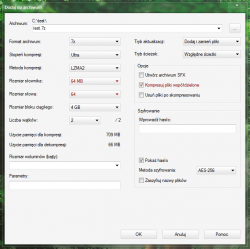
I tested 7zip for Windows 10 64-bit using ultra compression level and LZMA2.

Try using zip. There shouldn't be a big difference.
 
@JediKnight007 Maybe problematic here is option: compress share files (or something similar called in GUI)? This makes *.7z even smaller if there are many binary the same files or blobs, but it also makes incompatibility for not fully 7Z implementations. I don't know what ZArchiver doing but try to make both archives type on official GUI for Windows.

@aldostools Actually differences between RAR5/7Z/XZ (LZMA) and ZIP64 are significant. ;)
 
And/or maybe problem lie in dictionary size (the larger is, the more demanding memory usage is, which on PS3 could exceed maybe available memory? Just guessing).

7z_gui.png
 
somewhere the user mentioned "data encryption"... (???) that seems weird, unless used compression with password, then I guess there's an issue there.

Note: the unrar library I ported supports passwords (and even RAR volumes), but the un7zip library does not. (Also the 7zip library can't handle volumes)

btw, I haven't messed up with COBRA/MAMBA payloads, but perhaps it's possible to do some on-the-fly decompression and support something like "Gzipped-ISOs".
The zlib and bz2 libraries actually support a kind of "fopen/fread/fseek/fwrite" file functions directly over compressed streams, so you could open a .gz or .bz2 ISO as if it was the real .ISO . (you'll just replace fopen with gz_open, bz2_open, fread > gz_read, bz2_read, etc)
 

Featured content

Trending content

Back
Top