IsoBuster beta with added new consoles support

it is like FATX related programs need to read the HDD in a particular way that's not possible with some adaptors.

I honestly wouldn't know what that way is then ?
The applications do need low level access but that is independent from the type of adapter.
Luckily we can interface on a higher level than that.

I see. But shouldn't that lead to corruption problems??

I don't know how the Xbox OS handles your obviously wrong partitioning
If the OS is oblivious for the fact that partition F falls largely outside the addressable area, then this can definitely lead to all sorts of problems. However, I can imagine the OS actually sees your F partition as a smaller partition. A partition the size of the remaining addressable space rather than the recorded 408 GB. In case of the former it would then be able to handle everything properly

It is possible that that red X error have something to do with older partitioning?

Not sure that I understand the question but if I do then no. The red X indicates that at least one block in the object the X is shown next to is unreadable. Either because that block was read (to check something - explore a folder - sector view - ..) and was found to be unreadable, or because block(s) of the object fall outside the known readable area (beyond the disk).
 
I honestly wouldn't know what that way is then ?
The applications do need low level access but that is independent from the type of adapter.
Luckily we can interface on a higher level than that.

I'd like to know it '^^

...When I finally managed to makes programs correctly seeing the 1tb SATA HDD (with a SATA to USB 3.0 cable from kaico UK), FATXplorer gived me a message that cache function was disabled and if i wanted to enable it for higher speed (I never got that message before with any of the other adapters or the other HDD). I hitted yes but it said it was impossible to enable it, probably because the cable don't support that function.
I don't know if it can be a clue for something. Maybe the problems are related to the way adapters interface with different HDDs specifications.

I don't know how the Xbox OS handles your obviously wrong partitioning
If the OS is oblivious for the fact that partition F falls largely outside the addressable area, then this can definitely lead to all sorts of problems. However, I can imagine the OS actually sees your F partition as a smaller partition. A partition the size of the remaining addressable space rather than the recorded 408 GB. In case of the former it would then be able to handle everything properly

Then for verify I'd simply need to fill F: partition 100%. I shouldn't be able to correctly store 408GB of data in here, right?

Not sure that I understand the question but if I do then no. The red X indicates that at least one block in the object the X is shown next to is unreadable. Either because that block was read (to check something - explore a folder - sector view - ..) and was found to be unreadable, or because block(s) of the object fall outside the known readable area (beyond the disk).

I'll move games from the 1TB HDD to the 500GB HDD F partition and see what happens :D
 
  • Like
Reactions: TnA
No idea


That is correct !
You can't store data beyond the last block of your HDD


Sounds like a plan

You was perfectly right, in some way I formatted the F partition on wrong coordinates.

I filled up F partition till last cluster and as it was meant to prove I could fit 179GB of data in it. So on Pc I see 229GB (as IsoBuster program showed) of free space on F: but it cannot be filled any further. Then it all comes back :D :encouragement::encouragement:

F-HDD500GB.jpg


Note: Windows names F: partiton as X 'cause I mounted it as X Drive on PC with FATXplorer.
 
Last edited:
Hello, I tried to extract an iso from a PS2 partition but the md5 hash no longer corresponds to the original available on redump do you have this problem too?
 
Hello, I tried to extract an iso from a PS2 partition but the md5 hash no longer corresponds to the original available on redump do you have this problem too?

I never had this problem installing and extracting ISOs with the same program (I used HDL dump helper gui 2.3).

But if you install a game with HDL dump then extract it with HDLGameinstaller, 99% of time it will result in a corrupted ISO.
Also viceversa i think. You should extract the games with the same program you installed them to be safe.

EDIT: Sorry, you obviously extracted the game with IsoBuster. However it would be useful to know wich program you used for installing.
 
I never had this problem installing and extracting ISOs with the same program (I used HDL dump helper gui 2.3).

But if you install a game with HDL dump then extract it with HDLGameinstaller, 99% of time it will result in a corrupted ISO.
Also viceversa i think. You should extract the games with the same program you installed them to be safe.

EDIT: Sorry, you obviously extracted the game with IsoBuster. However it would be useful to know wich program you used for installing.

Yes I try to extract the Isos with IsoBuster. For installing my games I used "hdl_dump_helper_gui_2.3". I wanted a faster way to recover the isos instead of doing one by one with hdl. which would save me a lot of time
 
@GDX / @Peppe90 Every partition in APA must be rounded to 128 value. So i.e if game have size 1000MiB, in APA allocation scheme it will be APA header 4MiB + HDL partition 1000MiB + 20MiB of zeroes to round it. Another example: if game is 900MiB then it still occupy in summary on HDD 1024MiB; if it 2049MiB, then on HDD it will take 2176MiB. This is why extracted games will not match to ReDump (but added zeroes have no negative effect for the game itself).

Why extracted games cannot have their real size? Because they are not stored with real size and there is no information anywhere written in header how "long" disc image is (if this is somewhere in "APA header" then it can be easily implemented). Other programs extracting *.iso with proper size, probably they reading TOC from disc image. However not all games have real TOC (i.e FF12 have almost empty, this is used as security layer to not tinker with game files) and IsoBuster doesn't reading nested images (it would read disc image contents inside "HDL partition" if this can be possible).

BTW: It would be better and a lot space safe if games on PS2 would be stored on i.e PFS (or exFAT for making easy access to them on Windows if in addition APA driver would be created). This would safe a lot of space wasted to partitions rounding. Maybe "raw" partitions was made by HDL author because this is also less memory used to handle it? I dunno. But even then, we would face another problem: partition size limit which cannot be larger than 128GiB.
 
Last edited:
@GDX / @Peppe90 Every partition in APA must be rounded to 128 value. So i.e if game have size 1000MiB, in APA allocation scheme it will be APA header 4MiB + HDL partition 1000MiB + 20MiB of zeroes to round it. Another example: if game is 900MiB then it still occupy in summary on HDD 1024MiB; if it 2049MiB, then on HDD it will take 2176MiB. This is why extracted games will not match to ReDump (but added zeroes have no negative effect for the game itself).

Why extracted games cannot have their real size? Because they are not stored with real size and there is no information anywhere written in header how "long" disc image is (if this is somewhere in "APA header" then it can be easily implemented). Other programs extracting *.iso with proper size, probably they reading TOC from disc image. However not all games have real TOC (i.e FF12 have almost empty, this is used as security layer to not tinker with game files) and IsoBuster doesn't reading nested images (it would read disc image contents inside "HDL partition" if this can be possible).

BTW: It would be better and a lot space safe if games on PS2 would be stored on i.e PFS (or exFAT for making easy access to them on Windows if in addition APA driver would be created). This would safe a lot of space wasted to partitions rounding. Maybe "raw" partitions was made by HDL author because this is also less memory used to handle it? I dunno. But even then, we would face another problem: partition size limit which cannot be larger than 128GiB.

Btw, I and @jolek had a discussion some time ago about extracting games installed with HDL dump, using HDLGI. It resulted in mismatching size/MD5 and not working ISOs (all games I extracted freezed at boot, all but Crash TWoC, MD5 of that game remained correct).
I was using HDLGI for higher ETH extracting speed.
Then I extracted all those games with HDL dump (that's the program I used for installing) and all extracted ISOs where perfect. MD5 was the same as before installing (redump.org matching).
 
Hello, I tried to extract an iso from a PS2 partition but the md5 hash no longer corresponds to the original available on redump do you have this problem too?

@Berion explained it.

IsoBuster doesn't know the true size of the ISO, so it assigns a size based on the partition it is located in.

As a consequence the ISO will, in all likelyhood, be bigger in size than the version you're comparing it to.
In other words there will be 'random' data appended at the end of the file. But for an ISO that is never a problem.
If you could truncate the size of the extracted file to the size of the version you're comparing to, you would get a better idea.
Or, with IsoBuster, Extract From-To using the ISO's LBA and size in blocks (so true size / 512 in this case).
 
If game installer would put image size i.e at the end of space for SYSTEM.CNF (I talking about "APA header", not the file inside disc image) that would be easiest and failproof way for external app to determine the size, and will not interfere with PS2 firmware which stops parsing this file after first zeroes appears.

But HDL is dead for aeons, HDLGI is dead, HDLD is probably also dead (but @akuhak is still active, right?) so this will not gonna happen. Well, anyway, just the idea how to solve this problem. ^^
 
Just letting You knows that Iso Buster reached beta stage of v4.8:
https://www.isobuster.com/news/isobuster_4.8_beta_release_notes

What interesting us, the scene peoples is mostly:
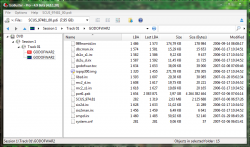
  • Support Amiga 500/600/1200 diskettes (all sizes), hard disks (any size, even if Workbench will not see partitions/contents), custom flash etc. in ADF and HDF format as of course real devices connected to PC.
  • Support Amiga media with RDB partition table or without it. Full support for OFS and FFS (in future maybe also last versions of SFS and PFS3 but currently only detection is implemented).
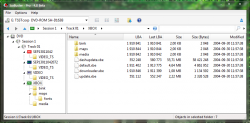
  • Support for reading original Xbox discs or 1:1 disc images (XGD) (e.g ReDump collecting checksums for them). On chosen Optical Disc Drives (only for those those with Kreon firmware and those unlocked comes from X360). Drive must be in default state, or else it will not shows all "partitions" at once but only first DVD-Video like in all standard ODDs or only XDFS like in any backup/pirate copy. However, full disc image creation is not possible because IsoBuster do not switching on the fly special ATA commands (what i.e Xbox Backup Creator doing), yet user is able to copy XDFS contents or image just fine right from the original disc! Possible support for XGD2 and XGD3 in future if I will get such drive connectors to PC (XGD4 and XGD5 no, as Xbox One an Xbox Series consoles wasn't hacked yet).
Those features are in free spectrum functionality but would be nice to buy home or pro license to help the author adding new features.

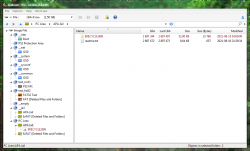
isobuster_a1200_hdd.png isobuster_xc_disc_xgd.png
 
Last edited:
There is a driver for the MC-Adapters! Just use libusb (can be created via Zadig easily) for it!
How so? How can I create such driver for my PS3MCA clone? Can I damage hardware (memory card and/or adaptor itself)?
 
Last edited:
First download "Zadig".
Connect your adapter and create a driver based on libusb and try PS3MCA.

KELF-binding will NOT work.

I ought to remember that some stuff in PS3MCA needed edits, but I can't quite remember.


Off topic: Since when is your picture green? Wasn't it red red before?
 
Actually I'm not interesting in any crypto, just raw access to a PSX and PS2 memory card to get access to saves or at least possibility of making memory card image. Prices of original PS3MCA are ridiculous (even 100$!) and no one care yet about Chinese, ugly and faulty, often read only, but hey, very cheap imitations. ^^

This one? https://zadig.akeo.ie/

OT: It was, but "sea green" is my favourite colour, so I decided to change it after some years. Refreshing. So, everything is fine with Your monitor/phone. :D
 
Last edited:
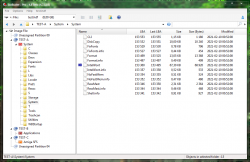
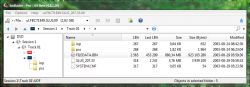
Since now IsoBuster can read:
  • [PlayStation 2] disc images made for USB Advance, USB Extreme, Open PS2 Loader and PS2ESDL in ul* and *.pdi formats (not really formats, just sliced *.iso to parts).
  • [PlayStation 2] MCFS deleted data recovery if still exist in fs table (but remember that it cannot be overwritten or else You get garbage). More information in the tutorial.
  • [PlayStation 2] APA Jail support (it shows contents from both GPT and APA logic at once).
  • [PlayStation 2] boot.kelf extraction from all Attribute area.
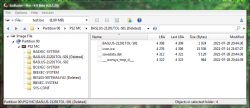
ib_ps2_disc_pdi.png ib_ps2_disc_ul.png ib_ps2_hdd_apajail.png ib_ps2_mc_del.png
 
Last edited:
Wow! The tool is/got very good for console-stuff as well!

Does it allow for boot.kelf injection or manipulation of patinfo, or adding files to PFS?
 

Similar threads

Back
Top