
You are using an out of date browser. It may not display this or other websites correctly.
You should upgrade or use an alternative browser.
You should upgrade or use an alternative browser.
IsoBuster beta with added new consoles support

60fpshacksrock
Member
Here's hoping for GC and Wii disc image support.
I already knew about the Xbox/360 ISO support for a while too.
I already knew about the Xbox/360 ISO support for a while too.
Last edited:

Berion
Developer
GC raw disc images (visible both area) and Wii's SDHC cards with WBFS are supported for sure.  I don't know if Wii and WiiU too (Wii probably it is but I never test this myself as I do not have this console and any games for this platform). However, disc dump must be decrypted of course.
I've tried in the past persuade author to add extensions for GameCube like *.god (GameCube Optical Disc) and *.gcm (the same structure, just old name), in case of Wii like *.wod (Wii Optical Disc) to let the user know just by looking at extensions list that they are supported. I didn't use Dolphin for ages so I don't know what convention they using, for sure *.iso extension but those discs aren't standard ISO so IMO it was bad decision to propagate it.
PS: Since v4.9.0.0, user can also retrieve deleted data from PS2 Memory Cards (if wasn't overwritten of course which is easy to do).
I don't know if Wii and WiiU too (Wii probably it is but I never test this myself as I do not have this console and any games for this platform). However, disc dump must be decrypted of course.I've tried in the past persuade author to add extensions for GameCube like *.god (GameCube Optical Disc) and *.gcm (the same structure, just old name), in case of Wii like *.wod (Wii Optical Disc) to let the user know just by looking at extensions list that they are supported. I didn't use Dolphin for ages so I don't know what convention they using, for sure *.iso extension but those discs aren't standard ISO so IMO it was bad decision to propagate it.
PS: Since v4.9.0.0, user can also retrieve deleted data from PS2 Memory Cards (if wasn't overwritten of course which is easy to do).
Last edited:
60fpshacksrock
Member
GC raw disc images (visible both area) and Wii's SDHC cards with WBFS are supported for sure.
I've tried in the past persuade author to add extensions for GameCube like *.god (GameCube Optical Disc) and *.gcn (the same structure, just old name), in case of Wii like *.wod (Wii Optical Disc) to let the user know just by looking at extensions list that they are supported. I didn't use Dolphin for ages so I don't know what convention they using, for sure *.iso extension but those discs aren't standard ISO so IMO it was bad decision to propagate it.
PS: Since v4.9.0.0, user can also retrieve deleted data from PS2 Memory Cards (if wasn't overwritten of course which is easy to do).
The GC extension that was used by some was .gcm.
I also know about recovering lost data, sometimes I use HxD for it by header identification for other files I may have accidentally deleted.
60fpshacksrock
Member
Right, *.gcm. Fixed.
@Berion
I'm not sure if images trimmed are supported or only full, proper dumps. This is another thing worth to check. If You have some games, could You do this? Doesn't matter on which version (stable or any of beta but better on beta's ^^).
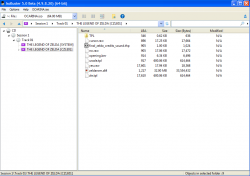
Just checked my trimmed custom injected n64 GC Zelda disc image and it's detected just fine.
(I renamed the ROM and extension as well as the Game ID)
Edit:
I forgot to mention that it is very impressive. It even has SLBB-00001/POPS VCD support.
Attachments
Last edited:
Berion
Developer
Great news thank You for the test. ^^
BTW: I never saw anyone before with 64bit Windows XP. Or it is only a theme?
POPS disc images are in reality the real disc layout. So it is standard mode2 disc image but with 2MiB of TOC on the beginning (if people back in the days would followed that, we would not need today *.cue, *.cu2, *.ccd and *.mdf). It was added in v4.7. The same using POPS for PSP/PS3/PSV/PSTV in *.pkg|*.pbp|PSAR (after decryption and decompression of course).
BTW: I never saw anyone before with 64bit Windows XP.
Or it is only a theme?POPS disc images are in reality the real disc layout. So it is standard mode2 disc image but with 2MiB of TOC on the beginning (if people back in the days would followed that, we would not need today *.cue, *.cu2, *.ccd and *.mdf). It was added in v4.7. The same using POPS for PSP/PS3/PSV/PSTV in *.pkg|*.pbp|PSAR (after decryption and decompression of course).
60fpshacksrock
Member
Great news thank You for the test. ^^
BTW: I never saw anyone before with 64bit Windows XP.
POPS disc images are in reality the real disc layout. So it is standard mode2 disc image but with 2MiB of TOC on the beginning (if people back in the days would followed that, we would not need today *.cue, *.cu2, *.ccd and *.mdf). It was added in v4.7. The same using POPS for PSP/PS3/PSV/PSTV in *.pkg|*.pbp|PSAR (after decryption and decompression of course).
You're welcome.
The theme you see is an unofficial Luna theme for WIndows 7 that also includes an Aero theme. I found it on the oddly named website deviantart. Though now it requires an account or profile to download though there are other ways to download it. It's a free unofficial theme by the way.
About VCD: I have in the past examined it in Hxd and noticed the header. I wish other emulator developers would add support for this format. Though lately I have picked up interest in compressed disc image formats. My PC isn't a power house (2.10 GHz dual-core 3GB RAM) so I use lighter compression when given the choice.
I tried a .CSO PS2 disc image file but IsoBuster doesn't support this format. Hopefully in the future they will and maybe .chd as it's gaining in popularity.
Berion
Developer
Unfortunately none of the compressed formats are supported. So no love yet for CSO (v1, v2), JSO, DAX, CHD5, ZSO, NKit etc.
Worth to point that it is commercial application so all those implementations must be worth for the author to support them (almost all console stuff is in free license spectrum). If from consoles users licenses income would increase, then this would be good signal that such direction is worth a time to invest. Just saying. ^^"
Worth to point that it is commercial application so all those implementations must be worth for the author to support them (almost all console stuff is in free license spectrum). If from consoles users licenses income would increase, then this would be good signal that such direction is worth a time to invest. Just saying. ^^"
Last edited:
60fpshacksrock
Member
Unfortunately none of the compressed formats are supported. So no love yet for CSO (v1, v2), JSO, DAX, CHD5, ZSO, NKit etc.
Worth to point that it is commercial application so all those implementations must be worth for the author to support them (almost all console stuff is in free license spectrum). If from consoles users licenses income would increase, then this would be good signal that such direction is worth a time to invest. Just saying. ^^"
It's amazing that you were able to get them to add support for console formats, though you are a very well respected scene developer/member and a great help to others.
Berion
Developer
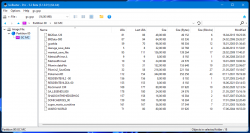
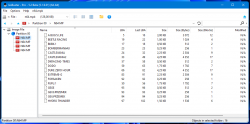
IsoBuster 5.2 beta has been released. Full changelog.
If You will buy license (all console stuff is in free spectrum of usage but buying stuff motivating author for further console implementations), don't forget to spam the author for adding CHD, RVZ, WIA and CCI support.
- Added support for some compressed disc image formats in all their variants (*.jso, *.dax, *.cso, *.zso)
- Added support for GameCube Memory Card images in all their variants (*.gcp, *.raw [both are binary the same but for some reason, Dolphin from some version start to naming them raw])
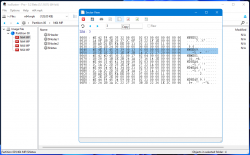
- Added support for Nintendo 64 Memory Pak images single and multi volumes (*.mpk, *.n64)
- Moved system section in GameCube disc images from main tree to meta data.
- Take in mind that *.n64 is Dex Drive memory pak image, NOT a cartridge dump format so it doesn't open so-called roms but memory cards only.
- You can extract save from MPK along to its meta data (32 bytes from $Notes), merge them together and use with emu on Wii, just by renaming file to *.eep.
- If You have some ancient images i.e in JSO, You no longer need to look for original tools, You can convert image back to *.iso by IsoBuster.
If You will buy license (all console stuff is in free spectrum of usage but buying stuff motivating author for further console implementations), don't forget to spam the author for adding CHD, RVZ, WIA and CCI support.
Last edited:

haxxxen
Developer
have you contacted the author about PSX media files ripping @Berion (.STR, .XA)? I am now sure these have to be ripped .2336 bytes per sector (think the original XA file format). those crafted imager tools I have posted about and also the app "cdprog" can rip them correctly, but neither CDMage nor Isobuster can do
haxxxen
Developer
dunno, but you know stupid f0ny, don't you. tbh, I was one of the very few back then, who could make PSX backups, cause I have bought such expensive burner back then. this burner had its own software, where the PSX images were all ripped 2336 bps (CDRom XA format) where others were using raw mode 2352bps and I never had any problems with backups back thenOh, damn I totally forgot about that but don't worry. Could You list example games with such XA?
BTW: But why 2336? 2352 have more informations or it is the case here, because they have intentionally broken ECC which must be ignored?
60fpshacksrock
Member
have you contacted the author about PSX media files ripping @Berion (.STR, .XA)? I am now sure these have to be ripped .2336 bytes per sector (think the original XA file format). those crafted imager tools I have posted about and also the app "cdprog" can rip them correctly, but neither CDMage nor Isobuster can do
Have you checked out vgmtoolbox and jpsxdec?
Berion
Developer
I have Vagrant Story for both regions (physical NTSC-U and digital PAL from store) and in both cases image is in 2352 and is covered by ReDump checksums (in case PSS versions it is not reliable test because image must be decrypyted and assembled from tracks, so maybe apps like xtract modifying them anyway by adding dummy for each sector? I dunno). So it is proper way to dump at least this game. And TBH, I always using 2352 for PSX games and this never failed me. So I'm not sure if I understand You correctly.
haxxxen
Developer
what is unclear about my input? try to rip those files raw 2352bps and then try to rebuild image with raw extracted, you will notice the media file gets malfunctioned, like artifacts, stuttering or even does not play
you can also try str tools to play these raw extracted .str files, and they will not work
those media files get a special XA header when building PSX images with official tools
you can also try str tools to play these raw extracted .str files, and they will not work
sorry, but it should only be example of both media file variants .str and .xa. I know about those ripping toolkits and I also have no problems with the files, cause I know how to rip them, but it would be nice, if Isobuster could do so and rip them correctlyHave you checked out vgmtoolbox and jpsxdec?
those media files get a special XA header when building PSX images with official tools
Last edited:
Berion
Developer
Anyone knows XA or STR player which just trying playing from file instead scanning it first for known structures? I would rather want to avoid crawling through PSY-Q SDK. Something which works on Windows 10.
So far I have tried PSmplay v0.4 (in theory works but not finding any file even after scan, complaining on start about missing aspi drivers), PSound v2.0.1 (missing dll, but putting it in app dir not fixing it), STR Converter v1.1 (unhandled exception), XA Audio Converter v1.00 (the same as earlier dll hell problem).
So far I have tried PSmplay v0.4 (in theory works but not finding any file even after scan, complaining on start about missing aspi drivers), PSound v2.0.1 (missing dll, but putting it in app dir not fixing it), STR Converter v1.1 (unhandled exception), XA Audio Converter v1.00 (the same as earlier dll hell problem).
Similar threads
-
PS3 Unencrypted .VM2 support on PS2 Classics (CECH-2101A)
- Started by James Buckwas
- Replies: 8
-
-
-
