ManaGunZ

PS3 ManaGunZ - PS3 Backup Manager by Zar v1.41

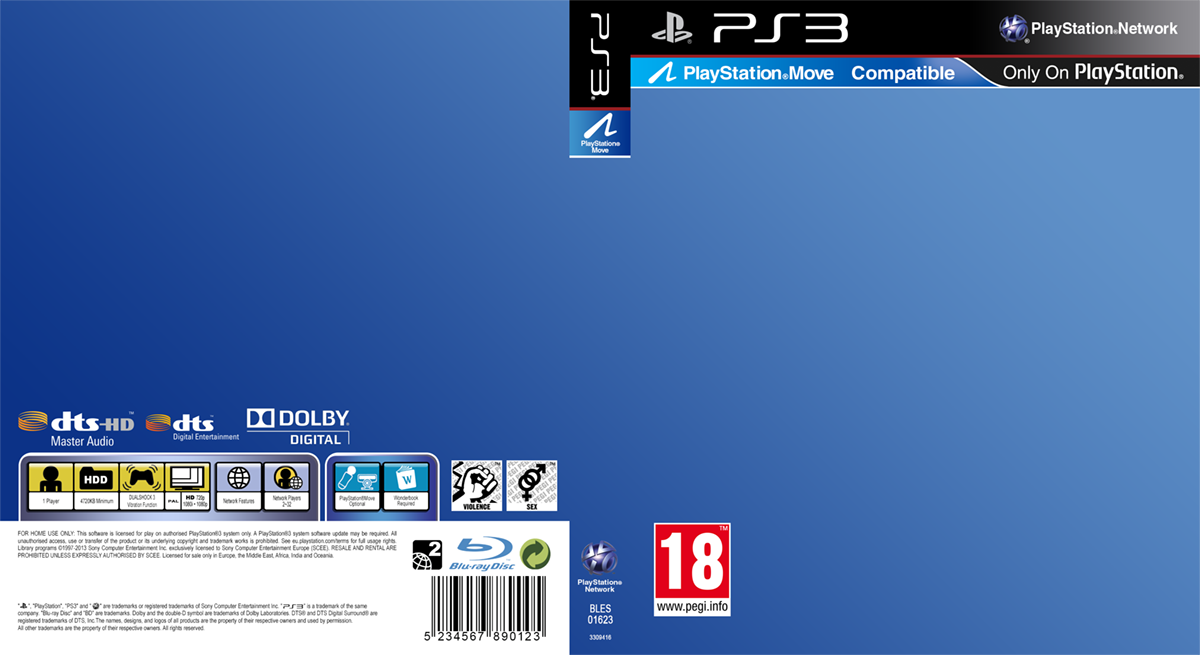
Ok, but then i guess i need to do my cover in 950x520 (following the aspect ratio of the real covers), because when is displayed it needs to be distorted exactly like the others
I mean.. it doesnt makes sense if i adjust it to prevent that distortion but all the others are going to be distorted

Dunno, you decide, im going to mantain the 950 width anyway, so is easy to crop it at bottom to change height
 
What i'm trying to say is : 950*520 is perfect ^^'
Great :)

Btw, are you still thinking in drawing the texts at back with code ?, i like the idea, is just the problem i see is what i mentioned before, we need a big group of translated strings
The nice thing is some of that text lines doesnt needs to be translated (like what i draw with the paths)

And we could add more lines that doesnt needs translation... dunno, examples of the cover names using the TITLE_ID codes... or what i did by writing all the posible image formats
All this things can be hardcoded and doesnt needs translations

We need to make a good plan about what to write in there :D
Actually... we are supposed to write the same in all the other game formats, just replacing the paths, the TITLE_ID examples, etc... you can "switch" some variables in the translated texts strings with code for every game format


-------------
Edit:
My oppinion by now is the most text we add at the back is going to look more "official" visually, because the official covers uses a font size a bit smaller than what i did in my previous test
The font size used at the back of the official covers is not an standard... but in general most games have at least 15 or 20 lines of text as minimal, we need to cover the "top" half with info
 
Last edited:
I think it's better to keep it empty and fill it with a big string. Why ? to make it more flexible, if we want to change something it will be in the txt :)
 
More tests...
HrQgIYx.png


Im not going to add the texts, im still keeping them to show you what i mean... and for experiments about sizes, location, alignments, etc... and even to discuss about what to write there (if someone have an idea please tell)

The texts should have the same color, the stuff i wrote in red is because it can be hardcoded (not needed to translate it), also you can update it at any point incase you make some change in the code related with paths, sizes, formats, etc...

In total there are only 3 strings that needs to be translated (but yeah i guess can be merged into a single line), i think is beter to keep them separated though
But... i also think is needed to add 2 or 3 more sentences because it will look better if we "fill" that space
 
We can add new lines \n or tabulation \t to the sentence to be translated... but I don't know what you can write in addition to this. But you can add a picture... don't ask me which picture ;p

The frame in the bottom is blurry, I found one pattern in HD :
d2zq4up-2a6ffe2e-c061-45ba-b1d8-ffa5d15d6025.png


it's very similar to a real one :

BLES01463.jpg
 

Attachments

The frame at bottom is just a placeholder, i dont like it either, is there mostly as a reference to see how big should be that area
The area at bottom at the BACK has been vandalised from a retail game (i dont even remember his name), it was mostly because is inside a "frame" and i decided to cut that frame entirelly (easy solution by now). But the plan was to create all that small elements individually (is going to loook much better)
And the only purpose of it is decoration, it could be made in different ways, but most probably what im going to do is to take some of that templates and modify them a bit/lot to reorganize it (it needs to be the most generic posible, not mentioning special features), and to cleanup (the barcode needs to be faked, etc...)
 
Last edited:
File Manager have "Previous directory" or "Next directory" button?
If i remember right... is this way

R1 + dpad left = dock explorer window to left screen border (half screen size)
R1 + dpad right = dock explorer window to right screen border (half screen size)
R1 + dpad up = maximize explorer window (full screen size)
R1 + dpad down = restore explorer window

L1 + dpad left = move 1 directory back
L1 + dpad right = move 1 directory forth
L1 + dpad up = move cursor to position - 10 files
L1 + dpad down = move cursor to position + 10 files
 
Btw, if you open 2 explorer windows in the filemanager (with start button), and then you "dock" them to the sides of the screen with this button combo...
R1 + dpad left = dock explorer window to left screen border (half screen size)
R1 + dpad right = dock explorer window to right screen border (half screen size)

The result is a "dual panel" view :)
Is very convenient when you are comparing or copying files from 2 directories (either located in the same device, or different devices)
Personally i use to dock a explorer window for dev_hdd0 at left... and other window for dev_usb docked at right
 
If i remember right... is this way

R1 + dpad left = dock explorer window to left screen border (half screen size)
R1 + dpad right = dock explorer window to right screen border (half screen size)
R1 + dpad up = maximize explorer window (full screen size)
R1 + dpad down = restore explorer window

L1 + dpad left = move 1 directory back
L1 + dpad right = move 1 directory forth
L1 + dpad up = move cursor to position - 10 files
L1 + dpad down = move cursor to position + 10 files
thank you
 
I had an idea yesterday, not sure how tricky would be to implement this, but i think is going to be very handy to organize the game lists

[MGZ settings]>[Global Settings]>[Game list order] ---> "by file name", "by TITLE", "by TITLE_ID"

Lets say i have a game:
FILENAME: "my favourite game.iso"
TITLE: "Real Name" (inside PARAM.SFO)
TITLE_ID: "BLES12345" (inside PARAM.SFO)

In the actual ManaGunZ code the game lists are ordered "by TITLE" and there is no way to change it, i guess there is going to be some people that would like to order the game list "by TITLE_ID" (to see then chronologically), but in my oppinion the best option of all them is going to be ordering them "by filename" because this gives us full freedom

As example, the TITLE of some Assassin's creed is "AC revelations" or "AC brotherhood" (they decided to write "AC" instead of the complete game name), and others uses the complete name like "Assassin's Creed 3"... so are not located together in the game list

Also, it would allow us to order them correctly, as example with the games i mentioned, we could do this:
Assassin's Creed 1.iso
Assassin's Creed 2.iso
Assassin's Creed 2.1 Brotherhood.iso
Assassin's Creed 2.2 Revelations.iso
Assassin's Creed 3.iso
Assassin's Creed 4 Black Flag.iso
Assassin's Creed 4.1 Rogue.iso


*Bonus:
Also, ordering game list "by filename" would allow us to see the same order when we take a look at the game files/folders with a filemanager running in PS3, or incase the games are stored in internal PS3 hdd when we access dev_hdd0 contents with a PC by FTP, or incase of storing the games in a USB when we connect it to a PC
 
Last edited:
What do you think about the texts in this one @Zar ?
There are many visual details that are not definitive, im not dedicating much time to this in the last days because i was not sure about the design concept of the front, and that area at back-bottom, in this test both things looks fine to me, it makes me feel confident about what i want to achieve... i just need to repeat it at better quality changing some things :)

I been dedicating most of the time in thinking what to do with the "info" texts (generated by code), this texts are very important imo, i been reviewing my initial idea and i changed my mind a bit in some of the things i suggested
The first time i was thinking in this texts i was thinking about using strings with variables, something like this:
Code:
STR_COVER_INFO_1	{cover size needs to be size %1 and file extension %2}
You know... where 1% is the cover size in pixels, and %2 is jpg, JPG, etc...
The same string for all game formats (PS1/PS2/PS3/PSP) and the values of %1 and %2 generated on runtime by code
I been looking yesterday at the "loc" files and it seems there is not any %1 variables in them, i could swear at some point in old managunz versions there was some string using variables, but anyway... i dont like this idea, just forget about it, im just mentioning it for curiosity sake, because i was trying to suggest this since beginning but i guess nobody was understanding me :D

As said... that was a bad idea really, mostly because is problematic for the translators, they are going to have problems to figure what means the %1 and %2, how to use them (if is posible to swap his positions in the same string), etc...
Also, there are some languages where the sentences are constructed in opposite order, so is not a good idea either to lets say... display text generated by code at a fixed position inside a sentence, the better example for myself (because im spanish) is when the sentence starts with something like "PS3 covers blah, blah, blah"... in spanish you need to write it in opposite oder, like "the covers for PS3"

So considering all this... the solution im suggesting now is to display the "loc" strings aligned to left... and at his right the texts generated by code :)
This assures us the translations are going to be easy and will have a correct meaning in all languages, in some way is like the style used in many other menus (like when you click in game settings --> properties)
I made the texts very generic, because maybe could be recycled later to use them in other places of managunz ;)
So0Kwdx.jpg


I guess you are not going to like the fact im using 5 strings, but please think in it before ditching the idea, it fits pretty well, what im suggesting is to add 5 strings like this:
Code:
STR_COVER_MISSING		{No cover found for this game !}
STR_GAME_TYPE			{Game type}
STR_COVER_SIZE			{Cover size}
STR_COVER_FORMATS		{Cover formats}
STR_COVER_PATHS			{Cover paths}
line 1) is like a warning, i think is gramatically correct to start with it (like an introduction of the texts that comes next)
line 2) we need to tell explicitelly that the info displayed belong to a specific game type (PS1/PS2/PS3/PSP), without it would be confusing
line 3 and 4) this ones are a must have :)
line 5) is the "title" of the text lines below it
line 6 and below) well, there is a lot to talk about it... i will keep it for another post, but i guess you got the idea, all this needs to be generated with code

 
  • Like
Reactions: Zar
Actually... there are some strings that already exists in the loc files that could be used:
Code:
STR_GAME_PLATFORM {Platform}
STR_GAME_SIZE {Size}
STR_GAME_FORMAT {Format}
STR_GAME_PATH {Path}
 
Actually... there are some strings that already exists in the loc files that could be used:
Code:
STR_GAME_PLATFORM {Platform}
STR_GAME_SIZE {Size}
STR_GAME_FORMAT {Format}
STR_GAME_PATH {Path}


I prefer using new string values like you suggested in the first post. I think you found the best solution.

Also, I think you can add a string to explain how we can configure paths. For example, "You can manager your covers path with " and then I'll add with code '[Settings][Covers paths]'

Actually, I want to build an option similar to 'Game scan paths'. The user will be able to add or remove the paths to scan covers. And dynamically, these paths will be displayed on the back cover.
 
I prefer using new string values like you suggested in the first post. I think you found the best solution.
I was scared to click in this thread today to read your oppinion about my suggestions because is one of that times when i think "i got it". At least in concept, in the way how are going to be distributed the texts, how are going to change for every game format, the potential translation problems, etc...
Of course the details are still open to discussion, whatever you decide to do is fine (use new strings or recycle old ones, is fine, i dont mind because the result is going to be pretty much the same), i care mostly about the internals and now im confident is going to look great :encouragement:

Also, I think you can add a string to explain how we can configure paths. For example, "You can manager your covers path with " and then I'll add with code '[Settings][Covers paths]'
Now is you who is suggesting to use more strings for "addons" :P
I like it, but this one could be a bit more tricky to fit because is a long sentence, im worried about PSP case, i dont know how much yet... but we are going to have problems making fit the long text lines in PSP, specially the paths starting with dev_hdd0 because that lines should not be breaked
Pretty much... that long paths starting with dev_hdd0 are going to be the direct responsibles of the max font size we can use

I added a line for it in this new test... it seems we are on the limit... it would be better to make that string shorter than what i wrote in the image... but im not sure how to do it (if some native english speaker have a better alternative for that text in a short way please tell)

Actually, I want to build an option similar to 'Game scan paths'. The user will be able to add or remove the paths to scan covers. And dynamically, these paths will be displayed on the back cover.
Great :encouragement:
M9gXrvM.jpg

This is why i used some colors in the texts generated "by code", let me make a review of what i have in mind

titleID
The fact you are displaying the ICON0.PNG from the game on top of the default cover it means you already know his TITLE_ID (readed from the PARAM.SFO)... so you can display it in the example paths

Also, we was brainstorming a bit about it before, but im not sure if you agreeded about it, but you can display the TITLE_ID also in the side (in the area where i added ABCD12345 in the first test), if you are going to do this, displaying it again in the paths examples is not going to need much more code, actually, the whole thing is about displaying the titleid several times at different positions of the cover

mygamename
This is either the filename (incase the backup is a single ISO/BIN) or the directory name (incase the backup is a PS3 JB)
The fact you are displaying the ICON0.PNG from the game on top of the default cover it means you already know his name (either name of the file, or the folder)... so you can display it in the example paths

mycustompath
This is very related with what you suggested... the point is we can display the "active" custom cover path in the examples (whatever the user wrote in MGZ settings for [STR_SETTINGS]>[STR_COVER_PATHS]). This will be very intuitive for the user
 
Last edited:
Btw, there is a nice feature in FLOW3D that most people doesnt knows, by pressing the sticks (L3 and R3) the game case can be zoomed and flipped
Both things are required to take a look at what we are doing adding info texts at the back of the case... the user is supposed to "zoom" the case first, and then "flip" it to read his back
But in the interface there is no info text about how the L3 and R3 buttons works.... and i dont think there is room in the bottom taskbar for them so... what can we do ? :rolleyes:

I dont have a clear/easy solution to solve this "problem", im just talking about it to expose the problem and as an invitation for other people to throw some ideas about what to do
Not sure if is a good idea, but i guess it could be made by making appear a (temporal) floating info window/text with the L3 and R3 buttons. It should not be much "invasive" though

The idea is... you start scrolling games, then you stop the cursor on top of a game (and stay inactive)
After 2 seconds appears a floating window (using a confortable and slow fade-in visual effect) with the info about L3/R3
After another 2 seconds the text dissapears with another fade-out

*if the user press L3/R3 along that sequence, then the timer stops and the info text is not displayed (because this means the user already knows about how L3/R3 works)
 
Back
Top