
You are using an out of date browser. It may not display this or other websites correctly.
You should upgrade or use an alternative browser.
You should upgrade or use an alternative browser.

PS2 Memory Card Annihilator v2.0a (a new version after more than 11 years!) 2.2.0
- Thread starter El_isra
- Start date

Berion
Developer
https://www.psx-place.com/resources/playstation-2-aio-project.277/
In Windows vmc tools there is converter.
In Windows vmc tools there is converter.
Berion
Developer
Application for adding/removing ECC:I didn't understand the use of this aio project. What should I do to open the mc image and modify the files contained in it?
Code:
/CONTENT/applications for Windows/save tools/vmc tools/PCSX2-VMC Converter.7zDoes this tool convert the image file created by mc annihilator into an image that can be edited, updated opl etc easily and then inserted back into MC?Code:/CONTENT/applications for Windows/save tools/vmc tools/PCSX2-VMC Converter.7z

El_isra
Developer
Hello everyone. we bring a brand new Update made by me and ffgriever.
Along with this release, the source code has been released, and it's avaiable on github from now on.
Here's a list of the changes since v2.0a:
[THEAD]
[/THEAD]
Release package layout:
the release package will come with several variations of the MCA program. each one offers the following:
Along with this release, the source code has been released, and it's avaiable on github from now on.
Here's a list of the changes since v2.0a:
| Change | |
| El_isra | Replace legacy USB drivers with BDM. adding support for EXFAT USBs |
| El_isra | Use homebrew MCMAN. adds support for ProtoKernel PS2s |
| El_isra | Compatibility with ps2dev:v1.0 (for automated compilation mostly) |
| El_isra | MECHAEMU Support. now MCA has special variants that read Arcade, Prototype and Developer memory cards from retail Consoles |
| El_isra | Minor tweaks on UI text |
| ffgriever | Make english the default and builtin language |
| ffgriever | Print version using a font instead of hardcoding it in logo image |
the release package will come with several variations of the MCA program. each one offers the following:
| MCA_legacy | Does not use Homebrew MCMAN nor BDM USB drivers (kept just in case) |
| MCA_new | Uses Homebrew MCMAN and BDM USB drivers |
| MCA_Arcade | Reads COH-H10020 Arcade Security dongles instead of retail memory cards |
| MCA_Developer | Reads TDB Startup cards and DEX Memory Cards (it can also read Sony licensed retail memory cards) |
| MCA_Prototype | Reads Prototype memory cards |
El_isra
Developer
a little secret: The new version of MCA, with the variant that reads developer memory cards, can also read original licensed Retail cards.
Meaning it could be used as a nicer (visual wise) alternative to https://www.psx-place.com/resources/original-card-test.1504/
Meaning it could be used as a nicer (visual wise) alternative to https://www.psx-place.com/resources/original-card-test.1504/
Berion
Developer
So does it means that: if user use "mca-packed_DEVELOPER.elf" and that build will see retail card, it points that retail card is original; because or else wouldn't be seen by that specific MCA build? Am I correct?
Since MCA became open source, is there a chance to add MCFS table and ECC checking feature (bad blocks count)? To give the user easy way to determine if his card is still healthy or garbage?
https://www.psx-place.com/threads/m...n-after-more-than-11-years.36277/#post-335260
Since MCA became open source, is there a chance to add MCFS table and ECC checking feature (bad blocks count)? To give the user easy way to determine if his card is still healthy or garbage?
https://www.psx-place.com/threads/m...n-after-more-than-11-years.36277/#post-335260
@El_isra :
In French : Si tu désires que je fasse une traduction en BON Français des ressources de ce software, fais moi parvenir le fichier au format texte de la ressource en Anglais et je la traduirai pour toi et la communauté en Français.
In English via G-Trad : If you would like me to translate the resources of this software into GOOD French, please send me the text file of the resource in English and I will translate it for you and the community into French.
In French : Si tu désires que je fasse une traduction en BON Français des ressources de ce software, fais moi parvenir le fichier au format texte de la ressource en Anglais et je la traduirai pour toi et la communauté en Français.
In English via G-Trad : If you would like me to translate the resources of this software into GOOD French, please send me the text file of the resource in English and I will translate it for you and the community into French.

jolek
Senior Member
Memory Card Annihilator v2.1.2 is out!
What's Changed (features)
What's Changed (features)
- Show a short commit hash instead of date on non versioned builds by @ffgriever-pl in #14
- Added PT_BR translation by @hardlevel in #15
- Brought back all the translations from v2.0a and translation fixes by @HowlingWolfHWC in #16, #17
- Automatically select a language file based on the OSD settings by @HowlingWolfHWC in #25
- Add issue template by @israpps in #13
- Added translator credits to readme by @HowlingWolfHWC in #19
- Removed lang.lng and moved the alternative PT-BR translation by @HowlingWolfHWC in #21
- Trigger compilation and artifact upload on pull requests from forked repositories by @ffgriever-pl in #22
- Renamed Portuguese language files by @HowlingWolfHWC in #24
Berion
Developer
They can be edited but mymc and its forks expecting images with ECC. If you want that this is tool for you: https://github.com/ffgriever-pl/PS2-ECC-Memory-Card-Converter If you only want extract, view contents or restore deleted data, use IsoBuster.
Second part of your sentence is not understandable to me.
Second part of your sentence is not understandable to me.
The image created by MC Anihilator contains two files in .bin and .mci formats. I have tried several ways but I was unable to edit them. For example: I would like to update the opl, place the popstarter file inside the MC and make modifications so that the apps appear in the opl apps tab. I don't know if it is possible to configure the apps that will appear in the funtuna list on the PC.
First I need to add or remove ECC from the images created by MC Anihilator ussing app you indicated? What is the easiest file manager to use and modify the files?As I said, mymc and all its forks, expecting cards with ECC. MCA not dumping ECCs because it is pointless.
The way you choose to updating software have zero sense. I told you year ago, that for that are file managers.
PS2-ECC-Memory-Card-Converter not open in my windows 10-64bit open e close
Last edited:
I was able to view the image folders within isobuster but I was unable to copy files from my PC (example: opl) into the image's apps folder.As I said, mymc and all its forks, expecting cards with ECC. MCA not dumping ECCs because it is pointless.
The way you choose to updating software have zero sense. I told you year ago, that for that are file managers.
Berion
Developer
First I need to add or remove ECC from the images created by MC Anihilator ussing app you indicated?
So what do you think?Berion said:MCA not dumping ECCs because it is pointless.

File managers not modifying files, but managing them like eg. copy, paste, delete, rename.cloudff7 said:What is the easiest file manager to use and modify the files?
uLE/wLE.
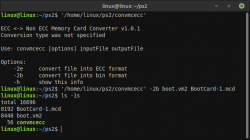
It is CLI app, not GUI, you run it from CMD or PS on Windows like on below I run it in Terminal on Linux:cloudff7 said:PS2-ECC-Memory-Card-Converter not open in my windows 10-64bit open e close
Read again what I wrote:cloudff7 said:I was able to view the image folders within isobuster but I was unable to copy files from my PC (example: opl) into the image's apps folder.
Berion said:If you only want extract, view contents or restore deleted data, use IsoBuster.
Last edited:
Similar threads
-

-

-
 PS2 [Old thread] Memory Card Annihilator coded by ffgriever, gfx by Berion
- Started by jolek
- Replies: 0
