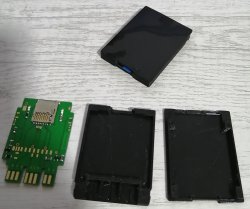
PS2 [MX4SIO/SIO2SD] SD Card Adapter and SD-driver for the PS2 SIO2 interface

I'm waiting for my own pcb, but I would think socket and 47 ohm resistor is enough? That is what I do for my own ps1 memory cards I cut off.

My other advise is make sure no bridges on the microsd card slot to any adjacent pins.

On one of my earlier builds, I had two pins shorted which turned off my system.

:D Yep i think it's exactly that, just did some tests with multimeter and it looks like 2+ pins are shorted, phew! They are so small these MicroSD connector pins, can just about see them hidden under the connector.
 
Does your version have an LED for detecting the MicroSD, and an LED for data transmission? Or just one of those? Yeah probably Sony won't come after you for a few printed cases, i just thought to put it out there considering this project was originally called "SD2SIO" but was later changed to "MX4SIO" because "SD" is copyright.

I think by default the BDM(1) OPL Beta 1627 is the correct version for your PS2, and not the BDM3 1629 version which is for Deckard PS2s, yours is an IOP (SCPH 30001). Not sure about the BSOD you are experiencing. Did you configure the BDM(1) Beta launch path correctly in FMCB Configurator > "configure OSDSYS options..." ? I put the OPL.elf in the FMCB "BOOT" folder (not the "APPS" folder) and point to that path in configure OSDSYS options. (using FMCB 1.964).

Have you tried having the official OPL v1.1.0 and the BDM(1) Beta OPL on the same MC, at the same time? They can share the same config folder (mc0 / OPL) so the settings can be the same if you want, that's how i have it at the moment for testing purposes. Maybe this could help your BSOD when launching BDM(1).

Oddly enough I looked at the listing of the FreeMCBoot I bought and it said it wasn't compatible with the SCPH 30001 but it booted just fine. I ended up making my own FreeMCBoot on another card and used the OPL v1.1.0 and then overwrote it with the OPL Beta 1627 and it's all working now, thanks.

So I changed the name and logos and my LED turns on when there is power in the 2nd Memory card slot and will flash as there is activity from the SD card and I also have the ACK line set to the SD Card Switch pin so if the card is removed that line will no longer be tied to GND.

20220131_190812.jpg
 
Oddly enough I looked at the listing of the FreeMCBoot I bought and it said it wasn't compatible with the SCPH 30001 but it booted just fine. I ended up making my own FreeMCBoot on another card and used the OPL v1.1.0 and then overwrote it with the OPL Beta 1627 and it's all working now, thanks.

So I changed the name and logos and my LED turns on when there is power in the 2nd Memory card slot and will flash as there is activity from the SD card and I also have the ACK line set to the SD Card Switch pin so if the card is removed that line will no longer be tied to GND.

20220131_190812.jpg

That's great news, very glad it's now working for you with OPL BDM 1627. I also like your new designs, very nice indeed. Do you have your own 3D printer, or do you use a 3D printing company for your cases?
 
I have quite a few nice tools including the Fiber Laser I used to mark those 3D prints. I own a 3D printer and designed the shell myself too using fusion 360, makes it easy to tweak the design till it's right. I'll have some videos up soon of it working.
 
@AngryHelder What 3d printer do you currently use? I'm thinking of getting one for hobby stuff and I could see myself making case designs for this project too.
I have a Prusa MK3 which is a bit pricey but if you want a smaller one their mini is nice or an Ender 3 for full size but much less expensive. Be aware the Ender requires alot of tweaking hence the price drop. My first printer was rather small and affordable and worked well from the Monoprice company, have a look at their offerings.
 
Does anyone have any idea how to make Sonic Gems Collection (Japan) work with SD card?? Sonic R loads infinitely. Turning any mode didn't help and making mode 3 ON breaks the functionality completely. So many games load infinitely using SD card adapter, especially arcade compilations which is one of the only things I try to use PS2 for...
 
So many games load infinitely using SD card adapter...

Hiya, i can't agree with that statement bro. Reason being, i spent a week testing 180 games and 87% worked perfectly, all with very smooth FMVs. Sure, if i only tested 10 games then the percentage would be completely different - it could have been 100% failed, or 100% worked perfectly, you know what i mean?

Agree with you about compilations though, i couldn't get any Midway, or Capcom compilations to work, they just load indefinitely. And most Namco compilations failed too. However, one of those Namco Museum compilations did actually work (just not the 50th anniversary one). I want to go back and test those games again with VMC set to MC0 or MC1, and see if that helps anything.

Friends here had tried that for a few games and said it worked. When i tried this once - setting VMC to MC0 / Slot 1 ...it then said (parapharing) "erasing multiple clusters" and a slow percentage timer started. At first i panicked thinking it would erase the contents on the FMCB memory card - so i cancelled it. But i want to go back and try this again for those compilations games, using a 2nd generic FMCB card i have, and also test VMC set to MC1 / Slot 2 (MX4SIO) like @Fabio Kuntze had tried and succeeded.

Maybe try this?
 
Wait, so configuring Virtual Memory Card can make this work?? Can you elaborate exactly yet again??

I tried configuring VMC for this game and OMG the process was cancer slow... After I created the VMC and booted Sonic Gems Collection, I tried to create a save file and PS2 kept making some fapping noises. It was creating a save file for a very, very, very long time so I reset the console. Now it is saying the save is damaged, I click continue without saving and, black screen. I'm not going through this shit again. This is probably not the way to go
 
Last edited by a moderator:
I tried configuring VMC for this game and OMG the process was cancer slow... After I created the VMC and booted Sonic Gems Collection, I tried to create a save file and PS2 kept making some fapping noises. It was creating a save file for a very, very, very long time so I reset the console. Now it is saying the save is damaged, I click continue without saving and, black screen. I'm not going through this shit again. This is probably not the way to go
I've experienced this slow VMC creation myself, what I found to work faster is to use a usb flash drive and use that to create a generic VMC file then transfer it to the SD card. Not sure why it's very slow and can often not finish or corrupt from my attempts.
 
I tried configuring VMC for this game and OMG the process was cancer slow... After I created the VMC and booted Sonic Gems Collection, I tried to create a save file and PS2 kept making some fapping noises. It was creating a save file for a very, very, very long time so I reset the console. Now it is saying the save is damaged, I click continue without saving and, black screen. I'm not going through this shit again. This is probably not the way to go

Yeah that creating VMC part took a very long time for me too, so long i was wondering if there was something wrong.

I've experienced this slow VMC creation myself, what I found to work faster is to use a usb flash drive and use that to create a generic VMC file then transfer it to the SD card. Not sure why it's very slow and can often not finish or corrupt from my attempts.

Thanks for the great tip, i'm gonna try this!
 
Last edited by a moderator:
Maybe instead of running in circles I have a question- what is OPL?? As far as I can tell it is just a game loader that works on existing PS2 hardware which means it takes existing PS2 resources. If that is the case then it can conflict with existing games that also use the same resources and after that those games will probably crash. In theory, is this even possible to make an absolute 100% perfect OPL that works with the entire PS2 romset?? Judging how things are going for over the years, I'd probably say no and the real 100% compatibility solution is a potential PS2 ODE. But here's another question- if Gaycube has a dedicated ODE then how come PS2 (supposedly the best selling console of all time) doesn't have any ODE made or at least patented even to this day?? Not even a single prototype exists as far as I know...
 
if Gaycube has a dedicated ODE then how come PS2 (supposedly the best selling console of all time) doesn't have any ODE made or at least patented even to this day?? Not even a single prototype exists as far as I know...

"Gaycube" my ass! ;)

headlock_by_eggtoasty_dco136u.png

I think the idea is:- as the game checks memory card slot 1 for a saved file, this interupts the bus and crashes the game on slot 2. So forcing VMC to slot 2 keeps the bus running on that particular port. At least that's what i understood from @Fabio Kuntze on previous pages of this thread.
 
BDM doesn't yet support DMA-Writes or at least the MX4SIO-Driver doesn't support it (yet)!

You can create the VMCs on PC and map them via i.e. OPLM.


I already wrote, that it IS in theory possible to achieve "100% compatibility" via re-implementing current stuff on the PPU/PPC-Side, instead of replacing the disc-drivers of the games.

...and what you proclaim going to be reaching "100% compatibility" is by no means in ANY advantageous position compared to implementing it on the PPU/PPC side... I already explained, that an ODE via laser-flex-cable is actually an inferior solution to an implementation on the PPU/PPC.

...and here comes the kicker...
MOST games which have problems now (especially due to bandwidth or seek-times), would still require adaptations to the ODE.

You "throw around" that 100%-claim over and over!
One question...
WHICH ODE actually has 100% compatibility?
 
@VegaVegas OPL that covering up whole PS2 library? That's not possible as parts of OPL residing in memory or else You would not read disc images from various of storage types, emulate MCSIO etc, while there is no memory space dedicated and separated only to OS, as there is no OS anyway. ESR have not 100% compatibility for the same reasons. This problem which facing any kind of loader which doing something with game code after game launching.

@TnA All real ODDE. ;)
 
Excellent device! I built a small batch recently (jlcpcb moq x5) based on the documentation found on trisaster.de and after reading this thread.
I have 2 questions:
1. Apparently FAT32 is the only format that is recognized by OPL + BDM? NTFS and EXFAT did not work for me.
2. I used usbutil2.2 for a game that is bigger than FAT32 max supported file size got an error when trying to load the game.
I am not used to use usbutil since I mostly rely on internal HDD for fat PS2 and PS2NETBOX for slim, however MX4SIO is really convenient to use with the slim specifically instead of the ps2netbox.

Here is the short list of games that I have thoroughly checked.
SCPH-79000 (deckard?) + OPNPS2LD-v1.1.0-Beta-1629-e20f2ee-bdm3 + FCMB 1.966 + modbo5.0 (Infinity 1.93) enabled or disabled did not matter.
Micro SD card Kingston 128GB Canvas Select Plus A1

Game TitleSerial NumberPadEmuModeVMC slotRemarks
Berserk- Millennium FalconSLPM_656.88ONOFF1Perfect
Gradius VSLUS_207.12OFFBlack screen
Ridge Racer VSLUS_200.02OFFOFF1Audio glitch (slight)
ICOSCUS_971.13OFFOFF2Perfect
Mushihime-samaSLPM_660.56OFFOFF1Perfect
Raiden IIISLUS_214.65OFFOFFOFFPerfect
Arc The LadSCUS_972.31OFFOFF1Perfect
Sly 2 – Band of ThievesSCUS_973.16ONOFF1Perfect
Marvel vs. Capcom 2SLUS_204.86ONOFF1Perfect
Rule of RoseSLUS_214.48OFFOFF2Perfect
I agree that creating a VMC is painfully slow as compared to HDD but still it works!

IMG_20220204_204028.jpg
 
Last edited:
Xstation for PS1??
Is that so? So there are ZERO compatibility-issues with ANY disc on xStation?

@VegaVegas OPL that covering up whole PS2 library? That's not possible as parts of OPL residing in memory or else You would not read disc images from various of storage types,
Hence I mentioned moving it to the PPU/PPC-Side! We can have the device-access/disc-emulation without exchanging the disc-driver, as long as it is a DECKARD-PS2 (75k+)!

emulate MCSIO
Emulate? MCSIO?
Are you referring to MX4SIO or to VMCs??

etc, while there is no memory space dedicated and separated only to OS, as there is no OS anyway. ESR have not 100% compatibility for the same reasons. This problem which facing any kind of loader which doing something with game code after game launching.
I marked the important part... Here is where the idea I explained comes into play!
The game-code remains the same on DECKARD-PS2s, if it is implemented that way...!

@TnA All real ODDE. ;)
"DECKARD-ODE/Hook/etc. > laser-flex-ODE
  • No hardware modifications needed.
  • No additional costs.
  • Higher possibilities THX to working at a lower Hardware-level. It is like an external HDMI-Adapter vs. PS2Digital!
  • etc.
Excellent device! I built a small batch recently (jlcpcb moq x5) based on the documentation found on trisaster.de and after reading this thread.
Congratulations and have fun with it! Spread the knowledge (please), etc.! :)

I have 2 questions:
1. Apparently FAT32 is the only format that is recognized by OPL + BDM?
New filesystems can be added easier now, THX to the hardware-access-stuff and block-logic being separated from the filesystem-stuff, but as of yet FAT32 is the only supported FS.

NTSC and EXFAT did not work for me.
Eeeerm... NTFS??!

2. I used usbutil2.2 for a game that is bigger than FAT32 max supported file size got an error when trying to load the game.
What error? "fragmented"?

I am not used to use usbutil since I mostly rely on internal HDD for fat PS2 and PS2NETBOX for slim, however MX4SIO is really convenient to use with the slim specifically instead of the ps2netbox.
Cool!

Btw.: YES, your 79k IS a "DECKARD"!
 
Last edited:
Emulate? MCSIO?
Are you referring to MX4SIO or to VMCs??

To be able to use VMC, You must emulate original MCSIO (so also MX4SIO took the name from the target interface). ;) First emulators was hard to use code, later Polo (HD Project) and ffgriever (mcemu) made their own loaders easy to use for end users, and after years later it was implemented to OPL.

The game-code remains the same on DECKARD-PS2s, if it is implemented that way...!
I don't have Decard PS2, and most of people doesn't. And someone first must build good sdk to use it and create such code if possible. For now it is only speculation. ;)
 
Is that so? So there are ZERO compatibility-issues with ANY disc on xStation?

Probably yes. I tested probably around 100-200 disc images on it and I haven't experienced even a single hiccup ever :D . I mean people reported some troubles with some games in PAL version because they used some unusual programming libraries but as far as I can tell the designer fixed 100% of reported issues somehow

...and what you proclaim going to be reaching "100% compatibility" is by no means in ANY advantageous position compared to implementing it on the PPU/PPC side... I already explained, that an ODE via laser-flex-cable is actually an inferior solution to an implementation on the PPU/PPC.

Maybe this statement is somewhat true but why is that the case?? After all the disc drive bus is the main bus for transferring game data so there must be a way to implement a compatible ODE, whether it's a simple adapter or some heavy hardware. Also this sort of solution will no longer conflict with existing MC/USB/Network or any other ports. If you mean that deckard PS2 doesn't even need an ODE and can implement 100% compatibility with OPL then this is very cool. However, this would mean I (or maybe all of us) would need to hunt down this specific model of PS2, which is still fine but of course not everyone will do that and not everyone has access to these things
 

Similar threads

Back
Top