
PS3 NOR & NAND Auto Patcher v4.70 By darkjiros

Here comes another 4.70 related release as Ps3 Developer darkjiros has updated the very popular and useful utility used for Downgrading Console. The NOR & NAND Auto Patcher now has support for the recently released official firmware update of 4.70 If you have a downgradable PS3 (and a hardware flasher), you may want to checkout this Auto Patcher for your NOR / NAND dumps. [break]ss[/break[
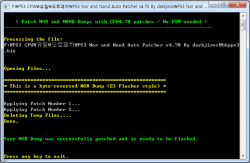
image01.png

darkjiros said:

PS3 NOR & NAND Auto Patcher v4.70 By darkjiros


  • [*=1]DARKNET CEX 4.70 BASE (CORE OS)
    [*=1] Support for OFW 4.70

★ ScreenShots
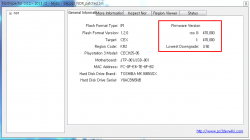
image01.png
image02.png


[MENTION=30]1986panzi1986[/MENTION] Updated download link to what [MENTION=156]darkjiros[/MENTION] provided. Thanks for the heads up.
 
I need help!

I put the .bin file already patched the PS3 and wait for the LED to be lit and everything went well!

assemble the console and when I turn it on nothing appears on the screen, does not recognize the control and I can not turn off the console from the button necendido!

that I done wrong ??
 
I need help!

I put the .bin file already patched the PS3 and wait for the LED to be lit and everything went well!

assemble the console and when I turn it on nothing appears on the screen, does not recognize the control and I can not turn off the console from the button necendido!

that I done wrong ??


What flasher do you used? Console model?
Give us more details.
 
use the method without downgrade PS3 Nor and Nand Auto Patcher v4.66 By darkjiros
model CECH-2501A factory version 3.50
 
I made a mistake!

only take out a .bin

and patch puese

not check before the .bin

when I saw the error

check and this bad

I have only one


I have no other!
 
If i understand you correct you made only one nor backup and you even don't check is good dump? :bangdesk: Now you have nice ps3 shape paperweight.


Send someone this dump, maybe this can be fixed somehow, but i don't think so.
 
Use another backup that is verified...
Oh wait.... You didn't even verify what you flashed to your ps3....

I don't know how many people have this same id-10-t error, like its in a guide or something.

Maybe its time to start building in taunts when people don't check their backup before flashing. Like 15 OK boxes with big flashing letters. MAYBE, just maybe, that might save one mouth breather from having the same problem as the others that can't properly follow a guide.

Though big warnings in the guides should be enough for anyone with common sense, but yanno. Gotta work with what ya got.
 
PS3 Nor and Nand Auto Patcher_v4.70-Fixed_By_darkjiros
- Fixed : CORE OS (LV2 kernel)

PS3 Nor and Nand Auto Patcher v4.70-Fixed By darkjiros


The base made Rogero tools Auto Patcher (FW4.65 / 4.66 / 4.70).

Credit is Rogero


Hello how are you?
I applied the patch 4.70 FIX (Nor backup ofw 4.70) and now my PS3 does not leave the Factory / Service mode mode.

I tried Lv2diag.self (exit) with various types of USB sticks and he can not get out of the way.

Could someone help me?
 
Hello how are you?
I applied the patch 4.70 FIX (Nor backup ofw 4.70) and now my PS3 does not leave the Factory / Service mode mode.

I tried Lv2diag.self (exit) with various types of USB sticks and he can not get out of the way.

Could someone help me?

You have to patch 3.55, install 3.55 CFW via fsm, then you will ne able to exit fsm.
 
You have to patch 3.55, install 3.55 CFW via fsm, then you will ne able to exit fsm.

The installation, I put a flash drive into the USB 0 port with Lv2diag.self + Rogero_3.55_v3.7_PS3UPDAT.PUP (PS3UPDAT.PUP) and turn on my PS3.
This is the procedure?
 
littlebalup I'm sorry, but I already recorded two FW: (Rogero_3.55_v3.7_PS3UPDAT.PUP) and (3.55 Rogero Downgrader RSOD.PUP) + Lv2diag.self and both fail to read and always starts in the XMB / FSM.

If I understood, you are stuck in 4.70, FSM mode. Certainly because you mixed no-FSM and FSM downgrade methode. I'm right?
So, now, you are not able to exit FSM just usig the "exit" lv2diag.self. Still right?

So now, you have no choice. You must apply the FSM method from the begining:
Patch your dump using the 3.55 FSM patch, flash your NOR again, then you will be able to install the 3.55 rogero v3.7 via fsm.
After that, you should be able to exit properly usig the "exit" lv2diag.self.
 
If I understood, you are stuck in 4.70, FSM mode. Certainly because you mixed no-FSM and FSM downgrade methode. I'm right?
So, now, you are not able to exit FSM just usig the "exit" lv2diag.self. Still right?

So now, you have no choice. You must apply the FSM method from the begining:
Patch your dump using the 3.55 FSM patch, flash your NOR again, then you will be able to install the 3.55 rogero v3.7 via fsm.
After that, you should be able to exit properly usig the "exit" lv2diag.self.


That's what happened because my WIFI / Bluetooth is broken. As I saw the OFW3.55 would not be installed, I went to the recording CFW 4.70, and there came to 4.70 with FSM.

To apply the 3.55 FSM patch, can I use the PS3 Nor Dump Patcher v0.01 w/ my bkpps3.bin?


PS: THANKS littlebalup, thanks!

Work 100%
THANKS!
huhuuuuuuuu :dcheese::rofl:
 
Last edited:
Back
Top


