PS2 [Open PS2 Loader] Game Bug Reports

Latest beta looks nice & all but no luck for me yet . How many modes can you enable at once for testing purpose ? 2, 3 ?

I remember that with e.g Jak and Daxter: The Precursor Legacy,
I've to enable mode 2,3,6, so at lest 3 should work.

Try to add your reports with tested\tried compatibility modes & with MD5 checksum.

Title = Capcom Classics Collection Vol 1
ID = SLUS_213.16
Media = DVD5
OPL version = 0.9.3 r1180
Device = USB
Mode(s) = not used
GSM = not used
VMC = not used
IGR = not used
PS2RD = not used
PADEMU = not used
Compatible = no , boots ingame but screen goes white when selecting a game from the list

I've tried Capcom Classics Collection Vol. 1 (SLES_536.61) PAL version with OPL 1180 through USB,
MD5 checksum = 970bd430d7d3e262f8add3653f891152.
I didn't need to enable any compatibility mode(s).

Title = Ratchet and Clank 1 ( v2.00 )
ID = SCES_509.16
Media = DVD5
OPL version = 0.9.3 r1180
Device = USB
Mode(s) = not used
GSM = not used
VMC = not used
IGR = not used
PS2RD = not used
PADEMU = not used
Compatible = no, boots ingame but black screen after choosing a memory slot

For Ratchet and Clank v2.00 (SCES_509.16) PAL version with OPL 1180 through USB,
MD5 checksum = 32b8347b2bb80cd30d30ba0601ebb0ee,
I also didn't need to enable any compatibility modes.
Game starts fine after selecting new game.

Title = Ratchet and Clank 2
ID = SCES_516.07
Media = DVD5
OPL version = 0.9.3 r1180
Device = USB
Mode(s) = not used
GSM = not used
VMC = not used
IGR = not used
PS2RD = not used
PADEMU = not used
Compatible = no , black screen

With Ratchet and Clank 2 (SCES_516.07) PAL version with OPL 1180 through USB,
MD5 checksum = e184fc2a495a4654f748a8e8c587261c.
Game is booting without any problems.

So... In my setup everything runs fine.
There can be some differences between PAL and NTSC version, but...

could you try another USB HDD?
 
Last edited:
How's about Twisted Metal: Black freezes after trying to exit the level? Same for USB/SMB/HDD, same for all modes/cold boot. For some reason OPL compatibility list says only USB and SMB are affected, but that's wrong, as it has exactly the same behavior for the HDD installs as well
 
How's about Twisted Metal: Black freezes after trying to exit the level? Same for USB/SMB/HDD, same for all modes/cold boot. For some reason OPL compatibility list says only USB and SMB are affected, but that's wrong, as it has exactly the same behavior for the HDD installs as well

Can you give more info?
What version of an OPL did you tried (did you tried OPL 1191)?
What tool you used to install this game?
MD5 checksum.
ID?
 
What version of an OPL did you tried (did you tried OPL 1191)?
I've tried 1179, but I don't see any recent TMB fixes, so I don't expect any magic from 1191.
What tool you used to install this game?
WinHIIP 1.7.6
MD5 checksum.
ID?
Redump.org US image.
As I've said, it's a long-standing bug, ps2-home and http://sx.sytes.net compat. lists both have it for 0.9.1, but both list it for USB and SMB only, while the HDD install acts exactly the same.

http://www.psx-place.com/threads/open-ps2-loader-v0-9-3.13415/#post-83141 -- I've noticed someone has already tried to bring some attention to it here :)
 
@sp193 any chance you can try and fix twisted metal black for opl? this is one of those rare games that only seems to work with hdloader

How's about Twisted Metal: Black freezes after trying to exit the level? Same for USB/SMB/HDD, same for all modes/cold boot. For some reason OPL compatibility list says only USB and SMB are affected, but that's wrong, as it has exactly the same behavior for the HDD installs as well

Title = Twisted Metal: Black
ID = SCES_503.60
Media = DVD
OPL version = 1191, OPL 0.9.1
Device = HDD
Mode(s) = Various types (6, 6+2+3, etc).
VMC = Not tested
IGR = Not tested
Compatible = See notes
MD5 Checksum = 87d89a383f08ca461391efeae5778a23
Notes = BSOD after exiting to menu

Title = Twisted Metal: Black
ID = SCUS_971.01
Media = DVD
OPL version = 1191, OPL 0.9.1
Device = HDD
Mode(s) = Various types (6, 6+2+3, etc).
VMC = Not tested
IGR = Not tested
Compatible = See notes
MD5 Checksum = f55bb3c22c2133f55dbd589dd7b0220d
Notes = BSOD after exiting to menu

I've tried 1179, but I don't see any recent TMB fixes, so I don't expect any magic from 1191.

I've the same symptoms with 1191, OPL 0.9.1, so... "magic" in latest rev doesn't seems to help.

WinHIIP 1.7.6

I've tried HDLGameInstaller 0.817 (09/09/2018), but... the results are the same.

As I've said, it's a long-standing bug, ps2-home and http://sx.sytes.net/oplcl/games.aspx compact.
lists both have it for 0.9.1, but both list it for USB and SMB only, while the HDD install acts exactly the same.

Thanks for clarifying this.

Redump.org US image.
ysz.gif
 
I've tried OPL rev 1116 and 11107.
From USB some games will not boot e.g Half-life (I'm getting stuck at 1st loading screen).
US one boots fine from USB for me (but only if defragmented, freezes with white screen otherwise).
 
US one boots fine from USB for me (but only if defragmented, freezes with white screen otherwise).

All games on USB devices needs to defragmented, otherwise they'll not work properly or will not boot.
Currently OPL should warn, that the game is fragmented.
There was some OPL reversions that do not required defragmentation, but it was lets say... long ago.

I think that the problem with PS2 logo and boot from USB was fixed in later revisions.

BTW have you tried Half-Life: Blue Shift:
http://www.psx-place.com/threads/half-life-blue-shift-unofficial-ps2-port.19302/#post-136080.
 
Last edited:
  • Like
Reactions: TnA
Title = SRS: Street Racing Syndicate
ID = SLES_530.45
Media = DVD
OPL version = r1193
Device = HDD, USB
Mode(s) = 1+6+4\cold boot
VMC = not tried
IGR = not tried
Compatible = see notes
MD5 Checksum = cf983b7266fa17a8597a9f418c090508
Notes = without mode 6 game may crash\freeze at random moments.
Mode 1 helps with performance "stuttering".
To pass this screen:
Fourth-Namco-logo.jpg

I've to hold "E1 launch key" to launch OPL at cold boot.
Or use mode 4 to skip first FMV which causes BSOD.
Occasionally there are "weird\unusual" sounds (mode 2 or 3 doesn't help).
 
"[SLUS-21780] Ferrari Challenge - Trofeo Pirelli (USA)" doesn't work at all, it seems, freezes after checking the memory card, none of the 'modes' nor the cool boot help. Haven't tried the HDD installation so far, but a little bit of googling reveals an old bug report from 2010 that it freezes exactly at the same spot in OPL-HDD and acts absolutely the same in the HD Loader.
 
Maybe adding through "form" will be more accurate, because some informations are missing.

E.g:

Title = Ferrari Challenge - Trofeo Pirelli
ID = SLUS_217.80
Media = Probably DVD?
OPL version = ?
Device = HDD?
Mode(s) = Tried all, see notes
VMC = ? (probably, not tried)
IGR = ? (probably, not tried)
Compatible = No, see notes
MD5 Checksum = ?
Notes = Freezes after checking the memory card, none of the 'modes' nor the cool boot help.
Haven't tried the HDD installation so far, but a little bit of googling reveals an old bug report from 2010 that it freezes exactly at the same spot in OPL-HDD and acts absolutely the same in the HD Loader.
 
I hoped someone would also verify this on his side before 'forming' it (especially since it pretends to be the 'doesn't work at all' case).
 
I understand, but you forgot to add what commit do you tried and MD5 Checksum.
I've bolded these two entries.
The "form" might help to not forget about these details.
 
Same as above, 1179 and redump.org-matching image.

Media = DVD, Device = SMB (HDD has been reported by another person in 2010), haven't tried VMC, IGR worked after the game freezed (disabling IGR aka mode 6 doesn't help, as stated above). MD5 = e15808634f24b57585578f25a9e801df
 
About Ferrari Challenge i tested it long time ago in OPL 0.7 in the internal HDD, worked fine using Mode 6.
In a first bot the game worked fine whithout using Mode 6, but after a soft reset with the IGR it freezed,
and the only thing i was found for prevent this freeze is using Mode 6 for quit the IGR.

I don't know if Mode 6 is still needed in the last OPL 0.9.3 version or betas.

Best regards.
 
Last edited:
Title = Sega Ages 2500 Series Vol. 01: Phantasy Star generation:1 (Limited Edition)
ID = SLPM_623.62
Media = CD
OPL version = OPL 0.9.3 (VMC+GSM+PS2RD), OPL r1193
Device = SATA-HDD, USB, SMB
Mode(s) = Tried 1, 2, 3, 6, 8
VMC = Works
IGR = Works
Compatible = See notes
MD5 Checksum =
Raw disc image: bba63da6bd64489da663a856b1d49c8f
ISO: 6af846454dba6b9a368fd2c7c912ebc1
Notes = USB: Seems to work without any mode set.
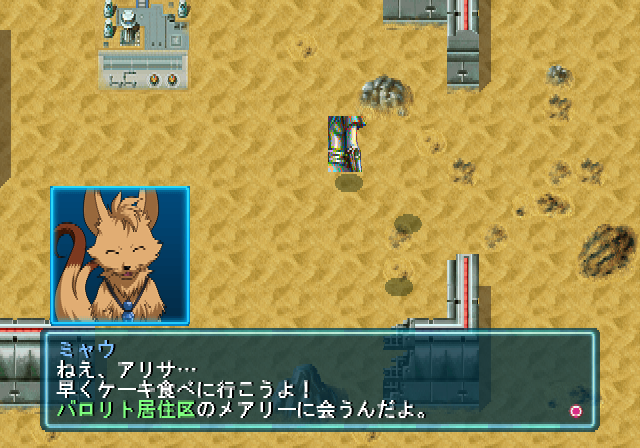
SMB: After every battle the party graphics glitches, modes do nothing.
47827488-7ac2ba80-dd7e-11e8-8013-3fb5d7e6b2df.png


47827491-7f876e80-dd7e-11e8-8c02-430b908ecf5a.png

Texture comes from the battle screen.
47827609-3552bd00-dd7f-11e8-89ff-808b735d30da.png


SATA-HDD: UDMA 0-4: If the game doesn't glitch after the first few battles it can take hours. But it does happen eventually.
MDMA 0-2/MODE 1: The party graphics gets corrupt within a few battles every time.
47827584-12280d80-dd7f-11e8-8896-dda5afdea127.png
 
Thanks @Zarper for your report.
Did you tried to combine compatibility modes (e.g. 1+3+6)?
You're using SATA-HDD, so it may means that you have got third-party NA (e.g. Gamestar) or you've genuine $ony NA+SATA mod?
You disk is HDD or SSD?
 
Back
Top