
You are using an out of date browser. It may not display this or other websites correctly.
You should upgrade or use an alternative browser.
You should upgrade or use an alternative browser.
PS2 [Open PS2 Loader] Game Bug Reports
- Thread starter jolek
- Start date

Grahf
Member
Would be very strange if this commit went through without testing the basic feature. Maybe something in the config naming changed or maybe now it must be a specific partition if it's HDD? Where exactly is your config file located on the HDD?@Grahf I know, that is why i mention about it:

jolek
Senior Member
It's a homebrew stuff, anything can happens, including bugs\problems, etc.Would be very strange if this commit went through without testing the basic feature.
That's why we have this topic.

Config on HDD always was stored in:Maybe something in the config naming changed or maybe now it must be a specific partition if it's HDD?
Where exactly is your config file located on the HDD?
hdd0:/+OPL/conf_opl.cfg (for almost all settings).
hdd0:/+OPL/conf_network.cfg (for network settings).
Does it also not search for the config on the internal HDD, when it is started from there?
OPL is not loading\saving my setting from HDD or from USB.
I'm launching OPL from HDD.
...does it happen when you start OPL from USB or internal HDD or in both cases?
The same thing is with USB HDD, so in both cases.
EDIT: I've notice that when "conf_opl.cfg" is on USB or HDD, settings can be saved.
If there is no "conf_opl.cfg", settings will not be saved.
Unfortunately no matter if settings are on USB or HDD, OPL will not load them.
Last edited:

jolek
Senior Member
It's really hard for me to debug this new system, because...
When I don't have "conf_opl.cfg", "conf_network.cfg" on hdd0:/+OPL/, I can't save setting on HDD, OPL launched from HDD (without MC & USB).
When I have "conf_opl.cfg", "conf_network.cfg" on hdd0:/+OPL/, OPL launched from HDD i can save settings (without MC & USB).
Previously OPL (1200 or lower) creates and save setting if with or without these files on HDD ("conf_opl.cfg", "conf_network.cfg).
Saving options without "conf_opl.cfg", "conf_network.cfg" works on USB & MC.
When I have MC with settings ("conf_opl.cfg", "conf_network.cfg) no matter from what device I'll launch OPL,
settings will be loaded from MC, not from e.g. HDD.
After some time I've got brain f***, because I don't what setting I was using?!
Anyway thanks for making some changes in loading\saving settings.
Maybe there is a chance that the device from OPL was launched will have highest priorytety?
What about add sentence: Settings saved on...
So It's hard to know, where to find.
 Hmm, Settings loaded from...
When I don't have "conf_opl.cfg", "conf_network.cfg" on hdd0:/+OPL/, I can't save setting on HDD, OPL launched from HDD (without MC & USB).
When I have "conf_opl.cfg", "conf_network.cfg" on hdd0:/+OPL/, OPL launched from HDD i can save settings (without MC & USB).
Previously OPL (1200 or lower) creates and save setting if with or without these files on HDD ("conf_opl.cfg", "conf_network.cfg).
Saving options without "conf_opl.cfg", "conf_network.cfg" works on USB & MC.
When I have MC with settings ("conf_opl.cfg", "conf_network.cfg) no matter from what device I'll launch OPL,
settings will be loaded from MC, not from e.g. HDD.
After some time I've got brain f***, because I don't what setting I was using?!
Anyway thanks for making some changes in loading\saving settings.
Maybe there is a chance that the device from OPL was launched will have highest priorytety?
What about add sentence: Settings saved on...
- Settings saved on HDD.
- Settings saved on USB.
- Settings saved on MC0.
- Settings saved on MC1.
So It's hard to know, where to find.
- Settings loaded from HDD.
- Settings loaded from USB.
- Settings loaded from MC0.
- Settings loaded from MC1.
Last edited:

sp193
Developer
From the commit message:
The good thing about the current design is that the user would not need to care about the device being used. If you want control over where it saves to, then you can control this by keeping OPL on the device which you want it to save to.
Changed how devices are selected for loading/storing config files.
When loading:
1. Check memory cards.
2. If config could be loaded, try the device that OPL was booted from (supported devices only).
3. If config could not be loaded, try all supported devices.
4. Default to memory card, if no config file could be loaded.
When saving:
1. Try the device that the config file was loaded from.
2. If config could not be saved, try the device that OPL was booted from (supported devices only).
3. If config could not be saved, try all supported devices.
4. Give up.
The good thing about the current design is that the user would not need to care about the device being used. If you want control over where it saves to, then you can control this by keeping OPL on the device which you want it to save to.
Last edited:
jolek
Senior Member
Almost the same "mechanism" was previously.
The only downside is that currently when "conf_opl.cfg", "conf_network.cfg" are not on HDD, settings will not be saved,
when there is no another device (MC o USB).
OPL 1206 or higher will not creates these files and user will get "Error writing settings...".
MC (if there are settings on it) still has the highest priority, not the device from where OPL was launched.
To be add, there is also no way to load translation from other device that MC:
http://www.psx-place.com/threads/op...leases-language-pack.20547/page-2#post-149522.
The only downside is that currently when "conf_opl.cfg", "conf_network.cfg" are not on HDD, settings will not be saved,
when there is no another device (MC o USB).
OPL 1206 or higher will not creates these files and user will get "Error writing settings...".
MC (if there are settings on it) still has the highest priority, not the device from where OPL was launched.
To be add, there is also no way to load translation from other device that MC:
http://www.psx-place.com/threads/op...leases-language-pack.20547/page-2#post-149522.
Last edited:
sp193
Developer
Almost the same "mechanism" was previously.
Previously, it would never consider where it booted from and will always fail to save anything if you:
- Do not have a HDD unit installed.
- Did not connect a memory card nor USB disk to the PS2, when OPL was booted.
This is now styled similarly to how FMCB locates USBD and USBHDFSD, as discussed previously. There cannot be an option for selecting the save device because you need to load that file before OPL can load the setting from it.
Now, you can choose what device you wish to save on, by putting OPL on the device that you want to save on. If you saved on the memory card before, then it will continue to use the settings there, for backward and forward compatibilty. If you no longer wish to keep your settings there, either move the files to the desired device (memory card, USB disk or the HDD unit) or delete the OPL saves directory (and OPL will start over).
The only downside is that currently when "conf_opl.cfg", "conf_network.cfg" are not on HDD, settings will not be saved,
when there is no another device (MC o USB).
I'm not sure what you mean. It sounds like something is not working, but it will fail if there is no device available to save to.
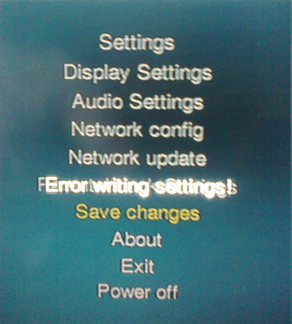
OPL 1206 or higher will not creates these files and user will get "Error writing settings...".
Is this before or after the fix was made (commit c8c4205)? Other than because of that bug, you should never get that error, unless you either have no usable devices connected or your hardware has some problem.
Currently no matter from what device OPL was launched, if there are settings on MC, this device has the highest priorytety, not the device that OPL was launched from.
Yes, but having the settings there also means that the user saved there before. If the user saved to a device before, we shall not move it on behalf of the user.
To be add, there is also no way to load translation from other device that MC:
http://www.psx-place.com/threads/op...leases-language-pack.20547/page-2#post-149522.
This is a different problem, not related to configuration loading. Support for languages and fonts will load their files independently of the main OPL configuration files. I added support for USB disks and the HDD unit for font-loading, quite a long time ago.
But okay, we can do something about loading the language files from other devices as well.
Last edited:

Vedita BR
Member
- ## Open PS2 loader version
646e850 and 0.9.3
## Open PS2 loader mode (USB, SMB, HDD)
USB
## Open PS2 type (Normal, Childproof, VMC, GSM, PS2RD)
Normal
## Issue description - Describe the problem you are having
Problem using USB peripheral supported by the game.
## Expected result
All fuctioning with harmony
## Actual result
Game tends to stop reading from USB Hard Drive if a device, like a USB keyboard is connected. It seems to just happen if my HDD, SanDisk and Duracell thumb drives didn't happen on my tests, needs more testing with the thumb drives though. I didn't go in further test with a fat PS2, but i guess it should be the same. I Will post if there is anything different though.
## How to reproduce the issue
most of my tests were with Metal Gear Solid 3: Subsistence > Disc 2 (Persistence Disc) > Online Mode > Online EULA Agreement (here musics play). Now cross your legs, and wait till the background music stops (yeah, game isn't reading anymore from USB HDD).
I guess this bug is reprodutible with other games, for example: Midnight Club 3, just go to profile selector and wait there until the game stops reading from USB.
I even ordered a new USB enclosure to see if the problem goes away.
Last edited:
jolek
Senior Member
Previously, it would never consider where it booted from and will always fail to save anything if you:
Connecting a USB disk or memory card later on, would not fix this. The only solution at that point, was to reboot OPL.
- Do not have a HDD unit installed.
- Did not connect a memory card nor USB disk to the PS2, when OPL was booted.
This is now styled similarly to how FMCB locates USBD and USBHDFSD, as discussed previously. There cannot be an option for selecting the save device because you need to load that file before OPL can load the setting from it.
Now, you can choose what device you wish to save on, by putting OPL on the device that you want to save on. If you saved on the memory card before, then it will continue to use the settings there, for backward and forward compatibilty. If you no longer wish to keep your settings there, either move the files to the desired device (memory card, USB disk or the HDD unit) or delete the OPL saves directory (and OPL will start over).
I'm starting to understand this new system and I like it.
One other thing is that OPL is creating OPL folder in mc? (e.g. mc?:/OPL), with icons, even if it won't be using it (settings are on HDD).
I'm not sure what you mean. It sounds like something is not working, but it will fail if there is no device available to save to.
Is this before or after the fix was made (commit c8c4205)? Other than because of that bug, you should never get that error, unless you either have no usable devices connected or your hardware has some problem.
When there are no settings ("conf_opl.cfg", "conf_network.cfg) on HDD (hdd0:/+OPL/):
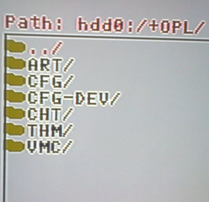
OPL will not save settings, giving an error:
When I have these settings in (hdd0:/+OPL/):
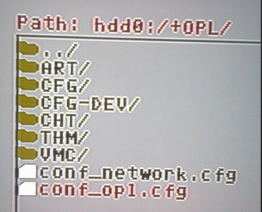
I can save settings:
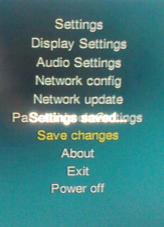
Until OPL 1200 I can save setting even without "conf_opl.cfg", "conf_network.cfg on HDD.
So if these files will not exist, OPL will create them and the settings will be saved.
I'm not entirely sure with what rev this problem has started 1206, 1214 or 1218.
Yes, but having the settings there also means that the user saved there before. If the user saved to a device before, we shall not move it on behalf of the user.

This is a different problem, not related to configuration loading. Support for languages and fonts will load their files independently of the main OPL configuration files. I added support for USB disks and the HDD unit for font-loading, quite a long time ago.
But okay, we can do something about loading the language files from other devices as well.
Thanks for support and trying to do something about it.
BTW I have also notice that when I want to power off PS2 with a button combination on PAD (L1+L2+L3+R1+R2+R3),
additional red debug color has been added.
Last edited:
sp193
Developer
Please wait for https://github.com/ifcaro/Open-PS2-Loader/pull/162.
I originally wanted to also change theme and language support to allow files to be loaded from other devices as well, but there might be a possibility that the rest of the UI depends on these two to be initialized first... and I cannot prove/disprove that within the time I have now.
For at least now, you still have to keep your themes and language files there. OPL was clearly originally designed to only support the memory card for settings.
Right now, there's no code that will tell OPL to not create that save, as it cannot tell whether it needs it or not. It will always create the folder when it checks the memory card.
I see, thanks.
That part was added to stop the device before the PS2 is shut down: https://github.com/ifcaro/Open-PS2-Loader/commit/f661fe286895a3f0ef6ebe8ba3188433d06d0157 and https://github.com/ifcaro/Open-PS2-Loader/commit/07b6677e6a4a45f2b8f448b4549865132ce6ca6f.
Both are related to this discussion: https://github.com/ps2dev/ps2sdk/issues/85
I originally wanted to also change theme and language support to allow files to be loaded from other devices as well, but there might be a possibility that the rest of the UI depends on these two to be initialized first... and I cannot prove/disprove that within the time I have now.
One other thing is that OPL is creating OPL folder in mc? (e.g. mc?:/OPL), with icons, even if it won't be using it (settings are on HDD).
For at least now, you still have to keep your themes and language files there. OPL was clearly originally designed to only support the memory card for settings.
Right now, there's no code that will tell OPL to not create that save, as it cannot tell whether it needs it or not. It will always create the folder when it checks the memory card.
When there are no settings ("conf_opl.cfg", "conf_network.cfg) on HDD (hdd0:/+OPL/):
OPL will not save settings, giving an error:
When I have these settings in (hdd0:/+OPL/):
I can save settings:
Until OPL 1200 I can save setting even without "conf_opl.cfg", "conf_network.cfg on HDD.
So if these files will not exist, OPL will create them and the settings will be saved.
I'm not entirely sure with what rev this problem has started 1206, 1214 or 1218.
I see, thanks.
BTW I have also notice that when I want to power off PS2 with a button combination on PAD (L1+L2+L3+R1+R2+R3),
additional red debug color has been added.
That part was added to stop the device before the PS2 is shut down: https://github.com/ifcaro/Open-PS2-Loader/commit/f661fe286895a3f0ef6ebe8ba3188433d06d0157 and https://github.com/ifcaro/Open-PS2-Loader/commit/07b6677e6a4a45f2b8f448b4549865132ce6ca6f.
Both are related to this discussion: https://github.com/ps2dev/ps2sdk/issues/85
Actually, OPL was meant to be able to load it's configuration from every of those devices, but it's initial code was rather meant to be a place-holder (so it 'just works') and ought to be replaced later, by a more sophisticated solution!
However! Due to too many additions and changes which were not 'ttt' (thoroughly thought through) [and I believe you know/understand, which changes and time-span/year{s} of development, I am referring to...{and who was involved in these}], changing it's code became unconvenient/hard and in some cases possibly next to impossible to change...
Your recent (and not only those) changes, are great however!
However! Due to too many additions and changes which were not 'ttt' (thoroughly thought through) [and I believe you know/understand, which changes and time-span/year{s} of development, I am referring to...{and who was involved in these}], changing it's code became unconvenient/hard and in some cases possibly next to impossible to change...
Your recent (and not only those) changes, are great however!
Last edited:
jolek
Senior Member
Please wait for https://github.com/ifcaro/Open-PS2-Loader/pull/162.
It's only a problem on HDD, that OPL fails to create new configuration files.
There shouldn't be any troubles with that on USB or MC.
Anyway thanks for this fix.
I'll wait for that commit to do some tests.
I originally wanted to also change theme and language support to allow files to be loaded from other devices as well, but there might be a possibility that the rest of the UI depends on these two to be initialized first... and I cannot prove/disprove that within the time I have now.
For at least now, you still have to keep your themes and language files there. OPL was clearly originally designed to only support the memory card for settings.
From what I remembered, themes can be loaded from USB, however I never tried it from HDD.
Soon we will have Christmas, so there is no hurry, we can continue later.
Thanks for your time.
Right now, there's no code that will tell OPL to not create that save, as it cannot tell whether it needs it or not. It will always create the folder when it checks the memory card.
Theoretically it is only few KB on MC, but on 8 MB MC, every KB counts.
Maybe soon we won't be needing to have any config on MC,
so we also will not need empty OPL folder with only icons for PS2 MC Browser.
When someone will launch OPL from MC, OPL folder can be made after someone will save settings.
That part was added to stop the device before the PS2 is shut down: https://github.com/ifcaro/Open-PS2-Loader/commit/f661fe286895a3f0ef6ebe8ba3188433d06d0157 and https://github.com/ifcaro/Open-PS2-Loader/commit/07b6677e6a4a45f2b8f448b4549865132ce6ca6f.
Both are related to this discussion: https://github.com/ps2dev/ps2sdk/issues/85
WOW!
THANKS FOR THAT!

Krah
Developer
I can confirm this, I've got themes on both USB and internal HDD and they load fine. I think it's just language files and fonts related to them that only load from MC?From what I remembered, themes can be loaded from USB, however I never tried it from HDD.
Thanks for your continued fixes.
sp193
Developer
It's only a problem on HDD, that OPL fails to create new configuration files.
There shouldn't be any troubles with that on USB or MC.
I'm not sure why it does not fail for you, but it was a fact that the same mistake also affected USB devices.
Soon we will have Christmas, so there is no hurry, we can continue later.
Indeed. Merry Christmas!
Theoretically it is only few KB on MC, but on 8 MB MC, every KB counts.
Maybe soon we won't be needing to have any config on MC,
so we also will not need empty OPL folder with only icons for PS2 MC Browser.
Indeed.
From what I remembered, themes can be loaded from USB, however I never tried it from HDD.
I can confirm this, I've got themes on both USB and internal HDD and they load fine. I think it's just language files and fonts related to them that only load from MC.
The theme config file has to be stored on the memory card as well, doesn't it?
The same limitation applies to languages.
Krah
Developer
It looks that way in the code but nope it doesn't.The theme config file has to be stored on the memory card as well, doesn't it?
I think because thmInit is only called at (opl)init, so the default theme is always loaded first underneath the logo (that's why if you have custom loading icons it shows the defaults then switches to custom), then it checks config and loads a saved theme with thmsetguivalue()? Everytime after init which uses thmadd elements with a pointer arg to your custom thm path.
I think that's why it works? Lol but I do know you don't have to have your theme cfg on MC as well as your chosen device.
jolek
Senior Member
I'm not sure why it does not fail for you, but it was a fact that the same mistake also affected USB devices.
I also don't know, but I know it's still working for USB* & MC.
I mean if I load OPL from USB, settings will be loaded from USB.
* - Without MC, settings can be saved and created ("conf_opl.cfg", "conf_network.cfg") on USB.
If I've MC & USB without setting, I'll launch OPL from USB, setting will be created & saved on MC,
so MC still has got the highest priorytety while saving settings, even when I'll launch OPL from other device.
With HDD I've strange "symptoms".
I mean I can save settings without "conf_opl.cfg", "conf_network.cfg":
but the "conf_opl.cfg" will not be created on HDD.
Only "conf_network.cfg" will be created:
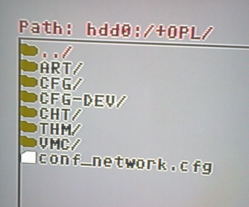
Without "conf_network.cfg" settings will not be loaded from HDD.
Tested with OPL 1220.
Indeed. Merry Christmas!
Merry Christmas!
In case we will not be available at 24\12\2018.
The theme config file has to be stored on the memory card as well, doesn't it?
The same limitation applies to languages.
Only languages have this limitation as @Krah mention.
I've tried themes from HDD & USB, both will work fine without any additional config file on MC.
I can even launch e.g. THM1 from USB & THM2 from HDD.
I just need to enable USB\HDD device start mode and set it on AUTO.
However i did not tried to have the same e.g. THM1 on both devices (USB & HDD).
Grahf
Member
Great to see all the improvements. Things are getting sweeter and sweeter for a public release.
Was it decided how Shadow Man and Phantasy Star will be fixed? Will that blacklisting solution be used since you guys didn't want to introduce speed selection for Mode 1? Debugging these games is totally not worth it since they work perfectly with the lower speeds.
Also, @sp193, can you confirm that building OPL with parental control, VMC, GSM and PS2RD no longer lowers compatibility? We don't need vanilla builds anymore?
Was it decided how Shadow Man and Phantasy Star will be fixed? Will that blacklisting solution be used since you guys didn't want to introduce speed selection for Mode 1? Debugging these games is totally not worth it since they work perfectly with the lower speeds.
Also, @sp193, can you confirm that building OPL with parental control, VMC, GSM and PS2RD no longer lowers compatibility? We don't need vanilla builds anymore?
Similar threads
-
PS2 Problems Launching "Buzz! The Big Quiz (Europe) (v2.00)" via OPL through sd2psx (PSxMemCard Gen2)
- Started by SawJig511
- Replies: 7
-
-
 PS2 [POC/Outdated] unofficial Open PS2 Loader (uOPL)
- Started by Ripto
- Replies: 58
-
