PS3 PKG Linker v1.0: Scan & Serve PKGs to PS3 from PC (CFW & PS3Xploit HAN)

Cam foi show te images of your screens? Like IP on PC, on PS3 qnd your server? Thanks
I just disabled my wifi card and connected both PC and PS3 together via ethernet, then ran PKG Linker. The PKG linker then assigned an IP for my ethernet card, so I used that same IP for PC, and on PS3 I used the same IP except the last digit I raised by 1 (so there were not the same). Then the default gateway/router I made it same IP for both PC and PS3.
Just make sure the first 2 sets of numbers are the same and keep wireless card disabled.

Example - If PKG Linker shows 167.175.5 in server
PC would be - 167.175.5
PS3 would be - 167.175.6
Default gateway/router I would end up using 167.175.10 (on both PC and PS3)
For DNS I would just use 10.1.1.0 and secondary 10.1.1.10 (on both PC and PS3)
 
Last edited:
Hello,

I just created this account to thanks DeViL303 and pink1 for this great job. Amazing, boys!

Now, can you please share some wisdom with me? Whenever I try to download a large file via ethernet cable, I get a very decent speed at first, but after some minutes (between 2 and 5) the download jeopardize and past from 60 minutes remaining to 4646543213215 minutes remaining and the transfer stops with error code 80023324.

In order to solve this, I have tried several servers like the one shared in python for the IDPS dumper (live some months ago here), and then XAMP as in the first post made by DeViL303, and none of those worked for me, not ask me why.
The only server that has worked for me is the mini apache that came with the PKG linker app that you guys made. It works like a charm, even to serve the .html HAN tools direct from my pc.

Last, with the PKG linker I have tried:
1. Changing port in APP. Doing this, the PS3 stops communicating with the PC. Also, kindly notice that it does not work to set X.X.X.X:8080 in the PKG Linker main windows because when I click on "start" the server it will always say "server running on X.X.X.X:8080:80", meaning that it takes the port I gave as an IP address instead a port.
2. I have Windows 10, but I can't find that service you mention, WWW Publishing etc. Is there a way to check if any APP is using the 80 port?
3. I have also tried with several types of config through the wired connection, as Proxy On, Off, etc, but no luck.

So, any glance?
 
For some reason after the included server started and put the given IP and port on the PS3 didn't worked, but after put everything in automatic on the PS3 internet settings it worked flawlessly. Both pc and PS3 directly connected to the router trougth Ethernet cable.
 
Since the server disappears, what can I do?
open the config file named httpd in the data folder(bin\ApacheHTTPD_PHP_Portable\Data) press cltrl+G type the word"listen 80" and change it to "listen 92" next go to the line "#ServerName www.example.com:80" and change it to" #ServerName www.example.com:92"
tat's all now you can run the server without any hiccup because no program uses port 92(in my system, may differ in ur system)
 
mwzxUBB.png


Use these settings. also start pkg linker again after you setup and make sure your server starts and also it says the server is running on 10.1.1.1. also after this, copy the packagelink.pkg to your usb and install it. Also if the server window dissappears, then your portis being used by some other program and you need to change it. here is the server window
IbZBt3n.png
Hi Junaid, thanks for the detailed instructions, I'll try to be as descrptive as you. I'm still getting error 80710092.
What I did was:
  • connect ps3 to pc via ethernet cable (no router in between)
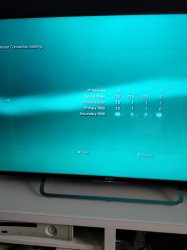
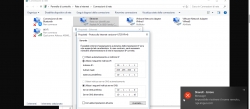
  • set pc ip and ps3 ip like you said (see attached photos)
  • did NOT test the connection since Devil03 said it's not worth bothering
  • left the rest of the options on ps3 (upnp, mtu etc) to default
  • started the built in pkglink server on pc; it started automatically on 192.168.189.1 so i stopped it, changed it to 10.1.1.1 and relaunched it
  • clicked refresh package list and got error 80010792
 

Attachments

  • IMG_20180317_101524.jpg
    IMG_20180317_101524.jpg
    874.5 KB · Views: 329
  • KApcC5B (1).png
    KApcC5B (1).png
    100.5 KB · Views: 345
Hi Junaid, thanks for the detailed instructions, I'll try to be as descrptive as you. I'm still getting error 80710092.
What I did was:
  • connect ps3 to pc via ethernet cable (no router in between)
  • set pc ip and ps3 ip like you said (see attached photos)
  • did NOT test the connection since Devil03 said it's not worth bothering
  • left the rest of the options on ps3 (upnp, mtu etc) to default
  • started the built in pkglink server on pc; it started automatically on 192.168.189.1 so i stopped it, changed it to 10.1.1.1 and relaunched it
  • clicked refresh package list and got error 80010792
Generate a new pkg list and then install the package_list.pkg manually via USB after changing ip settings, then reboot and try again.
Hello,

I just created this account to thanks DeViL303 and pink1 for this great job. Amazing, boys!

Now, can you please share some wisdom with me? Whenever I try to download a large file via ethernet cable, I get a very decent speed at first, but after some minutes (between 2 and 5) the download jeopardize and past from 60 minutes remaining to 4646543213215 minutes remaining and the transfer stops with error code 80023324.

In order to solve this, I have tried several servers like the one shared in python for the IDPS dumper (live some months ago here), and then XAMP as in the first post made by DeViL303, and none of those worked for me, not ask me why.
The only server that has worked for me is the mini apache that came with the PKG linker app that you guys made. It works like a charm, even to serve the .html HAN tools direct from my pc.

Last, with the PKG linker I have tried:
1. Changing port in APP. Doing this, the PS3 stops communicating with the PC. Also, kindly notice that it does not work to set X.X.X.X:8080 in the PKG Linker main windows because when I click on "start" the server it will always say "server running on X.X.X.X:8080:80", meaning that it takes the port I gave as an IP address instead a port.
2. I have Windows 10, but I can't find that service you mention, WWW Publishing etc. Is there a way to check if any APP is using the 80 port?
3. I have also tried with several types of config through the wired connection, as Proxy On, Off, etc, but no luck.

So, any glance?
Change the port in the app and in your server and don't worry about the extra "80" in the pop up. You will need to generate a new package_list.pkg and install it manually after every ip or port change. Then reboot.

If you are getting the 80010792 error it means there is no connection to the server\IP in the package_link.pkg, try a pkg link in the ps3 Web browser to confirm.
 
For some reason after the included server started and put the given IP and port on the PS3 didn't worked, but after put everything in automatic on the PS3 internet settings it worked flawlessly. Both pc and PS3 directly connected to the router trougth Ethernet cable.
The settings given are ONLY for connecting directly , if you use a router you don't need any IP settings changed.
 
Generate a new pkg list and then install the package_list.pkg manually via USB after changing ip settings, then reboot and try again.
Probably a stupid question but by reboot do you mean the ps3 or the server?
 

Attachments

  • IMG_20180317_113322_01.jpg
    IMG_20180317_113322_01.jpg
    2.3 MB · Views: 354
Last edited:
Generate a new pkg list and then install the package_list.pkg manually via USB after changing ip settings, then reboot and try again.
I changed the pc ip to 10.1.1.2 and the ps3 ip to 10.1.1.3 with gateway set on both to 10.1.1.1. At this point Windows even asked if I want the pc to be seen by other devices on the net, something like that.
Then I launched the server on 10.1.1.2, created a new PKG list, installed it and rebooted the ps3.
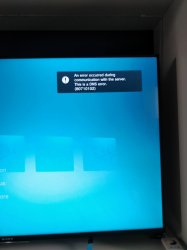
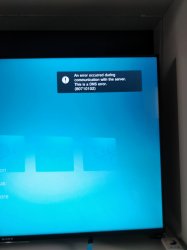
Now the new part: on boot a new error appeared on the top right of the screen "An error occurred during communication with the server. This is a DNS error (80710102)
 

Attachments

  • IMG_20180317_113322_01.jpg
    IMG_20180317_113322_01.jpg
    2.3 MB · Views: 296
I changed the pc ip to 10.1.1.2 and the ps3 ip to 10.1.1.3 with fastest set on both to 10.1.1.1. At this point Windows even asked if I want the pc to be seen by other devices on the net, something like that.
Then I launched the server on 10.1.1.2, created a new PKG list, installed it and rebooted the ps3.
Notes the new part: on boot a new error appeared on the top right of the screen "An error occurred during communication with the server. This is a DNS error (80710102)
Re read thread, it's working for thousands of people.

The dns error is normal as you have no Internet.
 
Still getting 80710092 when attempting download. I guess my setup is just cursed, thanks for trying.
That error just means no connection at all. Try things like different ports, different server, disable firewall for tests etc (safe when wired directly between ps3 and pc)

Looks like it just will not work for some people, must be something on your pc as it can't be ps3.
 
Back
Top