PS3 Project RSX Boost: Overclock your Retail PS3 RSX Speeds (ps3 cfw only)

Here is the @JoeSapecudo's one, also a Latin American model but from Brazil.

vK8Mtbz.jpeg


Confirmed that running the CECH-2511A at 850/750 MHz presents no issues. :)

The FPS dropped from 59 to 54 in GOW Ascention compared to 800/1000, as i already stated the Memory clocks also gives a FPS boost.

850/1000 will show the real result.

UPxq0dR.jpeg


@Charles_n_town can you make 850/800 up to 1000 and then a test 900/700?

I think it's better to test increments of 50Mhz each time.


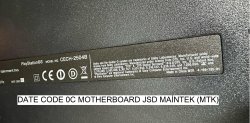
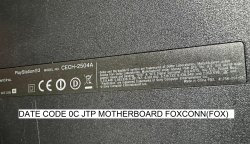
I have two PS3 slims, both with JTP code and JSD code. It is stated on the label that your console is a PS3 produced by FOXCONN (FOX). I'm asking so I can make a comparison. Are FOXCONN (FOX) manufactured components better for overclocking or Maintek (MTK) manufactured components? Finally, is your console JTP or JSD?
 

Attachments

  • 2504A-FOX-JTP.jpg
    2504A-FOX-JTP.jpg
    1.6 MB · Views: 75
  • 2504B-MTK-JSD.jpg
    2504B-MTK-JSD.jpg
    1.3 MB · Views: 67
Sorry to bother you, would it be possible to get some of these made with a 650mhz core and then 800mhz vram with 50mhz increments up to 1000mhz just so I can do some testing with one of my consoles? I do have a hardware flasher hooked up to my console as a backup but at 700mhz core it became unstable.

Sure.

650/800
https://1fichier.com/?hzv8bybgiug9kxvpp9xw

650/850
https://1fichier.com/?449b7i5f97mz11oaq3nn

650/900
https://1fichier.com/?cm83n2e2nigk3l04dxhj

650/950
https://1fichier.com/?70ec1volz1zngdqaoeh6

650/1000
https://1fichier.com/?jzqiwk76tqkuc714jnve

Make sure you have your flasher on hand in case it's too much for your system to handle.
 
Hello, guys. How can I get from which model i have rsx? I have cecha00 with frankie mod. Unfirtunately I don't know rsx revision. Is it posible to get this info by evilnat? At the moment I have default OC. It looks stable (crysis, black flag, gow: ascension)
 
Hello, guys. How can I get from which model i have rsx? I have cecha00 with frankie mod. Unfirtunately I don't know rsx revision. Is it posible to get this info by evilnat? At the moment I have default OC. It looks stable (crysis, black flag, gow: ascension)
Yes, use evilnat CFW tools to dump lvl1 to a USB device. Open it on a PC with HxD. Search for your clocks. For example, if you the default OC of "600/750" search for that. It should take you directly to the info I'm referring to. Post post everything from rsx to the end of the 3 bracked sections. That contains the rsx info about fab and VIDbin.
 
Hi everyone, I've signed up so I can post my results trying this amazing project.

My CECH-2003A (65nm RSX) is stable at 700/900.

750 GPU produced artifacts even on the XMB, but 700 is completely stable. 950 VRAM seemed stable at first, so I tried 1000 but that caused the XMB to consistently crash on the XMB after 20 seconds. Going back to 950 it was completely stable during 10+ hours of demanding gameplay (Far Cry 3, Crysis, GT6), but it would occasionally crash when rebooting or exiting a game, so I took it down to 900 where I've had no problems since.

A 45% (average) improvement, completely stable - wow. It does make me wonder why Sony didn't clock the slim models higher themselves, because they probably all can manage 600/700 at least.
 
I've gone up to 700/800 on my CECH-2504A with datecode 0C and it seems completely stable though I'm not sure if going further is worth the risk considering I've wanted NFS Carbon to run at 60fps and it's still nowhere near it (around 40fps ingame)

Assassins Creed 1 I think did not improve at all, I guess it's purely bad programming / CPU bottleneck.

The darkness on the other hand is completely fixed now with the overlcock, no 15 fps lock like on a non-OC console
try 750/750 and 700/900

Hi everyone, I've signed up so I can post my results trying this amazing project.

My CECH-2003A (65nm RSX) is stable at 700/900.

750 GPU produced artifacts even on the XMB, but 700 is completely stable. 950 VRAM seemed stable at first, so I tried 1000 but that caused the XMB to consistently crash on the XMB after 20 seconds. Going back to 950 it was completely stable during 10+ hours of demanding gameplay (Far Cry 3, Crysis, GT6), but it would occasionally crash when rebooting or exiting a game, so I took it down to 900 where I've had no problems since.

A 45% (average) improvement, completely stable - wow. It does make me wonder why Sony didn't clock the slim models higher themselves, because they probably all can manage 600/700 at least.
I noticed the same issue on one of my systems. 950 was game stable but would crash when starting the game.

The early RAM was only rated at 677 but later RAM was rated 700. So all Slims should be able to run 700 RAM. I think Sony kept the clocks the same to ensure hardware compatibility.
 
I hadn't tried Crysis yet !
On my CECH-2004B at 700Mhz/800MHz, no artifacts at all, 30fps with some rare, slight drops.
Not bad for this model :D
9wm5jOT.jpeg


Hi everyone, I've signed up so I can post my results trying this amazing project.

My CECH-2003A (65nm RSX) is stable at 700/900.

750 GPU produced artifacts even on the XMB, but 700 is completely stable. 950 VRAM seemed stable at first, so I tried 1000 but that caused the XMB to consistently crash on the XMB after 20 seconds. Going back to 950 it was completely stable during 10+ hours of demanding gameplay (Far Cry 3, Crysis, GT6), but it would occasionally crash when rebooting or exiting a game, so I took it down to 900 where I've had no problems since.

A 45% (average) improvement, completely stable - wow. It does make me wonder why Sony didn't clock the slim models higher themselves, because they probably all can manage 600/700 at least.
Wow, so 900MHz VRAM is possible on 20XX slims ? I wouldn't have bet on this !
I impressed by both your bravery and your PS3 :D
 
Last edited:
I hadn't tried Crysis yet !
On my CECH-2004B at 700Mhz/800MHz, no artifacts at all, 30fps with some rare, slight drops.
Not bad for this model :D
9wm5jOT.jpeg


Wow, so 900MHz VRAM is possible on 20XX slims ? I wouldn't have bet on this !
I impressed by both your bravery and your PS3 :D
Actually later slims can do 1000. One of mine can do 1000 on memory but only 700 on core. Though it seems memory does have big FPS gains.

I hadn't tried Crysis yet !
On my CECH-2004B at 700Mhz/800MHz, no artifacts at all, 30fps with some rare, slight drops.
Not bad for this model :D
9wm5jOT.jpeg


Wow, so 900MHz VRAM is possible on 20XX slims ? I wouldn't have bet on this !
I impressed by both your bravery and your PS3 :D
This is a slim right? I believe they are a 2009 slim?
 
Last edited by a moderator:
try 750/750 and 700/900
I noticed the same issue on one of my systems. 950 was game stable but would crash when starting the game.

The early RAM was only rated at 677 but later RAM was rated 700. So all Slims should be able to run 700 RAM. I think Sony kept the clocks the same to ensure hardware compatibility.

It's reassuring to know you also had that issue, at first I thought it was a bug with the beta firmware. I guess keeping hardware compatibility was the safe option, but it might have been nice to have a PS4 Pro-like boost mode. Would have been a good selling point I imagine.

Wow, so 900MHz VRAM is possible on 20XX slims ? I wouldn't have bet on this !
I impressed by both your bravery and your PS3 :D

Oh, I absolutely took baby steps testing! Started at 700 and worked my way up by 50, testing for at least an hour each time. Bear in mind too that although 950 VRAM seemed very stable ingame, it was causing issues on reboots and starting/exiting games, so look out for things like that if you're thinking of testing further.
 
Back
Top