PS3 Project RSX Boost: Overclock your Retail PS3 RSX Speeds (ps3 cfw only)

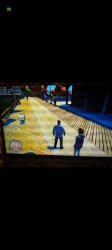
Just so you guys know I did lots of testing last night on my ps3 slim 2500b date code 0c and was doing really well I got to 850/900 and tested lots of games but one game gta 4 had artifacting and I had to reduce the core speed down to 650mhz to get it to go away and even then I started to notice slight artifacting onces the rsx had warmed up. This is the only game to do it so I would appreciate if anyone else could test there insane overclocks on gta 4 I know its a bit weird as the game is heavily cpu bond on ps3 but I thought I would share it with you guys.


I know its not the memory speed because I reduced it to stock speeds with the core overclock and it remained there.
AP1GczPAaDyebzpRQpR5FQvTxw9AXfnn7uvJdcxqZdv5IoO_aYhDlQ4GmqsdQZmAHPBtvX8iOczRay2hjGWhKBZTsqTOT4uud1Y-CKaD-oGSLA8yi1JxJ-lbfBYk2UA6pjO_RYZZ17f-rPm7BtleQftcsOhL=w1241-h931-s-no-gm
Just so you guys know I did lots of testing last night on my ps3 slim 2500b date code 0c and was doing really well I got to 850/900 and tested lots of games but one game gta 4 had artifacting and I had to reduce the core speed down to 650mhz to get it to go away and even then I started to notice slight artifacting onces the rsx had warmed up. This is the only game to do it so I would appreciate if anyone else could test there insane overclocks on gta 4 I know its a bit weird as the game is heavily cpu bond on ps3 but I thought I would share it with you guys.


I know its not the memory speed because I reduced it to stock speeds with the core overclock and it remained there.
AP1GczPAaDyebzpRQpR5FQvTxw9AXfnn7uvJdcxqZdv5IoO_aYhDlQ4GmqsdQZmAHPBtvX8iOczRay2hjGWhKBZTsqTOT4uud1Y-CKaD-oGSLA8yi1JxJ-lbfBYk2UA6pjO_RYZZ17f-rPm7BtleQftcsOhL=w1241-h931-s-no-gm
I played the game for about 3 hours now. Started new and enabled no police and traveled around, and finally started doing missions game's stable but you know GTA IV lol no issue with 750/975 :)
Oh and mine is Blus30127 I don't know if it will make a difference

I'll provide more screenshots later
 

Attachments
  • Screenshot_20240429_185657_Gallery.jpg
    Screenshot_20240429_185657_Gallery.jpg
    384.2 KB · Views: 88
Last edited:
Perhaps there should be a OC Test Download Hub where all versions are available for those looking to do testing. Starting from base OC of 600/750, then 600/800, 600/850, etc. Then when you reach the memory limit, you move onto core, 600/900, 650/900, etc. If need be, it can be password-protected so not any random user downloads it without fully understanding the risks.

Maybe a list of 3 to 5 games that are must plays to test results, even specific scenarios/missions. Then move onto miscellaneous games. Kinda want to start testing myself now in the name of science/PS3 excellence.

I'm fascinated by the community here and the love for this console. The educated members who work to improve the limits of the PS3 in their spare time is inspiring. I hope this is only the beginning of something truly special.
 
Perhaps there should be a OC Test Download Hub where all versions are available for those looking to do testing. Starting from base OC of 600/750, then 600/800, 600/850, etc. Then when you reach the memory limit, you move onto core, 600/900, 650/900, etc. If need be, it can be password-protected so not any random user downloads it without fully understanding the risks.

Maybe a list of 3 to 5 games that are must plays to test results, even specific scenarios/missions. Then move onto miscellaneous games. Kinda want to start testing myself now in the name of science/PS3 excellence.

I'm fascinated by the community here and the love for this console. The educated members who work to improve the limits of the PS3 in their spare time is inspiring. I hope this is only the beginning of something truly special.
Thats how i handle it so far. Unless @LuanTeles made the github by now

So would it be possible to stably overclock the cell?
We don't know. That modification is highly likely to brick the console and hasn't been done outside a DECR unit.
 
Last edited by a moderator:
Perhaps there should be a OC Test Download Hub where all versions are available for those looking to do testing. Starting from base OC of 600/750, then 600/800, 600/850, etc. Then when you reach the memory limit, you move onto core, 600/900, 650/900, etc. If need be, it can be password-protected so not any random user downloads it without fully understanding the risks.

Maybe a list of 3 to 5 games that are must plays to test results, even specific scenarios/missions. Then move onto miscellaneous games. Kinda want to start testing myself now in the name of science/PS3 excellence.

I'm fascinated by the community here and the love for this console. The educated members who work to improve the limits of the PS3 in their spare time is inspiring. I hope this is only the beginning of something truly special.
I would test core first then memory.
 
unfortunately, I have to disappoint you, cause this special lv1 does not have this config file included, or it does have other values. have to research a bit more...
nvm, have found it :D

@RIP-Felix
if you are interested, have patched it to safe standard 650MHz/750MHz, but not tested myself so far

the old new pattern for testbench lv1.elf
search for:
Code:
0A020000009D0000000000001A04
replace with:
Code:
what you want ;)
 
This is strange. The fact that only GTA IV react like this is somewhat reassuring imo. This let me think that the RSX isn't damaged. Not an expert at all though ^^'
I do not possess this game, unfortunately.


bombjack2's PS3 (2003A model) seems to be stable at 700MHz/900MHz max BUT since limits can differ even between similar models, this is to be verified.
Proceed carefully, start with the basic OC (600/750) and increment 50MHz by 50MHz only.
If you start to notice unusual things like artifacting, then step back.
Good games for testing are Crysis, AC4 - Black Flag, GOW Ascension, MGS4 or BioShock Infinite.

Regarding the core, 700MHz seems to be the stable limit on 20XX series.
As for VRAM, 950MHz start to show instability signs.
So it's better to stick to 900MHz max if your PS3 can do it.

Also, 1000MHz VRAM is really dangerous on those models. Brick risks are high. Avoid it. (Bricked my first 2004B that way ^^')

WHELP, I think I just bricked my PS3 2000 model, at first I tried the 700/900 and it did worked fine without any issue so I just wanted to go higher and tried 800/900 and after the update my ps3 goes black screen every time I start, but I can still hear the startup PS3 sound, is there any hope I can revive my PS3 or go lower firmware.

when you bricked your 2004B does it act the same as mine ?
 
WHELP, I think I just bricked my PS3 2000 model, at first I tried the 700/900 and it did worked fine without any issue so I just wanted to go higher and tried 800/900 and after the update my ps3 goes black screen every time I start, but I can still hear the startup PS3 sound, is there any hope I can revive my PS3 or go lower firmware.

when you bricked your 2004B does it act the same as mine ?
Ouch... I told you to not go over 700MHz on core... This is the stable limit for 20XX models. :\
Even 750MHz on core make games crash on those.
Unfortunately yes, my first 2004B is in the same situation.
The only way to revive it is to use a hardware flasher. I'm not familiar with those tools at all, but I'm sure that other users here can guide you.

Did you try to access recovery menu ?
I don't think it could work, but who knows.
 
Last edited:
Ouch... I told to not go over 700MHz on core... This is the stable limit for 20XX models. :\
Even 750MHz on core make games crash on those.
Unfortunately yes, my first 2004B is in the same situation.
The only way to revive it is to use a hardware flasher. I'm not familiar with those tools at all, but I'm sure that other users here can guide you.

yup I missed up by not listening to you lol, I thought it's easier to go back to lowering the overclocked. I saw the hardware flasher method on youtube and it's totally not worth it since the price of this PS3 wasn't expensive anyway.
 
yup I missed up by not listening to you lol, I thought it's easier to go back to lowering the overclocked. I saw the hardware flasher method on youtube and it's totally not worth it since the price of this PS3 wasn't expensive anyway.
Understandable. I did the same thing when I bricked my 2004B, just buy a new one. It's easier and prices are quite low, indeed. Keep the bricked one for pieces or maybe one day you'll just manage to unbrick it.

But yeah, this is why we must stay cautious while experimenting. You've learned it the hard way too, unfortunately :\
 
So Guys i actually got new Info's about my CECH2004A Date Code 9C for you, today the console died permanently

I was trying to get the maximum she can do with the Overclock, my GPU does not go over 650 Clock when i go to 700 it gives me a XMB Freeze, the Maximum is 650 Clock on GPU

The VRAM Clock can go to 900 so i tried to put it on 950 after the install i got a Black Screen but Sound in background XMB, i turned off the console and i wanted to go into the Recovery Menu but i also got a Freeze in there but first i saw a picture from the Message that say turn on the controller and press home button, after i tried it i realized i got a Frozen picture in recovery after that i tried to go back in Recovery but there was also a Black Screen. So i opened the Console and tried to Flash my Backup on the Nor Chip with my E3 Hardware Flasher i tried it several times about 6-8 Times but nothing happens i didnt get a Picture on my Monitor but the console stays always active. I have no USB and no Picture so i think the VRAM overclock from 950 was to much and it killed my VRAM totally also guys for the Future, if you have a CECH2004A Model with Date Code 9C, dont go over 900 VRAM Clock it will kill you VRAM i think the Console is dead i hope i can help with my Info's keep going guys <3
 

Attachments

  • IMG_20240428_180637.jpg
    IMG_20240428_180637.jpg
    443.9 KB · Views: 67
So Guys i actually got new Info's about my CECH2004A Date Code 9C for you, today the console died permanently

I was trying to get the maximum she can do with the Overclock, my GPU does not go over 650 Clock when i go to 700 it gives me a XMB Freeze, the Maximum is 650 Clock on GPU

The VRAM Clock can go to 900 so i tried to put it on 950 after the install i got a Black Screen but Sound in background XMB, i turned off the console and i wanted to go into the Recovery Menu but i also got a Freeze in there but first i saw a picture from the Message that say turn on the controller and press home button, after i tried it i realized i got a Frozen picture in recovery after that i tried to go back in Recovery but there was also a Black Screen. So i opened the Console and tried to Flash my Backup on the Nor Chip with my E3 Hardware Flasher i tried it several times about 6-8 Times but nothing happens i didnt get a Picture on my Monitor but the console stays always active. I have no USB and no Picture so i think the VRAM overclock from 950 was to much and it killed my VRAM totally also guys for the Future, if you have a CECH2004A Model with Date Code 9C, dont go over 900 VRAM Clock it will kill you VRAM i think the Console is dead i hope i can help with my Info's keep going guys <3

Have you tried using another HDD?

you have a link to the downloads? I have a 2501a that I'll start testing with. I already have the base OC on it.

I have the same model, the maximum I could get was 750-950
 
Last edited by a moderator:
So Guys i actually got new Info's about my CECH2004A Date Code 9C for you, today the console died permanently

I was trying to get the maximum she can do with the Overclock, my GPU does not go over 650 Clock when i go to 700 it gives me a XMB Freeze, the Maximum is 650 Clock on GPU

The VRAM Clock can go to 900 so i tried to put it on 950 after the install i got a Black Screen but Sound in background XMB, i turned off the console and i wanted to go into the Recovery Menu but i also got a Freeze in there but first i saw a picture from the Message that say turn on the controller and press home button, after i tried it i realized i got a Frozen picture in recovery after that i tried to go back in Recovery but there was also a Black Screen. So i opened the Console and tried to Flash my Backup on the Nor Chip with my E3 Hardware Flasher i tried it several times about 6-8 Times but nothing happens i didnt get a Picture on my Monitor but the console stays always active. I have no USB and no Picture so i think the VRAM overclock from 950 was to much and it killed my VRAM totally also guys for the Future, if you have a CECH2004A Model with Date Code 9C, dont go over 900 VRAM Clock it will kill you VRAM i think the Console is dead i hope i can help with my Info's keep going guys <3

were you experiencing any minor issues on 900? Maybe the higher you go on memory, the smaller the increments. So once you hit 850 or 900, next step should be 875 or 925 or somewhere in between.

hopefully you can recover your console some day somehow.
 
@DelixDex
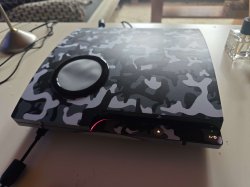
first off, nice Snow-Camo cover for your Slim :D
tbh, I do not believe it is dead. I have experienced similar with teensy, where I have soldered it to a Slim. the connection was proper and I could read/write flash accordingly, but there has happened sth else and now I also only have blackscreen. have not tried Syscon, but I am not interested in this stuff
 
Have you tried using another HDD?
Now it didnt even give a signal out of my HDMI port on my Slim its permanently dead it killed the VRAM of course, i can check the syscon error next days but i think the console is done with life

were you experiencing any minor issues on 900? Maybe the higher you go on memory, the smaller the increments. So once you hit 850 or 900, next step should be 875 or 925 or somewhere in between.

hopefully you can recover your console some day somehow.
i tried some games and the console runs very good, also better like the 650/800 that i have before on this console, i had no issues or problems with it, the only thing was that the Celsius is going a little bit up so i got 52 C on Cell and 59 C on RSX
 
Last edited by a moderator:
So Guys i actually got new Info's about my CECH2004A Date Code 9C for you, today the console died permanently

I was trying to get the maximum she can do with the Overclock, my GPU does not go over 650 Clock when i go to 700 it gives me a XMB Freeze, the Maximum is 650 Clock on GPU

The VRAM Clock can go to 900 so i tried to put it on 950 after the install i got a Black Screen but Sound in background XMB, i turned off the console and i wanted to go into the Recovery Menu but i also got a Freeze in there but first i saw a picture from the Message that say turn on the controller and press home button, after i tried it i realized i got a Frozen picture in recovery after that i tried to go back in Recovery but there was also a Black Screen. So i opened the Console and tried to Flash my Backup on the Nor Chip with my E3 Hardware Flasher i tried it several times about 6-8 Times but nothing happens i didnt get a Picture on my Monitor but the console stays always active. I have no USB and no Picture so i think the VRAM overclock from 950 was to much and it killed my VRAM totally also guys for the Future, if you have a CECH2004A Model with Date Code 9C, dont go over 900 VRAM Clock it will kill you VRAM i think the Console is dead i hope i can help with my Info's keep going guys <3
Damn... Another bricked PS3 :nightmare:
I hope you'll find a solution.

Have you tried using another HDD?
Unfortunately, this trick won't work in this situation, as the firmware is stored in the console itself :\

On my side, my CECH-2004B (RSX code : CXD2991EGB / Date code : 9C) seems able to do 700MHz core/900MHz VRAM.
I will test some games.
I won't push it any further, 950MHz would not be stable and I don't need a second door wedge ^^'
Ft5v4jL.jpeg
 
Last edited:
you have a link to the downloads? I have a 2501a that I'll start testing with. I already have the base OC on it.
Here you gan go for it but be careful mine was dead bricked at 950mhz

650/800
https://1fichier.com/?hzv8bybgiug9kxvpp9xw
650/850
https://1fichier.com/?449b7i5f97mz11oaq3nn
650/900
https://1fichier.com/?cm83n2e2nigk3l04dxhj
650/950
https://1fichier.com/?70ec1volz1zngdqaoeh6
650/1000
https://1fichier.com/?jzqiwk76tqkuc714jnve

Heres also a OneDrive Folder with other https://onedrive.live.com/?authkey=!AN83IKuHqhsAdsI&id=6C17BE77EAA9E82E!24688&cid=6C17BE77EAA9E82E
 
Back
Top